

Linner Theme For Windows 11
Transform your desktop with Linner Theme For Windows 11 featuring golden acrylic blur effects, custom folder icons, dark File Explorer styling, and a luxurious modern UI customization experience.

Linner Theme For Windows 11 – Elegant Golden Dark Customization
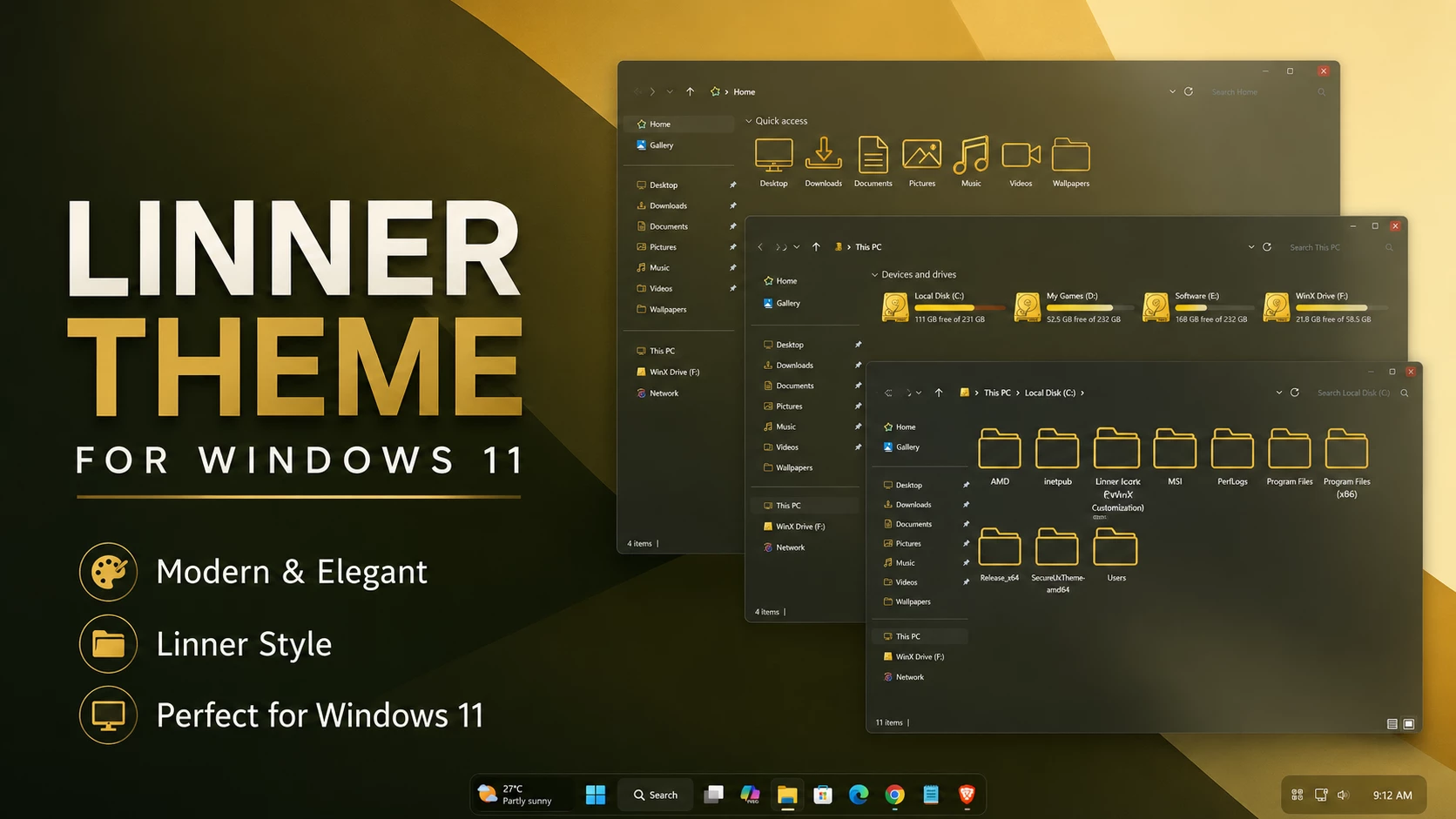
The Linner Theme For Windows 11 is a dark Windows customization built around warm golden tones and subtle glass-style surfaces. Instead of using bright colors across the entire interface, the theme keeps File Explorer darker and introduces gold, amber, and warm orange details in selected areas.
The golden color direction is what gives Linner its main identity. Dark translucent surfaces create the base, while warmer accents around storage information, navigation details, and supported controls add contrast without making the interface feel overly bright.
The hard-drive level indicators also follow the same warm palette with gold, amber, and orange tones. Together with the darker Explorer background, these details give the setup a more elegant golden appearance while keeping the familiar Windows 11 layout intact.
Golden Dark Visual Style
Linner works best for users who like darker Windows themes but want something warmer than the usual blue, purple, or gray color schemes. The golden accents stand out naturally against the dark interface and give File Explorer a more distinctive character.
The translucent treatment also allows some wallpaper detail to remain visible through supported areas. A darker wallpaper with gold, black, brown, olive, or muted tones can work especially well with this type of setup.
Linner Highlights
- Dark Windows 11 interface with warm golden styling
- Gold, amber, and orange accent details
- Dark translucent File Explorer surfaces
- Golden hard-drive level indicators
- Clean navigation and content areas
- Subtle borders and interface separators
- Compact customized DWM window controls
- Wallpaper colors can influence the translucent background
My Thoughts on Linner
In my opinion, Linner is a good option for users who enjoy dark Windows customization but want a warmer color palette. The golden accents give the interface a different personality from the more common blue or purple themes.
I particularly like the way the gold and amber storage indicators stand out against the darker Explorer background. The theme does not need to use gold everywhere to make the color direction noticeable, which helps the setup stay clean rather than becoming too flashy.
Optional Customization
The main Linner visual style can be used on its own. If you want to extend the same look further, compatible icon packs, taskbar styles, Start Menu styles, or Explorer modifications can be added separately.
Install Linner Theme
- Create a Restore Point, patch Windows with a compatible theme patcher, copy the Linner theme files to
C:\Windows\Resources\Themes, and apply the theme from Personalization > Themes. - For the complete process, follow this Windows 11 custom theme installation guide.
Supported Windows Builds
- Windows 11 21H2: Supported
- Windows 11 22H2: Supported
- Windows 11 23H2: Supported
- Windows 11 24H2: Supported
- Windows 11 25H2: Supported
Package Contents
- Windows 11 Theme
- Wallpapers
Download Linner Theme For Windows 11
Linner Theme 9MB
DownloadRemove Linner Theme
- Switch back to a default Windows 11 theme, disable any extra customizations you added, and restart Windows Explorer if needed.
- For more details, follow this Windows 11 custom theme removal guide.
Linner Theme Notice
Linner Theme for Windows 11 is an independently created third-party customization resource intended for personal desktop styling. It is not an official Microsoft product and is not affiliated with, sponsored by, or endorsed by Microsoft. Windows and related trademarks remain the property of their respective owners.
Third-party visual styles may behave differently across Windows builds. Creating a System Restore Point before applying custom theme files or other interface changes is recommended.
Final Thoughts
Linner gives Windows 11 a darker glass-style appearance with a warmer golden identity. Gold, amber, and orange details bring contrast to File Explorer without forcing the entire interface into one bright color.
If you prefer dark themes but want something warmer and less common than blue or purple customization, Linner offers a clean golden direction while keeping the normal Windows 11 Explorer structure familiar.



Disclaimer: All themes, visual styles, and concepts shared on this website are unofficial, fan-made creations built from imagination for customization purposes. We are not affiliated with, endorsed by, or sponsored by Microsoft or any other official brand.