Ocean Theme For Windows 11
Try This Ocean Theme For Windows 11 and refresh your desktop with calming ocean wallpapers, coastal views, and a clean, relaxing visual style.

Ocean Theme For Windows 11 – Transparent Aqua Desktop Customization
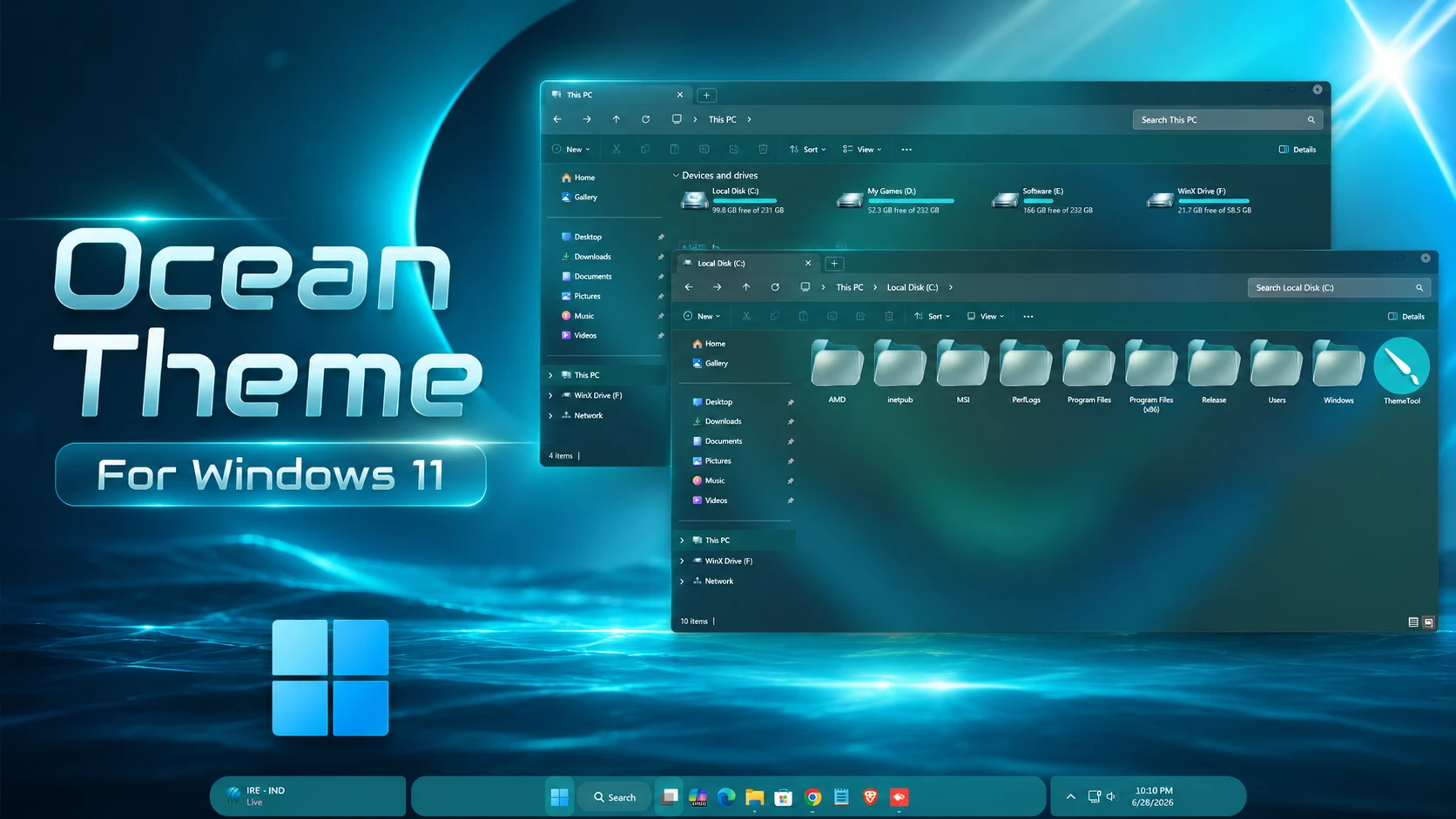
The Ocean Theme For Windows 11 gives File Explorer a dark translucent glass-style appearance with clean aqua and cyan details. The interface keeps the familiar Windows 11 layout while adding soft transparency, restrained borders, and a cooler visual direction that works naturally with ocean-inspired wallpapers.
File Explorer is slightly transparent rather than completely solid, allowing some of the desktop background to remain visible through the window. Because of this, part of the blue and teal atmosphere comes from the wallpaper behind the interface, so changing the background can also change the overall tone of the setup.
The drive section uses bright cyan and aqua hard-drive level indicators that stand out clearly against the darker Explorer surface. Supported windows also use compact DWM controls with a simple light-toned design and a small circular close treatment, keeping the upper window area clean rather than overly decorative.
What Makes Ocean Theme Different?
The main character of Ocean Theme comes from the combination of a dark glass-style Explorer surface and bright aqua storage accents. The interface does not rely on one heavy solid blue color across every panel. Instead, transparency allows the background to influence the final appearance.
This gives the setup more flexibility. A darker ocean wallpaper can create a deeper look, while a brighter cyan background can make the same transparent interface feel lighter without changing the theme files.
Key Features of the Ocean Theme
- Dark translucent File Explorer surfaces
- Slight glass-style transparency
- Bright cyan and aqua hard-drive level indicators
- Compact customized DWM window controls
- Simple circular close-button treatment
- Clean navigation and toolbar layout
- Subtle borders and interface separators
- Wallpaper colors can influence the final appearance
Ocean-Style File Explorer
File Explorer uses a dark semi-transparent surface with clean toolbar, navigation, and content areas. The wallpaper remains partially visible behind the interface, adding depth without making text, folders, or controls difficult to follow.
The theme keeps Explorer recognizable instead of rebuilding the layout around unfamiliar controls. Most of the change comes from transparency, color balance, and supported visual details.
Hard-Drive Level Styling
The hard-drive level bars use bright cyan and aqua tones, matching the cooler direction of the overall setup. These colors remain easy to identify against the darker background and give the Devices and Drives section a clear visual accent.
DWM Window Controls
Supported windows use compact DWM buttons in the upper-right corner. The controls follow a minimal light-toned style, with a small circular treatment around the close control that fits the clean glass interface without drawing too much attention.
Optional Customization Tools
Installation Steps
- Create a System Restore Point before making changes.
- Patch Windows using SecureUxTheme or UltraUXThemePatcher.
- Download and extract the theme package.
- Copy the theme folder and
.themefile toC:\Windows\Resources\Themes. - Double-click the
.themefile, or go to Personalization > Themes and select the theme. - For more details, follow this Windows 11 custom theme installation guide.
Compatibility
- 21H2 YES
- 22H2 YES
- 23H2 YES
- 24H2 YES
- 25H2 YES
What’s Included in This?
- Windows 11 Theme
- Wallpapers
- iPack Icons
Ocean Theme 12MB
DownloadRemoval Steps
- Open Windows Settings and go to Personalization > Themes.
- Select one of the default Windows 11 themes.
- Restore the default Windows icons if the included or optional icon pack was applied.
- Disable or remove any additional Explorer, taskbar, or Start Menu customizations used with the setup.
- Restart Windows Explorer or reboot your PC.
- Use the System Restore Point if any unwanted visual changes remain.
- For a complete step-by-step removal guide, see How to Remove a Custom Theme on Windows 11 .
Disclaimer
Ocean Theme for Windows 11 is an independent third-party customization resource intended for personal desktop customization. It is not an official Microsoft product and is not affiliated with, sponsored by, approved by, or endorsed by Microsoft. Windows and related trademarks belong to their respective owners. Third-party themes may behave differently across Windows builds, so create a System Restore Point before applying theme files or modifying Windows visual resources.
Final Thoughts
The Ocean Theme For Windows 11 combines dark translucent Explorer surfaces, bright cyan-aqua hard-drive level indicators, and compact DWM controls to create a clean cooler-toned desktop. The wallpaper contributes much of the surrounding blue and teal atmosphere, while the main theme keeps its own interface treatment restrained.
For users who want the complete coordinated appearance, the included wallpapers and matching icon resources can be used alongside the main Windows theme.
Frequently Asked Questions
Is Ocean Theme transparent?
Yes. File Explorer uses slight transparency, allowing part of the desktop wallpaper to remain visible through supported areas.
Are all of the blue and teal colors built into the theme?
No. Some of the blue and teal appearance comes from the wallpaper showing through the translucent Explorer surface, so another wallpaper can change the overall tone.
What color are the hard-drive level indicators?
The storage level bars use bright cyan and aqua tones that stand out against the darker Explorer background.
What style do the DWM buttons use?
The DWM controls use a compact light-toned design with a small circular treatment around the close control.
Does the package include icons?
Yes. iPack icons are listed among the included resources. A separate Ocean icon pack is also available through the optional customization link.
Can I use a different wallpaper?
Yes. Since File Explorer is translucent, another wallpaper can noticeably change the colors visible through the interface while the main theme remains the same.