Polar Night Theme for Windows 11
Discover the Polar Night Theme for Windows 11 with its dark visual style, setup steps, customization benefits, practical tips, and troubleshooting advice.

Polar Night Theme For Windows 11 – Aurora Inspired Desktop Style
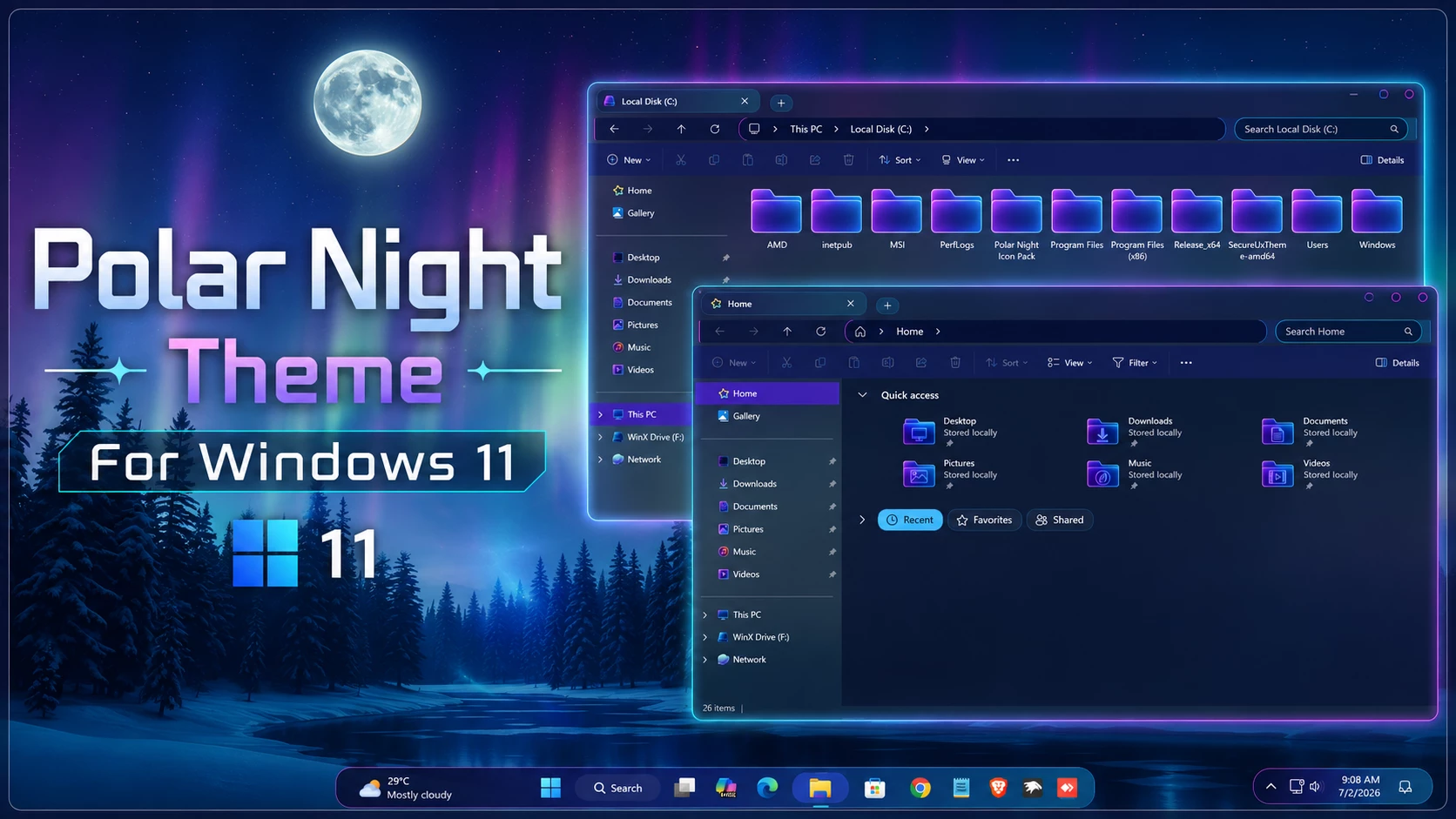
The Polar Night Theme For Windows 11 is a dark desktop customization built around deep blue, purple, and aurora-inspired lighting. Instead of using a plain dark interface, the setup adds soft glowing colors to folders, navigation areas, and other supported parts of Windows 11, giving the desktop a colder nighttime atmosphere.
One of the most noticeable parts of the setup is the folder design. The folders use a purple and blue color mix with a soft aurora-like glow, making them stand out clearly against the darker File Explorer background. This effect is easier to notice when the matching icon resources are used together with the main theme.
The left navigation panel follows a deeper purple direction, helping it blend naturally with the folder colors and the overall Polar Night palette. The result feels more coordinated than simply applying a dark Windows theme with a colorful wallpaper.
Aurora Styling Across File Explorer
Polar Night takes inspiration from the colors often associated with a dark winter sky and aurora lighting. Deep navy and purple create the base, while brighter blue and violet details appear around folders and selected interface areas.
The folder icons are an important part of this look. Their purple-blue glow gives File Explorer more personality and helps carry the aurora direction into the content area. The navigation panel on the left uses a deeper purple shade, keeping the darker sections of the interface connected to the brighter folder styling.
Polar Night Highlights
- Dark navy and deep purple Windows 11 interface
- Aurora-inspired purple and blue folder styling
- Soft glowing effect around matching folder icons
- Deep purple navigation panel inside File Explorer
- Cool blue and violet accents across supported interface areas
- Matching icon resources for a stronger Polar Night appearance
- Optional Windhawk mods for extending the style into more parts of Windows
- Designed for users who prefer darker desktops with colorful aurora-style details
My Thoughts on the Polar Night Theme
In my opinion, the folders are what really give Polar Night its identity. The purple and blue combination already works well with the dark interface, but the soft aurora-like glow around the icons makes File Explorer feel much more distinctive.
I also like the deep purple navigation panel because it keeps the left side of Explorer from looking disconnected from the rest of the theme. The darker navigation area and brighter folder colors balance each other well without making the whole window excessively bright.
For the complete Polar Night look, I would use the related Windhawk mods along with the main theme and matching icon resources. The Windows theme provides the basic visual direction, but the extra interface mods help carry the same design into more parts of the desktop and make the overall setup feel much more complete.
Build the Complete Polar Night Setup
You can use the main Windows theme by itself, but that will only give you part of the overall appearance. The matching icon pack is especially useful because it adds the aurora-style folders, while compatible Windhawk mods can change additional interface areas to follow the same dark purple and blue direction.
If you want a simpler desktop, you can stop after applying the main theme and icons. If you want the complete setup, add the compatible Windhawk modifications and other optional resources one at a time.
Tools and Resources for the Full Look
- SecureUxTheme – can be used when the main third-party visual style requires custom theme support.
- Polar Night Icon Pack – adds the matching purple and blue folder resources that help create the aurora-style File Explorer look.
- Windhawk – useful for applying compatible interface mods that help recreate more of the complete Polar Night desktop.
Installation Steps
- Create a System Restore Point before making changes.
- Patch Windows using SecureUxTheme or UltraUXThemePatcher.
- Download and extract the theme package.
- Copy the theme folder and
.themefile toC:\Windows\Resources\Themes. - Double-click the
.themefile, or go to Personalization > Themes and select the theme. - For more details, follow this Windows 11 custom theme installation guide.
Supported Windows Builds
- Windows 11 21H2: Not Tested
- Windows 11 22H2: Not Tested
- Windows 11 23H2: Not Tested
- Windows 11 24H2: YES
- Windows 11 25H2: YES
The main theme and optional Windhawk mods may have different compatibility requirements. After a Windows update, check the individual mods before applying them again because interface changes can affect older configurations.
Included Resources
- Windows 11 Theme
- Wallpapers
- iPack Icons
Polar Night Theme 28MB
DownloadRemove Polar Night
- Switch the Theme: Open Settings > Personalization > Themes and select one of the default Windows 11 themes.
- Undo the Extra Styling: Restore the original icons and disable any Windhawk, Explorer, taskbar, Start Menu, or other modifications used with the Polar Night setup.
- Restart and Recover: Restart Windows Explorer or reboot your PC. If unwanted changes remain, use the System Restore Point or follow this Windows 11 custom theme removal guide.
Polar Night Customization Notice
Polar Night Theme for Windows 11 is an independently created third-party customization resource intended for personal desktop styling. It is not an official Microsoft product and is not affiliated with, sponsored by, approved by, or endorsed by Microsoft. Windows and related trademarks remain the property of their respective owners.
Third-party themes and interface mods can behave differently across Windows builds. Creating a System Restore Point and checking compatibility before applying themes, icons, or Windhawk modifications is recommended.
Final Thoughts
Polar Night stands out mainly because of its aurora-inspired folder styling, dark navy surfaces, and deep purple navigation panel. The glowing purple-blue folders bring most of the visual character, while the darker interface keeps the setup from becoming excessively bright.
The main theme works as a starting point, but the matching icon resources and compatible Windhawk mods are what help recreate the complete Polar Night appearance. For users who enjoy dark Windows customization with purple, blue, and aurora-style lighting, the full setup has a much stronger identity than the default Windows 11 look.
Frequently Asked Questions
What makes the Polar Night folders different?
The matching folders use purple and blue tones with a soft aurora-like glow, helping them stand out against the dark File Explorer background.
What color is the navigation panel?
The left navigation area uses a deep purple tone that fits naturally with the darker blue and violet colors used throughout the setup.
Do I need the Polar Night icon pack?
No, but the matching icon resources are important if you want the aurora-style folder appearance shown with the complete setup.
Are Windhawk mods required?
The main theme can be used without them, but compatible Windhawk mods are recommended if you want to recreate the fuller Polar Night interface style.
Can I use only the main Windows theme?
Yes. You can apply only the main theme, although the desktop will look simpler without the matching icons and additional interface modifications.
Can I return to the normal Windows 11 appearance?
Yes. Switch back to a default Windows theme, restore the original icons, disable any additional mods, and restart Explorer or Windows if needed.