

New macOS Tahoe Inspired Theme For Windows 11
macOS Tahoe Inspired Theme For Windows 11 : The macOS Tahoe Theme for Windows 11 brings the refined beauty and fluid design of Apple’s latest macOS experience directly to your Windows desktop.

macOS Tahoe-Inspired Theme for Windows 11
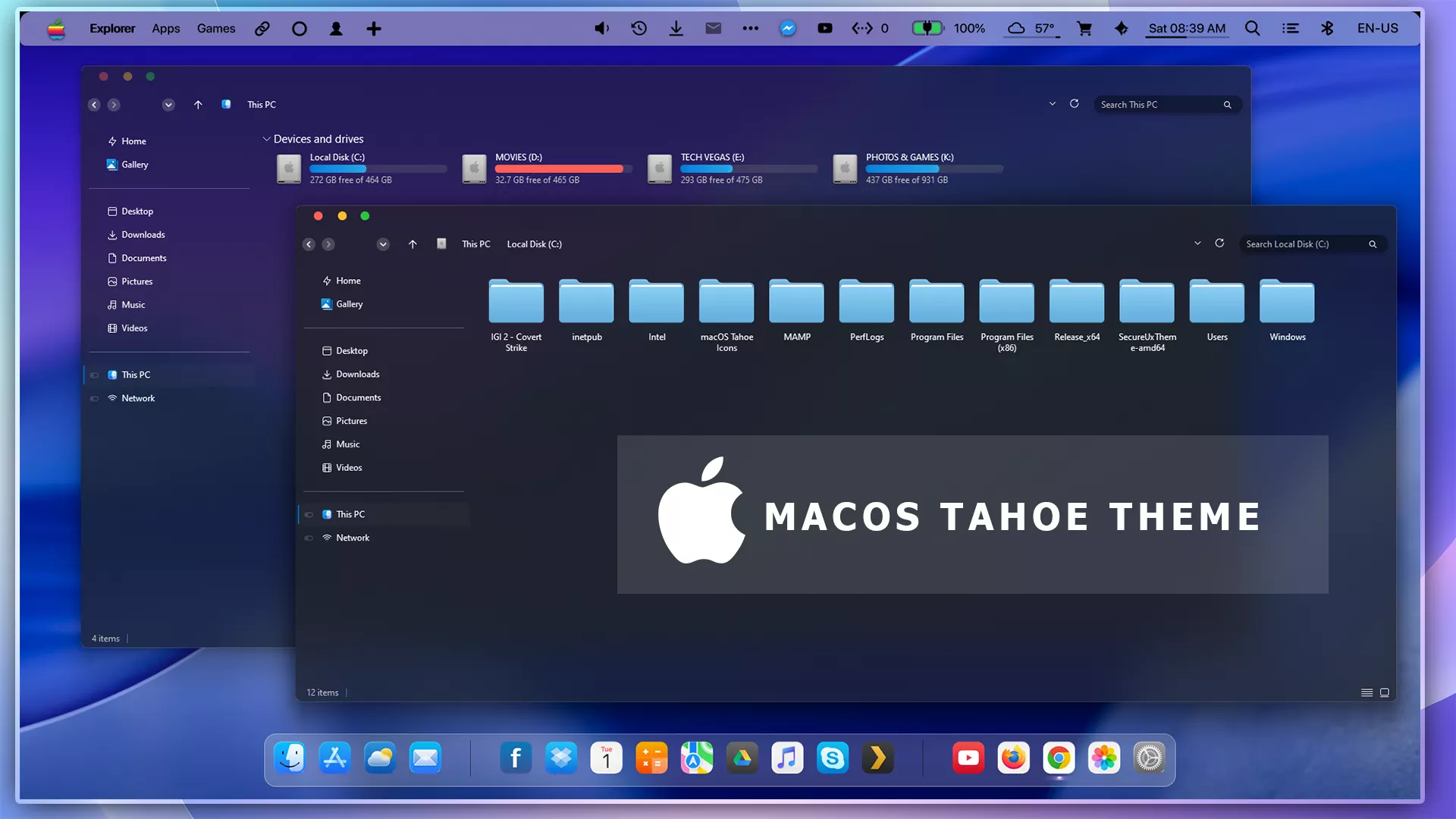
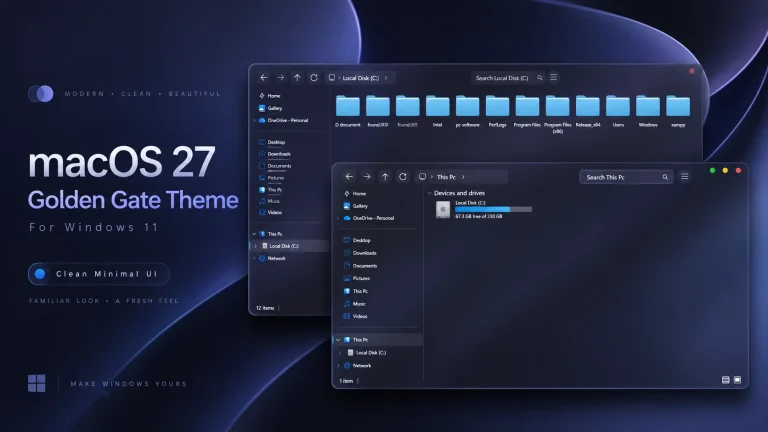
The macOS Tahoe-Inspired Theme for Windows 11 gives the desktop a dark, understated appearance influenced by macOS styling. File Explorer uses deep navy, charcoal, and muted blue surfaces with simple panel separation, compact controls, and a restrained overall layout that keeps the Windows 11 interface familiar underneath.
The upper Explorer area uses a darker blue-black treatment, while the main content panel carries a slightly lighter navy tone. This difference helps separate navigation, folders, and drive information without relying on bright borders or heavy visual effects.
Small colored window controls add a macOS-inspired detail to supported windows, while the rest of the interface remains based on Windows 11. The theme can also be paired with separate wallpapers, icon packs, docks, or taskbar customizations if you want to extend the same design direction across the desktop.
macOS Tahoe-Inspired Visual Style
The theme takes a darker approach rather than using a bright or highly transparent interface. File Explorer stays mostly solid with subtle tonal variation across the title area, navigation pane, and main content section.
Navigation items use simple spacing and thin separators between common locations, drives, and network entries. The darker surface keeps the interface calm, while small blue and purple details provide enough contrast to prevent the layout from feeling completely flat.
The overall design is restrained and practical. It borrows selected macOS-inspired ideas such as compact colored window controls and simpler visual grouping without attempting to reproduce macOS itself.
Features
- Dark navy and charcoal Windows 11 styling
- macOS-inspired window control details
- Subtle blue and violet interface accents
- Darker File Explorer navigation area
- Simple borders and restrained panel separation
- Designed for Windows 11 desktop customization
- Can be paired with separate icon and dock customizations
- Keeps the normal Windows 11 environment underneath
What the Theme Changes
macOS Tahoe-Inspired Theme focuses on supported Windows 11 visual elements such as File Explorer surfaces, title areas, navigation panels, borders, and other themeable interface components.
It does not install macOS, add Apple system features, or replace Windows 11. Your applications, personal files, and normal Windows functions continue to operate through Windows as usual.
Custom folder icons, docks, taskbar layouts, Start Menu modifications, and other desktop additions should be treated as separate customizations unless they are specifically listed as included in the downloaded package.
Compatibility
- Windows 11 21H2: Older build; compatibility may be limited
- Windows 11 22H2: Compatibility may vary depending on the theme tool
- Windows 11 23H2: Check current theme-tool support before installation
- Windows 11 24H2: Test carefully after cumulative or feature updates
- Windows 11 25H2: Recheck compatibility before applying the theme
What is included in this?
- Windows 11 Theme Files
- Included Extras and Supporting Resources
Optional Customization Tools
- SecureUxTheme — use only when required by the theme package and compatible with your Windows build.
- 7TSP GUI — optional for compatible system icon customization.
- StartAllBack — optional for additional Start Menu or taskbar changes.
- Matching Icon Pack — optional for extending the macOS-inspired styling to Windows icons.
Before You Install
- Create a System Restore Point before applying third-party Windows theme files.
- Keep a copy of your current Windows theme and desktop settings.
- Check that your theme tool supports your Windows 11 build.
- Read any instructions included with the downloaded package.
- Apply additional customization tools one at a time.
Installation Steps
- Create a Windows System Restore Point before starting.
- Download the macOS Tahoe-Inspired Theme package using the button below.
- Extract the downloaded archive to a separate folder.
- Read the included instructions and confirm which theme tool is required.
- Install SecureUxTheme or another compatible theme patcher only if needed.
- Copy the required theme files to the appropriate Windows theme location.
- Open Windows Personalization and apply the macOS Tahoe-Inspired theme.
- Restart Windows Explorer or your PC if the visual changes do not appear immediately.
- Add optional icons, taskbar changes, or other extras only after the main theme is working correctly.
If you are new to Windows customization, you can follow the How to Install Custom Themes on Windows 11 guide before applying the files.
For another detailed reference, see: How to Install Windows 10 or 11 Themes .
macOS Tahoe-Inspired Theme 150 MB
Download Removal Steps
- Open Windows Settings and go to Personalization > Themes.
- Select one of the default Windows 11 themes.
- Restore the default Windows icons if a separate icon pack was applied.
- Disable or remove optional dock, Start Menu, or taskbar customizations that were added separately.
- Restore your previous wallpaper if needed.
- Restart Windows Explorer or reboot your PC.
- Use the System Restore Point if unwanted visual changes remain.
Using the Theme With Other Customizations
The main theme can be used by itself or combined with a matching icon pack, dock, taskbar style, or other compatible Windows personalization tools. These additions are optional and can be applied separately according to the desktop layout you want.
Keeping the surrounding customizations restrained usually works best with the darker Tahoe-inspired interface. A simple wallpaper and matching icon set can often provide enough visual consistency without changing every part of Windows.
Disclaimer
macOS Tahoe-Inspired Theme for Windows 11 is an independent third-party Windows customization resource intended for personal desktop customization. It is not an official Apple or Microsoft product and is not affiliated with, sponsored by, approved by, or endorsed by Apple Inc. or Microsoft.
The term macOS Tahoe-inspired is used only to describe visual design influences. macOS and Apple-related trademarks belong to Apple Inc., while Windows and related trademarks belong to Microsoft. Third-party themes may behave differently across Windows builds, so create a System Restore Point before applying visual modifications.
Final Word
macOS Tahoe-Inspired Theme gives Windows 11 a darker and more restrained identity through navy and charcoal Explorer surfaces, compact window controls, subtle blue accents, and simple panel separation.
The main theme works well without additional modifications, while optional icons and other desktop components can be added later if you want a more complete macOS-inspired setup. Keeping each customization separate also makes the desktop easier to update and restore.
Frequently Asked Questions
Does this theme install macOS Tahoe on Windows 11?
No. It only changes supported visual elements of Windows 11. The operating system remains Windows 11.
What colors are used in the main theme?
The interface mainly uses dark navy, charcoal, muted blue, and subtle violet tones.
Are the light blue folder icons part of the main Windows theme?
The matching icon pack is a separate customization, so icon changes should not be assumed to be built into the main theme.
Does the theme include a macOS-style dock?
A dock should be treated as a separate customization unless the downloaded package specifically lists one as included.
Can I use the theme without changing my Windows icons?
Yes. The main theme can be used independently, and icon customization is optional.
Can I use another wallpaper with the theme?
Yes. The Windows theme can be used with any wallpaper, although darker blue, black, gray, or abstract backgrounds generally complement its interface well.



Disclaimer: All themes, visual styles, and concepts shared on this website are unofficial, fan-made creations built from imagination for customization purposes. We are not affiliated with, endorsed by, or sponsored by Microsoft or any other official brand.