

Ocean Wave Theme For Windows 11
Ocean Wave Theme For Windows 11 gives your desktop a clean, calm, and modern ocean-inspired look with matching wallpapers and icon pack resources.

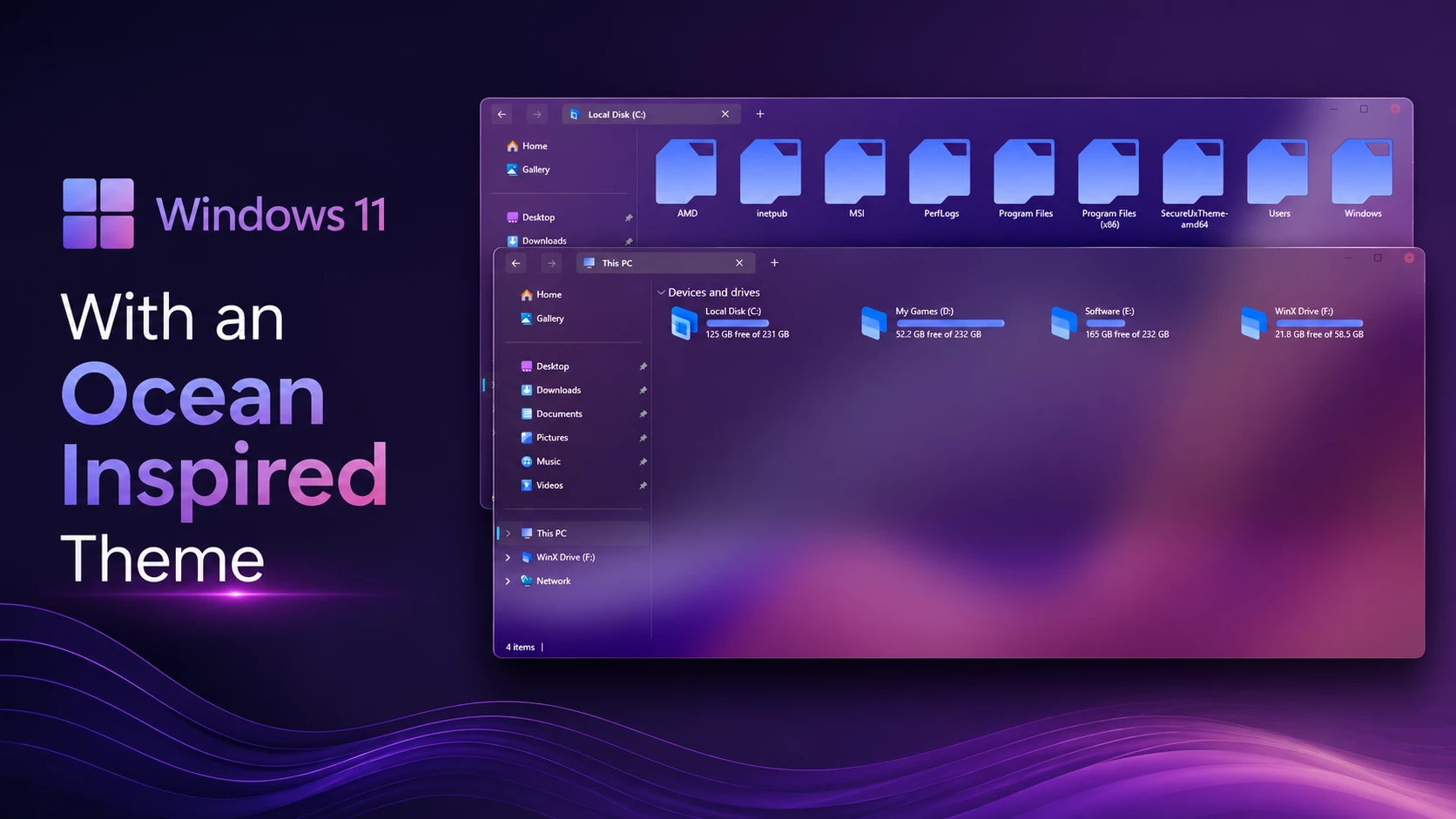
Ocean Wave Theme For Windows 11 – Transparent Glass Customization
The Ocean Wave Theme For Windows 11 gives File Explorer a transparent glass-style appearance with a clean, modern layout. The interface keeps the familiar Windows 11 structure while adding soft transparency, subtle borders, and cooler accent details that work naturally with ocean-inspired wallpapers.
Much of the purple, pink, and blue coloring visible through File Explorer comes from the wallpaper behind the transparent windows rather than from fixed theme colors. This means the same theme can take on a slightly different character when used with another background.
The drive section uses light blue and cyan hard-drive level indicators, keeping storage information easy to read against the transparent surface. Supported windows also use compact customized DWM controls, with a restrained close-button accent that fits the clean glass-style interface.
About Ocean Wave Theme
Ocean Wave Theme is designed for Windows 11 users who prefer a transparent glass-style interface instead of a solid background. File Explorer keeps its familiar layout, while the translucent surfaces allow parts of the desktop wallpaper to remain visible through the interface.
This transparent effect becomes more noticeable when you use a gradient or abstract wallpaper. Wallpapers with blue, violet, aqua, or mixed color tones can show through the glass areas more clearly, giving the Ocean Wave setup a deeper and more layered appearance.
Ocean Wave Visual Style
The main Explorer window uses a highly transparent surface with darker navigation sections and thin interface separators. Because the background remains visible through much of the window, the setup has more depth without covering the desktop with a solid color.
The sidebar, content area, title section, and supported Explorer surfaces follow the same clean direction. The result is a customized Windows 11 layout that still feels familiar during everyday file browsing.
Ocean Wave Highlights
- Transparent glass-style File Explorer surfaces
- Wallpaper remains visible through supported interface areas
- Light blue and cyan hard-drive level indicators
- Compact customized DWM window controls
- Clean navigation and content areas
- Subtle borders and interface separators
- Familiar Windows 11 Explorer structure
- Works well with matching Ocean Wave wallpapers and icon resources
Optional Customization Tools
Quick Preparation
- Create a System Restore Point before applying the custom theme.
- Make sure your theme patcher supports your current Windows 11 build.
- Keep a default Windows theme available in case you need to switch back.
- Apply optional customization components one at a time.
How to Install Ocean Wave Theme
- Create a System Restore Point before making changes.
- Patch Windows using SecureUxTheme or UltraUXThemePatcher.
- Download and extract the theme package.
- Copy the theme folder and
.themefile toC:\Windows\Resources\Themes. - Double-click the
.themefile, or go to Personalization > Themes and select the theme. - For more details, follow this Windows 11 custom theme installation guide.
Windows Version Compatibility
- Windows 11 21H2: Supported
- Windows 11 22H2: Supported
- Windows 11 23H2: Recommended
- Windows 11 24H2: Recommended
- Windows 11 25H2: Supported, but check compatibility again after major Windows updates
What’s Included in This?
- Windows 11 Theme
- Wallpapers
- Icons
Ocean Wave Theme 53.3 MB
DownloadSwitch Back from Ocean Wave
- Return to a Windows Theme: Open Settings > Personalization > Themes and choose one of the default Windows 11 themes.
- Undo Ocean Wave Customizations: Restore the original icons and disable any Explorer, taskbar, Start Menu, or other visual changes that were added with the setup.
- Restart and Recover: Restart Windows Explorer or reboot your PC. If any visual changes remain, use the System Restore Point you created earlier. For a full walkthrough, follow this Windows 11 custom theme removal guide.
Ocean Wave Customization Notice
Ocean Wave Theme for Windows 11 is an independently created third-party customization resource intended for personal desktop styling. It is not an official Microsoft product and is not affiliated with, sponsored by, approved by, or endorsed by Microsoft. Windows and related trademarks remain the property of their respective owners.
Compatibility may vary between Windows builds and the tools used with the setup. Creating a System Restore Point before applying custom themes, icon resources, or other visual modifications is recommended.
Final Thoughts
The Ocean Wave Theme For Windows 11 combines a transparent Explorer interface with light blue and cyan hard-drive level indicators, compact DWM controls, and a clean Windows 11 layout. The purple, pink, and deeper blue shades visible through the glass surfaces can change with the wallpaper, so they should not be treated as fixed colors of the theme itself.
For a more coordinated desktop, the included wallpapers and matching icon resources can be used alongside the main Windows theme while keeping each customization component separate and easy to restore.
Frequently Asked Questions
Is Ocean Wave Theme transparent?
Yes. Supported File Explorer areas use strong transparency, allowing the wallpaper to remain clearly visible through the interface.
Are the purple and pink colors built into the theme?
Not entirely. Much of that coloring comes from the wallpaper showing through the transparent Explorer surfaces, so another wallpaper can change the overall tone.
What colors are used for the hard-drive level indicators?
The storage level bars use light blue and cyan accents that remain clearly visible against the transparent background.
What style do the DWM buttons use?
The theme uses compact customized DWM controls with a simple design and a subtle accent on the close button.
Do I need the matching icon pack?
No. The main Windows theme can be used independently. Matching icon resources are optional if you want a more coordinated complete setup.
Can I use another wallpaper?
Yes. Since File Explorer is highly transparent, changing the wallpaper can noticeably change the colors visible through the interface while the main theme remains unchanged.



Disclaimer: All themes, visual styles, and concepts shared on this website are unofficial, fan-made creations built from imagination for customization purposes. We are not affiliated with, endorsed by, or sponsored by Microsoft or any other official brand.