

Fluent 2.0 Theme for Windows 11
Fluent 2.0 Theme for Windows 11 : Fluent 2.0 Theme for Windows 11 brings a modern, elegant Fluent Design look to your desktop with smooth transparency, refined UI elements, and customizable accents. Designed for performance and style, it delivers a clean, professional Windows 11 experience.

Fluent 2.0 Theme for Windows 11
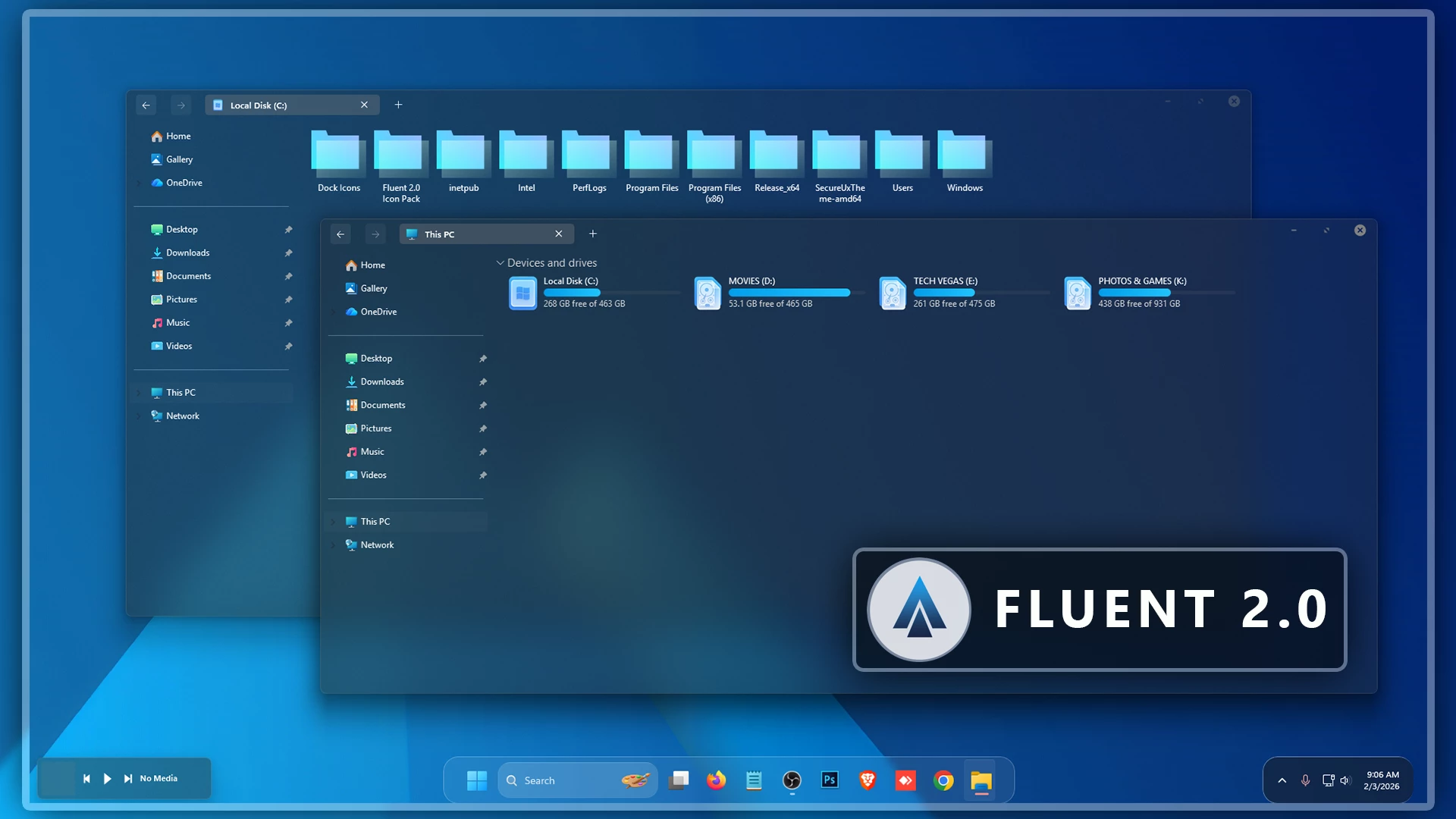
The Fluent 2.0 Theme for Windows 11 gives File Explorer a fully transparent appearance with a clean, Fluent-inspired visual direction. Instead of covering Explorer with a heavy background color, the interface allows the desktop wallpaper to remain clearly visible through supported areas while keeping the normal Windows 11 layout familiar.
Cyan provides the main built-in accent. It appears most noticeably in the drive section, where bright cyan hard-drive level indicators stand out against the transparent background and make storage information easy to identify without adding several competing colors.
The window controls follow the same restrained approach. Customized DWM buttons keep the minimize, maximize, and close area simple, so the transparent Explorer surface and wallpaper remain the main visual focus.
Fluent-Inspired Transparent Design
The most distinctive part of this setup is the combination of full transparency and limited cyan detailing. The theme does not depend on a strong fixed Explorer color, which means the wallpaper has a much larger influence on the finished desktop appearance.
A darker wallpaper can give the interface more contrast, while brighter or more colorful backgrounds can completely change the mood visible through File Explorer. The underlying visual style remains the same, but the desktop does not feel locked to one permanent color scheme.
Visual Highlights
- Fully transparent File Explorer surfaces
- Clean Fluent-inspired Windows 11 styling
- Cyan accent details
- Bright cyan hard-drive level indicators
- Customized Fluent-style DWM window controls
- Simple and restrained title-area controls
- Subtle borders and interface separators
- Wallpaper remains clearly visible through supported areas
Why This Setup Feels Different
Many dark or glass-style themes use a colored tint across most of File Explorer. This setup takes a simpler route by keeping the Explorer background highly transparent and using cyan mainly as a functional accent around storage information.
That makes the wallpaper more important than usual. If you regularly change backgrounds, the same theme can take on a noticeably different appearance without requiring another visual style.
Windows Compatibility
- Windows 11 21H2: May work, but not recommended for the best experience
- Windows 11 22H2: YES
- Windows 11 23H2: YES
- Windows 11 24H2: YES
- Windows 11 25H2: YES
Included Resources
- Windows 11 Theme
- Wallpapers
Apply the Theme
- Create a System Restore Point, prepare Windows with a compatible theme patcher, place the extracted theme files in
C:\Windows\Resources\Themes, and apply the visual style from Personalization > Themes. - For the complete setup process, follow this Windows 11 custom theme installation guide.
Return to Default
- Switch back to a default Windows 11 theme and disable any optional customization tools or interface changes used with the setup.
- For detailed restoration instructions, follow this Windows 11 custom theme removal guide.
Theme Files 5MB
Download Disclaimer
Fluent 2.0 Theme for Windows 11 is an independently created third-party customization resource intended for personal desktop styling. It is not an official Microsoft product and is not affiliated with, sponsored by, or endorsed by Microsoft. The term Fluent-inspired is used only to describe the visual direction of the customization. Windows, Fluent Design, and related trademarks remain the property of Microsoft.
Third-party visual styles may behave differently across Windows builds or after major system updates. Check compatibility before applying theme files or additional customization tools.
Final Thoughts
This setup focuses on transparency rather than a heavy fixed Explorer color. The wallpaper stays visible through supported File Explorer areas, while cyan drive indicators and restrained DWM controls provide the main built-in accents.
For users who prefer a cleaner Fluent-inspired desktop where the wallpaper plays a major role in the final appearance, this theme offers a simple visual direction without filling the interface with unnecessary colors or effects.



Disclaimer: All themes, visual styles, and concepts shared on this website are unofficial, fan-made creations built from imagination for customization purposes. We are not affiliated with, endorsed by, or sponsored by Microsoft or any other official brand.