

Fluent 2.0 Icon Pack for Windows 11
Fluent 2.0 Icon Pack for Resource Redirect : Fluent 2.0 Icon Pack for Resource Redirect brings a sleek, modern Fluent Design look to your Windows 11 desktop. Optimized for Windhawk Mods, it replaces system icons seamlessly, offering clean, consistent visuals for the Start Menu, Taskbar, File Explorer, and apps—perfect for a polished, aesthetic setup.

Fluent 2.0 Icon Pack for Resource Redirect (Windhawk Mods)
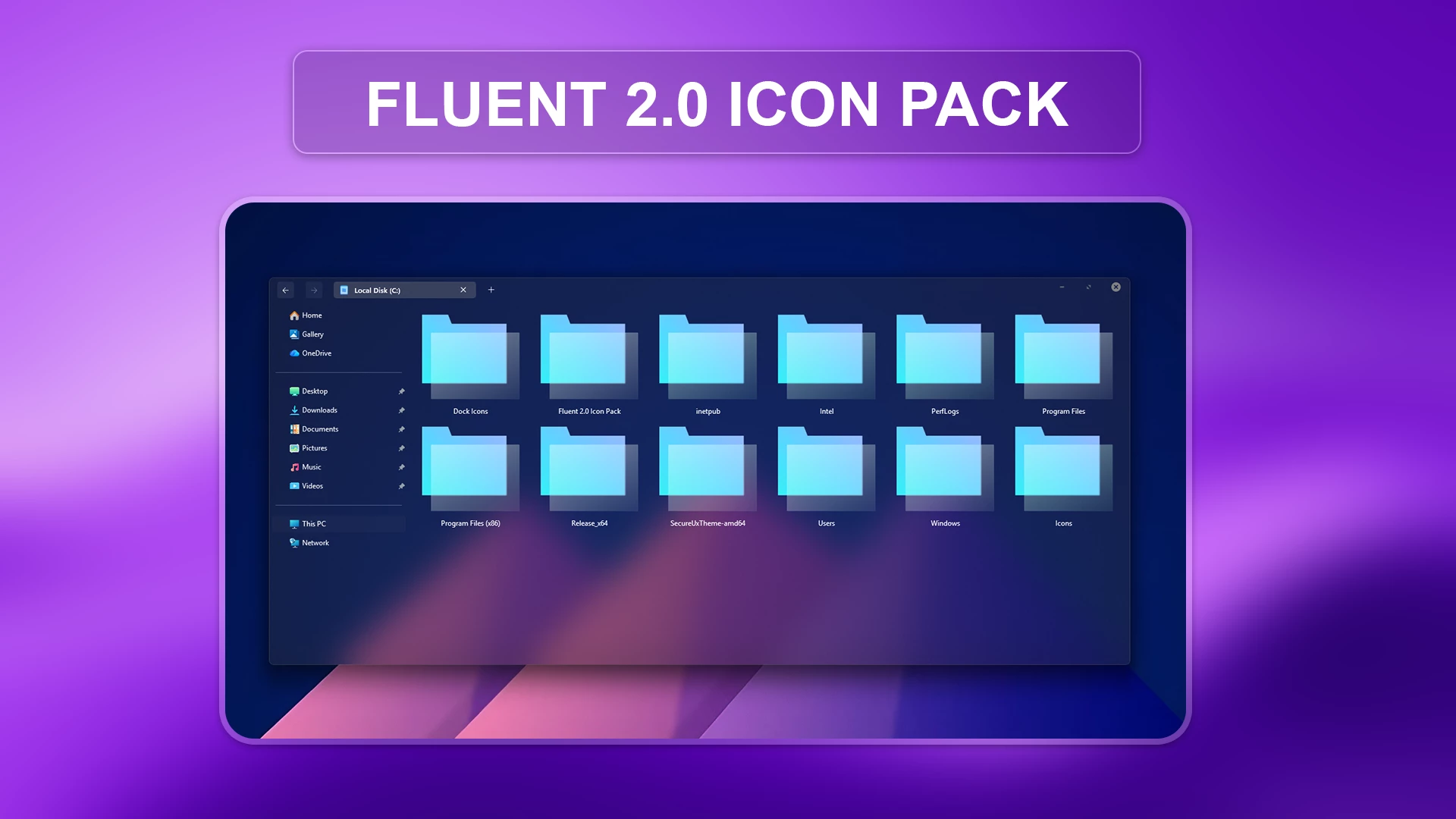
If you like the brighter side of Windows customization, this Fluent 2.0 Icon Pack gives supported system icons a clean glass-inspired look. The design uses light blue, cyan, and soft mint tones with translucent layers and subtle highlights, creating an airy appearance that feels right at home on a modern Windows 11 desktop.
The pack is not built around a dark or minimal monochrome style. Instead, it has a polished, slightly glossy finish that stands out nicely against light wallpapers, blurred taskbars, acrylic effects, and colourful desktop setups. Music, video, desktop, download, folder, drive, and picture-related icons all follow the same blue-toned visual direction, so the overall result feels more coordinated than the default mix of Windows resources.
Fluent 2.0 Icon Pack is intended for use with the Resource Redirect mod in Windhawk. This lets you apply supported replacement resources through the mod’s configuration instead of manually editing protected Windows system files. If you later want to return to the original appearance, you can remove the pack configuration or disable the mod.
What the Icon Style Looks Like
The icons use rounded shapes, bright aqua outlines, pale blue inner panels, and soft reflections that give them a glass-like depth. Folder and document-style icons use transparent layers, while media, download, desktop, and image icons are more illustrative and colourful. The pack works especially well when you want Windows 11 to look fresh and visually expressive without using a heavy third-party theme.
Highlights
- Glossy blue, cyan, and mint colour palette
- Translucent, glass-inspired visual effects
- Consistent styling across supported media, folder, drive, and system icons
- Designed for use with Resource Redirect in Windhawk
- A good match for light, acrylic, and glass-style Windows setups
- Easy to disable or replace through the Resource Redirect configuration
Compatibility & File Details
This pack is intended for Windows 11 users with Windhawk and the Resource Redirect mod installed. The exact result can vary with your Windows build, display scaling, active Windhawk mods, and the resources supported by the pack.
File Details & Requirements
- Platform: Windows 11
- Required Tool: Resource Redirect for Windhawk
- Included: Fluent 2.0 Resource Redirect Icon Pack files
- File Size: 18 MB
Installation Steps
- Download and extract the icon-pack files to a folder you do not plan to move or delete.
- Install Windhawk if it is not already available on your computer.
- Install and enable the Resource Redirect mod.
- Open the mod settings and apply the pack using its included configuration or the required resource path.
- Save your changes, then restart File Explorer or sign out and back in if the icons do not update immediately.
Windows may continue showing older cached icons for a short time. If that happens, restart File Explorer, refresh the icon cache through your Resource Redirect setup, or restart the computer.
A Few Things to Keep in Mind
Not every icon in Windows is controlled by the same resource file. Some application icons, thumbnail folders, and newer Windows components may continue to use their normal appearance. This is expected and does not necessarily mean that the pack has been installed incorrectly.
Before applying any system-wide visual customization, it is sensible to create a restore point and test one mod at a time. That makes it easier to reverse a change if another theme or Windhawk mod conflicts with the icon pack.
Icon Pack 18 MB
Download Icon PackHow to Remove This Icon Pack
If you want to restore the default Windows icons, you can easily remove this icon pack by disabling its Resource Redirect configuration in Windhawk. Follow the steps below to return your system icons to their original appearance.
How to Remove This Icon Pack
- Open the Windhawk application from your Windows system.
- Go to the Installed Mods section and open the Resource Redirect mod.
- Open the Resource Redirect settings and locate the configuration path used for this Icon Pack.
- Remove the custom icon pack path.
- Save the changes and apply the updated Resource Redirect settings.
- Restart Windows File Explorer from Task Manager or restart your computer to refresh the icons.
- If the old icons still appear, clear the Windows icon cache and restart your system again.
After completing these steps, Windows will return to using its default icon resources.
Pair With This Theme
You can use this icon pack with the Fluent 2.0 Theme for Windows 11 to complete the look and create a cleaner, more consistent desktop experience.
Disclaimer
This icon pack is an independent third-party customization resource and is not an official Microsoft product. It is not affiliated with, sponsored by, approved by, or endorsed by Microsoft Corporation. “Fluent 2.0” is used here as the name and visual description of this pack. Microsoft and Windows are trademarks of the Microsoft group of companies.
Final Thoughts
Fluent 2.0 is a good choice if you want a brighter, more decorative Windows 11 icon style without losing the familiar shape of everyday system icons. Its blue glass effect gives File Explorer and supported Windows areas a softer, more modern character, especially when paired with a clean wallpaper and a transparent taskbar.
You may also like
Disclaimer: All themes, visual styles, and concepts shared on this website are unofficial, fan-made creations built from imagination for customization purposes. We are not affiliated with, endorsed by, or sponsored by Microsoft or any other official brand.