Xeon Icon Pack For Windows 11 (Windhawk)
Download Xeon Icon Pack For Windows 11 Windhawk and give your desktop a modern, colorful and futuristic look with clean glossy icons.

Xeon Icon Pack for Windows 11 – Resource Redirect
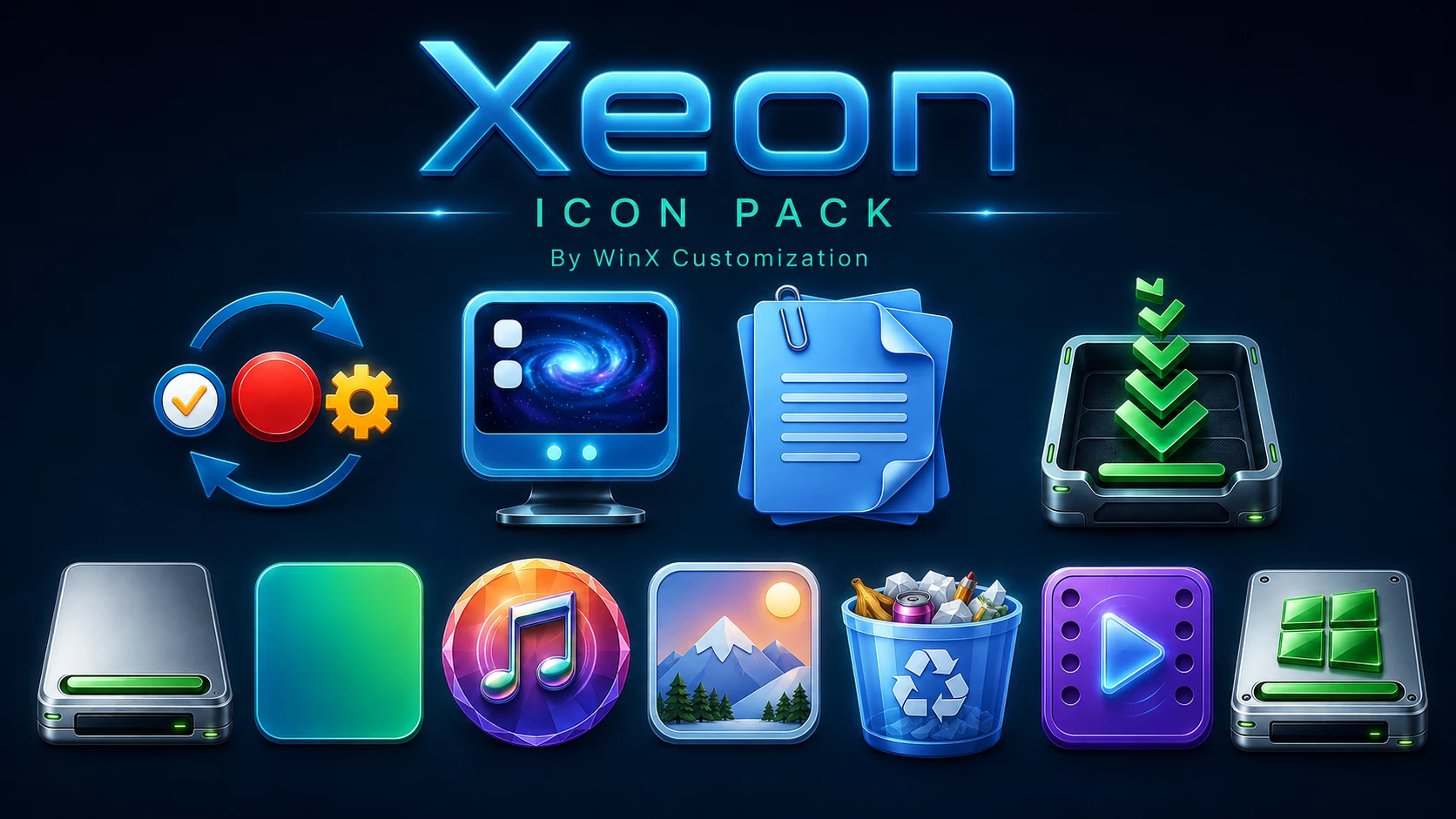
Xeon Icon Pack gives supported Windows 11 icons a glossy blue-and-metallic look with bright cyan highlights, glass-like surfaces, and a few stronger color accents for media and drive resources.
The set is more detailed than a simple flat icon pack. Documents use a layered blue paper design, the monitor carries a bright galaxy-style screen, the download resource combines electric blue with green, and the drive icons use metallic silver bodies with green indicator details.
Music, photo, video, Recycle Bin, and Windows-style resources bring in additional color, but the pack still feels connected because the same polished, reflective finish appears across the set.
This version is designed for Resource Redirect in Windhawk. It changes supported Windows icon resources through the mod, so you do not need to manually replace protected Windows system files. Your wallpaper, taskbar, Start menu, and Windows theme remain separate customizations.
Glossy Blue and Metallic Icon Style
Blue and cyan form the main visual base of Xeon. Several icons use bright blue surfaces with silver or white edges, giving them a polished hardware-style appearance rather than a flat Windows look.
The pack also uses selective color instead of forcing every resource into the same palette. Green appears on drive and download elements, the music icon uses a multicolor circular design, the photo resource brings in warmer landscape tones, and the video icon shifts into a purple-blue finish.
Features
- Glossy blue and cyan icon surfaces
- Metallic silver and white edge details
- Layered document-style resources
- Bright blue and green download icon
- Silver drive resources with green accents
- Colorful music, photo, video, and Recycle Bin icons
- Designed for Resource Redirect in Windhawk
- No manual replacement of protected Windows system files
What Is Included?
- Xeon Resource Redirect Icon Pack: Contains the replacement resources used by Resource Redirect for supported Windows 11 locations.
Compatibility
- Windows 11
Icon coverage can vary depending on your Windows build and the resources included in the pack. Some applications use their own icon files, while folders that display thumbnail previews may continue to show those previews instead of the themed resource.
Requirements
- Windows 11
- Windhawk installed
- Resource Redirect mod installed and enabled
- The Xeon pack extracted to a permanent folder
- A ZIP extraction tool
How to Install Xeon Icon Pack
- Install Windhawk: Download and install Windhawk if it is not already installed.
- Install Resource Redirect: Open Windhawk, search for Resource Redirect, and install the mod.
- Download Xeon: Download the ZIP archive using the button below.
- Extract the Pack: Extract the archive to a folder that you plan to keep in the same location.
- Copy the Folder Path: Open the extracted Xeon folder and copy its full Windows path.
- Open Resource Redirect Settings: Go to the mod’s settings and locate the custom theme or resource folder field.
- Paste the Path: Paste the Xeon folder path into the required field. Remove quotation marks if Windows added them automatically.
- Save the Settings: Apply the Resource Redirect configuration and let the mod reload.
- Refresh Explorer: Restart Windows Explorer if the new icons do not appear immediately.
For a more detailed setup guide, you can also check:
Download Xeon Icon Pack
Xeon Icon Pack 13MB
Download Icon PackHow to Remove Xeon Icon Pack
- Open Windhawk: Select the installed Resource Redirect mod.
- Open Its Settings: Find the custom path currently pointing to the Xeon folder.
- Restore Your Previous Setup: Replace the Xeon path with your earlier configuration, or remove it if you want to return to the default Windows resources.
- Save the Changes: Apply the updated Resource Redirect settings.
- Restart Explorer: Restart Windows Explorer so the previous or default icons can reload.
- Delete the Pack Later: Remove the extracted Xeon folder only after Resource Redirect is no longer using it.
Where Xeon Works Best
Xeon naturally suits darker desktops because the bright cyan edges, metallic surfaces, and green drive accents have more contrast there. Black, navy, deep blue, or space-style wallpapers can all work nicely with the pack.
You do not need to build the whole desktop around it, though. Xeon already has enough variation in its music, photo, video, drive, and document resources to work as the main visual change on an otherwise simple Windows setup.
Disclaimer
Xeon Icon Pack is an independently created third-party Windows customization resource intended for desktop personalization. It is not an official Microsoft, Windhawk, or Resource Redirect product and is not affiliated with, authorized by, sponsored by, approved by, or endorsed by those companies or projects. Microsoft, Windows, and other trademarks belong to their respective owners. Appearance and compatibility may vary between Windows builds and mod versions.
Final Word
Xeon has more personality than a simple blue folder pack. The glossy cyan system icons and metallic drives create the base look, while the green download details, colorful music icon, landscape photo resource, and purple video icon add enough variation to keep the set interesting.
If you like brighter, more detailed icons but still want a consistent visual language across Windows 11, Xeon sits comfortably between clean system styling and more elaborate desktop artwork.