Ares Theme For Windows 11 – Stunning Glass UI
Ares Theme For Windows 11 is a stunning glass UI theme that transforms your desktop with modern design, smooth gradients, and custom icons. Explore features, benefits, and setup

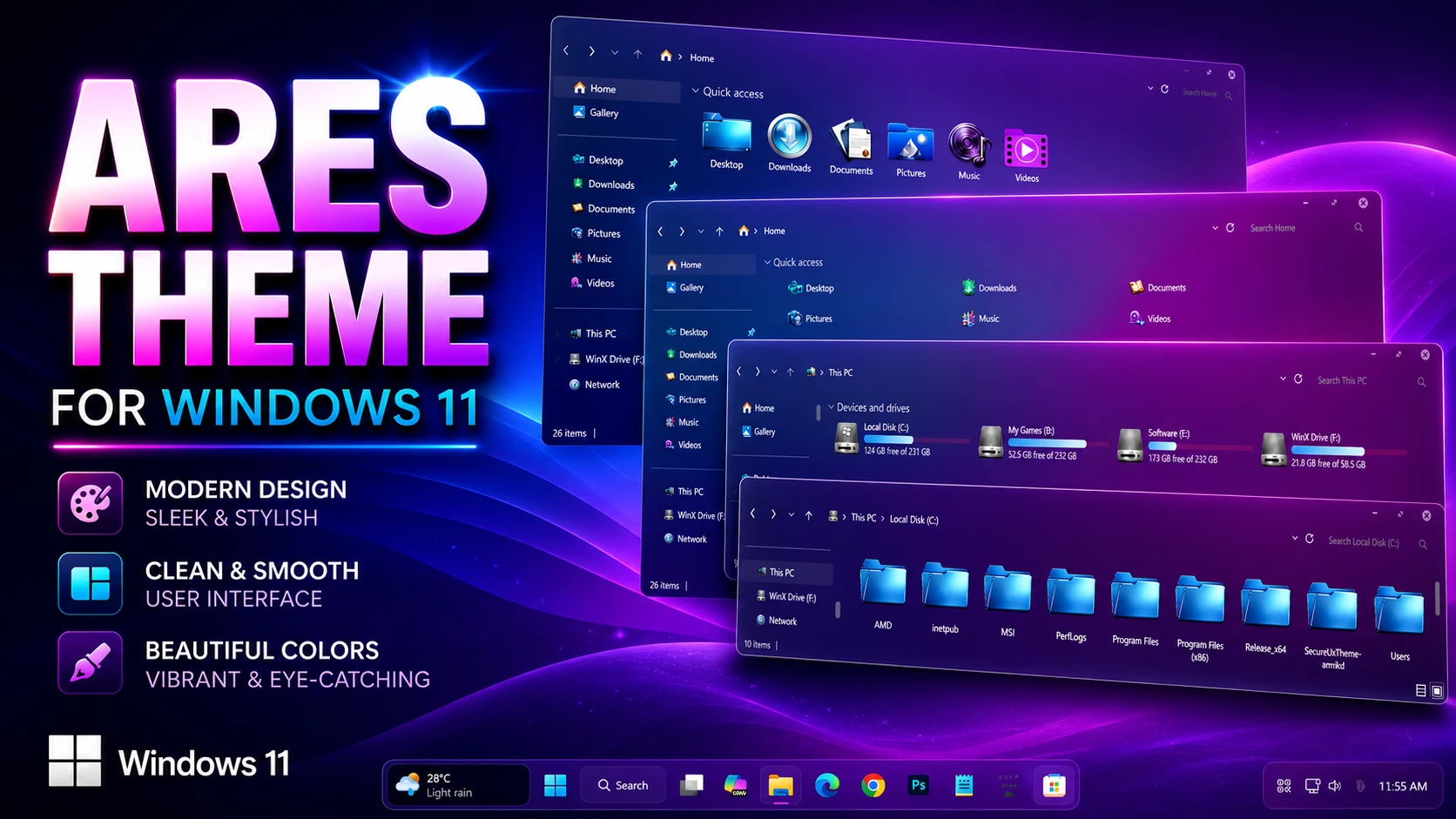
Ares Theme For Windows 11 – Full Transparent Glass Style
The Ares Theme for Windows 11 turns File Explorer into a highly transparent glass-style interface while keeping the familiar Windows 11 layout in place. The wallpaper stays clearly visible through supported content, navigation, and title areas, making the desktop background an important part of the finished look.
There is no strong fixed color covering the entire Explorer window. Instead, the colors you see through the glass are largely influenced by the wallpaper behind it. Switching to another background can therefore give the same setup a very different character without changing the main visual style.
Storage information adds its own splash of color through cyan, light-blue, and pink-magenta drive indicators. The upper window area stays much quieter, using small customized DWM controls that fit the clean transparent design without drawing too much attention.
- Highly transparent File Explorer surfaces
- Wallpaper remains clearly visible through supported areas
- Transparent navigation, title, and content sections
- Cyan and light-blue hard-drive level indicators
- Pink-magenta accents on selected storage bars
- Small customized DWM window controls
- Clean borders and restrained separators
- Familiar Windows 11 Explorer structure remains intact
My Take on the Transparent Setup
For users who enjoy seeing more of their wallpaper while working inside File Explorer, this style has a clear advantage over heavily tinted themes. It does not lock the desktop into one permanent color palette, so changing the wallpaper can refresh the overall appearance very quickly.
I also like that the colorful drive indicators are limited to the storage area. They add enough contrast to keep the interface interesting without competing with the wallpaper or making every panel look busy.
Extra Styling Options
The package includes Windhawk mods that can be used to extend the visual setup beyond the main Windows theme. They are optional, so the transparent theme can still be used without applying every additional customization.
Set It Up
- Patch Windows with a compatible theme patcher, place the extracted theme files in
C:\Windows\Resources\Themes, and apply the style from Personalization > Themes. - For the complete process, follow this Windows 11 custom theme installation guide.
Windows Build Compatibility
- Windows 11 21H2: Supported
- Windows 11 22H2: Supported
- Windows 11 23H2: Supported
- Windows 11 24H2: Supported
- Windows 11 25H2: Supported
Files Included
- Windows 11 Theme
- Windhawk Mods
- Wallpapers
Download Ares Theme For Windows 11
Ares Theme 9MB
DownloadRestore the Standard Windows Style
- Select a default Windows 11 theme, disable any optional mods used with the setup, and restart Explorer if necessary.
- For detailed steps, use this Windows 11 custom theme removal guide.
Independent Customization Notice
Ares Theme for Windows 11 is an independently created third-party customization resource intended for personal desktop styling. It is not an official Microsoft product and is not affiliated with, sponsored by, or endorsed by Microsoft. Windows and related trademarks remain the property of their respective owners.
Third-party themes and Windhawk modifications may behave differently across Windows builds. Creating a System Restore Point before applying visual files or additional interface changes is recommended.
Final Thoughts
This setup is mainly about letting the wallpaper remain part of File Explorer rather than hiding it behind a fixed interface color. The transparent surfaces create the glass effect, while cyan, light-blue, and pink-magenta drive indicators provide controlled bursts of color where they are useful.
If you frequently change wallpapers and want the Windows interface to respond visually to those changes, this type of transparent customization gives you more flexibility than a heavily colored theme.
Frequently Asked Questions
How transparent is the interface?
Supported File Explorer areas use a highly transparent treatment, allowing the desktop wallpaper to remain clearly visible behind the interface.
Are the colors seen through Explorer fixed?
No. Many of those colors come from the wallpaper behind the transparent surfaces, so changing the background can significantly change the overall look.
Which colors are used for the drive indicators?
The storage bars use cyan, light blue, and pink-magenta accents depending on the drive.
What do the window controls look like?
The customized DWM controls are small and light-colored, keeping the upper window area simple and unobtrusive.
Are Windhawk mods required?
No. They are included as additional customization options and can be applied separately if you want to extend the setup.
Will another wallpaper change the appearance?
Yes. Because the Explorer surfaces are transparent, a different wallpaper can noticeably change the colors and mood visible through the interface.