Nexa UI Theme for Windows 11
Download Nexa UI Theme for Windows 11 and give your desktop a futuristic, clean, and modern look with custom theme files, icons, Windhawk mods, and wallpaper.

Nexa UI Theme for Windows 11
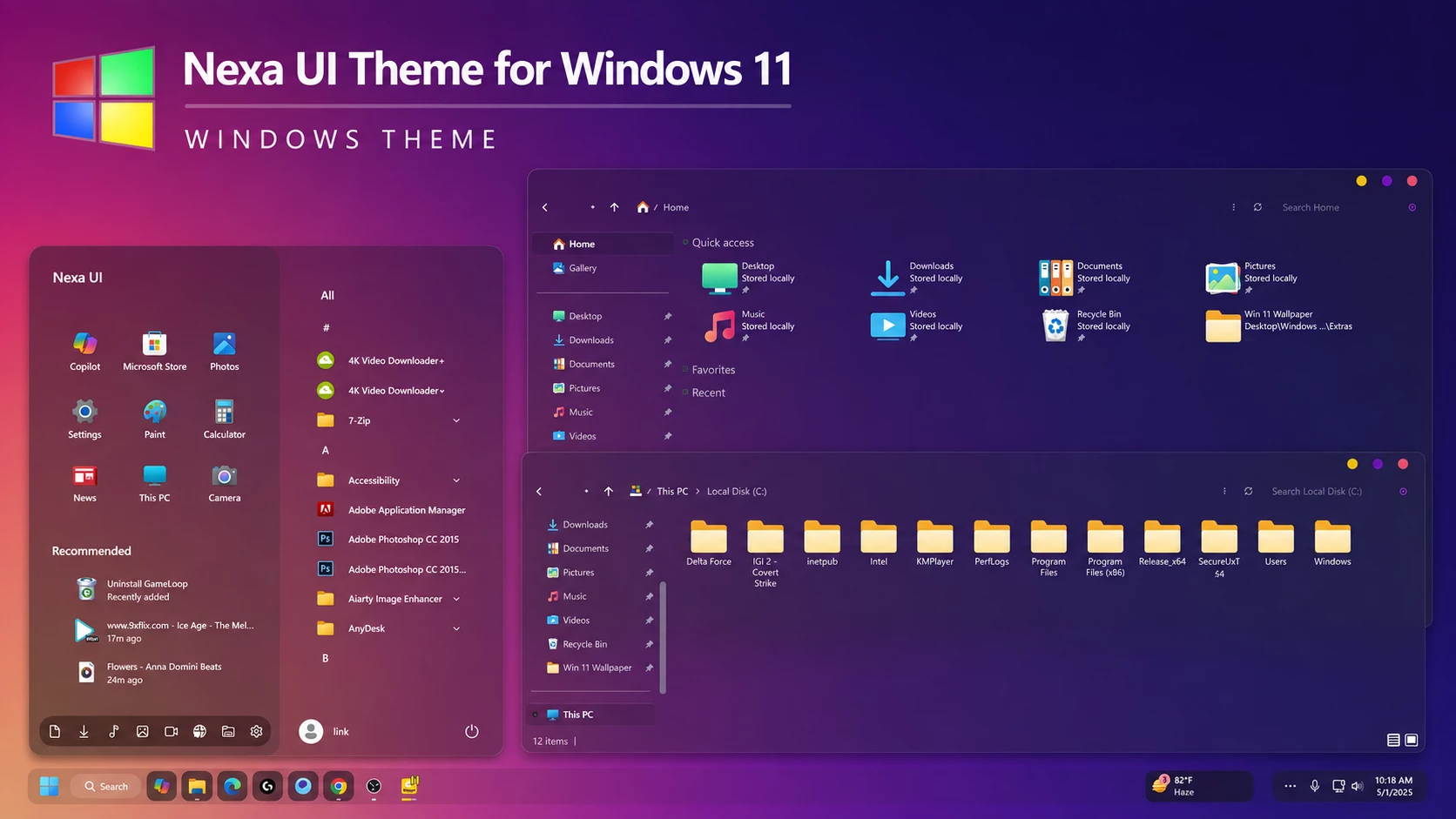
Nexa UI Theme for Windows 11 is a custom desktop setup made for users who want a darker, cleaner, and more futuristic look on Windows 11. It combines a custom visual style, matching icons, wallpaper, and optional interface tweaks to give the desktop a more coordinated appearance without replacing the familiar Windows experience.
The design uses deep purple and blue tones with glass-inspired surfaces, subtle transparency, and colorful accents. The Start menu, File Explorer, icons, and surrounding interface elements follow the same visual direction, helping the desktop feel connected rather than like a mix of unrelated modifications.
This is an independently created third-party customization package made only for Windows desktop personalization. It does not install another operating system, upgrade Windows, or add official Microsoft features. The changes are focused on supported visual elements of an existing Windows 11 installation.
Modern Glass-Inspired Desktop Style
Nexa UI focuses on a dark interface with smooth glass effects, rounded elements, and a balanced mix of purple and blue. The styling gives Windows 11 a more expressive appearance while keeping the layout familiar enough for everyday use.
You can use the complete setup or keep only the parts that fit your desktop. For example, the visual theme and wallpaper can be used on their own, while the icon pack and Windhawk mods can be added later if you want a more complete custom look.
Theme Highlights
- Dark purple and blue glass-inspired Windows 11 style
- Custom visual theme for supported Windows interface elements
- Matching icon pack for a more consistent desktop appearance
- Optional Windhawk mods for additional interface styling
- Customized Start menu and File Explorer possibilities
- Wallpaper designed to match the overall color direction
- Individual components can be used separately
Package Contents
- Windows 11 Theme: Provides the main Nexa UI visual style for supported parts of the Windows interface.
- Icon Pack: Adds matching folder and system icons to keep the desktop styling more consistent.
- Windhawk Mods: Includes optional tweaks for changing additional areas that are not covered by the main theme.
- Wallpaper: Finishes the setup with a background chosen to fit the overall Nexa UI color scheme.
Useful Setup Tools
- SecureUxTheme – helps apply compatible third-party Windows visual styles.
- 7TSP GUI – can be used when you want to apply a compatible 7TSP icon pack.
- StartAllBack – offers additional options for changing the Start menu and taskbar.
- ExplorerBlurMica – adds supported blur and transparency effects to File Explorer.
- Windhawk – lets you extend the setup with compatible interface mods.
Not every tool is required for the basic Nexa UI look. You can begin with the main theme and then add the icon pack, Windhawk mods, or other interface changes only if you want to build the fuller setup. Installing each part separately also makes it easier to spot which component is responsible if something does not work as expected.
Before Starting the Setup
- Create a System Restore Point before changing themes, icons, or other interface elements.
- Make sure the tools you plan to use support your current Windows 11 build.
- Keep a default Windows theme available so you can switch back easily.
- Back up your existing icons before applying a custom icon pack.
- Get third-party utilities from their trusted or original project pages.
- Apply the larger customization changes one at a time rather than all at once.
Nexa UI Setup Steps
- Create a System Restore Point before starting so you can easily revert if anything goes wrong.
- Download and run UltraUXThemePatcher as Administrator, then restart your computer to patch core system files.
- Download the theme package using the button below and extract the
.zipor.rarfile. - Copy both the
.themefile and the theme folder toC:\Windows\Resources\Themes. - Right-click your desktop, go to Settings > Personalization > Themes, and select your new custom theme to apply it.
- If you are new to Windows customization, follow this detailed guide first: How to Install Custom Themes on Windows 11.
- Once the main theme looks right, try optional icons, Start menu styling, or Explorer effects one at a time.
Nexa UI Theme 61 MB
Download Nexa UI ThemeRestore the Original Setup
- Switch the Theme: Go to Settings > Personalization > Themes and select one of the default Windows 11 themes.
- Undo the Extra Styling: Restore the original icons, disable any Nexa UI Windhawk mods, and turn off Start menu, taskbar, File Explorer, or blur customizations used with the setup.
- Restart and Restore if Needed: Restart Windows Explorer or reboot your PC. If any visual changes remain, use your System Restore Point or follow this Windows 11 theme removal guide.
My Thoughts on the Theme
In my opinion, this theme is a good choice for users who want a modern and elegant Windows 11 look. The overall design feels clean, stylish, and well suited for personal desktop customization.
That said, I would mainly recommend it for customization and personal use. If you use your PC mostly for office work, business tasks, or a more formal environment, I would prefer keeping the default Windows look or using a simpler setup with fewer visual changes.
Frequently Asked Questions
Is Nexa UI Theme an official Microsoft theme?
No. It is an independently created third-party customization package made for Windows desktop personalization.
Does it replace Windows 11?
No. It changes supported visual elements of your existing Windows installation and does not install another operating system.
Do I need every optional tool?
No. Use only the tools required for the parts of the setup you want to apply.
Are Windhawk mods required?
No. They are optional and are mainly useful if you want to customize additional interface areas.
Can I use only the icon pack?
Yes. The icon pack can be used separately if the required icon tool supports your Windows build.
Can Windows updates affect compatibility?
Yes. Major Windows updates can affect third-party themes and customization tools, so compatibility should be checked again after a feature update.
Theme Disclaimer
Nexa UI Theme is a third-party Windows customization package created for personal desktop styling. It is not an official Microsoft product and is not affiliated with or endorsed by Microsoft or any of the independent tools and projects referenced in this post. All trademarks and brand names remain the property of their respective owners. Because compatibility can vary between Windows builds and customization tools, creating a System Restore Point before applying any changes is recommended.
Final Word
Nexa UI gives Windows 11 a darker glass-inspired personality built around purple and blue tones, matching icons, and optional interface tweaks. The different components work together without forcing you to change every part of the desktop, which makes the setup easy to adjust to your own taste.
If you prefer this kind of modern glass-style desktop, would you use the full Nexa UI setup or keep only the main theme and matching icons?