

macOS-Inspired Dark Theme For Windows 11
macOS-Inspired Dark Theme : Experience the ultimate transformation of your Windows 11 interface with the Greatest macOS Dark Theme — a sleek, modern, and visually refined design that brings the elegance of macOS right to your desktop

macOS-Inspired Dark Theme For Windows 11
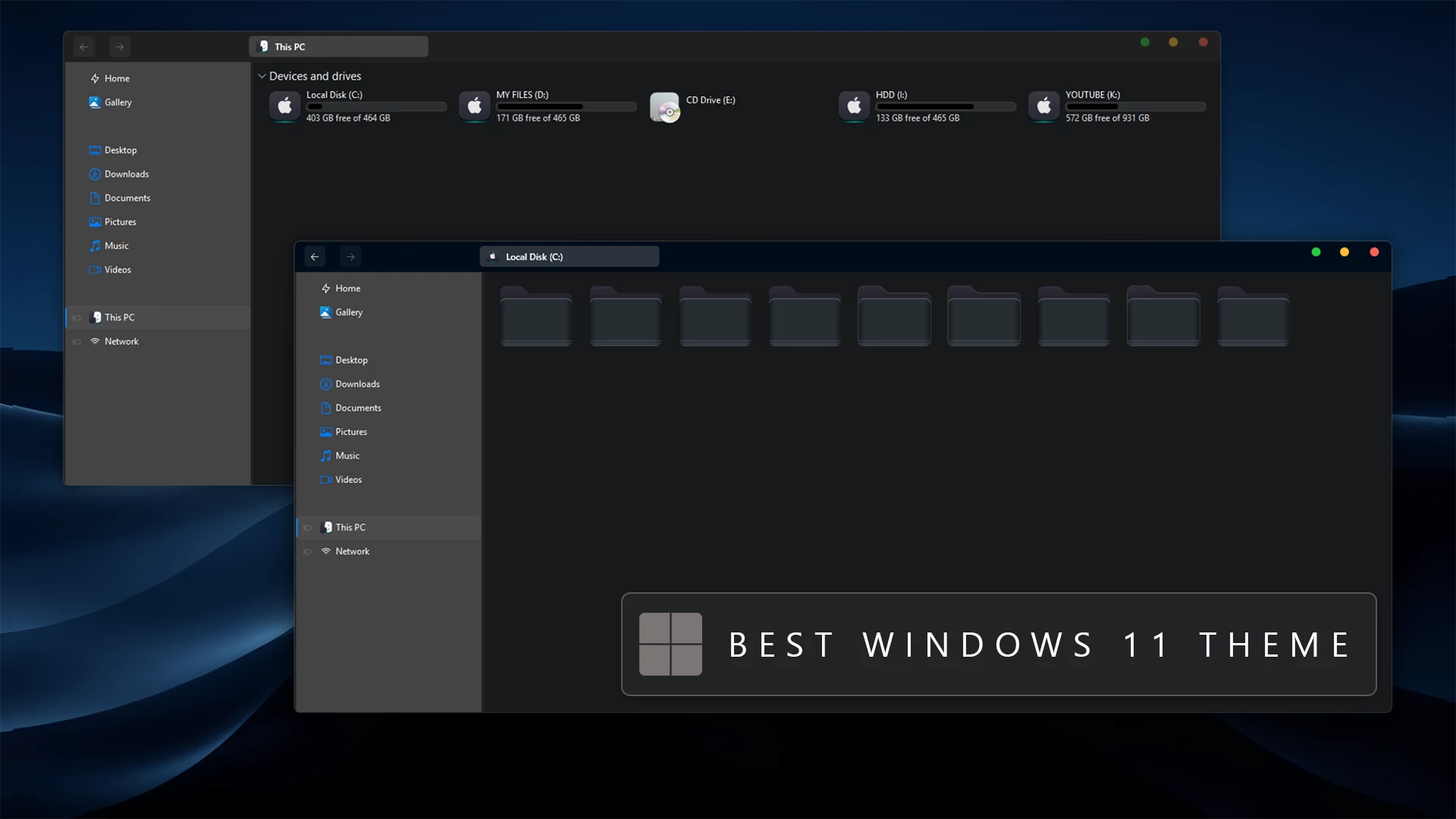
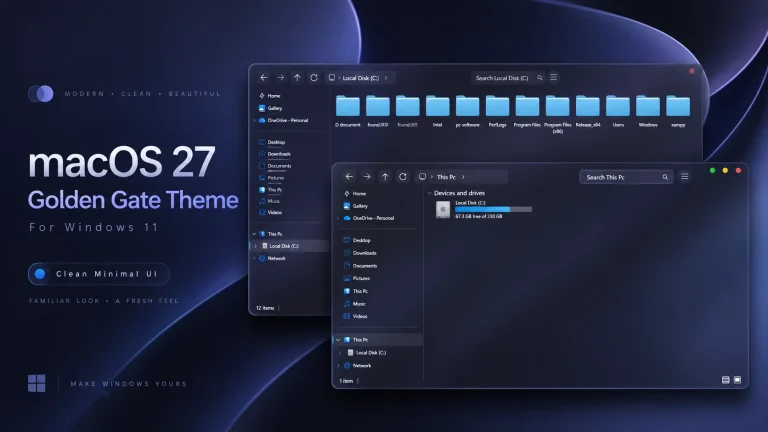
macOS-Inspired Dark Theme For Windows 11 is a custom desktop setup made for users who prefer a deep charcoal interface with subtle macOS-style details. The design combines dark File Explorer surfaces, graphite folder icons, navy-blue accents, custom window controls, and a matching dark wallpaper to give Windows 11 a more distinctive appearance.
The overall color palette stays restrained rather than colorful. Most of the interface uses black, charcoal, and dark gray tones, while blue accents around the title bar and navigation areas add just enough contrast. This keeps the desktop visually consistent without filling it with unnecessary effects.
This is an independently created third-party Windows customization package made only for desktop personalization. It does not install macOS, replace Windows 11, or add official Apple features to your computer.
Dark macOS-Inspired Desktop Style
File Explorer uses a near-black main surface with a lighter graphite navigation panel. The folder icons follow the same muted direction, using dark gray and slate tones instead of bright colors. That limited palette gives the Explorer windows a very clean and controlled appearance.
A noticeable macOS-inspired detail is the custom DWM window controls. The minimize, maximize, and close buttons use the familiar yellow, green, and red traffic-light color arrangement, giving supported windows a different character from the standard Windows 11 title bar.
The hard drive level indicators are also kept subtle. Instead of bright neon colors, the storage bars use muted silver and gray tones that blend naturally with the charcoal Explorer background. This makes the drive section easy to read without breaking the darker visual style.
Features
- Deep charcoal and graphite Windows 11 visual style
- Dark File Explorer with muted gray interface surfaces
- macOS-style red, yellow, and green DWM window buttons
- Dark slate and graphite folder icon appearance
- Hard drive level indicators using muted silver and gray tones
- Subtle navy-blue accents around supported interface areas
- Matching dark wallpaper for a more coordinated desktop
- Optional Explorer and icon customization support
- Windows 11 Theme: Applies the main dark visual style to supported Windows interface elements.
- Icon Resources: Gives compatible folders and system icons a darker appearance that matches the setup.
- Explorer Customization Files: Optional resources for users who want to recreate more of the File Explorer styling.
- Wallpaper: Completes the desktop with a dark blue and black background that fits the overall color direction.
Compatibility
- Windows 11 21H2: Supported
- Windows 11 22H2: Supported
- Windows 11 23H2: Recommended
- Windows 11 24H2: Recommended
- Windows 11 25H2: Supported
Compatibility with icon tools, Explorer modifications, and other optional customization resources can vary between Windows builds. After a major Windows update, check the tools you use before applying them again.
Optional Customization Tools
- SecureUxTheme – used when a compatible third-party visual style requires custom theme support.
- 7TSP GUI – useful for applying compatible icon packs.
- ExplorerBlurMica – optional for compatible File Explorer visual effects.
- Windhawk – supports additional Windows interface customization through compatible mods.
You do not need every optional tool to use the main visual style. Start with the theme itself, then add icons or Explorer changes only if you want the desktop to match the complete dark setup more closely.
Installation Steps
- Create a System Restore Point before making changes.
- Patch Windows using SecureUxTheme or UltraUXThemePatcher.
- Download and extract the theme package.
- Copy the theme folder and
.themefile toC:\Windows\Resources\Themes. - Double-click the
.themefile, or go to Personalization > Themes and select the installed theme. - For more details, follow this Windows 11 custom theme installation guide.
macOS-Inspired Dark Theme 30 MB
DownloadHow to Remove
- Switch Back to a Default Theme: Open Settings > Personalization > Themes and select one of the standard Windows 11 themes.
- Restore the Original Icons: If you applied custom icons, use the restore or backup option provided by your icon tool.
- Disable Explorer Changes: Turn off any Explorer, Windhawk, or additional interface modifications used with the setup.
- Restore Your Wallpaper: Choose your previous wallpaper or one of the standard Windows backgrounds.
- Restart Windows Explorer: Restart Explorer or reboot your PC. If visual changes remain, use the Restore Point created before installation.
Who Is This Setup For?
This setup works best for users who prefer very dark desktops and do not want strong gradient or neon colors. The graphite Explorer surfaces, muted folders, and small blue accents keep the design restrained while the macOS-style traffic-light buttons add a more distinctive detail.
You can use the complete setup or keep only the main visual style and wallpaper. The darker color palette also works well with simple navy, black, or charcoal backgrounds.
Disclaimer
The macOS-Inspired Dark Theme is an independently created third-party Windows customization package made only for desktop personalization. It is not affiliated with, endorsed by, sponsored by, or officially connected to Apple Inc., Microsoft Corporation, macOS, SecureUxTheme, 7TSP, ExplorerBlurMica, Windhawk, or any other company, developer, or project mentioned on this page. Apple, macOS, Windows, and other trademarks or brand names belong to their respective owners. The macOS name and visual references are used only to describe the inspiration behind the customization style.
Final Word
The macOS-Inspired Dark Theme gives Windows 11 a restrained graphite look with dark Explorer surfaces, muted folder icons, silver storage indicators, and custom traffic-light window buttons. The design avoids bright colors almost completely, which is exactly what gives the setup its quiet, consistent character.
The main theme works well on its own, while the matching icons and optional Explorer changes can be added if you want the desktop to lean further into the macOS-inspired direction.
Frequently Asked Questions
Why are the folder icons so dark in this setup?
The slate and graphite folder colors are designed to stay within the same muted palette as File Explorer instead of introducing bright accents.
What colors are used in the hard drive level indicators?
The visible storage bars use muted silver and gray tones, matching the darker charcoal interface instead of using bright green or cyan indicators.
Are the red, yellow, and green window buttons part of the macOS-inspired styling?
Yes. The custom DWM controls use the familiar traffic-light color arrangement to give supported windows a more macOS-like title bar appearance.
Can I use a blue wallpaper instead of the included dark background?
Yes. Navy, dark blue, charcoal, and black wallpapers all work naturally with the darker interface and subtle blue accents.
Do I need ExplorerBlurMica for the dark File Explorer style?
Not necessarily. The main visual theme provides most of the dark appearance, while additional Explorer effects are optional if you want more depth or transparency.



2 Comments
Leave a Reply
Disclaimer: All themes, visual styles, and concepts shared on this website are unofficial, fan-made creations built from imagination for customization purposes. We are not affiliated with, endorsed by, or sponsored by Microsoft or any other official brand.
Has your YouTube channel been closed?
I Created New One Please Subscribe