New Arctic Theme For Windows 11
Arctic Theme For Windows 11 : Arctic Theme for Windows 11 brings a breath of fresh, icy air to your desktop experience. Inspired by the serene beauty of polar landscapes and minimal Scandinavian design

Arctic Theme For Windows 11
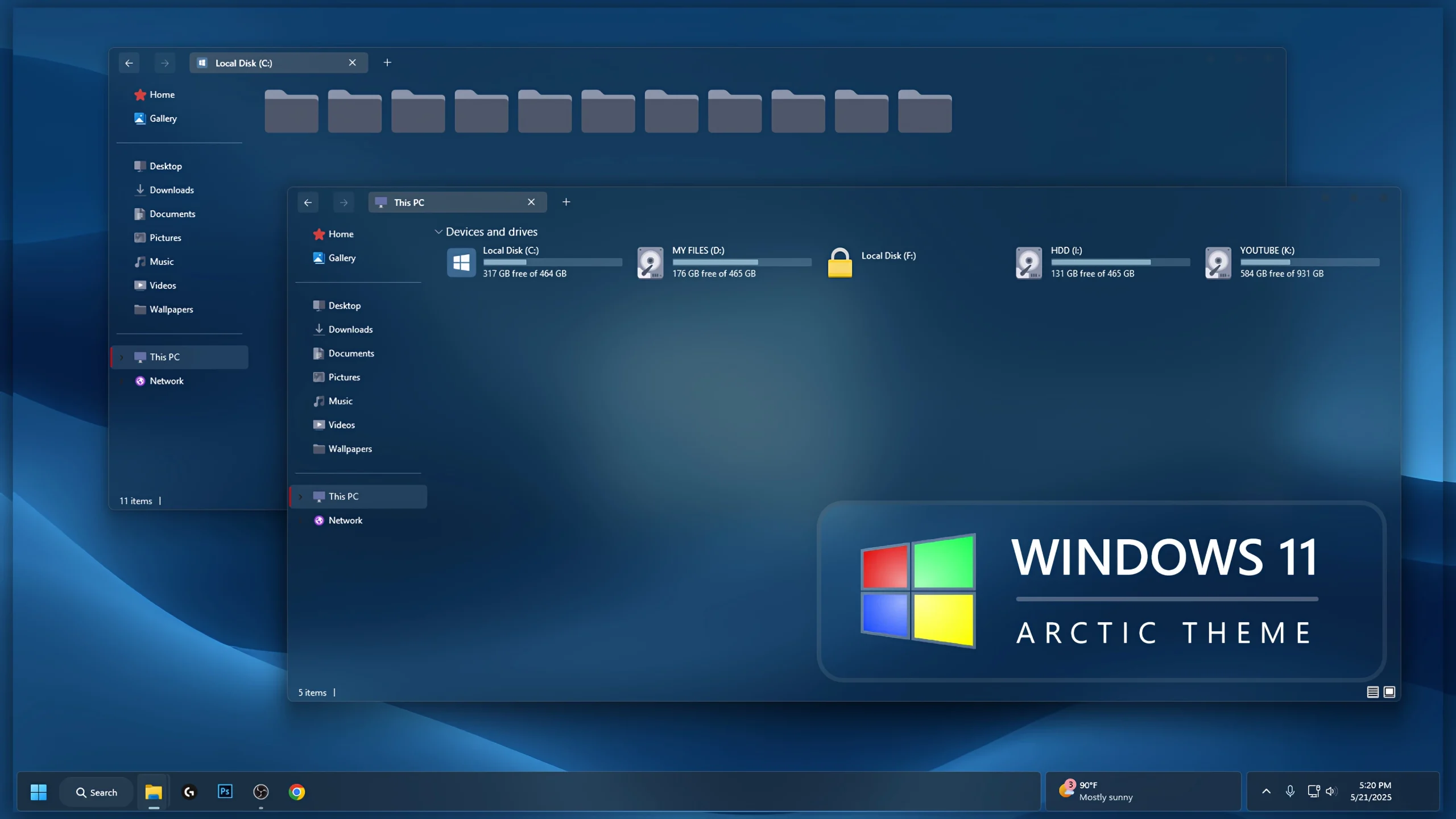
Arctic Theme For Windows 11 is a custom desktop setup built around cool blue and steel-toned visuals. It gives Windows 11 a darker, calmer appearance with a translucent File Explorer, muted blue folder icons, subtle glass effects, and a matching wallpaper that keeps the whole desktop visually consistent.
The design stays fairly restrained. Deep blue surfaces are mixed with softer gray-blue details, while the Explorer layout remains familiar and easy to navigate. The folder icons follow the same cool color direction, which helps the setup feel coordinated without relying on bright or overly decorative effects.
This is an independently created third-party customization package made only for Windows desktop personalization. It does not replace Windows 11, install another operating system, or add official Microsoft features. The changes are focused on supported visual elements of an existing Windows installation.
Cool Blue Glass Desktop Style
Arctic uses a dark blue glass-inspired interface with soft transparency across File Explorer and other supported areas. The wallpaper adds a deeper blue background behind the windows, while the muted folder icons blend naturally with the darker Explorer surface.
The overall layout is simple and uncluttered, which makes the setup a good fit for users who prefer cooler colors and a more understated desktop style. Optional interface tools can be added later if you want stronger blur, taskbar styling, or other visual changes.
Theme Highlights
- Deep blue and steel-toned Windows 11 visual style
- Dark translucent File Explorer with Soft glass effects
- Muted blue folder icons that match the overall palette
- Cool blue wallpaper designed to complement the interface
- Clean Explorer layout without excessive visual effects
- Optional Windhawk and Explorer customization support
- Suitable for users who prefer darker and more minimal desktop setups
What Comes with the Arctic Setup?
Inside the Arctic Package
- Windows 11 Custom Theme: Provides the main Arctic visual style for supported parts of the Windows interface.
- Icon Pack: Adds matching folder and system icons that follow the cool blue color direction of the theme.
- Windhawk Mods: Optional interface tweaks for users who want to extend the Arctic style into more areas of Windows.
- Wallpaper: Includes a cool-toned background designed to blend with the rest of the desktop setup.
- Glass UI Resources: Extra visual files for adding stronger blur or transparent effects to supported interface areas.
The main theme is enough to create the basic Arctic look, while the icon pack, glass effects, and Windhawk mods can be added if you want a more complete setup. You can also use the components separately instead of applying everything at once.
Tools You Can Use with Arctic
Helpful Customization Tools
- SecureUxTheme – helps apply compatible third-party Windows visual styles.
- 7TSP GUI – can be used when applying a compatible 7TSP icon pack.
- ExplorerBlurMica – useful for adding supported blur and transparency effects to File Explorer.
- Windhawk – lets you apply compatible mods for additional Windows interface changes.
You do not have to install every tool listed above. Start with the Arctic theme itself, then add the icon pack or glass effects if you want the desktop to match the full setup more closely. Adding each part separately also makes it easier to identify the cause if one customization does not work as expected.
Before Applying the Theme
Prepare Your System
- Create a System Restore Point before making visual changes to Windows.
- Make sure the tools you plan to use support your current Windows 11 build.
- Keep a default Windows theme available so you can switch back if needed.
- Back up your original icons before applying a custom icon pack.
- Download third-party tools from their original or trusted project pages.
- Apply the main theme and optional components one at a time.
How to Set Up Arctic Theme
Arctic Setup Steps
- Create a System Restore Point before starting so you can easily revert if anything goes wrong.
- Download and run UltraUXThemePatcher Or SecureX Theme Tool as Administrator, then restart your computer to patch core system files.
- Download the theme package using the button below and extract the
.zipor.rarfile. - Copy both the
.themefile and the theme folder toC:\Windows\Resources\Themes. - Right-click your desktop, go to Settings > Personalization > Themes, and select your new custom theme to apply it.
- If you are new to Windows customization, follow this detailed guide first: How to Install Custom Themes on Windows 11.
- Once the main theme looks right, try optional icons, Start menu styling, or Explorer effects one at a time.
Download Arctic Theme For Windows 11
G Drive 127MB
DownloadHow to Remove Arctic Theme
How to Remove
- Switch Back to a Default Theme: Open Settings > Personalization > Themes and select one of the standard Windows 11 themes.
- Restore the Original Icons: If you applied the custom icon pack, use the restore or backup option in your icon tool.
- Disable Optional Mods: Turn off any Windhawk or File Explorer modifications used with the setup.
- Restore Your Wallpaper: Choose your previous wallpaper or one of the default Windows backgrounds.
- Restart Windows Explorer: Restart Explorer or reboot your PC. If any visual changes remain, use the Restore Point created before installation.
My Thoughts on the Arctic Theme
In my opinion, Arctic Theme is a good choice for users who like a dark glass look with soft transparency. The gray-toned interface keeps the desktop calm and understated, while the glass effect adds a modern touch without making everything feel too bright or busy.
I think the theme looks even better when it is paired with the matching icon pack. The icons help the folders and other desktop elements blend more naturally with the gray glass style, so the whole setup feels more complete and consistent. If you prefer darker themes with a clean transparent effect, Arctic is definitely a nice option for personal Windows customization.
Disclaimer
Arctic Theme is an independently created third-party customization package made only for Windows desktop personalization. It is not affiliated with, endorsed by, or officially connected to Microsoft, Windhawk, SecureUxTheme, 7TSP, ExplorerBlurMica, or any other company, developer, or project mentioned on this page. All trademarks and brand names belong to their respective owners. Compatibility may vary between Windows builds, so creating a System Restore Point before applying customization files is recommended.
Final Word
Arctic gives Windows 11 a cool blue identity built around dark Explorer surfaces, muted folder icons, glass effects, and a matching wallpaper. The setup stays visually consistent without relying on bright colors or unnecessary interface decoration.
Would you use the full Arctic setup, or keep it simple with just the main theme and matching icons?
Frequently Asked Questions
Does the Arctic setup work well with a dark wallpaper?
Yes. The cool blue and steel-toned interface pairs naturally with darker wallpapers, especially backgrounds that do not overpower the Explorer and icon colors.
Can I keep the default taskbar and use only the Arctic theme?
Yes. The optional taskbar or Windhawk changes are not required. You can use only the main visual style and keep the rest of Windows closer to default.
Do the blue folder icons come with the main theme?
The folder icon style may be included as a separate icon pack, so it can usually be applied independently from the main Windows theme.
Can I skip the blur effect in File Explorer?
Yes. Explorer blur is optional. The theme can still be used without adding extra transparency effects.
What type of desktop setup matches Arctic best?
It works especially well with simple dark-blue wallpapers, minimal desktop icons, and a cleaner taskbar layout.