Linux Inspired Theme For Windows 11
Linux Inspired Theme For Windows 11 :Transform Windows 11 into a clean, minimal Linux-style desktop with modern icons, dark UI, and lightweight customization. Perfect for users who love Linux aesthetics but want Windows performance.

Linux Inspired Theme For Windows 11
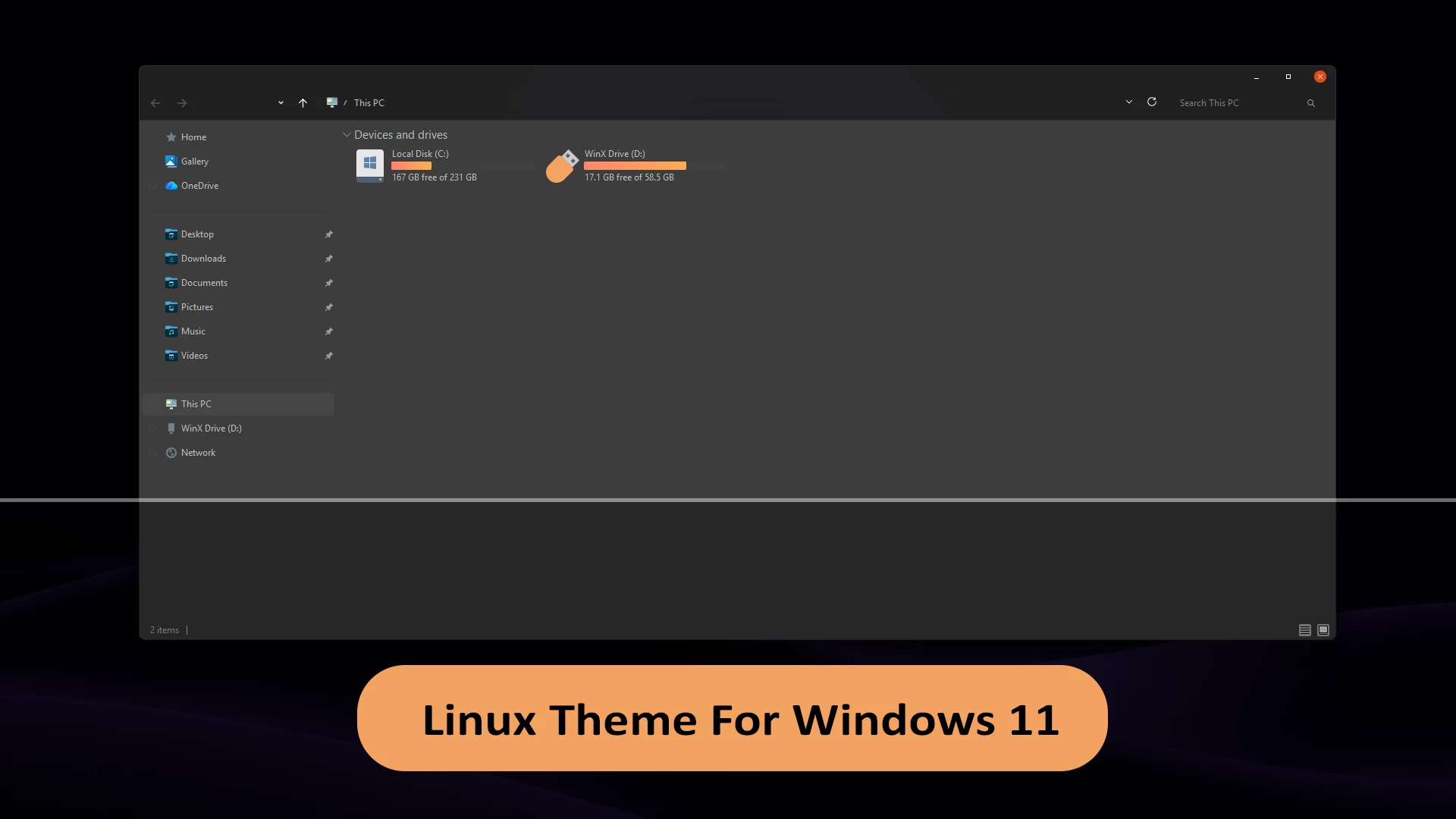
The Linux Inspired Theme For Windows 11 gives File Explorer a simple dark appearance built around charcoal, deep gray, and muted black tones. Inspired by modern Linux desktop aesthetics, the design keeps the familiar Windows 11 structure while giving the main Explorer workspace, navigation panel, and title area a cleaner, more restrained visual style.
The interface uses mostly solid dark surfaces rather than heavy transparency or acrylic blur effects. Subtle borders, low-contrast separators, and compact controls keep the layout uncluttered, while warm orange accents provide balanced contrast around active elements and storage information.
Drive usage indicators feature distinct orange bars that stand out clearly against the dark Explorer background. The core theme remains focused on the primary Windows interface, while matching folder icons, Start Menu styling, and other Linux-inspired desktop enhancements can be added separately through compatible tools.
Linux-Style Highlights
- Linux-inspired dark charcoal and deep gray Windows 11 styling.
- Solid dark surfaces across File Explorer windows and panels.
- Muted dark title bars and navigation menus for reduced eye strain.
- Minimal borders and subtle interface dividers.
- High-contrast orange drive usage indicators.
- Compact, functional window controls.
- Clean and distraction-free desktop aesthetic.
- Compatible with matching third-party icon packs.
Compatibility
- Windows 11 21H2: May work, but not recommended for optimal performance
- Windows 11 22H2: Supported
- Windows 11 23H2: Supported
- Windows 11 24H2: Supported
- Windows 11 25H2: Supported
Included Files
- Windows 11 Theme Files
Optional Customization Tools
The Windows theme functions independently. If you want to carry the Linux-inspired aesthetic across your entire desktop, you can install matching icons or companion utilities separately:
- SecureUxTheme — custom theme enabler for compatible Windows builds.
- 7TSP GUI — utility for applying compatible custom icon packs.
- StartAllBack — optional tool for classic Start Menu and taskbar personalization.
- Linux-Style Icon Pack — matching icon set designed to complete the visual theme.
How to Install the Theme
- Create a Windows System Restore Point before modifying system personalization settings.
- Patch Windows using a compatible theme patcher (such as SecureUxTheme or UltraUXThemePatcher).
- Download the theme package using the button below and extract the ZIP archive.
- Copy both the
.themefile and the theme folder intoC:\Windows\Resources\Themes. - Go to Settings > Personalization > Themes and select the Linux Inspired Theme to apply it.
- For step-by-step guidance, follow our detailed Windows 11 custom theme installation guide.
Theme Files 5 MB
Download How to Remove the Theme
- Open Settings > Personalization > Themes and select any default Windows 11 theme.
- If you applied separate icon packs, StartAllBack styles, or custom wallpapers, restore or disable those components individually.
- Restart Windows Explorer or reboot your PC to ensure all default interface elements return.
- For detailed uninstallation steps, refer to our Windows 11 custom theme removal guide.
Disclaimer
The Linux Inspired Theme For Windows 11 is an independently created third-party customization resource intended solely for personal desktop styling. It is inspired by Linux desktop environments but is not an official product of, nor affiliated with, sponsored by, or endorsed by Microsoft Corporation, Linus Torvalds, or any Linux distribution. Linux is a registered trademark of Linus Torvalds. Windows is a registered trademark of Microsoft Corporation. All trademarks, logos, and brand names belong to their respective owners.
This theme modifies supported visual styles in Windows 11 only. It does not install Linux, replace Windows system files, or add another operating system to your PC.
Final Words
The Linux Inspired Theme For Windows 11 gives File Explorer a sleek dark identity through charcoal surfaces, minimal borders, and distinct orange highlights. Its balanced layout provides a fresh, productive atmosphere while keeping the familiar workflow of Windows 11 intact.
You can run the visual theme independently for a lightweight refresh or pair it with our matching icon pack and taskbar tweaks for a comprehensive, customized workspace.