

Delight Theme For Windows 11
Delight Theme For Windows 11 : The Delight Theme for Windows 11 is a beautifully crafted custom theme designed to bring a soft, clean, and uplifting visual style to your entire desktop

Delight Theme For Windows 11
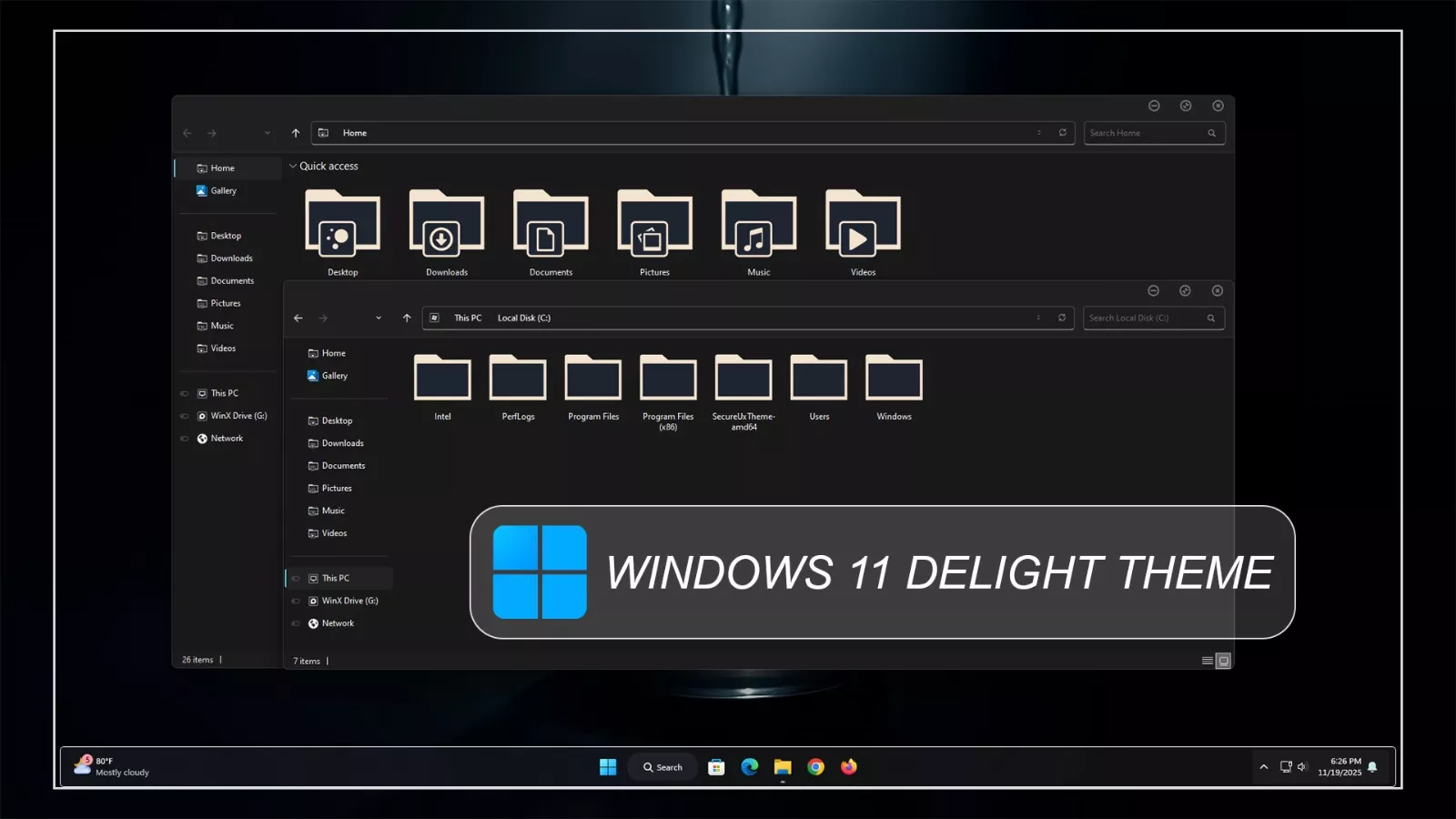
The Delight Theme for Windows 11 gives the desktop a dark and restrained appearance built around charcoal, near-black, and muted gray surfaces. File Explorer keeps the familiar Windows 11 structure while replacing the standard interface colors with a deeper monochrome treatment that works naturally with darker desktop setups.
The main Explorer area and navigation panel stay close in tone, with subtle shading differences helping separate folders, shortcuts, and system locations. Thin borders and low-contrast separators keep the interface organized without introducing bright accents or heavy visual effects.
Compact circular window controls appear in the upper corner of supported windows, adding a small custom detail to the otherwise minimal interface. The overall design stays focused on dark surfaces, simple structure, and understated contrast rather than strong gradients or colorful panels.
Delight Visual Style
The theme uses a deep charcoal base across File Explorer, giving the interface a more uniform appearance than the default Windows 11 design. The title area, navigation pane, and main content section follow the same dark direction, which helps the windows feel visually connected.
Navigation items remain easy to distinguish through simple spacing and subtle separators between Home, Gallery, common folders, drives, and Network. The theme does not rely on bright color blocks, so the interface stays calm even when several Explorer windows are open at the same time.
Window borders use muted gray lines, while the minimize, maximize, and close controls remain compact and lightly outlined. This gives Delight a darker, cleaner character without changing the normal behavior of Windows 11.
Dark Theme Highlights
- Dark charcoal and near-black Windows 11 styling
- Restrained File Explorer surfaces
- Darker navigation panel with subtle separation
- Thin gray borders and low-contrast dividers
- Compact circular window controls
- Minimal monochrome interface direction
- Works naturally with darker wallpapers
- Designed for Windows 11 desktop customization
Compatibility
- Windows 11 21H2: Supported
- Windows 11 22H2: Supported
- Windows 11 23H2: Supported
- Windows 11 24H2: Supported
- Windows 11 25H2: Supported
Included Files
- Windows 11 Theme
- Extras
Using the Matching Icon Pack
The main Windows theme works on its own, so the matching Delight icon pack is not required. If you want folders and supported system icons to follow the same darker desktop direction, you can apply the icon pack separately after confirming that the main theme is working correctly.
Set Up the Theme
- Create a System Restore Point and make sure your theme patcher is compatible with the Windows 11 build you are using.
- Download and extract the Delight Theme package, then copy the theme folder and
.themefile toC:\Windows\Resources\Themes. - Open Settings > Personalization > Themes and select the new visual style.
- Apply the optional Delight icon pack, StartAllBack, or other customization only after the main theme is working correctly.
- For the complete setup process, follow this Windows 11 custom theme installation guide.
Theme Files 49.4MB
Download Removal Steps
- Open Settings > Personalization > Themes and switch back to one of the default Windows 11 themes.
- If you applied the separate Delight icon pack, StartAllBack, or other interface changes, restore or disable those customizations individually.
- Restart Windows Explorer or reboot the PC if the original appearance does not return immediately.
- If unwanted visual changes remain, use the System Restore Point created before installation.
- For detailed restoration instructions, follow this Windows 11 custom theme removal guide.
Disclaimer
Delight Theme for Windows 11 is an independent third-party customization resource intended for personal desktop customization. It is not an official Microsoft product and is not affiliated with, sponsored by, or endorsed by Microsoft. Windows and related trademarks belong to their respective owners.
Third-party themes and optional customization tools may behave differently across Windows builds or after major system updates. Check compatibility before applying additional visual modifications.
Final Word
Delight takes a simple dark approach to Windows 11 customization. Its charcoal Explorer surfaces, understated borders, compact window controls, and restrained panel styling give the interface a noticeably different character without relying on bright colors or heavy visual effects.
The main theme can be used on its own, while matching icons and other interface changes can be added separately if you want a more coordinated desktop. Keeping those extras optional also makes the setup easier to manage and restore later.



Disclaimer: All themes, visual styles, and concepts shared on this website are unofficial, fan-made creations built from imagination for customization purposes. We are not affiliated with, endorsed by, or sponsored by Microsoft or any other official brand.