

Minimal Clean Pro Rainmeter Skin 2025
Minimal Clean Pro Rainmeter Skin : The Minimal Clean Rainmeter Skin is a beautifully designed desktop suite focused on simplicity, clarity, and modern aesthetics. Built for users who love a distraction-free workspace, this skin delivers a crisp, elegant interface with perfectly balanced spacing, soft typography, and clean geometric layout

Minimal Clean Pro Rainmeter Skin
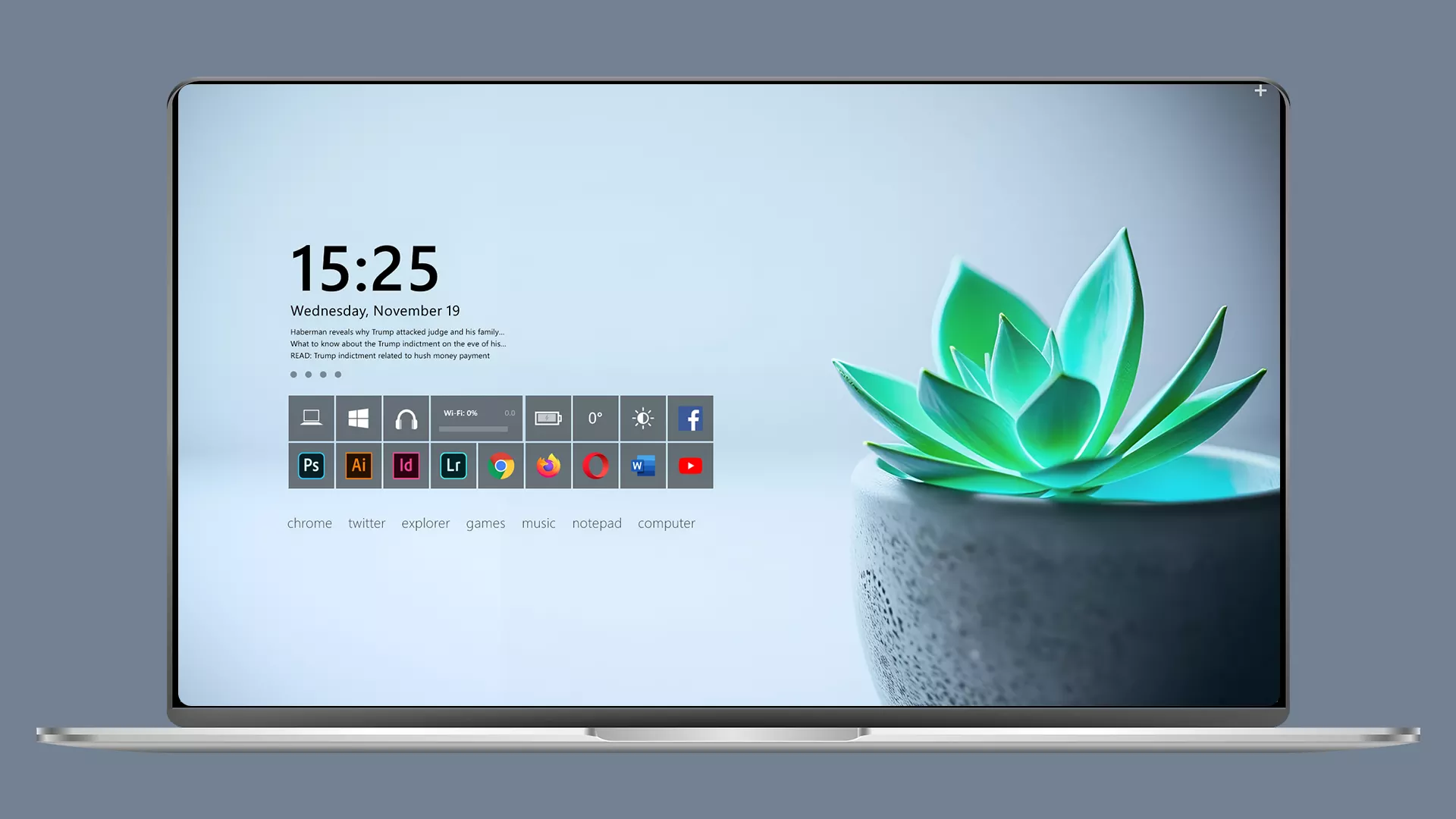
Minimal Clean Pro Rainmeter Skin is a clean and modern desktop layout based on the Omnimo 10 Rainmeter interface. Designed for users who prefer a simple and organized workspace, this customization brings a minimal panel arrangement, clean typography, and a balanced desktop appearance.
The setup features a light and minimal desktop design with a clock display, small information elements, and a compact shortcut panel. The simple layout keeps the desktop clean while providing a practical interface that blends well with modern wallpapers.
Minimal Clean Pro Rainmeter Skin is a saved Omnimo 10 configuration that allows users to quickly apply a pre-arranged desktop layout. It is a good choice for users who enjoy minimal designs, clean workspaces, and organized Rainmeter customization.
Design Overview
The main focus of this setup is a simple and distraction-free desktop arrangement. The layout uses a clean information panel on the left side with a small application shortcut area, while the remaining desktop space stays open for the wallpaper.
The combination of soft colors, minimal elements, and balanced spacing creates a professional-looking desktop environment suitable for work, study, and everyday use.
About Omnimo 10 Configuration
This customization uses the Omnimo 10 Rainmeter suite as the base. Instead of installing a completely separate Rainmeter skin, the package provides a saved configuration that replaces the existing WP7 configuration inside Omnimo 10.
After applying the configuration, the layout becomes available from the Omnimo saved configurations section and can be loaded directly through Rainmeter.
Key Features
- Minimal and clean desktop layout.
- Based on Omnimo 10 Rainmeter interface.
- Pre-arranged saved configuration.
- Simple clock and information display.
- Compact shortcut panel design.
- Works well with clean and modern wallpapers.
- Easy to adjust through Rainmeter and Omnimo settings.
What Is Included In This?
The package includes the required configuration files to apply the complete desktop layout.
- Omnimo 10 Configuration Files
- Minimal Clean Pro Layout Settings
- Rainmeter Customization Files
Requirements
- Windows operating system.
- Rainmeter installed on your computer.
- Omnimo 10 Rainmeter Suite installed.
- Basic knowledge of managing Rainmeter configurations.
Required Tools
- Rainmeter
- Omnimo 10 Rainmeter Suite
How to Install Minimal Clean Pro Rainmeter Skin
- First, install Rainmeter and Omnimo 10 Rainmeter Suite on your computer.
- Download the Minimal Clean Pro Rainmeter Skin package from this page.
- Extract the downloaded file.
- Open the extracted folder and locate the WP7 folder.
- Copy the provided WP7 folder.
- Go to your Rainmeter Skins directory:
Documents\Rainmeter\Skins - Replace the existing Omnimo 10 WP7 folder with the provided folder.
- Restart Rainmeter from the system tray.
- Open the Omnimo 10 saved configurations section.
- Select the Minimal Clean Pro configuration and load it.
- The desktop layout will appear automatically. You can adjust the elements according to your preference.
Theme Files56MB
Download Customization Tips
For the best result, use a clean wallpaper with simple colors and avoid adding too many extra widgets. The minimal layout works best when the desktop remains open and organized.
How to Remove Minimal Clean Pro Configuration
To remove this customization, you can restore your previous Omnimo 10 configuration or replace the modified WP7 folder with your original backup.
- Close Rainmeter from the system tray.
- Restore your previous WP7 folder backup.
- Restart Rainmeter.
- Load your preferred Omnimo configuration.
Who Should Use This Setup?
Minimal Clean Pro Rainmeter Skin is suitable for users who enjoy simple, professional, and organized desktop designs.
- Users who prefer minimal desktop layouts.
- People who like clean productivity-focused workspaces.
- Omnimo 10 users looking for a ready-made configuration.
- Rainmeter enthusiasts who enjoy customized desktop interfaces.
Disclaimer
Minimal Clean Pro Rainmeter Skin is a third-party desktop customization resource created for Rainmeter and Omnimo users. It is not an official Microsoft product or Windows feature. Omnimo, Rainmeter, Windows, and related trademarks belong to their respective owners.
Conclusion
Minimal Clean Pro Rainmeter Skin provides an easy way to apply a clean and organized Omnimo 10 desktop layout. With its minimal interface, balanced arrangement, and simple design style, it helps create a modern and comfortable Windows workspace.
For users who enjoy Rainmeter customization and prefer clean desktop designs, this configuration offers a simple way to refresh the look of their Windows environment.







Disclaimer: All themes, visual styles, and concepts shared on this website are unofficial, fan-made creations built from imagination for customization purposes. We are not affiliated with, endorsed by, or sponsored by Microsoft or any other official brand.