

Pandroid Menu Rainmeter Skin
Pandroid Menu Rainmeter Skin:Pandroid Menu Rainmeter Skin is a sleek, modern interface skin designed for Rainmeter users seeking a clean, Android-inspired desktop experience.

Pandroid Menu Rainmeter Skin
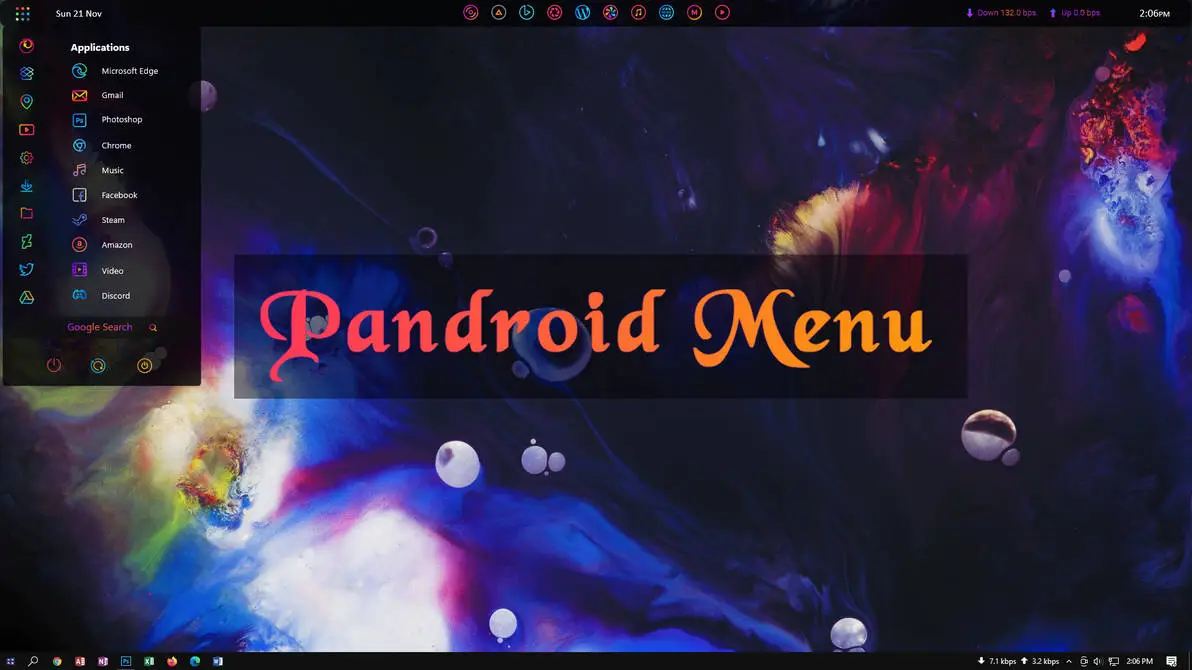
Pandroid Menu Rainmeter Skin adds a mobile-inspired application menu to the Windows desktop. It uses a dark translucent panel on the left, a colourful central title bar, and a compact top information strip to create a modern Rainmeter layout.
The left panel contains the date, a vertical icon column, and a list of application shortcuts. The menu includes shortcuts for Microsoft Edge, Gmail, Photoshop, Chrome, Music, Facebook, Steam, Amazon, Video, and Discord. A Google Search option is placed near the bottom of the panel.
A large transparent bar stretches across the centre of the desktop with the text “Pandroid Menu” in a pink-to-orange colour style. The top section includes several circular shortcut icons, download and upload information, and a digital time display. The colourful wallpaper remains visible around the panels and between the widgets.
Key Features
- Mobile-inspired desktop menu layout.
- Dark translucent application panel on the left.
- Date display at the top-left of the menu.
- Vertical icon column beside the application list.
- Shortcuts for Microsoft Edge, Gmail, Photoshop, and Chrome.
- Additional shortcuts for Music, Facebook, Steam, Amazon, Video, and Discord.
- Google Search option inside the side panel.
- Large central “Pandroid Menu” title bar.
- Pink-to-orange colour effect on the main title.
- Top row of circular shortcut icons.
- Download and upload speed information.
- Digital time display in the top-right corner.
System Requirements
- A Windows computer that supports the Rainmeter version you install.
- Rainmeter installed on your computer.
- Basic knowledge of loading and managing Rainmeter skins.
Installation Steps
- Download and install Rainmeter from the official website.
- Download the Pandroid Inspired Menu Rainmeter Skin package.
- Extract the ZIP file if required.
- If the package contains a .rmskin file, double-click it to open the Rainmeter Skin Installer.
- Click Install to add the skin to Rainmeter.
- Open Rainmeter’s Manage window from the system tray.
- Find the Pandroid Menu skin folder and select the component you want to use.
- Click Load to apply the available elements.
- Arrange the menu and other widgets according to your desktop layout.
What is included in this?
- Rainmeter Skins
- Wallpaper
Theme Files 3MB
DownloadHow to Remove Pandroid Menu Rainmeter Skin
Unload the active components from Rainmeter to hide the menu and other widgets from the desktop. Unloading keeps the installed files available if you want to use the skin again later.
- Right-click an active Pandroid Menu Rainmeter element.
- Select Unload Skin to hide that component.
- Open Rainmeter’s Manage window from the system tray.
- Find the Pandroid Menu skin folder and unload its active components.
- Delete the related skin folder if you no longer want to keep the files.
Disclaimer
Pandroid Inspired Menu Rainmeter Skin is a third-party desktop customization resource created for Rainmeter users. It is not an official Android, Google, Microsoft, or Windows product. The term “Pandroid Inspired” refers only to the visual design concept. Android, Windows, Rainmeter, and related trademarks belong to their respective owners.
Conclusion
Pandroid Menu Rainmeter Skin brings a mobile-style application menu to the Windows desktop through a dark translucent panel, colourful shortcuts, and a large central title bar. The organised application list makes the layout easy to recognise while the top information strip adds extra desktop details.
For users who enjoy app drawer-style interfaces and creative Rainmeter layouts, this skin offers a different way to arrange shortcuts and personalise the Windows desktop.







Disclaimer: All themes, visual styles, and concepts shared on this website are unofficial, fan-made creations built from imagination for customization purposes. We are not affiliated with, endorsed by, or sponsored by Microsoft or any other official brand.