

WinDox Rainmeter Skin
WinDox Rainmeter Skin:WinDox Rainmeter Skin is lightweight and fully customizable — change icon sets, colors, positions, or even blend it with other skins to match your unique setup. It supports high-resolution displays and works flawlessly on Windows 10 and 11.

WinDox Rainmeter Skin
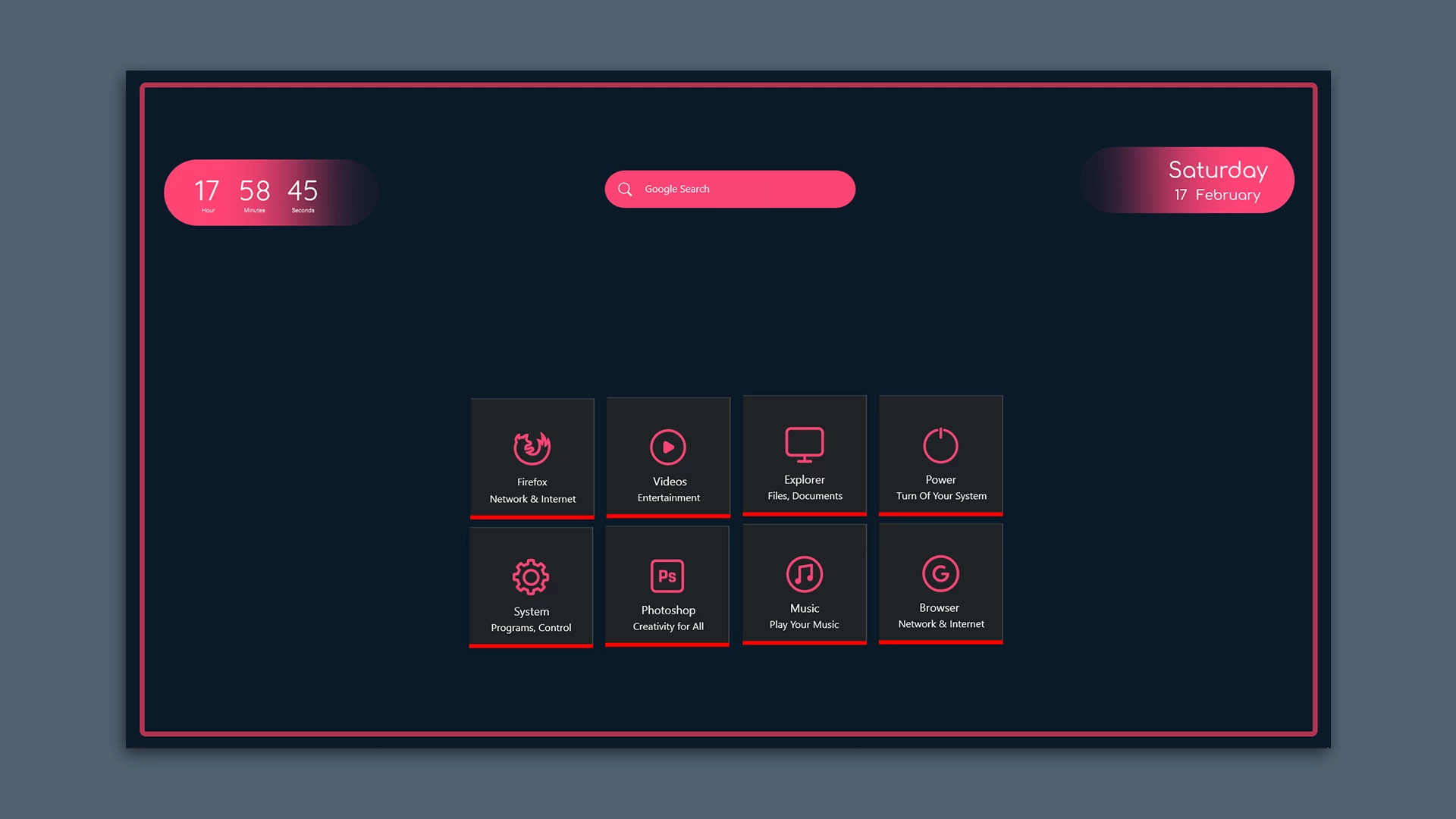
WinDox Rainmeter Skin creates a clean desktop launcher with a dark panel, bright pink icons, and simple information widgets. The layout is arranged inside a large bordered frame, giving the desktop a neat and organised appearance without adding unnecessary elements.
At the top, the skin includes a digital clock showing hours, minutes, and seconds. A Google Search bar is placed in the centre, while the right side displays the weekday and date. These three sections use rounded pink gradient panels that match the main accent colour of the skin.
The centre of the layout contains eight square shortcut tiles arranged in two rows. Each tile has a pink line icon, a main label, and a short description. The available shortcuts include Firefox, Videos, Explorer, Power, System, Photoshop, Music, and Browser. A bright red line along the bottom of each tile gives the launcher a consistent visual style.
Key Features
- Dark desktop launcher layout inside a bordered frame.
- Rounded pink gradient clock panel with hour, minute, and second display.
- Central Google Search bar with a search icon.
- Rounded weekday and date panel on the right.
- Eight square shortcut tiles arranged in two rows.
- Firefox shortcut labelled for Network & Internet.
- Videos shortcut labelled for Entertainment.
- Explorer shortcut for Files and Documents.
- Power shortcut for turning off the system.
- System shortcut for Programs and Control.
- Photoshop shortcut for creative work.
- Music shortcut for playing music.
- Browser shortcut for Network & Internet.
- Pink line icons with red accent lines below the tiles.
System Requirements
- A Windows computer that supports the Rainmeter version you install.
- Rainmeter installed on your computer.
- Basic knowledge of loading and managing Rainmeter skins.
How to Install WinDox Rainmeter Skin
- Download and install Rainmeter from the official website.
- Download the WinDox Rainmeter Skin package from this page.
- Extract the ZIP file if the package is compressed.
- If the package contains a .rmskin file, double-click it to open the Rainmeter Skin Installer.
- Click Install to add the skin to Rainmeter.
- Open Rainmeter’s Manage window from the system tray.
- Find the WinDox skin folder in the installed skins list.
- Click Load to display the available components.
- Arrange the clock, search bar, date panel, and shortcut tiles according to your preferred layout.
What Is Included in This?
- WinDox Rainmeter Skin
Zip File 20MB
DownloadMore Resources
How to Remove WinDox Rainmeter Skin
You can hide the WinDox elements through Rainmeter’s management window whenever you no longer want to use the launcher.
- Right-click an active WinDox Rainmeter element.
- Select Unload Skin to remove that component from the desktop.
- Open Rainmeter’s Manage window from the system tray.
- Find the WinDox skin folder and unload the remaining active components.
- Delete the related skin folder after unloading it if you no longer need the files.
Who Should Use This Skin?
WinDox Rainmeter Skin suits users who prefer a structured desktop launcher with a clock, search bar, date display, and clearly labelled shortcuts.
- Users who like dark desktop layouts with pink interface details.
- People who want common shortcuts grouped in one launcher.
- Rainmeter users who prefer square tiles with labels and descriptions.
- Users who want a simple desktop layout with separate time, search, and date panels.
Disclaimer
WinDox Rainmeter Skin is a third-party desktop customization resource created for Rainmeter users. It is not an official Microsoft product, Windows feature, or system component. Windows, Microsoft, Rainmeter, and other related trademarks belong to their respective owners.
Conclusion
WinDox Rainmeter Skin combines a digital clock, Google Search bar, date panel, and eight labelled shortcut tiles inside one organised desktop layout. Its dark frame, pink icons, and red tile accents give the launcher a clear and consistent appearance.
For users who want quick access to common desktop tools without scattering separate widgets across the screen, WinDox offers a simple Rainmeter-based way to keep the main shortcuts together.







Disclaimer: All themes, visual styles, and concepts shared on this website are unofficial, fan-made creations built from imagination for customization purposes. We are not affiliated with, endorsed by, or sponsored by Microsoft or any other official brand.