

Captain Rainmeter Skin
Captain Rainmeter Skin:Captain Rainmeter Skin is a sleek and modern desktop customization tool designed to enhance your Windows experience. With a clean and minimalistic interface

Captain Rainmeter Skin
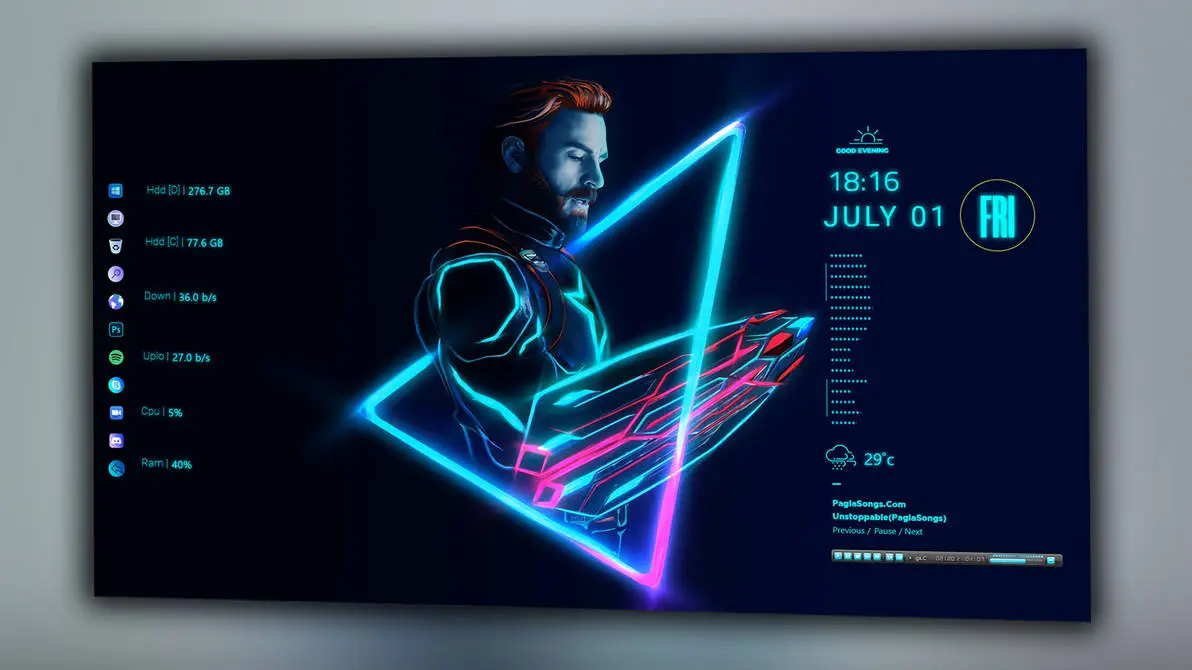
Captain Rainmeter Skin gives the Windows desktop a dark neon dashboard style with cyan, blue, pink, and purple highlights. The design is built around a futuristic character artwork placed in the centre, while Rainmeter widgets are arranged on both sides to display system details, time, date, weather, and music information.
The left side contains a vertical group of small application icons and system monitors. These widgets display hard drive space, download and upload activity, CPU usage, and RAM usage in a simple text-based layout.
On the right side, the skin includes a greeting, digital time, full date, weekday display, weather information, and a music control area. The music section includes the track title, artist information, playback controls, and a progress bar. Bright neon lines and colourful details around the central artwork complete the overall gaming-inspired appearance.
Design Overview
Captain Rainmeter Skin uses a dark desktop layout with a large neon character illustration as the main visual focus. Cyan and blue lighting is combined with pink and purple highlights, creating a strong futuristic appearance without filling the screen with too many widgets.
Main Features
- Dark neon desktop interface.
- Central futuristic character artwork.
- Cyan, blue, pink, and purple visual accents.
- Hard drive storage information on the left side.
- Download and upload speed indicators.
- CPU and RAM usage details.
- Digital time and date display.
- Weekday indicator inside a circular design.
- Weather information with temperature display.
- Music title and artist information.
- Music playback controls and progress bar.
- Compact icon layout for quick access.
System Information Widgets
The left side of the layout is used for system monitoring. It includes storage information for the hard drives along with download speed, upload speed, CPU usage, and RAM usage. These details remain grouped in one vertical column, making them easy to check without covering the main artwork.
Time, Date and Weather
The right side contains a digital clock with the date and weekday shown underneath. A small greeting appears above the time, while the weather widget displays a cloud icon and temperature information below the date section.
Music Controls
The lower-right area includes a compact music player section. It displays the current song title, artist name, playback controls, and a progress bar. This keeps basic music information available directly on the desktop.
Compatibility
Captain Rainmeter Skin requires Rainmeter to display its desktop widgets. The final appearance may vary depending on your screen resolution, wallpaper, Rainmeter settings, and the position of the individual components.
- Required software: Rainmeter
- Suitable for Windows desktop customization
- Display results may vary by screen resolution and configuration
What is Included in This?
- Captain Rainmeter Skin
- Rainmeter configuration files
- System information widgets
- Clock, date, weather, and music components
Required Tool
Installation Steps
- Download and install Rainmeter from the official website.
- Download the Captain Rainmeter Skin package.
- Extract the downloaded file if required.
- Open the Rainmeter skin installer file.
- Click Install to add the skin.
- Open Rainmeter from the system tray.
- Go to Skins and select Captain Rainmeter Skin.
- Load the available components and arrange them on the desktop.
Zip File 2MB
DownloadMore Resources
Customization Tips
Captain Rainmeter Skin can be used with dark wallpapers that allow the cyan, blue, pink, and purple elements to remain visible. You can also adjust the position of the system widgets, music player, clock, weather panel, and other components through Rainmeter.
How to Remove Captain Rainmeter Skin
- Right-click an active Rainmeter widget.
- Select Unload Skin.
- Open the Rainmeter Manage window.
- Unload all Captain Rainmeter components.
- Delete the skin folder if you no longer need it.
Disclaimer
Captain Rainmeter Skin is a third-party desktop customization resource created for Rainmeter users. It is not an official Microsoft product or Windows feature. Windows, Rainmeter, and related trademarks belong to their respective owners.
Final Thoughts
Captain Rainmeter Skin combines a dark neon interface with system monitoring, time and date details, weather information, and music controls. The central artwork gives the desktop a strong visual focus, while the side widgets keep useful information available in an organised layout.
It is a suitable choice for users who enjoy futuristic gaming-style desktop designs and want to create a more personalised Windows workspace with Rainmeter.







Disclaimer: All themes, visual styles, and concepts shared on this website are unofficial, fan-made creations built from imagination for customization purposes. We are not affiliated with, endorsed by, or sponsored by Microsoft or any other official brand.