

Arctic Glass Rainmeter Skin v6
Arctic Glass Rainmeter Skin v6: Arctic Glass Rainmeter Skin v6 brings a clean, blue-toned glass look to the Windows desktop with transparent panels, soft visual details, and a simple layout. It is designed for users who prefer a calm, organized Rainmeter setup without filling the screen with unnecessary elements.

Arctic Glass Rainmeter Skin v6
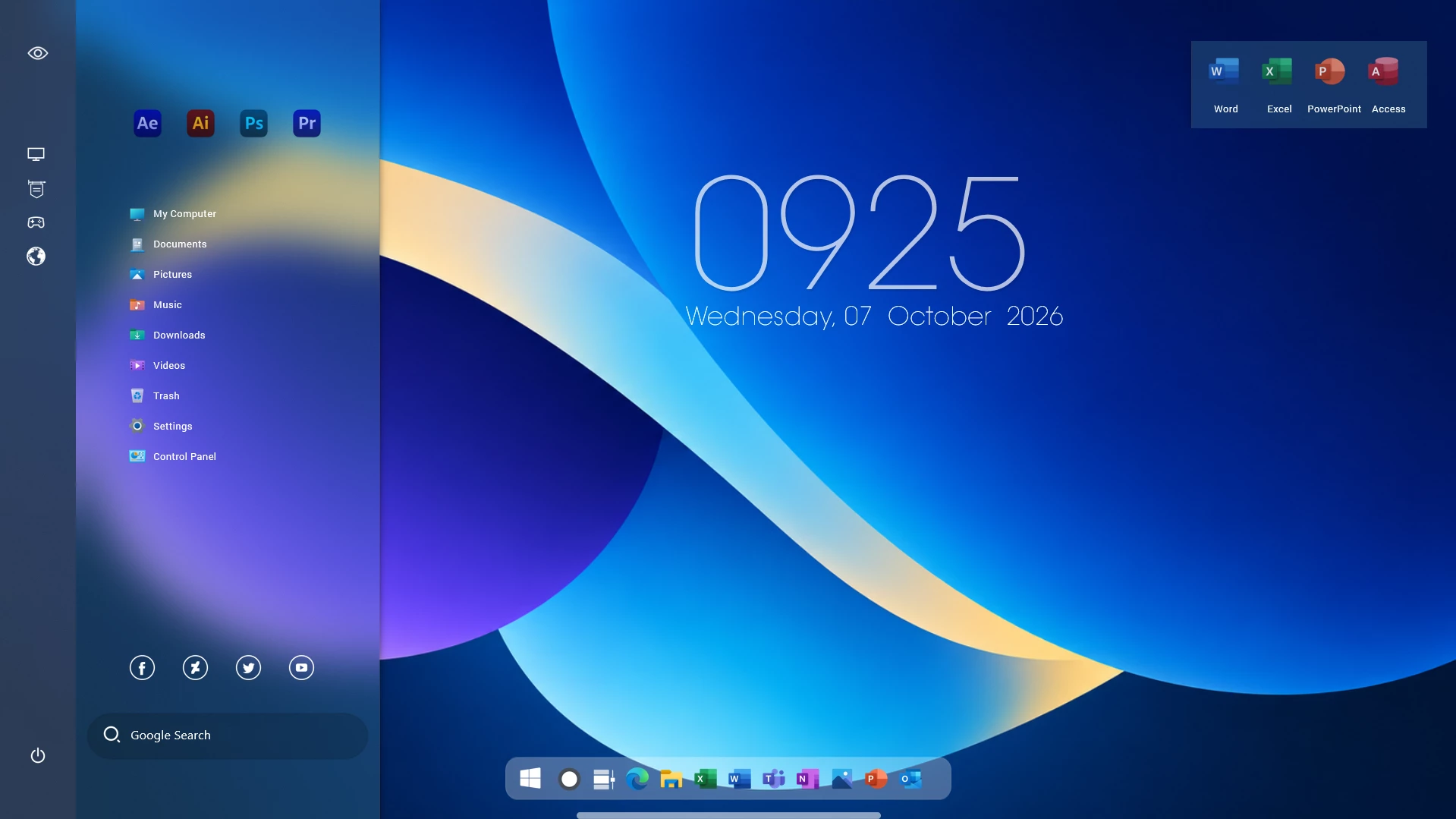
The Arctic Glass Rainmeter Skin v6 gives the Windows desktop a clean glass-inspired layout with soft blue tones, transparent panels, and neatly arranged desktop elements. The design keeps the screen open and uncluttered while adding useful visual components through Rainmeter.
A translucent side panel forms the main part of the layout, with shortcuts and system-related items arranged in a simple vertical structure. The soft blue background and subtle transparency help the panel blend with the wallpaper instead of covering a large part of the desktop.
The setup also includes a large clock and date display that fits naturally with the blue glass theme. Combined with a matching wallpaper and a simple desktop arrangement, Arctic Glass creates a calm and organized Windows setup without making the interface feel overloaded.
Design Overview
Arctic Glass uses a cool blue color palette with transparent and frosted-style surfaces. The side menu keeps frequently used items grouped together, while the main desktop remains mostly open for the wallpaper, clock, and other Rainmeter elements.
The overall layout works especially well with blue, light, or abstract wallpapers. Because the design relies on simple shapes and restrained colors, it can also be combined with matching taskbar styles, icon packs, and other desktop customization resources.
Key Features
- Blue glass-inspired desktop design
- Transparent side menu layout
- Large clock and date display
- Clean and organized desktop arrangement
- Soft blue and translucent visual elements
- Works well with matching wallpapers
- Designed for Rainmeter desktop customization
System Requirements
- A Windows PC
- Rainmeter installed on the computer
- Arctic Glass Rainmeter Skin v6 package
- A suitable display resolution for the intended layout
How to Install Arctic Glass Rainmeter Skin v6
- Download and install Rainmeter.
- Download the Arctic Glass Rainmeter Skin v6 package.
- Extract the ZIP file if the downloaded package is compressed.
- If the package contains a .rmskin file, double-click it to open the Rainmeter Skin Installer.
- Click Install to add the skin to Rainmeter.
- Open Rainmeter from the system tray.
- Go to the installed Arctic Glass skin folder and load the components you want to use.
- Move the loaded elements into position to match your preferred desktop layout.
Some Rainmeter packages contain several individual components rather than one complete layout. If that is the case, load the included modules one by one and arrange them on the desktop as needed.
What Is Included?
- Rainmeter Skin
Required Customization Tool
Arctic Glass Rainmeter Skin v634MB
Downloadhttps://drive.google.com/file/d/1PCbIG_hsPVdj8IeEpvVRVR_MtYKxNwAC/view?usp=sharing More Windows Customization Resources
How to Remove Arctic Glass Rainmeter Skin v6
You can remove the active Arctic Glass elements directly from Rainmeter without making changes to the Windows interface itself.
- Right-click an active Arctic Glass Rainmeter element.
- Select Unload Skin.
- Open the Rainmeter Manage window and unload any remaining Arctic Glass components.
- If you no longer want the skin files, remove the Arctic Glass folder from your Rainmeter Skins directory.
- Refresh Rainmeter if the removed skin still appears in the skin list.
Who Is This Skin For?
Arctic Glass is intended for users who prefer a cleaner desktop with cool colors, transparent panels, and a simple arrangement of Rainmeter elements.
- Users who prefer glass-inspired desktop layouts
- People who like blue and light-colored Windows setups
- Rainmeter users who prefer simple desktop arrangements
- Users who want to combine Rainmeter with matching wallpapers and other Windows customization resources
Disclaimer
Arctic Glass Rainmeter Skin v6 is an unofficial third-party desktop customization resource. It is not developed, endorsed, or sponsored by Microsoft. Rainmeter is a separate third-party application. Product names and trademarks mentioned in this post belong to their respective owners. Use the skin for personal desktop customization and keep a copy of your preferred Rainmeter layout before making major changes.
Final Thoughts
Arctic Glass Rainmeter Skin v6 gives the desktop a softer blue glass appearance without filling the screen with unnecessary widgets. The transparent side panel, large clock, simple shortcuts, and open desktop space work together to create a layout that feels organized and easy to use.
The skin can be used on its own or paired with a matching wallpaper, icon pack, or taskbar style. Keeping the rest of the desktop simple usually works better with this type of layout and helps the glass elements remain the main visual focus.
Frequently Asked Questions
What is Arctic Glass Rainmeter Skin v6?
It is a Rainmeter desktop customization skin that uses transparent panels, blue tones, shortcuts, and clock elements to create a glass-inspired Windows desktop layout.
Do I need Rainmeter to use this skin?
Yes. Rainmeter is required to load and manage the included skin components.
Can I move the Rainmeter elements?
Yes. Rainmeter elements can normally be repositioned on the desktop, allowing you to adjust the layout for your screen size and wallpaper.
Do I have to load every component?
No. You can load only the components you want to use and leave the others disabled.
Can I remove the skin later?
Yes. Unload the active components through Rainmeter and remove the skin folder if you no longer want to keep the files.







Disclaimer: All themes, visual styles, and concepts shared on this website are unofficial, fan-made creations built from imagination for customization purposes. We are not affiliated with, endorsed by, or sponsored by Microsoft or any other official brand.