

Glass Rainmeter Skin
Glass Rainmeter Skin:The Glass Rainmeter Skin is a sleek and elegant desktop enhancement tool designed for users who love a clean, modern, and transparent look.

Glass Rainmeter Skin
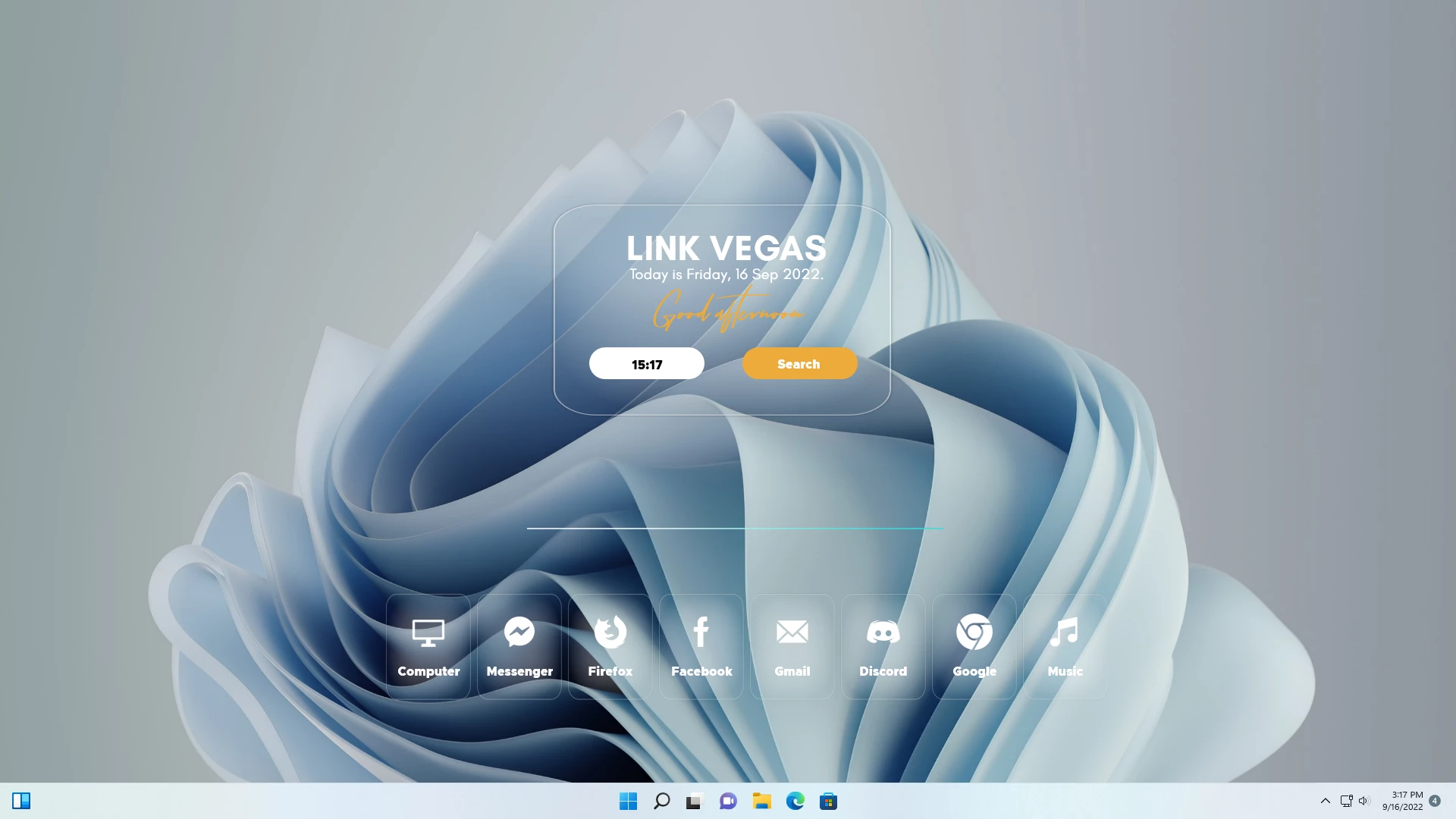
Glass Rainmeter Skin is a modern desktop customization theme designed for users who prefer a clean, transparent, and elegant Windows desktop appearance. Inspired by glass-style user interfaces, this Rainmeter skin adds a soft translucent look with minimal desktop elements that blend naturally with modern wallpapers.
The skin features a centered glass-style desktop panel with clock and date information, a search-style element, and a clean application launcher area. Its transparent layout creates a lightweight and premium visual experience while keeping the desktop organized and distraction-free.
Glass Rainmeter Skin is ideal for users who enjoy minimal Windows customization setups. By combining Rainmeter with suitable wallpapers and matching icons, you can create a modern glass-inspired desktop environment without modifying Windows system files.
Design Overview
The main focus of Glass Rainmeter Skin is simplicity and visual balance. The transparent panels, soft glass appearance, and minimal arrangement help create a refined desktop setup suitable for productivity and aesthetic customization.
Key Features
- Modern glass-inspired desktop interface.
- Transparent and minimal visual design.
- Centered clock and date display.
- Search-style desktop element.
- Clean application launcher layout.
- Works well with modern wallpapers.
- Lightweight Rainmeter-based customization.
- Suitable for minimal and premium desktop setups.
Compatibility
Glass Rainmeter Skin requires Rainmeter to work properly. The final appearance may vary depending on your wallpaper, display resolution, and other installed customization resources.
System Requirements
- Windows 10 or Windows 11.
- Rainmeter installed on your computer.
- Basic knowledge of loading Rainmeter skins.
- Recommended for Full HD and higher resolution displays.
What is included in this?
- Glass Rainmeter Skin
- Rainmeter configuration files
- Desktop glass-style interface elements
Download & Install Rainmeter
Installation Steps
- Download and install Rainmeter from the official website.
- Download the Glass Rainmeter Skin package.
- Extract the file if required.
- Open the .rmskin file to start the Rainmeter Skin Installer.
- Click Install to add the skin.
- Open Rainmeter from the Windows system tray.
- Go to Skins and select Glass Rainmeter Skin.
- Click Load to apply the available elements.
- Adjust the position according to your preferred desktop layout.
Zip File1MB
Download Customization Tips
For the best result, use Glass Rainmeter Skin with clean wallpapers, minimal icon packs, and modern Windows themes. Adjusting the widget position and transparency settings can help create a balanced desktop appearance.
Who Should Use This Skin?
Glass Rainmeter Skin is suitable for users who enjoy clean, modern, and transparent desktop designs.
- Users who like glass-style interfaces.
- People who prefer minimal desktop layouts.
- Rainmeter users looking for elegant customization.
- Users who enjoy creating premium Windows desktop setups.
Disclaimer
Glass Rainmeter Skin is a third-party desktop customization resource created for Rainmeter users. It is not an official Microsoft product and is not affiliated with Microsoft Corporation. Windows, Microsoft, Rainmeter, and related trademarks belong to their respective owners. This resource is provided for personal desktop customization purposes only.
Final Thoughts
Glass Rainmeter Skin provides a simple way to transform a standard Windows desktop into a clean and modern glass-inspired workspace. Its transparent design, minimal layout, and elegant interface make it a great choice for users who prefer stylish but uncluttered desktop customization.
Combined with suitable wallpapers, icons, and other Windows customization resources, this Rainmeter skin can help create a refined and personalized desktop experience.







Disclaimer: All themes, visual styles, and concepts shared on this website are unofficial, fan-made creations built from imagination for customization purposes. We are not affiliated with, endorsed by, or sponsored by Microsoft or any other official brand.