

WhiteSur Inspired Rainmeter Skin For Windows
WhiteSur Transparent Rainmeter Skins:Bring the clean, elegant look of macOS Big Sur to your Windows desktop with the WhiteSur Transparent Edition Rainmeter Skins! This Rainmeter theme delivers a sleek, translucent UI inspired by macOS, blending modern Apple aesthetics with powerful customization.

WhiteSur Inspired Rainmeter Skin
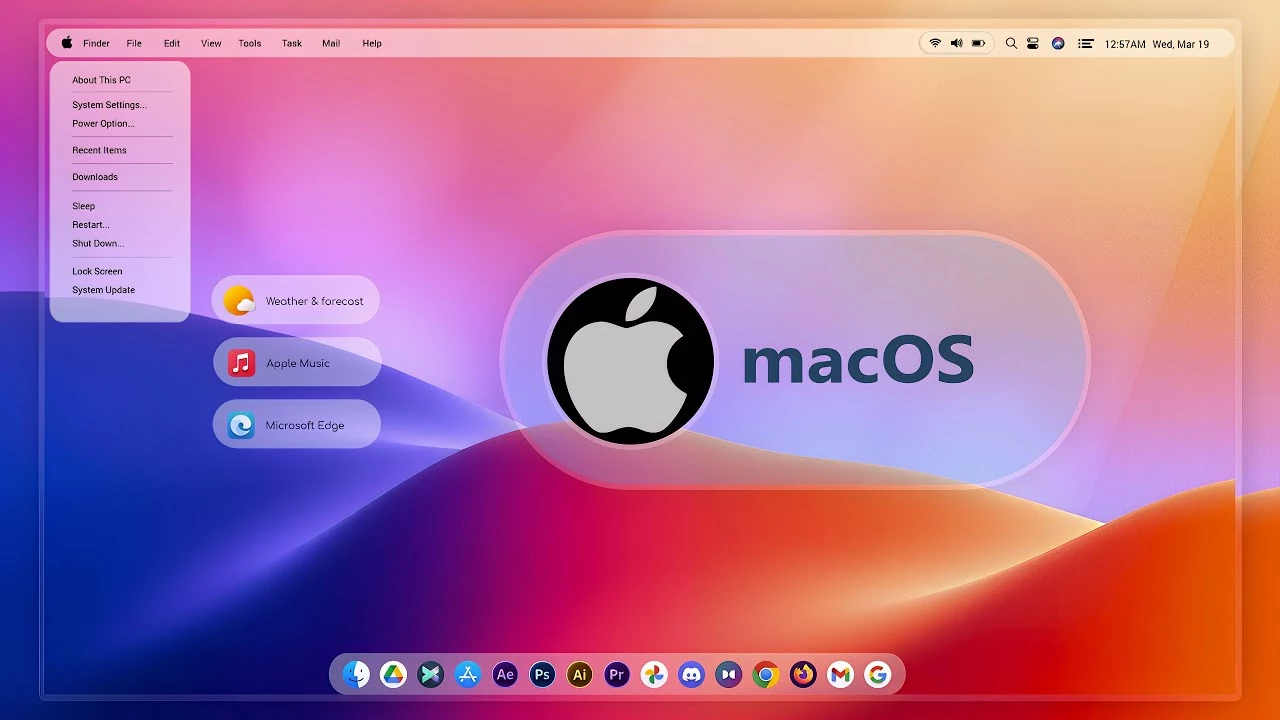
WhiteSur Inspired Rainmeter Skin brings a macOS-inspired layout to the Windows desktop with a slim top menu bar, a bottom dock, and small widgets. Translucent backgrounds and rounded shapes give the desktop elements a light, glass-style appearance.
The top menu bar stretches across the desktop, with menu labels on the left and small status icons and time information on the right. A translucent dropdown menu sits below its left end. At the bottom, a compact rounded dock holds a single row of colourful application icons.
The left-side widgets include weather, music, and Microsoft Edge. Each uses a small horizontal panel with rounded ends, an icon on the left, and text beside it. Their stacked arrangement keeps them together without taking up much desktop space.
Key Features
- macOS-inspired top menu bar with a slim translucent background.
- Menu labels on the left and status information on the right.
- Translucent dropdown menu below the left end of the top bar.
- Compact bottom dock with a rounded background and a single row of application icons.
- Weather widget in a small rounded panel.
- Music widget with an icon and text arranged side by side.
- Microsoft Edge shortcut panel beneath the other left-side widgets.
- Soft panel edges and open spacing between the desktop elements.
System Requirements
- A Windows computer that supports the Rainmeter version you install.
- Rainmeter installed on your computer.
- Basic knowledge of loading and managing Rainmeter skins.
Installation Steps
- Download and install Rainmeter from the official website.
- Download the WhiteSur Inspired Rainmeter Skin package.
- Extract the downloaded ZIP file.
- If the package includes a .rmskin file, open it and click Install in the Rainmeter Skin Installer.
- If no installer file is included, check the package for setup instructions.
- After installing the skin, open Rainmeter’s Manage window from the system tray.
- Find the installed WhiteSur components and select the component you want to use.
- Click Load and repeat for the other available components.
- Arrange the loaded elements to suit your desktop.
What Is Included In This?
- WhiteSur Inspired Rainmeter skin components.
Zip File 36MB
DownloadHow to Remove WhiteSur Inspired Rainmeter Skin
Unload the active components to hide them from your desktop. The installed skin files remain available if you want to load them again later.
- Right-click an active WhiteSur Rainmeter element.
- Select Unload Skin to hide that component.
- Open Rainmeter’s Manage window from the system tray.
- Find the installed WhiteSur components.
- Unload the remaining active components to hide the Rainmeter setup.
Who Should Use This Skin?
This skin suits users who like a macOS-inspired menu and dock layout with small desktop widgets.
- Users who prefer a top menu bar and bottom dock arrangement.
- People who like translucent panels with rounded edges.
- Rainmeter users who want weather, music, and a browser shortcut grouped on the left.
- Users who prefer compact desktop elements with space between them.
Disclaimer
WhiteSur Inspired Rainmeter Skin is a third-party desktop customization resource. Its macOS-inspired appearance does not install macOS or turn Windows into an Apple operating system. It is not an official Apple or Microsoft product. Product names and logos belong to their respective owners.
Conclusion
WhiteSur Inspired Rainmeter Skin combines a slim top menu bar, a rounded bottom dock, and three compact left-side widgets. The translucent panels keep the layout light, while weather, music, and Microsoft Edge each have their own place on the desktop.

Disclaimer: All themes, visual styles, and concepts shared on this website are unofficial, fan-made creations built from imagination for customization purposes. We are not affiliated with, endorsed by, or sponsored by Microsoft or any other official brand.