

Jade Jubilee Theme For Windows 11
Jade Jubilee Theme For Windows 11 : Get New experience with the Windows 11 Jade Jubilee Theme, a vibrant and elegant customization that blends rich jade green tones with festive design elements. This theme introduces a fresh, nature-inspired interface

Jade Jubilee Theme For Windows 11
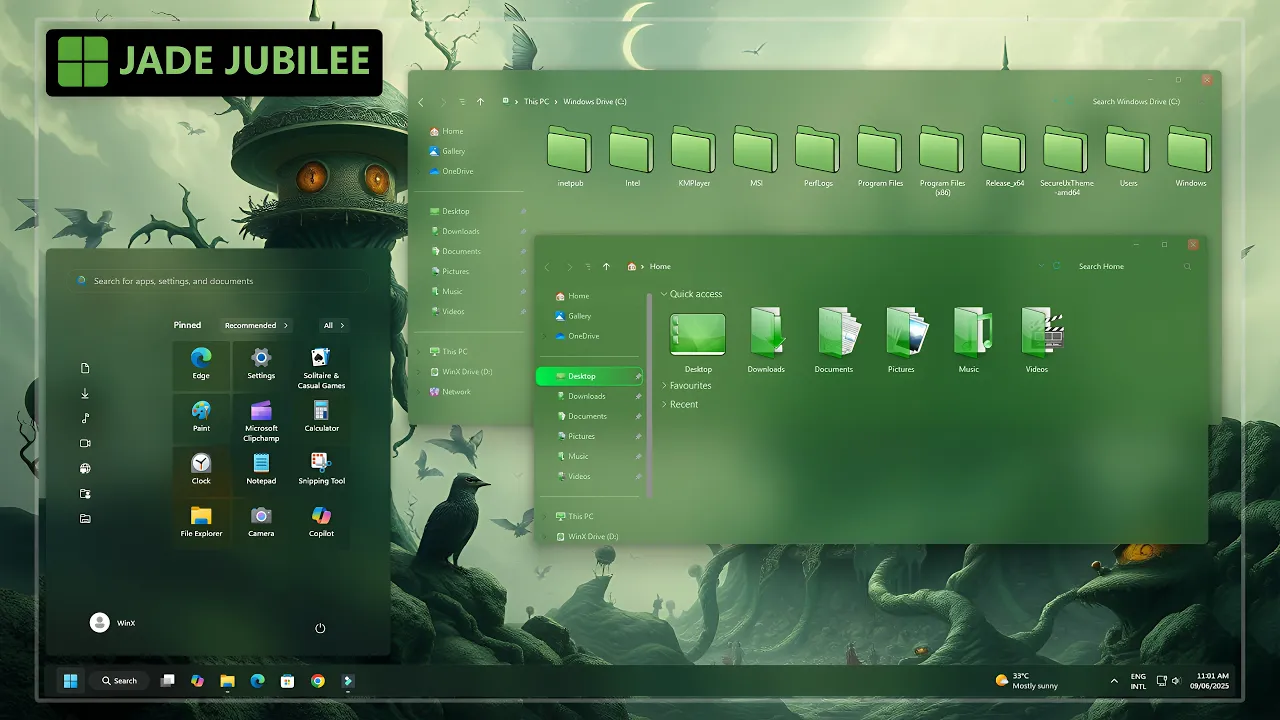
The Jade Jubilee Theme For Windows 11 gives the desktop a rich green identity built around jade, emerald, smoky green, and soft lime accents. File Explorer uses darker translucent surfaces, while brighter green folders and selected interface details create contrast without making the desktop overly saturated.
The theme uses several shades of green rather than relying on one flat color. Darker glass-style areas form the base of the interface, while jade and lime accents appear across folders, icons, and other visual elements. This keeps the setup colorful while preserving a more balanced overall look.
The package also includes an icon pack, Explorer mods, and a matching wallpaper, allowing the green styling to extend beyond the main Windows theme without changing the normal Windows 11 environment underneath.
Jade Green Glass Style
File Explorer is one of the strongest parts of the setup. The window uses a soft translucent green treatment, while brighter jade folder resources stand out naturally against the darker background.
The darker interface areas help prevent the green palette from becoming too bright. Lighter lime and emerald details are used more selectively, creating separation between folders, navigation elements, and other supported visual components.
The included wallpaper follows the same nature-inspired direction, using darker scenery that complements the interface without competing with the stronger jade accents.
Features
- Jade, emerald, and smoky green Windows 11 styling
- Transparent green-tinted File Explorer surfaces
- Matching jade-green folder and system icons
- Darker glass-style interface areas
- Soft lime accent details
- Nature-inspired wallpaper included
- Explorer customization resources included
- Optional tools can be added separately when needed
Package Contents
- Windows 11 Theme: Applies the main Jade Jubilee visual style to supported Windows interface elements.
- Icon Pack: Adds matching green folder and system icons where supported.
- Explorer Mods: Provides additional File Explorer styling for users who want more of the complete setup.
- Wallpaper: Includes a background that follows the same dark green and nature-inspired direction.
Compatibility
- Windows 11 21H2: Supported
- Windows 11 22H2: Supported
- Windows 11 23H2: Recommended
- Windows 11 24H2: Recommended
- Windows 11 25H2: Supported
Optional theme tools and Explorer modifications can behave differently after major Windows updates, so check their compatibility before reapplying additional interface changes.
Optional Tools
Installation Steps
- Download the Jade Jubilee package and extract the ZIP file.
- Copy the extracted theme files and theme folder to
C:\Windows\Resources\Themes. - Right-click on the desktop, select Personalize, open the Themes section, and choose the Jade Jubilee theme to apply it.
- After the main theme is active, you can apply the included icon pack, Explorer mods, and wallpaper separately to complete more of the green setup.
- For the complete installation process and additional setup details, follow this Windows 11 custom theme installation guide.
Theme Files 122MB
Download Removal Steps
- Right-click on the desktop, open Personalize, and switch back to one of the default Windows 11 themes.
- If you applied the included icon pack, use your icon customization tool to restore the default Windows icons.
- Disable the Explorer mods and restore your previous wallpaper if you no longer want the additional Jade Jubilee styling.
- For the complete restoration process, follow this Windows 11 custom theme removal guide.
Carrying the Jade Look Across Windows
The included icon pack and Explorer mods allow the green direction to continue beyond the main visual theme. Applying them together can make folders, system locations, and File Explorer feel more closely connected to the jade and emerald palette.
You do not need to apply every component, though. Keeping only the main theme and wallpaper gives the desktop a simpler green appearance, while adding the icons and Explorer changes creates a more complete Jade Jubilee setup.
Choosing a Wallpaper for the Green Palette
The included wallpaper already follows the darker nature-inspired direction of the theme, but other backgrounds can work well too. Forest scenes, dark green gradients, muted teal, charcoal, and subdued landscape wallpapers usually complement the jade interface naturally.
Brighter wallpapers can make the translucent surfaces feel more vivid, while darker backgrounds bring more attention to the lime and emerald details in File Explorer.
Disclaimer
Jade Jubilee Theme For Windows 11 is an independent third-party customization resource intended for personal desktop styling. It is not an official Microsoft product and is not affiliated with, sponsored by, or endorsed by Microsoft.
SecureUxTheme, 7TSP GUI, ExplorerBlurMica, Windhawk, Windows, and other product or project names belong to their respective owners. Third-party themes and optional interface tools can behave differently across Windows builds or after major system updates.
Final Word
Jade Jubilee stands out because its green palette carries naturally from the darker Explorer surfaces to the brighter folder icons and softer lime details. The result feels coordinated without relying on neon colors or excessive visual effects.
The main theme works well on its own, while the included icon pack, Explorer mods, and wallpaper can extend the same jade-inspired direction across more of the desktop when you want a fuller setup.
Frequently Asked Questions
Is the green icon pack included?
Yes. The Jade Jubilee package includes an icon pack that can be applied separately from the main Windows theme.
Do I have to install the icon pack?
No. You can use the main Jade Jubilee visual theme while keeping the default Windows icons.
Are Explorer mods included?
Yes. Explorer customization resources are listed as part of the package and can be added separately after the main theme is applied.
Do I need ExplorerBlurMica?
No. ExplorerBlurMica is an optional tool. Use it only if you want compatible additional blur or transparency effects.
Can I keep the default Windows Start Menu?
Yes. The Windows theme, icon pack, Explorer mods, and wallpaper can be used without changing the Start Menu if you prefer to keep it closer to the default Windows layout.
Can I use another wallpaper with Jade Jubilee?
Yes. Dark green, forest, charcoal, muted teal, and other nature-inspired wallpapers generally work well with the jade and emerald interface colors.
Can I install only the theme and skip the extra resources?
Yes. The main Windows theme, icon pack, Explorer mods, and wallpaper can be treated as separate parts of the setup.



Disclaimer: All themes, visual styles, and concepts shared on this website are unofficial, fan-made creations built from imagination for customization purposes. We are not affiliated with, endorsed by, or sponsored by Microsoft or any other official brand.