Glowing Dock Rainmeter Skin
Glowing Dock Rainmeter Skin is a modern and stylish desktop dock designed to enhance your Windows 11 and Windows 10 customization experience.

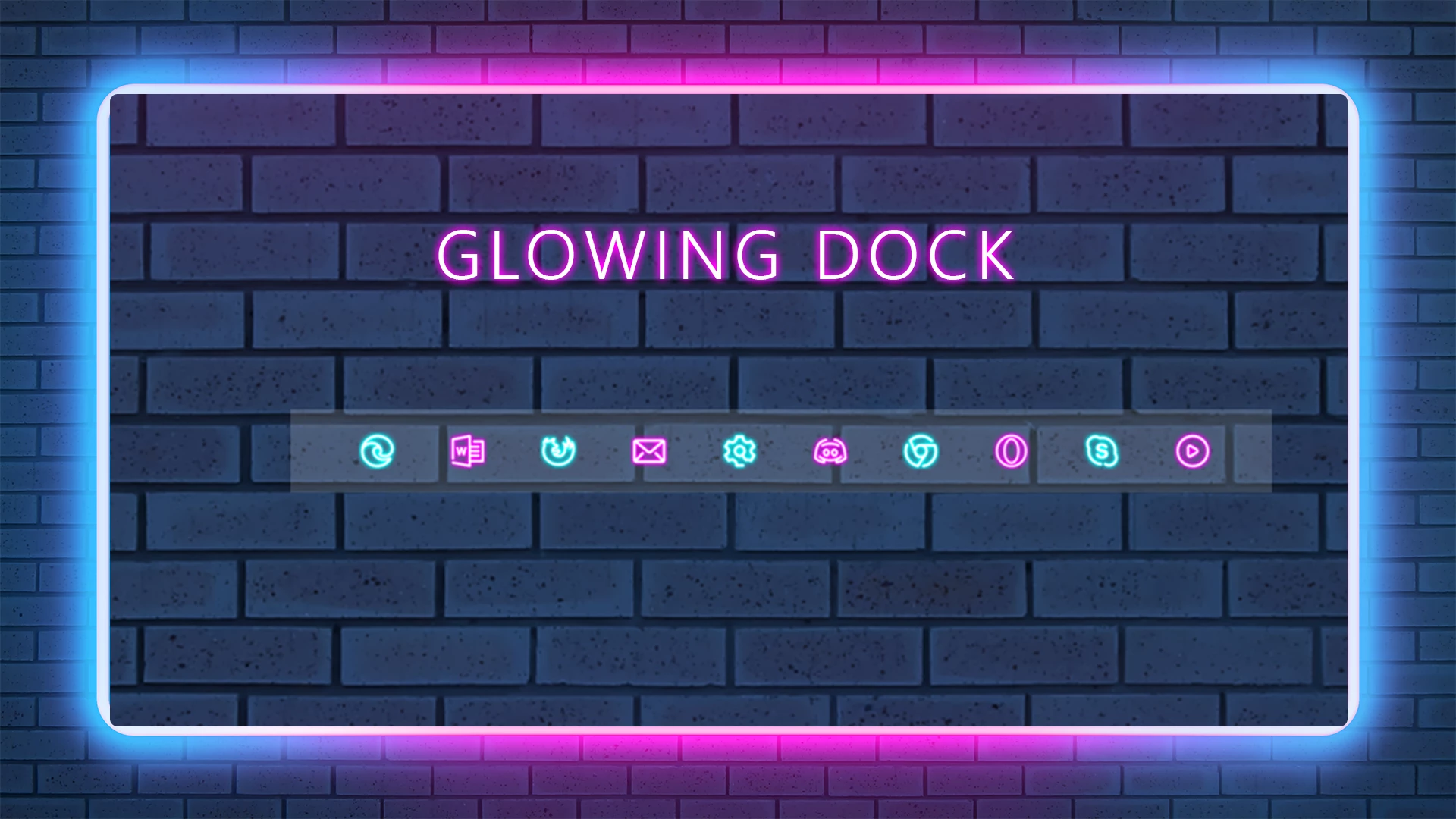
Glowing Dock Rainmeter Skin
Glowing Dock Rainmeter Skin is a modern desktop customization dock designed for Windows users who want a clean, stylish, and futuristic desktop setup. With its neon-inspired glowing appearance and minimal layout, this Rainmeter dock adds a unique visual element while keeping your favorite shortcuts organized.
This dock allows you to place application shortcuts, folders, and other useful links directly on your desktop. The glowing design works well with dark wallpapers, AMOLED backgrounds, cyberpunk themes, gaming setups, and modern Windows customization layouts.
Glowing Dock Rainmeter Skin is lightweight and customizable, allowing users to adjust the dock position, appearance, and layout according to their preference. It is a suitable choice for users who enjoy aesthetic desktop designs while keeping their workspace clean and organized.
Key Features
- Neon-inspired glowing dock design.
- Clean and minimal desktop launcher style.
- Organize apps, folders, and shortcuts easily.
- Works well with dark and futuristic wallpapers.
- Suitable for Windows 10 and Windows 11 customization.
- Lightweight Rainmeter-based desktop enhancement.
- Customizable position and appearance.
- Perfect for gaming and aesthetic desktop setups.
Compatibility
- Windows 10 / Windows 11
- Rainmeter application installed
- Recommended Resolution: 1920 × 1080 or higher
What is included in this?
- Glowing Dock Rainmeter Skin
- Dock Icons & Backup
Optional Customization Tools
How to Install Glowing Dock Rainmeter Skin
- Download and install Rainmeter from the official website.
- After installation, Rainmeter will start automatically.
- Download the Glowing Dock Rainmeter Skin file.
- Open the downloaded .rmskin file if available.
- The Rainmeter Skin Installer window will appear.
- Click Install to add the dock to Rainmeter.
- Right-click the Rainmeter icon from the system tray.
- Go to Skins and select Glowing Dock.
- Click Load to apply the dock on your desktop.
- Adjust shortcuts and position according to your preference.
Theme Files836kB
Download How to Remove Glowing Dock Rainmeter Skin
- Right-click the active dock widget.
- Select Unload Skin to remove it from the desktop.
- Open Rainmeter Manager from the system tray.
- Find Glowing Dock and unload the active components.
- Delete the skin folder from the Rainmeter Skins directory if you want to remove it completely.
Who Should Use This Dock?
Glowing Dock Rainmeter Skin is suitable for users who enjoy modern desktop customization and want a stylish alternative to traditional desktop shortcuts. It works well for gaming setups, creative workspaces, minimal desktops, and futuristic Windows themes.
Users who enjoy neon designs, RGB-inspired setups, and clean desktop layouts can use this dock to complete their customization style.
Explore More
Disclaimer
Glowing Dock Rainmeter Skin is a third-party desktop customization resource created for personal Windows customization purposes only. It is not an official Microsoft product and is not affiliated with Microsoft Corporation.
This customization works through Rainmeter and does not modify core Windows system files. Always download customization tools from trusted sources and use them carefully.
Final Thoughts
Glowing Dock Rainmeter Skin is a simple and stylish way to improve your Windows desktop appearance. Its glowing design, clean layout, and shortcut organization features make it a good option for users who want a modern and personalized workspace.
For the best result, combine this dock with a matching wallpaper, icon pack, and other Windows customization resources to create a complete aesthetic desktop setup.