Satin Dark Theme for Windows 11
Satin Dark Theme for Windows 11 : Satin Dark Theme for Windows 11 brings a smooth, elegant dark interface with a premium satin finish. Designed for comfort and style, it enhances the Start Menu, Taskbar, and system UI with balanced dark tones, subtle depth, and a modern, eye-friendly look.

Satin Dark Theme for Windows 11
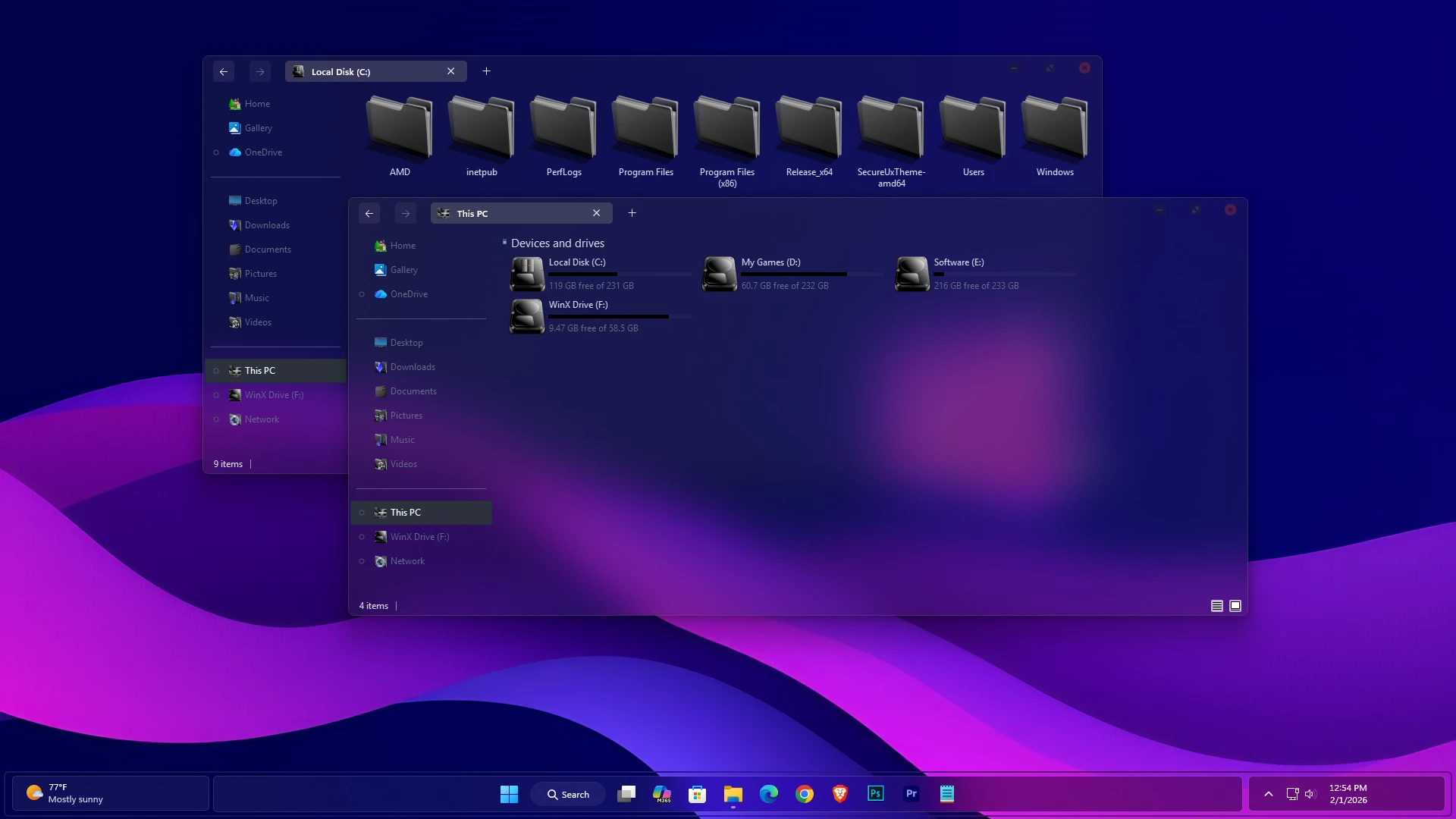
The Satin Dark Theme for Windows 11 gives File Explorer a fully transparent dark appearance, allowing the wallpaper and desktop colors to remain visible through the window surfaces. Instead of using a solid Explorer background, the theme creates a layered look with dark transparent panels, subtle borders, and a clean Windows 11 layout.
The transparency is one of the main characteristics of Satin Dark. The blue, purple, and pink tones visible through File Explorer come from the wallpaper behind the transparent surfaces rather than from a fixed theme color. Changing the wallpaper can therefore give the same theme a noticeably different appearance.
The drive section uses near-black hard-drive level indicators, which stay consistent with the darker interface while remaining visible against the transparent background. Satin Dark also uses customized DWM window buttons, with restrained minimize and maximize controls and a red close button in the upper corner of supported windows.
The main Windows theme can be used on its own, but users who want to reproduce the same complete desktop look should also use the matching Satin Dark icon pack. The icon pack is a separate customization and is not part of the main theme itself.
Features
- Fully transparent File Explorer surfaces
- Wallpaper remains visible through the Explorer background
- Dark transparent navigation and content areas
- Near-black hard-drive level indicators
- Custom DWM minimize, maximize, and close buttons
- Red accent used on the close button
- Subtle borders and restrained interface details
- Can be paired with the matching Satin Dark icon pack for the same complete look
Compatibility
- Windows 11 21H2: May work, but not recommended for the best experience
- 22H2 YES
- 23H2 YES
- 24H2 YES
- 25H2 YES
What is included in this?
- Windows 11 Theme
Installing the Visual Style
- Create a System Restore Point, prepare Windows with a compatible theme patcher, then place the extracted files in
C:\Windows\Resources\Themesand apply the theme from Personalization > Themes. - For detailed instructions, follow this Windows 11 custom theme installation guide.
Theme Files 20MB
Download Switch Back to the Standard Windows Style
- Select a default Windows 11 theme and undo any separate icon, StartAllBack, or other interface customization used with the setup.
- For the complete removal process, see this Windows 11 custom theme removal guide.
Disclaimer
Satin Dark Theme for Windows 11 is an independently created third-party visual customization intended for personal desktop styling. It is not an official Microsoft product and is not affiliated with, sponsored by, or endorsed by Microsoft. Windows and related trademarks remain the property of their respective owners. Compatibility with third-party themes and optional customization tools can vary between Windows builds and after system updates.
Finalization
The Satin Dark Theme for Windows 11 gives File Explorer a fully transparent dark appearance with restrained DWM controls and near-black drive-level indicators. Because the wallpaper remains visible through the interface, changing the background can significantly alter the overall look without changing the theme itself.
For users who want to reproduce the same complete desktop appearance, the matching Satin Dark icon pack should be applied separately alongside the main theme.