

Gravity Theme For Windows 11
Gravity Theme For Windows 11 : Gravity Theme for Windows 11 is a stylish dark and Nord color mix theme designed to give your desktop a clean, modern, and eye-friendly look. With its smooth dark interface and cool blue accents, it enhances the overall Windows 11 experience while keeping the design minimal, elegant, and professional.

Gravity Theme For Windows 11 (Custom Windows Theme)
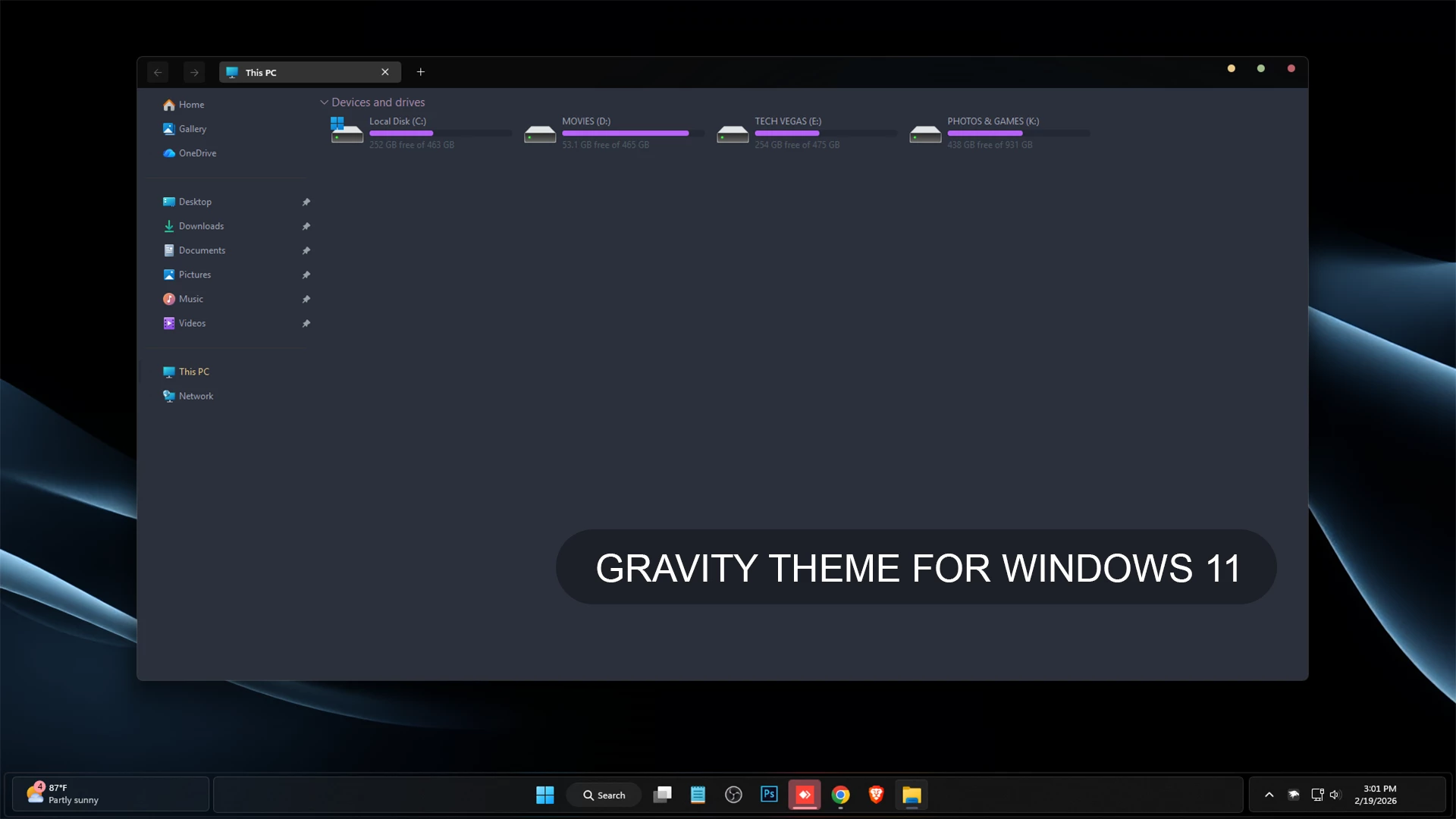
The Gravity Theme for Windows 11 gives File Explorer a dark, restrained appearance built around slate blue, charcoal, and deep gray tones. The main Explorer surface stays slightly lighter than the upper title area, creating clear separation without using bright borders or heavy visual effects.
The theme keeps the familiar Windows 11 layout while changing supported interface colors and window details. The darker navigation area, subtle separators, and low-contrast surfaces give Explorer a more consistent dark appearance without making every section completely black.
The drive section uses purple and magenta hard-drive level indicators, adding a small amount of color against the dark background. Gravity also uses customized DWM window buttons, with yellow, green, and pink-red circular controls in the upper corner of supported windows.
Features
- Dark slate-blue and charcoal File Explorer styling
- Darker title and navigation areas
- Subtle borders and low-contrast separators
- Purple and magenta hard-drive level indicators
- Custom DWM window controls
- Yellow, green, and pink-red DWM button accents
- Restrained dark interface without excessive visual effects
- Keeps the familiar Windows 11 Explorer structure
Compatibility
- Windows 11 21H2: May work, but not recommended for the best experience
- 22H2 YES
- 23H2 YES
- 24H2 YES
- 25H2: Not working properly
What is included in this?
- Windows 11 Theme
Optional Customization Tools
Installing the Theme
- Create a System Restore Point, prepare Windows with a compatible theme tool, and place the extracted theme files in
C:\Windows\Resources\Themesbefore applying the visual style. - For the complete process, follow this Windows 11 custom theme installation guide.
Theme Files 11MB
Download Restore the Default Windows Look
- Switch back to a default Windows 11 theme and disable any optional StartAllBack or other interface changes used with the setup.
- For the full restoration process, see this Windows 11 custom theme removal guide.
Third-Party Theme Notice
Gravity Theme for Windows 11 is an independently created visual customization intended for personal desktop styling. It is not an official Microsoft product and has no affiliation with, sponsorship from, or endorsement by Microsoft. Windows and related trademarks remain the property of their respective owners. Compatibility can vary between Windows builds, especially after major system updates.
Finalization
The Gravity Theme for Windows 11 gives File Explorer a darker identity through slate-blue and charcoal surfaces, purple-magenta storage indicators, and colored DWM controls. The restrained color palette keeps the interface simple while still giving it a noticeably different appearance from the default Windows 11 design.




Disclaimer: All themes, visual styles, and concepts shared on this website are unofficial, fan-made creations built from imagination for customization purposes. We are not affiliated with, endorsed by, or sponsored by Microsoft or any other official brand.