

Windows Xp Inspired Classic Theme For Windows 11
Windows Xp Classic Theme For Windows 11 : Windows Xp Classic Theme For Windows 11 is a nostalgic yet modern customization theme that brings back the classic charm of Windows XP while blending it with the sleek functionality of Windows 11.

Windows XP Inspired Classic Theme for Windows 11
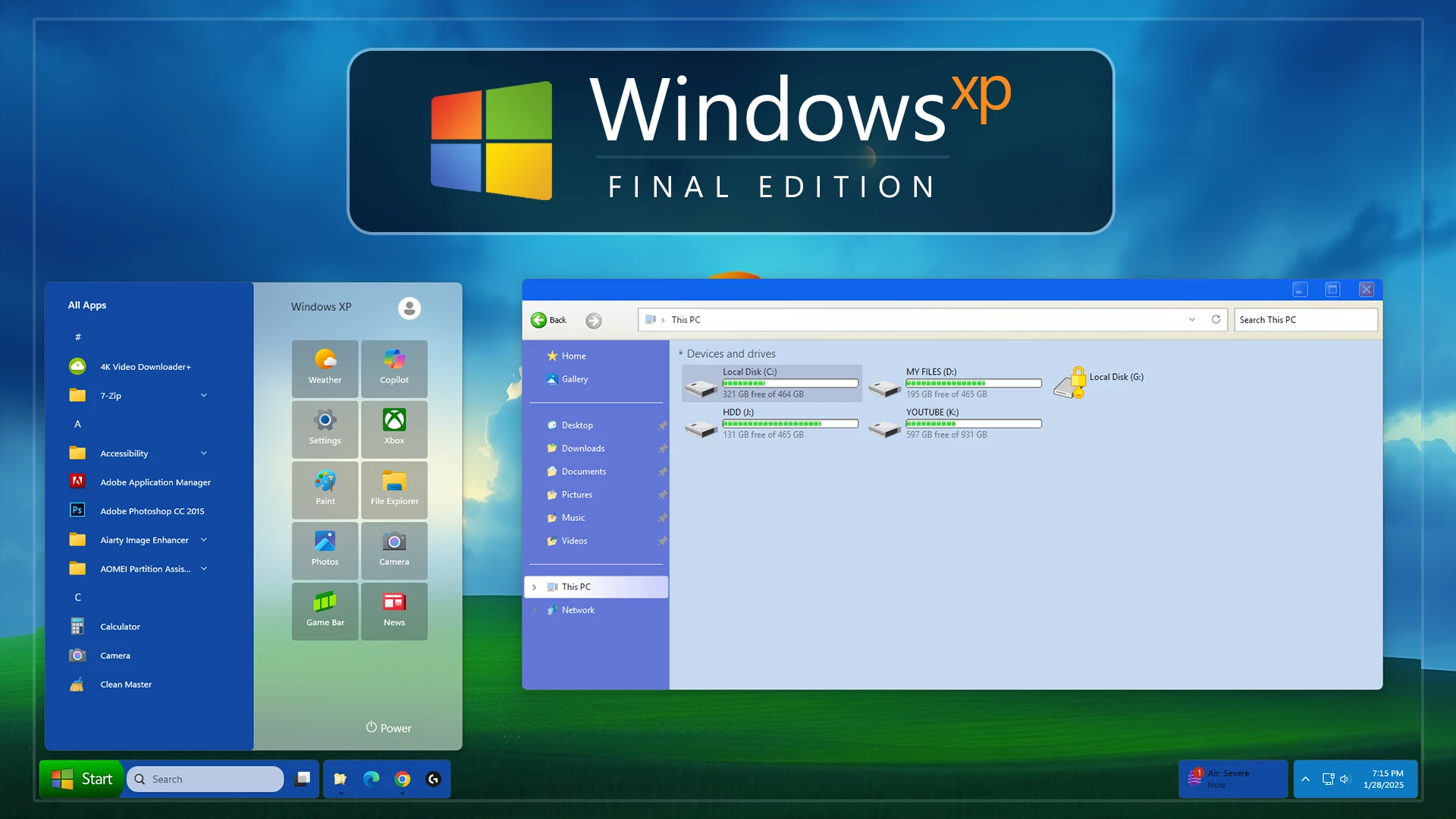
The Windows XP Inspired Classic Theme for Windows 11 recreates the familiar character of the Windows XP desktop while keeping Windows 11 underneath. The setup uses strong blue interface accents, light Explorer surfaces, classic-style drive graphics, an XP-inspired Start Menu, and the recognizable green Start button to bring back the nostalgic Windows look on a modern Windows system.
File Explorer follows a distinctly retro color scheme. The title bar uses a vivid blue tone, the navigation panel has a softer lavender-blue finish, and the main file area stays light blue-gray. Drive resources use simple classic-style icons with green capacity indicators, giving the storage section a much older Windows appearance than the default Windows 11 design.
The complete setup can also be paired with the included Windows XP-inspired wallpaper and optional Windhawk configurations. These extra elements help extend the retro styling to the Start Menu, taskbar, and other supported interface areas without installing Windows XP or replacing Windows 11 itself.
Classic Windows XP Visual Style
The theme focuses on recognizable Windows XP design cues rather than copying the default Windows 11 appearance. Bright blue window chrome, pale interface panels, simple borders, square window controls, and traditional drive graphics all contribute to the older desktop character.
The Start Menu uses a split layout with a darker blue application list on the left and a lighter panel on the right for shortcuts and pinned items. The taskbar continues the same retro direction with a green Start button, a light search area, and blue taskbar sections.
The included green-hill and blue-sky wallpaper strengthens the XP-inspired look, but it remains a separate visual component rather than part of the Windows interface itself.
What the Theme Changes
The main theme changes supported Windows 11 visual elements to resemble the styling used in older Windows releases. Additional Windhawk configurations can extend the setup to other interface areas, while wallpaper and icon resources can be applied separately depending on how closely you want to match the full XP-style desktop.
Windows 11 remains the operating system underneath. Applications, files, system functions, and normal Windows features are not replaced by Windows XP.
Classic XP Highlights
- Windows XP-inspired Windows 11 visual style.
- Bright blue classic-style window title bars.
- Light blue-gray File Explorer content area.
- Lavender-blue Explorer navigation panel.
- Classic-style drive resources with green usage indicators.
- XP-inspired split Start Menu layout.
- Green Start button and retro taskbar styling.
- Matching Windows XP-inspired bliss wallpaper.
- Optional Windhawk configurations for supported interface elements.
Compatibility
- Windows 11 21H2: Supported
- Windows 11 22H2: Supported
- Windows 11 23H2: Supported
- Windows 11 24H2: Supported
- Windows 11 25H2: Not Supported
Included Package Contents
- Windows 11 visual theme files
- Windows XP-inspired wallpaper
- Optional Windhawk configurations
- Additional customization resources
How to Install Windows XP Inspired Classic Theme
- Download the Windows XP Inspired Classic Theme package and extract the ZIP file.
- Copy the extracted theme files and theme folder to
C:\Windows\Resources\Themes. - Right-click on the desktop, select Personalize, open the Themes section, and choose the theme to apply it.
- Once the main theme is active, you can apply the included wallpaper and enable optional Windhawk configurations or other compatible resources separately.
- For the complete step-by-step setup, follow this Windows 11 custom theme installation guide.
XP Inspired Theme 48 MB
Download How to Remove the Theme
- Right-click on the desktop, open Personalize, and switch back to one of the default Windows 11 themes.
- If you applied separate icons, Windhawk configurations, wallpaper changes, or other XP-style customizations, restore or disable those components individually.
- Restart Windows Explorer or reboot the PC if the original Windows appearance does not return immediately.
- For the full restoration procedure, follow this Windows 11 custom theme removal guide.
Disclaimer
Windows XP Inspired Classic Theme for Windows 11 is an independent third-party customization resource intended solely for personal desktop styling. It is not an official Microsoft product and is not affiliated with, sponsored by, or endorsed by Microsoft Corporation.
Windows, Windows XP, Windows 11, and related trademarks belong to Microsoft Corporation. This package does not install Windows XP or replace Windows 11. Compatibility with third-party themes, icon tools, and Windhawk configurations can vary between Windows builds and after system updates.
Final Word
The Windows XP Inspired Classic Theme for Windows 11 gives your desktop a deliberately nostalgic visual identity through bright blue window styling, pale Explorer surfaces, green drive indicators, an XP-inspired Start Menu, and the familiar green Start button.
The theme can be kept fairly simple or expanded with the included wallpaper and optional interface configurations. Either way, the goal is to recreate the recognizable character of Windows XP without changing the underlying Windows 11 operating system.
Frequently Asked Questions
Does this theme install Windows XP?
No. It only changes supported visual elements of Windows 11. Windows 11 remains the operating system underneath.
What colors are used in File Explorer?
The Explorer styling uses a strong blue title bar, a lavender-blue navigation section, and a light blue-gray main content area.
What color are the drive usage indicators?
The drive usage indicators use green bars, matching the classic Windows XP-inspired direction of the setup.
Is the Windows XP-inspired wallpaper included?
Yes. The package includes a Windows XP-inspired wallpaper along with the Windows 11 visual theme and additional customization resources.
Is the XP-style Start Menu part of the main Windows theme?
The Start Menu styling can depend on the optional interface configuration used with the setup, so it should be treated separately from the main Windows visual theme unless the package instructions specify otherwise.
Do I need to use every included customization?
No. The main theme, wallpaper, and optional interface configurations can be used separately depending on how much of the XP-inspired setup you want to apply.



Disclaimer: All themes, visual styles, and concepts shared on this website are unofficial, fan-made creations built from imagination for customization purposes. We are not affiliated with, endorsed by, or sponsored by Microsoft or any other official brand.