

Infinity Windows 11 Theme
Infinity Windows 11 Theme : Infinity Windows 11 Theme is a sleek, futuristic customization pack designed to enhance your desktop experience with a modern and immersive look

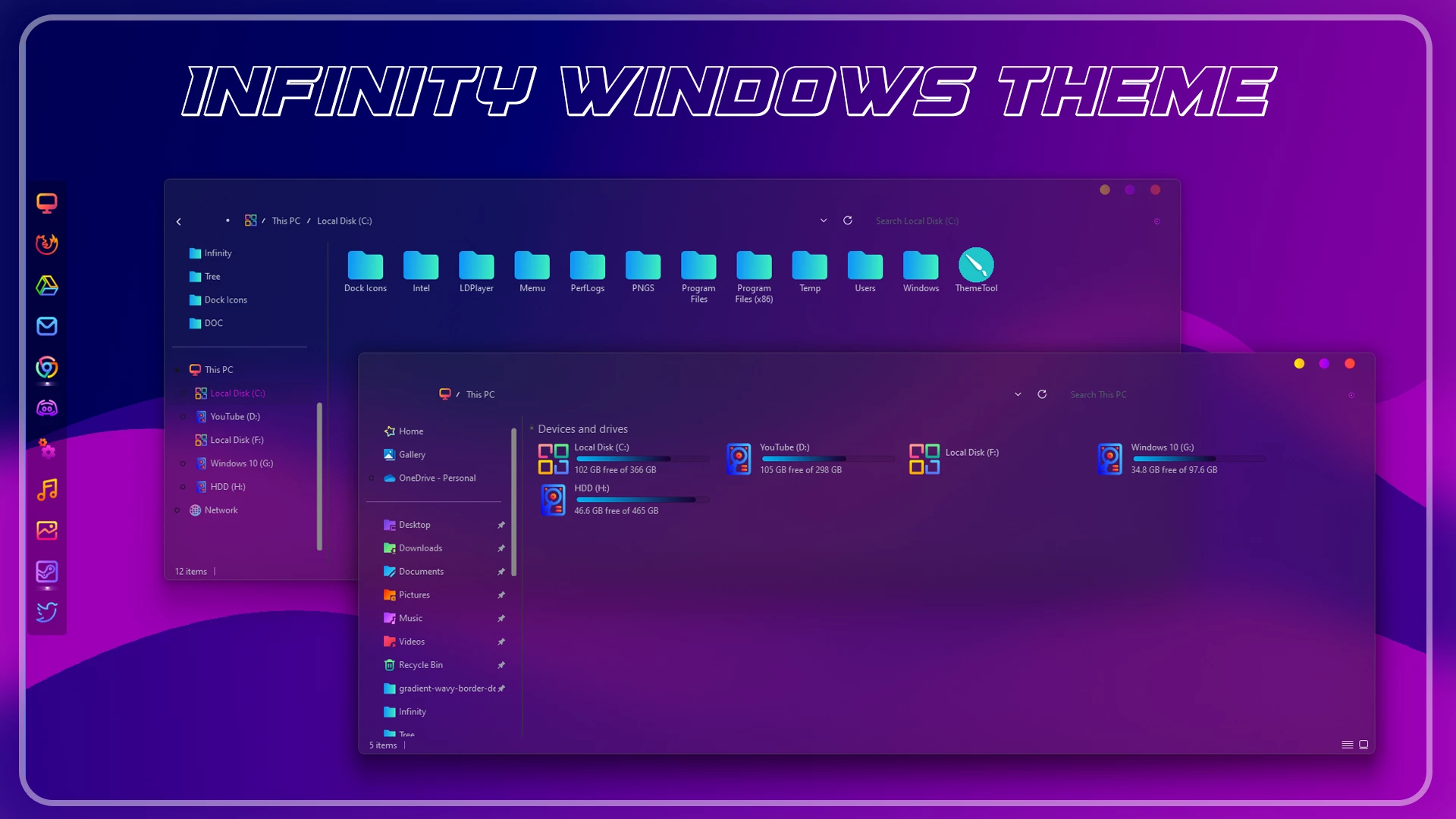
Infinity Windows 11 Theme: A Futuristic Purple Desktop Style
Infinity Windows 11 Theme is a custom Windows theme created for users who want to give Windows 11 a darker, more colorful, and futuristic appearance. It combines deep purple and blue tones with matching icons and custom visual details, making it a good fit for anyone who wants something more expressive than the standard Windows desktop.
The overall design uses a dark interface, purple and blue accents, modern icons, and subtle transparency to create a more distinctive setup. It keeps the familiar Windows 11 structure while changing selected visual elements, so the desktop feels customized without turning into a completely different operating system.
What Is Infinity Windows 11 Theme?
Infinity Windows 11 Theme is an independently created third-party custom theme made for Windows desktop personalization. It changes selected parts of the Windows 11 interface and gives the desktop a more futuristic visual style without replacing Windows or installing another operating system.
The setup focuses on dark backgrounds, purple and blue accents, matching icons, smooth interface details, and a cleaner overall appearance. It is aimed at users who enjoy colorful dark themes and want their desktop to feel more personal than the default Windows design.
The final appearance can vary depending on your Windows build, screen resolution, display scaling, wallpaper, and any other customization tools already installed.
Visual Highlights
- Dark purple and blue futuristic visual style for Windows 11
- Custom Windows theme that changes selected interface elements
- Matching 7TSP icon pack for supported folders and system icons
- Modern icon styling that fits the overall theme design
- Subtle transparency and smooth visual details
- Works well with dark or purple-toned wallpapers
- Made for users who enjoy colorful and personalized desktop setups
What You Can Customize
The main theme changes selected visual parts of Windows 11, while the included 7TSP icon pack can update compatible folder and system icons. Used together, they help create a more consistent Infinity-style desktop rather than a mix of unrelated visual changes.
You can apply the complete setup or use only the parts you prefer. For example, you can keep the default Windows theme and use only the icon pack if you want a smaller visual change.
Windows Version Support
Infinity Windows 11 Theme is made for Windows 11 customization. Support can vary depending on your Windows build and the tools used for themes and icons.
- Windows 11 21H2: Supported
- Windows 11 22H2: Supported
- Windows 11 23H2: Recommended
- Windows 11 24H2: Recommended
- Windows 11 25H2: Supported
Get Ready Before Setup
- Create a System Restore Point before making any changes.
- Keep a backup of your current theme and icon setup.
- Make sure your Theme Patcher supports your Windows build.
- Keep a default Windows theme available in case you need to switch back.
Apply the Theme
- Install the required Theme Patcher before applying the custom theme.
- Apply the theme and other customization parts one at a time.
- For help, follow this Windows 11 theme installation guide.
- You can also check the theme installation guide by niivu.
What’s Included?
- Windows 11 Custom Theme
- 7TSP Icon Pack
The custom theme changes selected interface elements, while the 7TSP pack adds matching icons to supported Windows locations. Together, they help create the complete Infinity desktop style.
Infinity Windows 11 Theme 12 MB
DownloadRemove Infinity Theme
- Switch Theme: Go to Settings > Personalization > Themes and select a default Windows theme.
- Restore Extra Changes: Restore the original icons with 7TSP if used, then remove any added wallpapers, files, or customization tools.
- Restart and Recover: Restart Explorer or your PC. If anything still looks changed, use your System Restore Point or follow this theme removal guide.
Who Should Use This Theme?
This setup is a good match for users who enjoy dark desktop themes but still want noticeable color. The purple and blue styling gives Windows 11 a more expressive look without changing the familiar way the operating system works.
- Windows customization enthusiasts
- Users who enjoy purple, blue, and dark desktop styles
- Gamers who prefer a futuristic-looking setup
- Creators who want a distinctive desktop for recordings or showcases
- Users who want more personality than the default Windows appearance
Wrapping Up
Infinity Windows 11 Theme is a good choice if you enjoy dark desktops with strong purple and blue accents. The custom visual style and matching icon pack give Windows 11 a more distinctive look while keeping the familiar Windows environment underneath.
You can use the full setup or keep only the parts that suit your desktop. Would you use the complete Infinity setup, or would you keep the default Windows theme and use only the matching icons?
Third-Party Theme Notice
This is an independently created third-party theme shared for Windows desktop customization only. It is not affiliated with, endorsed by, or officially connected to Microsoft or any third-party customization tool, developer, or project mentioned in this post.
Frequently Asked Questions
What is Infinity Windows 11 Theme?
Infinity Windows 11 Theme is a third-party desktop customization package that changes selected visual elements of Windows 11 with a futuristic purple design and matching icons.
Is Infinity Windows 11 Theme an official Microsoft theme?
No. It is an independent third-party customization package and is not created, supported, or endorsed by Microsoft.
Does this theme install a new version of Windows?
No. It does not install or upgrade Windows. It only changes supported visual elements of your existing Windows 11 system.
Do I need a theme patcher to install Infinity Theme?
Some third-party Windows themes require a compatible theme patcher. Make sure the tool supports your Windows build before applying the theme.
Are icons included with Infinity Windows 11 Theme?
Yes. This theme package includes a 7TSP icon pack to provide a matching appearance for supported Windows icons.
Can I use only the icon pack?
Yes. You can use individual components separately if they are compatible with your Windows version and required tools.
Will Infinity Theme work after Windows updates?
Compatibility may change after major Windows updates. Some theme files or customization tools may require updates or reinstallation.
How can I restore the default Windows appearance?
Switch back to the default Windows theme, restore original icons, remove additional customization files, or use your system restore point if necessary.
Is Infinity Windows 11 Theme safe to use?
The theme is intended for desktop customization. Use trusted files, scan downloads, create a restore point, and confirm tool compatibility before installation.



Disclaimer: All themes, visual styles, and concepts shared on this website are unofficial, fan-made creations built from imagination for customization purposes. We are not affiliated with, endorsed by, or sponsored by Microsoft or any other official brand.