

Minimal Quantum Start Menu Style
Windhawk Quantum Start Menu Style : Quantum Start Menu Style is a futuristic and highly customizable redesign of the traditional Windows 11 Start Menu

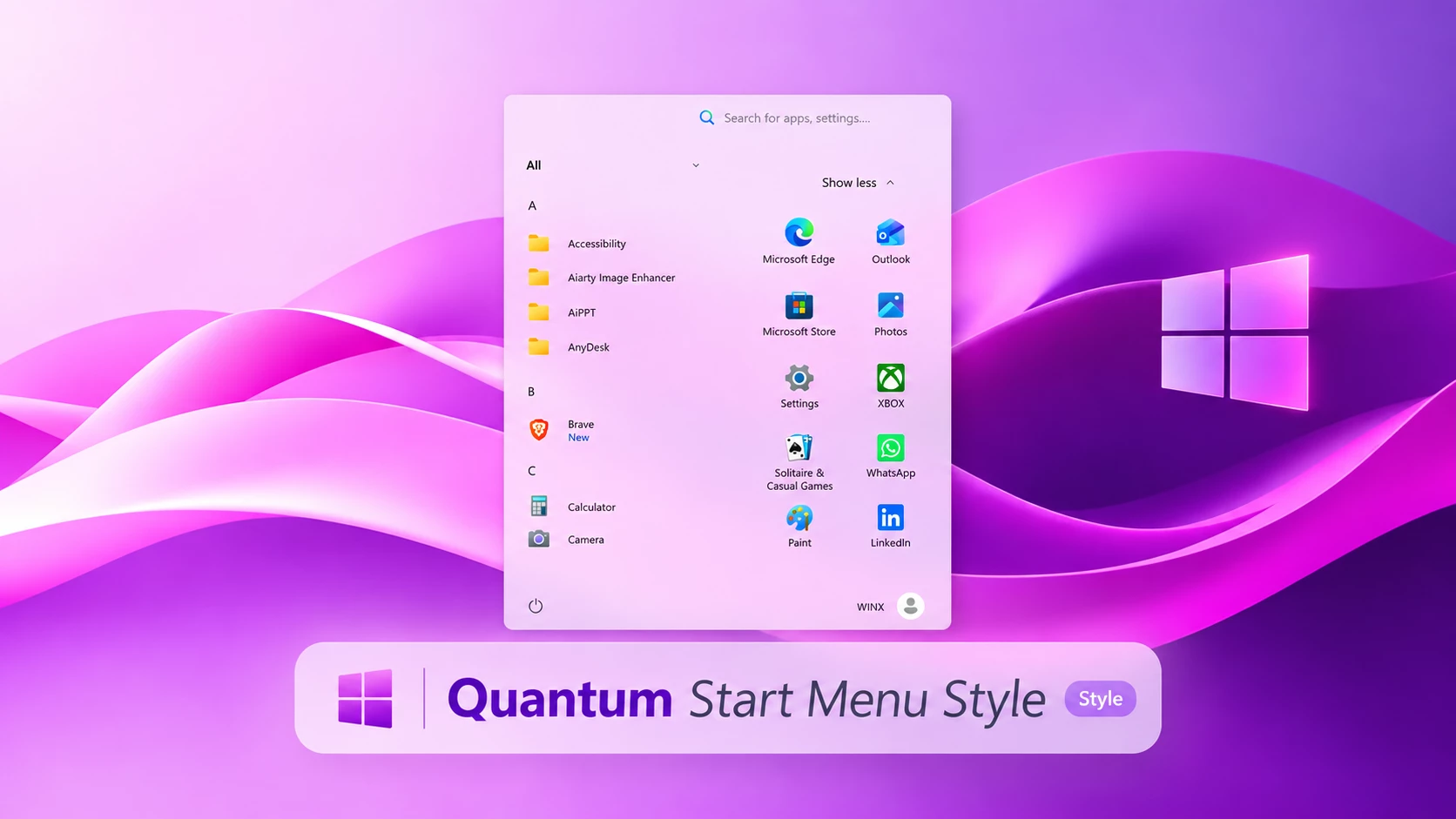
Quantum Start Menu Style for Windows 11
The Quantum Start Menu Style gives the Windows 11 Start Menu a fresh and organized appearance. Instead of the usual layout, it brings your applications together in a compact design with an alphabetical app list, neatly arranged shortcuts, and a soft, rounded background.
Created for the Windhawk Windows 11 Start Menu Styler mod, Quantum offers a different way to personalize your Start Menu without installing a separate launcher. The layout feels familiar enough for everyday use while giving your desktop a more distinctive look. One useful feature is its support for both Light and Dark themes. Whether you prefer a bright desktop or a darker Windows setup, you can use Quantum with your preferred Windows appearance.
A Different Look for Your Start Menu
Quantum uses a two-column arrangement that makes browsing and launching applications straightforward. The alphabetical app list sits on the left, while a selection of application shortcuts appears on the right.
A search bar at the top keeps Windows search within easy reach. The rounded corners, gentle background colors, and tidy spacing give the menu a softer appearance than the standard Windows 11 layout.It’s a nice option if you enjoy customizing Windows but still want a Start Menu that’s practical for everyday tasks.
Features of Quantum Start Menu Style
- Compact Layout: A neatly arranged Start Menu that keeps applications and shortcuts together.
- Alphabetical App List: Browse installed applications in an organized list on the left side.
- App Shortcut Section: Convenient access to application icons in a separate area.
- Light and Dark Theme Support: Works with both Windows 11 Light and Dark themes.
- Rounded Corners: Soft edges give the Start Menu a clean, modern appearance.
- Built-in Search: Keeps the search field accessible at the top of the menu.
- Balanced Spacing: A comfortable arrangement of app names, icons, and other menu elements.
- Windhawk Customization: Uses the Windows 11 Start Menu Styler mod to apply the visual changes.
Designed for Light and Dark Themes
You don’t have to use a particular Windows color mode to enjoy this style. Quantum Start Menu Style supports both Light and Dark themes, making it suitable for different desktop preferences.
The light appearance works nicely with soft-colored wallpapers and brighter desktop setups. If you prefer darker backgrounds, you can also use Quantum alongside your Windows Dark theme.
The exact colors and transparency may vary depending on your Windows personalization settings and the configuration you apply.
Installation Steps:
- Download and install Windhawk.
- Open Windhawk and install the Windows 11 Start Menu Styler mod.
- Open the Start Menu Styler settings.
- Back up your existing configuration before making changes.
- Copy the provided Quantum Start Menu configuration.
- Paste the configuration into the appropriate Mod Settings section.
- Save the settings to apply the style.
Compatibility
- Windows 11 21H2: Yes
- Windows 11 22H2: Yes
- Windows 11 23H2: Yes
- Windows 11 24H2: Yes
- Windows 11 25H2: Yes, but test carefully after Windows updates.
- Last Tested on Windows 11 25H2: Build 26200.9457
{ "theme": "", "controlStyles[0].target": "Grid#MainMenu", "controlStyles[0].styles[0]": "Width=500", "controlStyles[0].styles[1]": "MinWidth=500", "controlStyles[0].styles[2]": "MaxWidth=500", "controlStyles[1].target": "Grid#FrameRoot", "controlStyles[1].styles[0]": "Height=700", "controlStyles[1].styles[1]": "MaxHeight=700", "controlStyles[2].target": "Grid#SideBySidePinnedWrapper", "controlStyles[2].styles[0]": "ColumnDefinitions:=<ColumnDefinitionCollection><ColumnDefinition Width=\"250*\"/><ColumnDefinition Width=\"250*\"/></ColumnDefinitionCollection>", "controlStyles[3].target": "GridView#AllAppsGrid > Border > Grid#SideBySidePinnedWrapper > ScrollViewer#ScrollViewer", "controlStyles[3].styles[0]": "Grid.Column=0", "controlStyles[4].target": "ScrollViewer#SideBySidePinnedScrollViewer", "controlStyles[4].styles[0]": "Grid.Column=1", "controlStyles[4].styles[1]": "Margin=0", "controlStyles[5].target": "Grid#SideBySidePinnedWrapper > ScrollViewer > Border#Root > Grid > ScrollContentPresenter > ItemsPresenter > ItemsWrapGrid", "controlStyles[5].styles[0]": "Margin=18,0,18,14", "controlStyles[6].target": "Grid#AllListHeading", "controlStyles[6].styles[0]": "Margin=0,3,0,0", "controlStyles[7].target": "Grid#AllListHeading > TextBlock#AllListHeadingText", "controlStyles[7].styles[0]": "Margin=28,6,8,7", "controlStyles[8].target": "Grid#AllListHeading > Microsoft.UI.Xaml.Controls.DropDownButton#ViewSelectionButton", "controlStyles[8].styles[0]": "Margin=0,0,16,0", "controlStyles[8].styles[1]": "Width=28", "controlStyles[8].styles[2]": "Height=28", "controlStyles[9].target": "GridView#AllAppsGrid", "controlStyles[9].styles[0]": "Margin=0,0,0,64", "controlStyles[10].target": "StartMenu.PinnedList#StartMenuPinnedList", "controlStyles[10].styles[0]": "Width=240", "controlStyles[10].styles[1]": "MaxWidth=240", "controlStyles[10].styles[2]": "Height=510", "controlStyles[10].styles[3]": "MaxHeight=510", "controlStyles[10].styles[4]": "Margin=5,10,5,0", "controlStyles[11].target": "TextBlock#PinnedListHeaderText", "controlStyles[11].styles[0]": "Visibility=Collapsed", "controlStyles[11].styles[1]": "Height=0", "controlStyles[12].target": "Microsoft.UI.Xaml.Controls.PipsPager#PinnedListPipsPager", "controlStyles[12].styles[0]": "Visibility=Collapsed", "controlStyles[13].target": "Grid#TopLevelSuggestionsListHeader", "controlStyles[13].styles[0]": "Visibility=Collapsed", "controlStyles[13].styles[1]": "Height=0", "controlStyles[14].target": "Grid#TopLevelSuggestionsRoot", "controlStyles[14].styles[0]": "Visibility=Collapsed", "controlStyles[14].styles[1]": "Height=0", "controlStyles[14].styles[2]": "MaxHeight=0", "controlStyles[15].target": "Grid#TopLevelSuggestionsContainer", "controlStyles[15].styles[0]": "Visibility=Collapsed", "controlStyles[15].styles[1]": "Height=0", "controlStyles[16].target": "GridView#RecommendedList", "controlStyles[16].styles[0]": "Visibility=Collapsed", "controlStyles[16].styles[1]": "Height=0", "controlStyles[17].target": "Grid#ShowMoreSuggestions", "controlStyles[17].styles[0]": "Visibility=Collapsed", "controlStyles[17].styles[1]": "Height=0", "controlStyles[18].target": "Grid#MoreSuggestionsRoot", "controlStyles[18].styles[0]": "Visibility=Collapsed", "controlStyles[18].styles[1]": "Height=0", "controlStyles[19].target": "StartMenu.SearchBoxToggleButton#SearchBoxToggleButton", "controlStyles[19].styles[0]": "Height=38", "controlStyles[19].styles[1]": "Width=230", "controlStyles[19].styles[2]": "HorizontalAlignment=Right", "controlStyles[19].styles[3]": "Margin=0,0,18,14", "controlStyles[19].styles[4]": "Canvas.ZIndex=10", "controlStyles[20].target": "StartMenu.SearchBoxToggleButton#SearchBoxToggleButton > Grid@CommonStates > Border#BorderElement", "controlStyles[20].styles[0]": "Background:=<SolidColorBrush Color=\"#11FFFFFF\"/>", "controlStyles[20].styles[1]": "BorderBrush:=<RevealBorderBrush Color=\"Transparent\" TargetTheme=\"1\" Opacity=\".55\"/>", "controlStyles[20].styles[2]": "BorderThickness=1", "controlStyles[20].styles[3]": "CornerRadius=20", "controlStyles[21].target": "Border#AcrylicBorder", "controlStyles[21].styles[0]": "Background:=<AcrylicBrush TintColor=\"{ThemeResource CardStrokeColorDefaultSolid}\" FallbackColor=\"{ThemeResource CardStrokeColorDefaultSolid}\" TintOpacity=\"0\" TintLuminosityOpacity=\".80\" Opacity=\"1\"/>", "controlStyles[21].styles[1]": "BorderBrush:=<RevealBorderBrush Color=\"Transparent\" TargetTheme=\"1\" Opacity=\".55\"/>", "controlStyles[21].styles[2]": "BorderThickness=1", "controlStyles[21].styles[3]": "CornerRadius=10", "controlStyles[21].styles[4]": "Margin=0", "controlStyles[22].target": "Border#AcrylicOverlay", "controlStyles[22].styles[0]": "Visibility=Collapsed", "controlStyles[23].target": "Border#DropShadow", "controlStyles[23].styles[0]": "CornerRadius=15", "controlStyles[23].styles[1]": "Margin=0", "controlStyles[24].target": "Border#StartDropShadow", "controlStyles[24].styles[0]": "CornerRadius=15", "controlStyles[25].target": "StartMenu.PinnedList#StartMenuPinnedList Border#ContentBorder@CommonStates > Grid#DroppedFlickerWorkaroundWrapper > Border", "controlStyles[25].styles[0]": "Background@Normal:=<RevealBorderBrush Color=\"Transparent\" TargetTheme=\"1\" Opacity=\".12\"/>", "controlStyles[25].styles[1]": "Background@PointerOver:=<RevealBorderBrush Color=\"Transparent\" TargetTheme=\"1\" Opacity=\".30\"/>", "controlStyles[25].styles[2]": "BorderBrush@PointerOver:=<RevealBorderBrush Color=\"White\" TargetTheme=\"1\" Opacity=\".55\"/>", "controlStyles[25].styles[3]": "BorderThickness=1", "controlStyles[25].styles[4]": "CornerRadius=10", "controlStyles[25].styles[5]": "Margin=1", "controlStyles[26].target": "StartMenu.PinnedList#StartMenuPinnedList Border#ContentBorder@CommonStates > Grid#DroppedFlickerWorkaroundWrapper > Border#BackgroundBorder", "controlStyles[26].styles[0]": "Background@Normal:=<RevealBorderBrush Color=\"Transparent\" TargetTheme=\"0\" Opacity=\".10\"/>", "controlStyles[26].styles[1]": "Background@PointerOver:=<RevealBorderBrush Color=\"Transparent\" TargetTheme=\"1\" Opacity=\".25\"/>", "controlStyles[26].styles[2]": "Margin=2", "controlStyles[26].styles[3]": "CornerRadius=9", "controlStyles[27].target": "Grid#NavPanePlaceholder", "controlStyles[27].styles[0]": "Margin=18,0,18,0", "controlStyles[28].target": "StartDocked.NavigationPaneView#UserControl > Grid#RootPanel", "controlStyles[28].styles[0]": "FlowDirection=1", "controlStyles[29].target": "StartDocked.PowerOptionsView#PowerButton", "controlStyles[29].styles[0]": "FlowDirection=0", "controlStyles[30].target": "ItemsStackPanel > ListViewItem", "controlStyles[30].styles[0]": "FlowDirection=0", "controlStyles[31].target": "StartDocked.AppListView#NavigationPanePlacesListView > Border", "controlStyles[31].styles[0]": "Background:=<RevealBorderBrush Color=\"Transparent\" TargetTheme=\"1\" Opacity=\".18\"/>", "controlStyles[31].styles[1]": "BorderBrush:=<RevealBorderBrush Color=\"Transparent\" TargetTheme=\"1\" Opacity=\".40\"/>", "controlStyles[31].styles[2]": "BorderThickness=1", "controlStyles[31].styles[3]": "CornerRadius=10", "controlStyles[32].target": "StartDocked.AppListViewItem > Grid@CommonStates > Border", "controlStyles[32].styles[0]": "Background@Normal:=<RevealBorderBrush Color=\"Transparent\" TargetTheme=\"1\" Opacity=\".12\"/>", "controlStyles[32].styles[1]": "Background@PointerOver:=<RevealBorderBrush Color=\"Transparent\" TargetTheme=\"1\" Opacity=\".30\"/>", "controlStyles[32].styles[2]": "BorderBrush@PointerOver:=<RevealBorderBrush Color=\"Transparent\" TargetTheme=\"1\" Opacity=\".65\"/>", "controlStyles[32].styles[3]": "BorderThickness=1", "controlStyles[32].styles[4]": "CornerRadius=10", "controlStyles[33].target": "StartDocked.NavigationPaneButton#PowerButton > Grid@CommonStates > Border", "controlStyles[33].styles[0]": "Background@Normal:=<RevealBorderBrush Color=\"Transparent\" TargetTheme=\"1\" Opacity=\".18\"/>", "controlStyles[33].styles[1]": "Background@PointerOver:=<RevealBorderBrush Color=\"Transparent\" TargetTheme=\"1\" Opacity=\".35\"/>", "controlStyles[33].styles[2]": "BorderBrush@PointerOver:=<RevealBorderBrush Color=\"White\" TargetTheme=\"1\" Opacity=\".55\"/>", "controlStyles[33].styles[3]": "BorderThickness=1", "controlStyles[33].styles[4]": "CornerRadius=20", "controlStyles[34].target": "StartDocked.UserTileView", "controlStyles[34].styles[0]": "Height=42", "controlStyles[35].target": "StartDocked.NavigationPaneButton#UserTileButton > Grid@CommonStates > Border", "controlStyles[35].styles[0]": "Background@Normal:=<RevealBorderBrush Color=\"Transparent\" TargetTheme=\"1\" Opacity=\".15\"/>", "controlStyles[35].styles[1]": "Background@PointerOver:=<RevealBorderBrush Color=\"Transparent\" TargetTheme=\"1\" Opacity=\".30\"/>", "controlStyles[35].styles[2]": "CornerRadius=20", "controlStyles[36].target": "MenuFlyoutPresenter > Border", "controlStyles[36].styles[0]": "BorderBrush:=<RevealBorderBrush Color=\"Transparent\" TargetTheme=\"1\" Opacity=\".75\"/>", "controlStyles[36].styles[1]": "BorderThickness=1", "controlStyles[36].styles[2]": "CornerRadius=10", "controlStyles[37].target": "Windows.UI.Xaml.Controls.Primitives.ToggleButton#ShowHideCompanion", "controlStyles[37].styles[0]": "Visibility=Collapsed", "controlStyles[38].target": "Grid#CompanionRoot", "controlStyles[38].styles[0]": "Visibility=Collapsed", "disableNewStartMenuLayout": "newLayoutSideBySide"}How to Remove Quantum Start Menu Style
If you decide to return to the original Windows 11 Start Menu, open Windhawk and disable the Windows 11 Start Menu Styler mod.
You can also restore your previous configuration if you want to keep using the mod with another style. If you no longer need Windhawk, you can uninstall it through Windows Settings.
Frequently Asked Questions
Does Quantum Start Menu Style support Dark Mode?
Yes. Quantum Start Menu Style supports both Light and Dark themes in Windows 11.
Do I need Windhawk to use this style?
Yes. The style is applied through the Windows 11 Start Menu Styler mod in Windhawk.
Will this replace the original Windows 11 Start Menu?
No separate Start Menu launcher is installed. The Windhawk mod changes the appearance of the existing Windows 11 Start Menu.
Can I return to the default Start Menu?
Yes. Disable the Start Menu Styler mod in Windhawk to remove the applied customization.
Final Words
Quantum Start Menu Style is a good choice if you want something different from the standard Windows 11 Start Menu without moving away from familiar Windows features.
Its compact app list, convenient shortcuts, rounded layout, and support for both Light and Dark themes make it a flexible option for everyday desktop customization. Try it with your favorite wallpaper and taskbar style to create a setup that suits your preferences.
Disclaimer
Quantum Start Menu Style is a third-party Windows customization resource and is not affiliated with or endorsed by Microsoft. Windhawk and its mods are maintained by their respective developers.
Windows updates or other customization tools may affect how the style works. Always keep a backup of your existing settings and download software from trusted sources.
You may also like


Disclaimer: All themes, visual styles, and concepts shared on this website are unofficial, fan-made creations built from imagination for customization purposes. We are not affiliated with, endorsed by, or sponsored by Microsoft or any other official brand.