

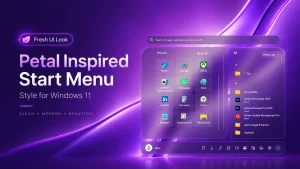
Petal Inspired Start Menu Style for Windows 11
Petal Inspired Start Menu Style for Windows 11 : Bring a fresh and elegant look to your Windows 11 desktop with the Petal Inspired Start Menu Style. Designed with a clean, modern, and aesthetic approach, this customization gives your Start Menu a soft and stylish appearance inspired by the natural flow of petals. It blends beautifully with modern wallpapers and glass-style interfaces while keeping the familiar Windows 11 experience.

Petal Inspired Start Menu Style for Windows 11
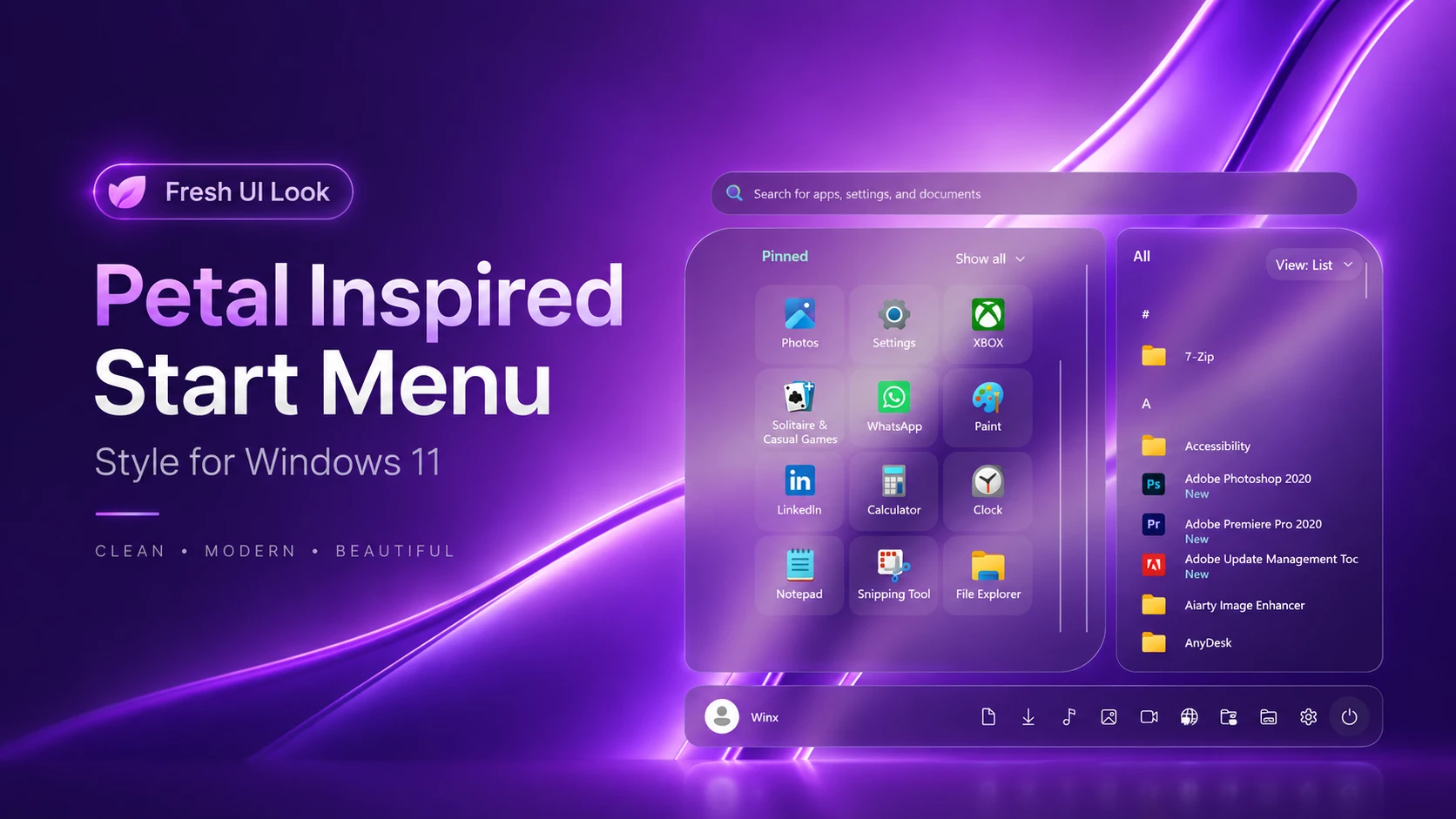
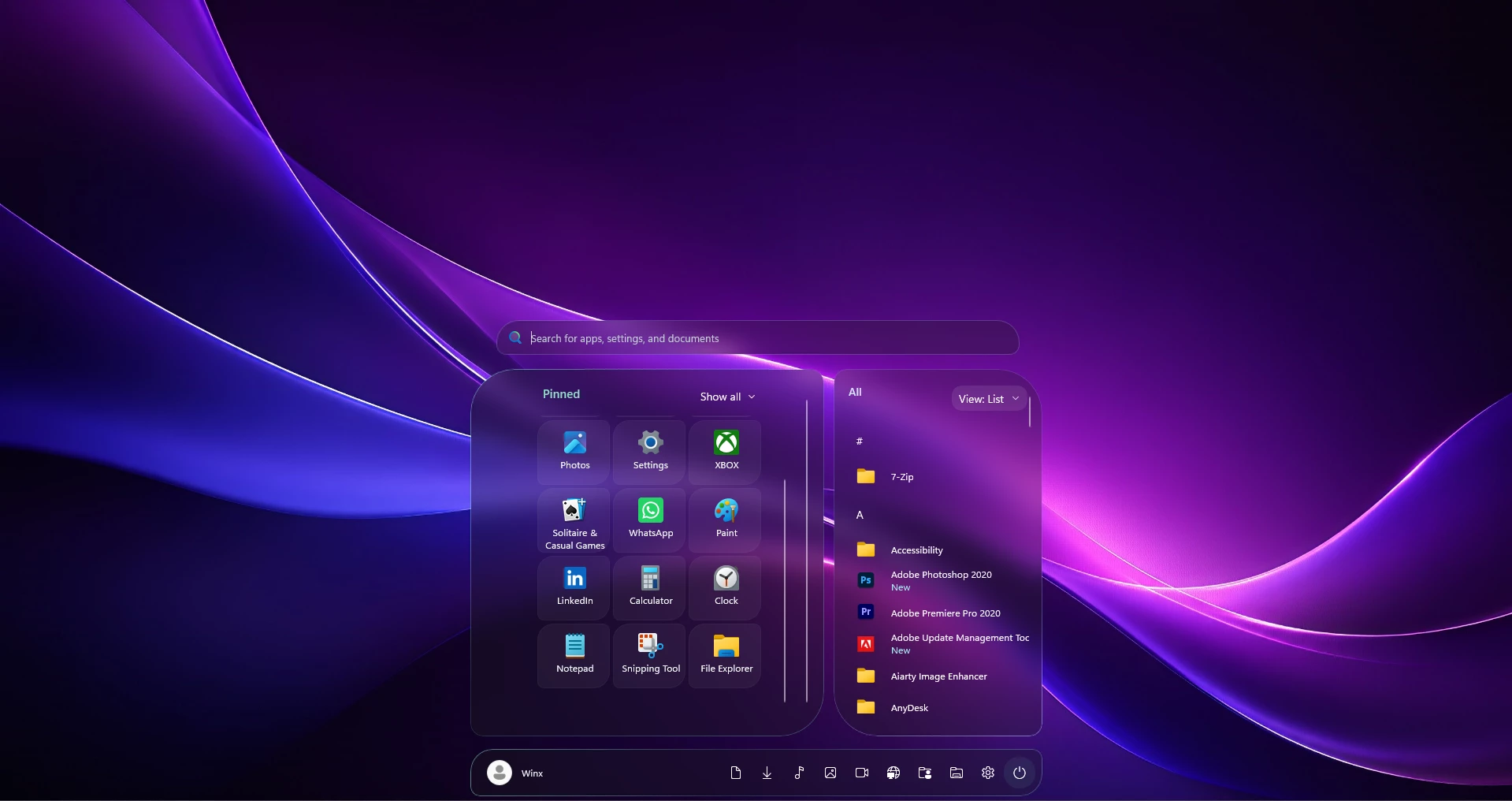
The Petal Inspired Start Menu Style is a custom Windows 11 Start Menu customization created with Windhawk. It adds a clean translucent appearance, smooth rounded corners, and a more organized layout while keeping the familiar Windows experience.
This customization separates pinned applications and the full app list into different sections, making the Start Menu look cleaner and easier to use. The design is inspired by soft petal-like shapes, giving Windows 11 a fresh modern appearance without changing the core system functionality.
In this tutorial, I will show you how to install and configure this Start Menu style on Windows 11 using Windhawk. I will also explain how to restore the default Start Menu if you want to remove the customization later.
A Closer Look at the Petal Design
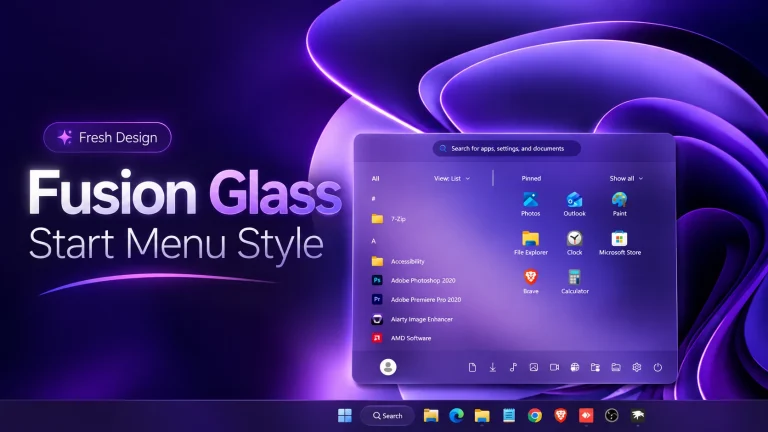
The main visual identity of this customization comes from its unique curved corners. Larger curves are used on the main panels, while smaller rounded edges are applied to individual tiles and buttons. This creates a balanced petal-inspired appearance that feels modern and minimal.
The main panels combine background blur with a light system-theme tint. Wallpaper colors remain visible through the translucent surfaces, helping the menu blend naturally with your desktop.
Mint-green highlights define the pinned section and its tile interactions, while soft blue gradient borders and highlights distinguish the app-list panel. Light text and muted search text complement the dark interface styling.
Pinned apps sit together in a centered tile grid, with the full app list alongside them. Both sections have vertical scrolling enabled. The separate search bar and bottom navigation bar use the same blurred glass treatment to connect the layout visually.
Features
- Petal-inspired corners: Curved panel edges give the menu its distinctive shape.
- Translucent backgrounds: A soft glass appearance connects the menu visually with the wallpaper.
- Separate search bar: A rounded search field sits above the app panels.
- Three-column pinned layout: Individual tiles keep app icons and labels grouped together.
- Side-by-side app sections: Pinned apps and the alphabetical list appear in separate panels.
- Bottom shortcut bar: Profile controls, shortcut icons, and the power button sit beneath the main layout.
System Requirements and Compatibility
- A Windows 11 computer with a Start Menu layout supported by the preset.
- Windhawk and the Windows 11 Start Menu Styler mod.
- The Petal Inspired configuration and any instructions supplied with it.
- Permission to install and use customization software on the computer.
Compatibility
- Windows 11 21H2: Not Tested
- Windows 11 22H2: Not Tested
- Windows 11 23H2: Not Tested
- Windows 11 24H2: Yes
- Windows 11 25H2: Yes, but test carefully after Windows updates.
Check the current compatibility notes on the Windows 11 Start Menu Styler page before installing. Compatibility can vary with your Windows build, screen resolution, and display scaling.
Before You Apply the Style
Create a system restore point first. Search Windows for Create a restore point, open it, and check that protection is enabled for your system drive. If needed, enable it through Configure. Select Create and give the restore point a name you will recognize.
Microsoft explains these steps in its System Protection guide. Keep a separate backup of important files and copy your existing Windhawk settings into a text file before replacing them.
How to Install
Note: This is a JSON format configuration code. Do not paste it into Textual Mode. Use the Advanced tab and paste it into the Mod settings box.
- Download and install Windhawk.
- Open Windhawk and install the Windows 11 Start Menu Styler mod.
- Copy the JSON code from the box below and go to the Advanced tab.
- Paste the JSON configuration code into the Mod settings box.
- Click Save to apply the style.
- For more details, visit this GitHub guide.
- For the taskbar style, check Taskbar Styler.
{ "theme": "Petal By Link Vegas", "disableNewStartMenuLayout": "newLayoutSideBySide", "styleConstants[0]": "MenuWidth=760", "styleConstants[1]": "MenuHeight=620", "styleConstants[2]": "SearchWidth=664", "styleConstants[3]": "TileWidth=92", "styleConstants[4]": "TileHeight=82", "styleConstants[5]": "LeftRadius=56,16,56,16", "styleConstants[6]": "RightRadius=16,56,16,56", "styleConstants[7]": "TileRadius=20,8,20,8", "styleConstants[8]": "PinnedGlass=<WindhawkBlur BlurAmount=\"15\" TintColor=\"{ThemeResource SystemChromeMediumColor}\" TintOpacity=\"0.3\" />", "styleConstants[9]": "AppsGlass=<WindhawkBlur BlurAmount=\"15\" TintColor=\"{ThemeResource SystemChromeMediumColor}\" TintOpacity=\"0.3\" />", "styleConstants[10]": "BarGlass=<WindhawkBlur BlurAmount=\"15\" TintColor=\"{ThemeResource SystemChromeMediumColor}\" TintOpacity=\"0.3\" />", "styleConstants[11]": "PinnedEdge=<LinearGradientBrush StartPoint=\"0,0\" EndPoint=\"1,1\"><GradientStop Color=\"#997DDAC1\" Offset=\"0\"/><GradientStop Color=\"#307DDAC1\" Offset=\"0.45\"/><GradientStop Color=\"#557DDAC1\" Offset=\"1\"/></LinearGradientBrush>", "styleConstants[12]": "AppsEdge=<LinearGradientBrush StartPoint=\"0,0\" EndPoint=\"1,1\"><GradientStop Color=\"#557D91C7\" Offset=\"0\"/><GradientStop Color=\"#307D91C7\" Offset=\"0.5\"/><GradientStop Color=\"#AA9EADE4\" Offset=\"1\"/></LinearGradientBrush>", "styleConstants[13]": "BarEdge=#557E9DAB", "styleConstants[14]": "Text=#FFF2F8F7", "styleConstants[15]": "MutedText=#FFBED0CE", "styleConstants[16]": "Accent=#FF8DE2C4", "styleConstants[17]": "TileNormal=#0DFFFFFF", "styleConstants[18]": "TileHover=#3055C5A7", "styleConstants[19]": "TilePressed=#484AA68E", "styleConstants[20]": "PinnedViewportHeight=380", "controlStyles[0].target": "StartMenu.StartBlendedFlexFrame", "controlStyles[0].styles[0]": "RequestedTheme=Dark", "controlStyles[1].target": "Grid#FrameRoot", "controlStyles[1].styles[0]": "Height=$MenuHeight", "controlStyles[1].styles[1]": "MinHeight=0", "controlStyles[1].styles[2]": "MaxHeight=$MenuHeight", "controlStyles[1].styles[3]": "Margin=0", "controlStyles[1].styles[4]": "Padding=0", "controlStyles[2].target": "Grid#MainMenu", "controlStyles[2].styles[0]": "Width=$MenuWidth", "controlStyles[2].styles[1]": "MinWidth=$MenuWidth", "controlStyles[2].styles[2]": "MaxWidth=$MenuWidth", "controlStyles[2].styles[3]": "Height=$MenuHeight", "controlStyles[2].styles[4]": "MinHeight=0", "controlStyles[2].styles[5]": "MaxHeight=$MenuHeight", "controlStyles[2].styles[6]": "Background=Transparent", "controlStyles[2].styles[7]": "RequestedTheme=Dark", "controlStyles[3].target": "Grid#MainMenu > Border#AcrylicBorder", "controlStyles[3].styles[0]": "Background=Transparent", "controlStyles[3].styles[1]": "BorderBrush=Transparent", "controlStyles[3].styles[2]": "BorderThickness=0", "controlStyles[4].target": "Grid#MainMenu > Grid#MainContent", "controlStyles[4].styles[0]": "Background=Transparent", "controlStyles[5].target": "Grid#MainMenu > Border#AcrylicOverlay, Grid#MainMenu > Grid#MainContent > Border#AcrylicOverlay", "controlStyles[5].styles[0]": "Background=Transparent", "controlStyles[5].styles[1]": "BorderBrush=Transparent", "controlStyles[5].styles[2]": "BorderThickness=0", "controlStyles[6].target": "Border#StartDropShadow, Border#RootGridDropShadow", "controlStyles[6].styles[0]": "Visibility=Collapsed", "controlStyles[7].target": "StartMenu.StartHome > Grid#PageRoot", "controlStyles[7].styles[0]": "Background=Transparent", "controlStyles[7].styles[1]": "MinHeight=0", "controlStyles[8].target": "StartMenu.SearchBoxToggleButton#SearchBoxToggleButton", "controlStyles[8].styles[0]": "Width=Auto", "controlStyles[8].styles[1]": "Height=44", "controlStyles[8].styles[2]": "MinHeight=44", "controlStyles[8].styles[3]": "HorizontalAlignment=Stretch", "controlStyles[8].styles[4]": "Margin=16,8,16,8", "controlStyles[8].styles[5]": "MinWidth=0", "controlStyles[8].styles[6]": "MaxWidth=$SearchWidth", "controlStyles[9].target": "StartMenu.SearchBoxToggleButton#SearchBoxToggleButton > Grid@CommonStates > Border#BorderElement", "controlStyles[9].styles[0]": "Background:=$BarGlass", "controlStyles[9].styles[1]": "Background@Normal:=$BarGlass", "controlStyles[9].styles[2]": "Background@PointerOver:=$BarGlass", "controlStyles[9].styles[3]": "Background@Pressed:=$BarGlass", "controlStyles[9].styles[4]": "Background@Checked:=$BarGlass", "controlStyles[9].styles[5]": "Background@CheckedPointerOver:=$BarGlass", "controlStyles[9].styles[6]": "Background@CheckedPressed:=$BarGlass", "controlStyles[9].styles[7]": "BorderBrush=$BarEdge", "controlStyles[9].styles[8]": "BorderBrush@PointerOver=$Accent", "controlStyles[9].styles[9]": "BorderBrush@Pressed=$Accent", "controlStyles[9].styles[10]": "BorderThickness=1", "controlStyles[9].styles[11]": "CornerRadius=28,28,12,12", "controlStyles[10].target": "StartMenu.SearchBoxToggleButton#SearchBoxToggleButton > Grid > ContentPresenter > TextBlock#PlaceholderText", "controlStyles[10].styles[0]": "Foreground=$MutedText", "controlStyles[10].styles[1]": "FontSize=13", "controlStyles[11].target": "Grid#SideBySidePinnedWrapper", "controlStyles[11].styles[0]": "ColumnDefinitions:=<ColumnDefinitionCollection><ColumnDefinition Width=\"456*\"/><ColumnDefinition Width=\"272*\"/></ColumnDefinitionCollection>", "controlStyles[11].styles[1]": "Margin=16,8,16,0", "controlStyles[11].styles[2]": "Background=Transparent", "controlStyles[12].target": "ScrollViewer#SideBySidePinnedScrollViewer", "controlStyles[12].styles[0]": "Grid.Column=0", "controlStyles[12].styles[1]": "Margin=0,0,6,16", "controlStyles[12].styles[2]": "HorizontalScrollMode=Disabled", "controlStyles[12].styles[3]": "HorizontalScrollBarVisibility=Disabled", "controlStyles[12].styles[4]": "VerticalScrollMode=Enabled", "controlStyles[12].styles[5]": "VerticalScrollBarVisibility=Auto", "controlStyles[13].target": "ScrollViewer#SideBySidePinnedScrollViewer > Border#Root", "controlStyles[13].styles[0]": "Background:=$PinnedGlass", "controlStyles[13].styles[1]": "BorderBrush:=$PinnedEdge", "controlStyles[13].styles[2]": "BorderThickness=1", "controlStyles[13].styles[3]": "CornerRadius=$LeftRadius", "controlStyles[13].styles[4]": "Padding=16,18,16,26", "controlStyles[14].target": "GridView#AllAppsGrid > Border > Grid#SideBySidePinnedWrapper > ScrollViewer#ScrollViewer", "controlStyles[14].styles[0]": "Grid.Column=1", "controlStyles[14].styles[1]": "Margin=6,0,0,16", "controlStyles[14].styles[2]": "HorizontalScrollMode=Disabled", "controlStyles[14].styles[3]": "HorizontalScrollBarVisibility=Disabled", "controlStyles[14].styles[4]": "VerticalScrollMode=Enabled", "controlStyles[14].styles[5]": "VerticalScrollBarVisibility=Auto", "controlStyles[15].target": "GridView#AllAppsGrid > Border > Grid#SideBySidePinnedWrapper > ScrollViewer#ScrollViewer > Border#Root", "controlStyles[15].styles[0]": "Background:=$AppsGlass", "controlStyles[15].styles[1]": "BorderBrush:=$AppsEdge", "controlStyles[15].styles[2]": "BorderThickness=1", "controlStyles[15].styles[3]": "CornerRadius=$RightRadius", "controlStyles[15].styles[4]": "Padding=10,18,10,28", "controlStyles[16].target": "Grid#SideBySidePinnedContent", "controlStyles[16].styles[0]": "Margin=0", "controlStyles[16].styles[1]": "Background=Transparent", "controlStyles[17].target": "Grid#PinnedListHeaderGrid", "controlStyles[17].styles[0]": "Margin=12,0,12,4", "controlStyles[18].target": "TextBlock#PinnedListHeaderText", "controlStyles[18].styles[0]": "Foreground=$Accent", "controlStyles[18].styles[1]": "FontSize=15", "controlStyles[18].styles[2]": "FontWeight=SemiBold", "controlStyles[19].target": "Grid#ShowMorePinnedGrid", "controlStyles[19].styles[0]": "Margin=8,4,8,8", "controlStyles[20].target": "StartMenu.PinnedList#StartMenuPinnedList", "controlStyles[20].styles[0]": "Margin=0", "controlStyles[20].styles[1]": "Padding=0", "controlStyles[20].styles[2]": "Height=$PinnedViewportHeight", "controlStyles[20].styles[3]": "MinHeight=0", "controlStyles[20].styles[4]": "MaxHeight=$PinnedViewportHeight", "controlStyles[20].styles[5]": "VerticalAlignment=Top", "controlStyles[21].target": "GridView#PinnedList", "controlStyles[21].styles[0]": "Margin=0", "controlStyles[21].styles[1]": "Padding=0,0,0,16", "controlStyles[21].styles[2]": "Height=$PinnedViewportHeight", "controlStyles[21].styles[3]": "MinHeight=0", "controlStyles[21].styles[4]": "MaxHeight=$PinnedViewportHeight", "controlStyles[21].styles[5]": "VerticalAlignment=Top", "controlStyles[22].target": "GridView#PinnedList > Border > ScrollViewer > Border > Grid > ScrollContentPresenter > ItemsPresenter > ItemsWrapGrid", "controlStyles[22].styles[0]": "MaximumRowsOrColumns=4", "controlStyles[22].styles[1]": "HorizontalAlignment=Center", "controlStyles[22].styles[2]": "Margin=0,4,0,16", "controlStyles[23].target": "GridView#PinnedList > Border > ScrollViewer > Border > Grid > ScrollContentPresenter > ItemsPresenter > ItemsWrapGrid > GridViewItem", "controlStyles[23].styles[0]": "Width=$TileWidth", "controlStyles[23].styles[1]": "MinWidth=$TileWidth", "controlStyles[23].styles[2]": "MaxWidth=$TileWidth", "controlStyles[23].styles[3]": "Height=$TileHeight", "controlStyles[23].styles[4]": "Margin=2", "controlStyles[24].target": "GridView#PinnedList > * > Border#ContentBorder@CommonStates > Grid#DroppedFlickerWorkaroundWrapper > Border#BackgroundBorder", "controlStyles[24].styles[0]": "Background=$TileNormal", "controlStyles[24].styles[1]": "Background@Normal=$TileNormal", "controlStyles[24].styles[2]": "Background@PointerOver=$TileHover", "controlStyles[24].styles[3]": "Background@Pressed=$TilePressed", "controlStyles[24].styles[4]": "Background@Selected=$TileHover", "controlStyles[24].styles[5]": "BorderBrush=#18C8EEE2", "controlStyles[24].styles[6]": "BorderBrush@PointerOver=#AA8DE2C4", "controlStyles[24].styles[7]": "BorderBrush@Pressed=$Accent", "controlStyles[24].styles[8]": "BorderThickness=1", "controlStyles[24].styles[9]": "CornerRadius=$TileRadius", "controlStyles[24].styles[10]": "BackgroundTransition:=<BrushTransition Duration=\"0:0:0.12\" />", "controlStyles[25].target": "GridView#PinnedList > * > TextBlock#Text, StartMenu.PinnedListTile > * > TextBlock#DisplayName", "controlStyles[25].styles[0]": "Foreground=$Text", "controlStyles[25].styles[1]": "FontSize=12", "controlStyles[26].target": "Grid#AllListHeading", "controlStyles[26].styles[0]": "Margin=8,0,8,8", "controlStyles[26].styles[1]": "MinHeight=36", "controlStyles[27].target": "Grid#AllListHeading > TextBlock#AllListHeadingText", "controlStyles[27].styles[0]": "Foreground=#FFD5DEFF", "controlStyles[27].styles[1]": "FontSize=14", "controlStyles[27].styles[2]": "FontWeight=SemiBold", "controlStyles[27].styles[3]": "Margin=0,0,4,0", "controlStyles[28].target": "Grid#AllListHeading > Microsoft.UI.Xaml.Controls.DropDownButton#ViewSelectionButton", "controlStyles[28].styles[0]": "Margin=0", "controlStyles[28].styles[1]": "Height=32", "controlStyles[28].styles[2]": "MinWidth=0", "controlStyles[28].styles[3]": "Padding=8,0,8,0", "controlStyles[29].target": "Grid#AllListHeading > Microsoft.UI.Xaml.Controls.DropDownButton#ViewSelectionButton > Grid@CommonStates", "controlStyles[29].styles[0]": "CornerRadius=12", "controlStyles[29].styles[1]": "Background=#18FFFFFF", "controlStyles[29].styles[2]": "Background@PointerOver=#30B5BFE9", "controlStyles[29].styles[3]": "Background@Pressed=#489AABD8", "controlStyles[30].target": "Grid#SideBySidePinnedWrapper > ScrollViewer#ScrollViewer > Border#Root > Grid > ScrollContentPresenter > ItemsPresenter > ItemsWrapGrid", "controlStyles[30].styles[0]": "MaximumRowsOrColumns=1", "controlStyles[30].styles[1]": "Margin=6,0,6,8", "controlStyles[31].target": "Grid#SideBySidePinnedWrapper > ScrollViewer#ScrollViewer > * > TextBlock#AppDisplayName", "controlStyles[31].styles[0]": "Foreground=$Text", "controlStyles[32].target": "Grid#SideBySidePinnedWrapper > ScrollViewer#ScrollViewer > * > Border#ContentBorder@CommonStates > Grid > Border#BackgroundBorder", "controlStyles[32].styles[0]": "CornerRadius=12", "controlStyles[32].styles[1]": "Background@PointerOver=#287B8FC7", "controlStyles[32].styles[2]": "Background@Pressed=#408396BF", "controlStyles[32].styles[3]": "BorderThickness=1", "controlStyles[32].styles[4]": "BorderBrush@PointerOver=#808FA7E2", "controlStyles[32].styles[5]": "BorderBrush@Pressed=#A0AABEEF", "controlStyles[33].target": "Grid#TopLevelSuggestionsRoot", "controlStyles[33].styles[0]": "Visibility=Collapsed", "controlStyles[34].target": "Grid#NavPanePlaceholder", "controlStyles[34].styles[0]": "Margin=0", "controlStyles[34].styles[1]": "Padding=0", "controlStyles[34].styles[2]": "Height=80", "controlStyles[34].styles[3]": "MinHeight=80", "controlStyles[34].styles[4]": "MaxHeight=80", "controlStyles[34].styles[5]": "Background=Transparent", "controlStyles[34].styles[6]": "BorderBrush=Transparent", "controlStyles[34].styles[7]": "BorderThickness=0", "controlStyles[34].styles[8]": "CornerRadius=0", "controlStyles[35].target": "StartDocked.NavigationPaneView > Grid#RootPanel", "controlStyles[35].styles[0]": "Background:=$BarGlass", "controlStyles[35].styles[1]": "Margin=16,8,16,12", "controlStyles[35].styles[2]": "Padding=8,6,8,6", "controlStyles[35].styles[3]": "Height=60", "controlStyles[35].styles[4]": "MinHeight=60", "controlStyles[35].styles[5]": "MaxHeight=60", "controlStyles[35].styles[6]": "VerticalAlignment=Center", "controlStyles[35].styles[7]": "BorderBrush:=$PinnedEdge", "controlStyles[35].styles[8]": "BorderThickness=1", "controlStyles[35].styles[9]": "CornerRadius=28,12,28,12", "controlStyles[36].target": "StartDocked.UserTileView > StartDocked.NavigationPaneButton > Grid@CommonStates > Border", "controlStyles[36].styles[0]": "CornerRadius=18", "controlStyles[36].styles[1]": "Background@PointerOver=$TileHover", "controlStyles[36].styles[2]": "Background@Pressed=$TilePressed", "controlStyles[37].target": "StartDocked.PowerOptionsView > StartDocked.NavigationPaneButton > Grid@CommonStates > Border", "controlStyles[37].styles[0]": "CornerRadius=18", "controlStyles[37].styles[1]": "Background=#185FCBAF", "controlStyles[37].styles[2]": "Background@PointerOver=$TileHover", "controlStyles[37].styles[3]": "Background@Pressed=$TilePressed", "controlStyles[38].target": "TextBlock#UserTileNameText", "controlStyles[38].styles[0]": "Foreground=$Text", "controlStyles[39].target": "MenuFlyoutPresenter > Border#BackgroundElement, FlyoutPresenter > Border#BackgroundElement", "controlStyles[39].styles[0]": "Background=#FF202E33", "controlStyles[39].styles[1]": "BorderBrush=$BarEdge", "controlStyles[39].styles[2]": "BorderThickness=1", "controlStyles[39].styles[3]": "CornerRadius=16", "controlStyles[40].target": "StartMenu.FolderModal#StartFolderModal > Grid#Root > Border", "controlStyles[40].styles[0]": "Background=#FF1D3431", "controlStyles[40].styles[1]": "BorderBrush:=$PinnedEdge", "controlStyles[40].styles[2]": "BorderThickness=1", "controlStyles[40].styles[3]": "CornerRadius=28", "controlStyles[41].target": "StartDocked.NavigationPaneView", "controlStyles[41].styles[0]": "Height=80", "controlStyles[41].styles[1]": "MinHeight=80", "controlStyles[41].styles[2]": "MaxHeight=80", "controlStyles[41].styles[3]": "Margin=0", "controlStyles[41].styles[4]": "Padding=0", "controlStyles[41].styles[5]": "VerticalAlignment=Bottom", "controlStyles[42].target": "StartDocked.NavigationPaneView StartDocked.NavigationPaneButton", "controlStyles[42].styles[0]": "Height=40", "controlStyles[42].styles[1]": "MinHeight=40", "controlStyles[42].styles[2]": "MaxHeight=40", "controlStyles[42].styles[3]": "VerticalAlignment=Center", "controlStyles[43].target": "StartMenu.PinnedList#StartMenuPinnedList > Grid#Root", "controlStyles[43].styles[0]": "Height=$PinnedViewportHeight", "controlStyles[43].styles[1]": "MinHeight=0", "controlStyles[43].styles[2]": "MaxHeight=$PinnedViewportHeight", "controlStyles[43].styles[3]": "VerticalAlignment=Top", "controlStyles[44].target": "GridView#PinnedList > Border > ScrollViewer", "controlStyles[44].styles[0]": "VerticalScrollMode=Enabled", "controlStyles[44].styles[1]": "VerticalScrollBarVisibility=Auto", "controlStyles[44].styles[2]": "HorizontalScrollMode=Disabled", "controlStyles[44].styles[3]": "HorizontalScrollBarVisibility=Disabled"}How to Remove the Style
- Open Windhawk and find Windows 11 Start Menu Styler.
- Disable the mod to stop applying its styling.
- Close and reopen Start. Restart Windows if the appearance does not refresh.
- To return to an earlier custom design, restore your saved configuration before enabling the mod again.
Frequently Asked Questions
Can I keep my own wallpaper?
Yes. You can keep your preferred desktop background. Because this design has a translucent appearance, a different wallpaper may change the overall visual effect.
Does the preset include additional apps?
The preset changes the appearance of your Start Menu. It does not install additional applications. Your menu displays your own installed and pinned apps.
Will it make Windows faster?
This is an appearance customization. There are no performance measurements here to support claims of faster searches, quicker app launches, or lower memory use.
Will the style look the same on every computer?
The appearance can vary with your Windows layout, display scaling, wallpaper, installed apps, and preset settings. Check that the panels fit comfortably and all controls remain accessible on your screen.
Conclusion
The Petal Inspired Start Menu Style brings together curved glass panels, individual app tiles, and a separate search bar. If that layout suits your desktop, back up your settings, check compatibility, and try the preset with the wallpaper you already enjoy.
Disclaimer
Petal Inspired is a third-party Windows customization, not an official Microsoft theme. This guide is provided for educational and desktop personalization purposes. Compatibility and results may vary. Create a restore point before applying changes and download tools from their official sources. Microsoft, Windows, and application names and logos belong to their respective owners.
You may also like


Disclaimer: All themes, visual styles, and concepts shared on this website are unofficial, fan-made creations built from imagination for customization purposes. We are not affiliated with, endorsed by, or sponsored by Microsoft or any other official brand.