

Arctic Glass Start Menu & Taskbar Style (Windhawk)
Arctic Glass Start Menu & Taskbar Style (Windhawk) : Arctic Glass Start Menu & Taskbar Style for Windows 11 brings a beautiful frosted glass interface to your desktop using Windhawk. Enjoy a clean, minimal, and modern Start Menu with smooth transparency and elegant arctic-inspired design.

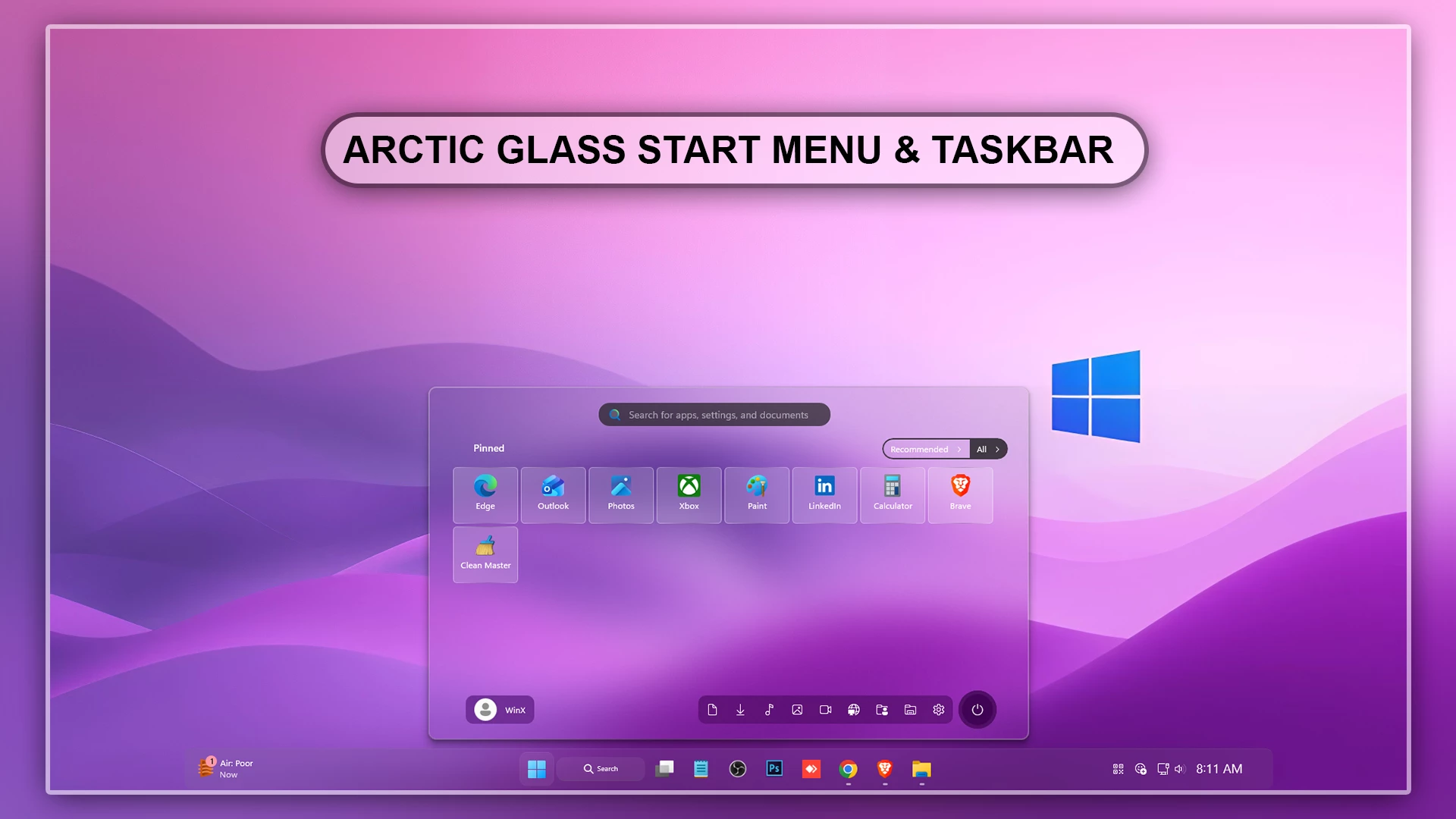
Arctic Glass Start Menu and Taskbar Style for Windows 11
The Arctic Glass Start Menu and Taskbar Style for Windows 11 is a premium customization designed for users who want a clean, transparent, and modern desktop experience. Built for Windhawk, this elegant style transforms the default Windows 11 Start Menu and taskbar into a beautiful glass-inspired interface with smooth transparency, soft blur effects, and a polished futuristic design. If you are looking for the best Arctic Glass Start Menu and Taskbar Style for Windows 11, this customization delivers both style and performance in one complete package.
Why Choose Arctic Glass Start Menu and Taskbar Style?
The Arctic Glass Start Menu and Taskbar Style is perfect for users who love minimal and modern Windows 11 customization. It creates a soft acrylic glass appearance that blends beautifully with wallpapers, icon packs, Rainmeter setups, and custom themes. The transparent taskbar and stylish Start Menu design give your desktop a premium and professional look while maintaining the smooth usability of Windows 11.
Unlike ordinary Start Menu themes, the Arctic Glass Start Menu and Taskbar Style focuses on visual balance and smooth integration. The elegant blur effect, rounded corners, and transparent layers create a refined user interface that feels lightweight and futuristic. Whether you are customizing your gaming setup, productivity workspace, or aesthetic desktop environment, this Windhawk style enhances the entire Windows 11 experience.
Features of Arctic Glass Start Menu and Taskbar Style
- Beautiful transparent glass effect for Start Menu
- Elegant acrylic taskbar customization
- Smooth blur and modern rounded corners
- Optimized for Windows 11 customization
- Works perfectly with Windhawk
- Minimal and futuristic desktop appearance
- Clean UI with premium visual design
- Perfect for aesthetic Windows setups
- Lightweight performance without lag
- Easy installation and configuration
Perfect for Windows 11 Customization Lovers
If you enjoy customizing Windows 11, the Arctic Glass Start Menu and Taskbar Style is an excellent addition to your desktop setup. This style pairs beautifully with custom icon packs, transparent widgets, Rainmeter skins, wallpapers, and modern cursor themes. The glassmorphism-inspired design creates a consistent and immersive visual experience across your desktop.
Many users search for modern Windhawk Start Menu styles that offer a balance between elegance and usability. The Arctic Glass Start Menu and Taskbar Style delivers exactly that with its clean transparent interface and smooth visual effects. It is ideal for users who want their Windows 11 desktop to feel unique, stylish, and visually premium.
Optimized for Windhawk
Windhawk is one of the best tools for advanced Windows 11 customization, and the Arctic Glass Start Menu and Taskbar Style is carefully optimized to work smoothly with it. The style integrates seamlessly with Windhawk modifications, allowing users to apply modern Start Menu and taskbar changes without affecting system stability or performance.
The Arctic Glass Start Menu and Taskbar Style provides a polished desktop environment while keeping the familiar functionality of Windows 11 intact. Users can enjoy a visually stunning interface without sacrificing speed, responsiveness, or accessibility.
Modern Glass UI Experience
Glass-style interfaces are becoming increasingly popular in modern UI design, and this customization brings that trend directly to Windows 11. The Arctic Glass Start Menu and Taskbar Style introduces a soft transparent aesthetic inspired by premium operating systems and futuristic desktop environments. The combination of blur effects, transparency, and smooth layouts creates a visually relaxing and elegant workspace for everyday use.
Whether you are a casual user, content creator, gamer, or Windows enthusiast, the Arctic Glass Start Menu and Taskbar Style for Windows 11 helps you achieve a modern desktop setup with a premium glass UI appearance. Install this Windhawk customization today and transform your Windows 11 desktop into a sleek and futuristic environment.
Download Windhawk To Use The Style
Compatibility
- Windows 11 21H2: May work, but not recommended for the best experience
- Windows 11 22H2: May work, but compatibility can vary
- Windows 11 23H2: Recommended
- Windows 11 24H2: Recommended
- Windows 11 25H2: No
What is included in this?
- Windhawk Start Menu Mods
- Windhawk Taskbar Mods
- Wallpapers
Installation steps:
- Download & Install windhawk.
- install & Open the Windows 11 Start Menu Styler mod in Windhawk.
- Go to the “Advanced” tab.
- Copy the content below to the text box under “Mod settings” and click “Save”.
{ "controlStyles[0].target": "StartDocked.StartSizingFrame", "controlStyles[0].styles[0]": "MaxHeight=500", "controlStyles[0].styles[1]": "MaxWidth=850", "controlStyles[0].styles[2]": "MinWidth=850", "controlStyles[1].target": "Windows.UI.Xaml.Controls.Grid#TopLevelSuggestionsListHeader", "controlStyles[1].styles[0]": "Visibility=Collapsed", "controlStyles[2].target": "StartMenu.PinnedList", "controlStyles[2].styles[0]": "Height=340", "controlStyles[3].target": "Windows.UI.Xaml.Controls.Grid#ShowMoreSuggestions", "controlStyles[3].styles[0]": "RenderTransform:=<TranslateTransform Y=\"-408\" />", "controlStyles[4].target": "Windows.UI.Xaml.Controls.Grid#NoTopLevelSuggestionsText", "controlStyles[4].styles[0]": "Height=0", "controlStyles[5].target": "Windows.UI.Xaml.Controls.Grid#ShowMoreSuggestions > Windows.UI.Xaml.Controls.Button > Windows.UI.Xaml.Controls.ContentPresenter > Windows.UI.Xaml.Controls.StackPanel > Windows.UI.Xaml.Controls.TextBlock", "controlStyles[5].styles[0]": "Text=Recommended", "controlStyles[6].target": "Windows.UI.Xaml.Controls.Border#DropShadow", "controlStyles[6].styles[0]": "CornerRadius=10", "controlStyles[7].target": "StartDocked.LauncherFrame > Grid#RootGrid > Grid#RootContent > Grid#MainContent > Grid#InnerContent > Rectangle", "controlStyles[7].styles[0]": "Visibility=Collapsed", "controlStyles[8].target": "StartDocked.SearchBoxToggleButton", "controlStyles[8].styles[0]": "Height=35", "controlStyles[8].styles[1]": "Margin=0,0,0,0", "controlStyles[8].styles[2]": "Width=330", "controlStyles[8].styles[3]": "RenderTransform:=<TranslateTransform Y=\"-10\" X=\"-20\" />", "controlStyles[33].styles[4]": "CornerRadius=5", "controlStyles[9].target": "Border#AcrylicBorder", "controlStyles[9].styles[0]": "Background:=<AcrylicBrush TintColor=\"{ThemeResource CardStrokeColorDefaultSolid}\" FallbackColor=\"{ThemeResource CardStrokeColorDefaultSolid}\" TintOpacity=\"0\" TintLuminosityOpacity=\".05\" Opacity=\"1\"/>", "controlStyles[9].styles[1]": "BorderBrush:=<LinearGradientBrush StartPoint=\"0,0\" EndPoint=\"1,1\" Opacity=\"0.6\"><GradientStop Color=\"#80ffffff\" Offset=\"0.0\" /><GradientStop Color=\"{ThemeResource SurfaceStrokeColorDefault}\" Offset=\"0.55\" /><GradientStop Color=\"#80ffffff\" Offset=\"1\" /></LinearGradientBrush>", "controlStyles[9].styles[2]": "BorderThickness=2", "controlStyles[9].styles[3]": "CornerRadius=10", "controlStyles[9].styles[4]": "Margin=0", "controlStyles[10].target": "Border#AcrylicOverlay", "controlStyles[10].styles[0]": "Visibility=Collapsed", "controlStyles[11].target": "Windows.UI.Xaml.Controls.Grid#AllAppsRoot", "controlStyles[11].styles[0]": "Margin=0,0,0,40", "controlStyles[12].target": "Windows.UI.Xaml.Controls.Grid#UndockedRoot", "controlStyles[12].styles[0]": "Margin=0,0,0,40", "controlStyles[13].target": "StartDocked.NavigationPaneView#NavigationPane > Windows.UI.Xaml.Controls.Grid#RootPanel", "controlStyles[13].styles[0]": "Margin=0,-10,0,10", "controlStyles[14].target": "StartDocked.AppListView#NavigationPanePlacesListView > Windows.UI.Xaml.Controls.Border", "controlStyles[14].styles[0]": "Background:=<AcrylicBrush TintColor=\"{ThemeResource CardStrokeColorDefaultSolid}\" FallbackColor=\"{ThemeResource CardStrokeColorDefaultSolid}\" TintOpacity=\"0\" TintLuminosityOpacity=\".5\" Opacity=\"1\"/>", "controlStyles[14].styles[1]": "CornerRadius=10", "controlStyles[14].styles[2]": "Margin=0,0,15,0", "controlStyles[15].target": "StartDocked.NavigationPaneButton#PowerButton > Windows.UI.Xaml.Controls.Grid@CommonStates > Windows.UI.Xaml.Controls.Border#BackgroundBorder", "controlStyles[15].styles[0]": "Background:=<AcrylicBrush TintColor=\"{ThemeResource CardStrokeColorDefaultSolid}\" FallbackColor=\"{ThemeResource CardStrokeColorDefaultSolid}\" TintOpacity=\"0\" TintLuminosityOpacity=\"1\" Opacity=\"1\"/>", "controlStyles[15].styles[1]": "BorderBrush@Normal:=<AcrylicBrush TintColor=\"{ThemeResource SurfaceStrokeColorDefault}\" FallbackColor=\"{ThemeResource SurfaceStrokeColorDefault}\" TintOpacity=\"0\" TintLuminosityOpacity=\".05\" Opacity=\"1\"/>", "controlStyles[15].styles[2]": "CornerRadius=40", "controlStyles[15].styles[3]": "BorderThickness=5", "controlStyles[15].styles[4]": "Margin=-7", "controlStyles[15].styles[5]": "BorderBrush@PointerOver:=<AcrylicBrush TintColor=\"{ThemeResource SystemAccentColor}\" FallbackColor=\"{ThemeResource SystemAccentColor}\" TintOpacity=\".8\" TintLuminosityOpacity=\".5\" Opacity=\"1\"/>", "controlStyles[16].target": "StartDocked.NavigationPaneButton#UserTileButton > Grid > Border#BackgroundBorder", "controlStyles[16].styles[0]": "Background:=<AcrylicBrush TintColor=\"{ThemeResource CardStrokeColorDefaultSolid}\" FallbackColor=\"{ThemeResource CardStrokeColorDefaultSolid}\" TintOpacity=\"0\" TintLuminosityOpacity=\".5\" Opacity=\"1\"/>", "controlStyles[16].styles[1]": "CornerRadius=10", "controlStyles[17].target": "Windows.UI.Xaml.Controls.Button#ShowAllAppsButton > Windows.UI.Xaml.Controls.ContentPresenter#ContentPresenter@CommonStates", "controlStyles[17].styles[0]": "Background@Normal:=<SolidColorBrush Color=\"{ThemeResource SystemChromeAltHighColor}\" Opacity=\".8\"/>", "controlStyles[17].styles[1]": "Background@PointerOver:=<SolidColorBrush Color=\"{ThemeResource SystemBaseLowColor}\" Opacity=\"1\" />", "controlStyles[17].styles[2]": "Padding=10,7", "controlStyles[17].styles[3]": "Margin=0,0,-35,0", "controlStyles[17].styles[4]": "CornerRadius=0,15,15,0", "controlStyles[17].styles[5]": "BorderThickness=0", "controlStyles[18].target": "Windows.UI.Xaml.Controls.Button#ShowMoreSuggestionsButton > Windows.UI.Xaml.Controls.ContentPresenter#ContentPresenter@CommonStates", "controlStyles[18].styles[0]": "Background@Normal:=<SolidColorBrush Color=\"{ThemeResource SystemAltMediumLowColor}\" Opacity=\"0\" />", "controlStyles[18].styles[1]": "BorderBrush@Normal:=<SolidColorBrush Color=\"{ThemeResource SystemChromeAltHighColor}\" Opacity=\".8\"/>", "controlStyles[18].styles[2]": "Padding=10,5", "controlStyles[18].styles[3]": "Margin=0,0,19,0", "controlStyles[18].styles[4]": "CornerRadius=15,0,0,15", "controlStyles[18].styles[5]": "BorderThickness=2,2,0,2", "controlStyles[18].styles[6]": "Background@PointerOver:=<SolidColorBrush Color=\"{ThemeResource SystemBaseLowColor}\" Opacity=\".7\" />", "controlStyles[18].styles[7]": "BorderBrush@PointerOver:=<SolidColorBrush Color=\"{ThemeResource SystemBaseLowColor}\" Opacity=\"1\"/>", "controlStyles[19].target": "Windows.UI.Xaml.Controls.Button#HideMoreSuggestionsButton > Windows.UI.Xaml.Controls.ContentPresenter#ContentPresenter", "controlStyles[19].styles[0]": "Background:=<SolidColorBrush Color=\"{ThemeResource SystemChromeMediumLowColor}\" Opacity=\"1\"/>", "controlStyles[19].styles[1]": "Padding=10,6", "controlStyles[19].styles[2]": "Margin=0,0,-35,0", "controlStyles[19].styles[3]": "CornerRadius=0", "controlStyles[20].target": "Windows.UI.Xaml.Controls.Button#CloseAllAppsButton > Windows.UI.Xaml.Controls.ContentPresenter#ContentPresenter", "controlStyles[20].styles[0]": "Background:=<SolidColorBrush Color=\"{ThemeResource SystemChromeMediumLowColor}\" Opacity=\"1\"/>", "controlStyles[20].styles[1]": "Padding=10,6", "controlStyles[20].styles[2]": "Margin=0,0,5,0", "controlStyles[20].styles[3]": "CornerRadius=10", "controlStyles[21].target": "Border#ContentBorder@CommonStates > Grid#DroppedFlickerWorkaroundWrapper > Border", "controlStyles[21].styles[0]": "FocusVisualPrimaryBrush:=<SolidColorBrush Color=\"#b3cefd\" Opacity=\".10\"/>", "controlStyles[21].styles[1]": "CornerRadius=5", "controlStyles[21].styles[2]": "Height=80", "controlStyles[21].styles[3]": "Width=92", "controlStyles[21].styles[4]": "BorderBrush :=<LinearGradientBrush StartPoint=\"0,0\" EndPoint=\"1,0\"><GradientStop Color=\"#80ffffff\" Offset=\"0.0\" /><GradientStop Color=\"{ThemeResource SurfaceStrokeColorDefault}\" Offset=\"0.55\" /><GradientStop Color=\"#80ffffff\" Offset=\"1\" /></LinearGradientBrush>", "controlStyles[21].styles[5]": "BorderThickness=1", "controlStyles[22].target": "Windows.UI.Xaml.Controls.Border#ContentBorder@CommonStates > Windows.UI.Xaml.Controls.Grid#DroppedFlickerWorkaroundWrapper > Border#BackgroundBorder", "controlStyles[22].styles[0]": "Background@Normal:=<WindhawkBlur BlurAmount=\"10\" TintColor=\"#30ffffff\" />", "controlStyles[22].styles[1]": "Background@PointerOver:<WindhawkBlur BlurAmount=\"10\" TintColor=\"#30ffffff\" />", "controlStyles[23].target": "Border#ContentBorder@CommonStates > Grid#DroppedFlickerWorkaroundWrapper > Border", "controlStyles[23].styles[0]": "CornerRadius=5", "controlStyles[36].styles[1]": "FocusVisualPrimaryBrush:<WindhawkBlur BlurAmount=\"10\" TintColor=\"#30ffffff\" />", "controlStyles[23].styles[2]": "Height=80", "controlStyles[23].styles[3]": "Width=92", "controlStyles[24].target": "Windows.UI.Xaml.Shapes.Rectangle", "controlStyles[24].styles[0]": "Visibility=Collapsed", "disableNewStartMenuLayout": "legacyClassicLayout"}{ "controlStyles[0].target": "Taskbar.TaskbarFrame#TaskbarFrame", "controlStyles[0].styles[1]": "HorizontalAlignment=Auto", "controlStyles[0].styles[2]": "Width=Auto", "controlStyles[0].styles[0]": "MaxWidth:=1600", "controlStyles[0].styles[3]": "MinWidth:=1600", "controlStyles[1].target": "Taskbar.TaskbarFrame#TaskbarFrame > Grid#RootGrid", "controlStyles[1].styles[0]": "Margin=30,0,30,5", "controlStyles[1].styles[1]": "BorderThickness=$BorderThickness", "controlStyles[1].styles[2]": "BorderBrush:=$BorderBrush", "controlStyles[1].styles[3]": "CornerRadius=$CornerRadius", "controlStyles[1].styles[4]": "Background:=Transparent", "controlStyles[2].target": "Rectangle#BackgroundFill", "controlStyles[2].styles[0]": "Visibility=Visible", "controlStyles[2].styles[1]": "Fill:=$Background", "controlStyles[3].target": "Rectangle#BackgroundStroke", "controlStyles[3].styles[0]": "Visibility=Collapsed", "controlStyles[4].target": "Taskbar.AugmentedEntryPointButton#AugmentedEntryPointButton > Taskbar.TaskListButtonPanel#ExperienceToggleButtonRootPanel", "controlStyles[4].styles[0]": "Margin=4", "controlStyles[4].styles[1]": "Background:=$ElementBGG", "controlStyles[4].styles[2]": "CornerRadius=10", "controlStyles[5].target": "Grid#SystemTrayFrameGrid", "controlStyles[5].styles[0]": "Margin=0,0,-250,0", "controlStyles[5].styles[1]": "RenderTransform:=<TranslateTransform X=\"-435\" Y=\"-2\"/>", "controlStyles[5].styles[2]": "Padding=10", "controlStyles[5].styles[3]": "Background:=$ElementBGG", "controlStyles[5].styles[4]": "CornerRadius=10", "controlStyles[6].target": "SystemTray.ChevronIconView", "controlStyles[6].styles[0]": "Padding=$TrayPadding", "controlStyles[6].styles[1]": "CornerRadius=10", "controlStyles[7].target": "SystemTray.NotifyIconView#NotifyItemIcon", "controlStyles[7].styles[0]": "Padding=$TrayPadding", "controlStyles[7].styles[1]": "CornerRadius=10", "controlStyles[8].target": "SystemTray.OmniButton", "controlStyles[8].styles[0]": "Padding=$TrayPadding", "controlStyles[8].styles[1]": "CornerRadius=10", "controlStyles[9].target": "SystemTray.CopilotIcon", "controlStyles[9].styles[0]": "Padding=$TrayPadding", "controlStyles[10].target": "SystemTray.OmniButton#NotificationCenterButton > Grid > ContentPresenter > ItemsPresenter > StackPanel > ContentPresenter > systemtray:IconView#SystemTrayIcon > Grid", "controlStyles[10].styles[0]": "Padding=$TrayPadding", "controlStyles[11].target": "SystemTray.IconView#SystemTrayIcon > Grid#ContainerGrid > ContentPresenter#ContentPresenter > Grid#ContentGrid > SystemTray.TextIconContent > Grid#ContainerGrid", "controlStyles[11].styles[0]": "Padding=0", "controlStyles[11].styles[1]": "CornerRadius=10", "controlStyles[12].target": "SystemTray.StackListView#IconStack > ItemsPresenter > StackPanel > ContentPresenter > SystemTray.IconView#SystemTrayIcon", "controlStyles[12].styles[0]": "Padding=0", "controlStyles[13].target": "SystemTray.Stack#ShowDesktopStack", "controlStyles[13].styles[0]": "Visibility=Visible", "controlStyles[14].target": "Taskbar.Gripper#GripperControl", "controlStyles[14].styles[0]": "Width=Auto", "controlStyles[14].styles[1]": "MinWidth=24", "controlStyles[15].target": "Windows.UI.Xaml.Controls.Grid#AugmentedEntryPointContentGrid", "controlStyles[15].styles[0]": "Margin=4,0,0,0", "controlStyles[15].styles[1]": "HorizontalAlignment=Left", "controlStyles[16].target": "TextBlock#TimeInnerTextBlock", "controlStyles[16].styles[0]": "FontSize=18", "controlStyles[16].styles[1]": "FontFamily=Quantico", "controlStyles[16].styles[2]": "Margin=0", "controlStyles[16].styles[3]": "Padding=0", "controlStyles[16].styles[4]": "RenderTransform:=<TranslateTransform X=\"0\" Y=\"1\" />", "controlStyles[17].target": "TextBlock#DateInnerTextBlock", "controlStyles[17].styles[0]": "Visibility=Collapsed", "controlStyles[17].styles[1]": "RenderTransform:=<TranslateTransform X=\"0\" Y=\"-9\" />", "controlStyles[17].styles[2]": "FontSize=11", "controlStyles[17].styles[3]": "FontFamily=vivo Sans EN VF", "controlStyles[18].target": "TextBlock#InnerTextBlock[Text=]", "controlStyles[18].styles[0]": "Text=", "controlStyles[19].target": "Windows.UI.Xaml.Controls.Grid#ConfirmatorMainGrid", "controlStyles[19].styles[0]": "CornerRadius=22", "controlStyles[19].styles[1]": "BorderThickness=$BorderThickness", "controlStyles[19].styles[2]": "BorderBrush:=$BorderBrush", "controlStyles[19].styles[3]": "Background:=$Background", "controlStyles[20].target": "TextBlock#SearchBoxTextBlock", "controlStyles[20].styles[0]": "Text=Search ", "controlStyles[20].styles[1]": "FontSize=10", "controlStyles[20].styles[2]": "FontFamily=vivo Sans EN VF", "controlStyles[21].target": "SystemTray.OmniButton#NotificationCenterButton > Grid > ContentPresenter > ItemsPresenter > StackPanel > ContentPresenter > SystemTray.IconView#SystemTrayIcon > Grid > Grid > SystemTray.TextIconContent", "controlStyles[21].styles[0]": "Visibility=Visible", "controlStyles[22].target": "Windows.UI.Xaml.Controls.Button", "controlStyles[22].styles[0]": "BorderThickness=$BorderThickness", "controlStyles[23].target": "Windows.UI.Xaml.Controls.Border#OverflowFlyoutBackgroundBorder", "controlStyles[23].styles[0]": "BorderThickness=$BorderThickness", "controlStyles[23].styles[1]": "BorderBrush:=$BorderBrush", "controlStyles[23].styles[2]": "Background:=$Background", "controlStyles[23].styles[3]": "CornerRadius=$CornerRadius", "controlStyles[24].target": "Windows.UI.Xaml.Controls.Grid#ModalRootGrid > Windows.UI.Xaml.Controls.Border#BackgroundElement", "controlStyles[24].styles[0]": "BorderThickness=$BorderThickness", "controlStyles[24].styles[1]": "BorderBrush:=$BorderBrush", "controlStyles[24].styles[2]": "Background:=$Background", "controlStyles[24].styles[3]": "CornerRadius=20", "controlStyles[25].target": "WindowsInternal.ComposableShell.Experiences.Switcher.VirtualDesktopBarElement#VirtualDesktopBar", "controlStyles[25].styles[0]": "Width=1000", "controlStyles[25].styles[1]": "Visibility=Collapsed", "controlStyles[25].styles[2]": "RenderTransform:=<TranslateTransform X=\"0\" Y=\"60\" />", "controlStyles[25].styles[3]": "CornerRadius=$CornerRadius", "controlStyles[26].target": "Windows.UI.Xaml.Controls.Border#BackgroundDimmingLayer", "controlStyles[26].styles[0]": "Background:=$Background", "controlStyles[27].target": "Taskbar.TaskListButtonPanel#ExperienceToggleButtonRootPanel > Windows.UI.Xaml.Controls.Border#BackgroundElement", "controlStyles[27].styles[0]": "CornerRadius=10", "controlStyles[28].target": "Taskbar.TaskListButton#TaskListButton", "controlStyles[28].styles[0]": "CornerRadius=10", "controlStyles[29].target": "Windows.UI.Xaml.Controls.Border#SnapBarBorder", "controlStyles[29].styles[0]": "Background:=$Background", "controlStyles[29].styles[1]": "BorderBrush:=$BorderBrush", "controlStyles[29].styles[2]": "CornerRadius=$CornerRadius", "controlStyles[29].styles[3]": "BorderThickness=$BorderThickness", "controlStyles[29].styles[4]": "RenderTransform:=<TranslateTransform X=\"0\" Y=\"10\" />", "controlStyles[29].styles[5]": "Margin=0,0,0,-10", "controlStyles[30].target": "Windows.UI.Xaml.Controls.Border#SnapPickerBorder", "controlStyles[30].styles[0]": "Background:=$Background", "controlStyles[30].styles[1]": "BorderBrush:=$BorderBrush", "controlStyles[30].styles[2]": "CornerRadius=$CornerRadius", "controlStyles[30].styles[3]": "BorderThickness=$BorderThickness", "controlStyles[31].target": "Windows.UI.Xaml.Controls.Border#SearchPillBackgroundElement", "controlStyles[31].styles[0]": "BorderBrush:=$ElementBorderBrush", "controlStyles[31].styles[1]": "CornerRadius=$ElementCornerRadius", "controlStyles[31].styles[2]": "BorderThickness=$ElementBorderThickness", "controlStyles[31].styles[3]": "Margin=0", "controlStyles[32].target": "Taskbar.TaskbarExtensionElement", "controlStyles[32].styles[0]": "RenderTransform:=<TranslateTransform X=\"0\" Y=\"0\" />", "controlStyles[33].target": "Taskbar.TaskListButtonPanel#ExperienceToggleButtonRootPanel", "controlStyles[33].styles[0]": "RenderTransform:=<TranslateTransform X=\"0\" Y=\"0\" />", "controlStyles[34].target": "Windows.UI.Xaml.Controls.ToolTip > Windows.UI.Xaml.Controls.ContentPresenter#LayoutRoot", "controlStyles[34].styles[0]": "Background:=$Background", "controlStyles[34].styles[1]": "BorderBrush:=$BorderBrush", "controlStyles[34].styles[2]": "BorderThickness:=$BorderThickness", "controlStyles[34].styles[3]": "CornerRadius=12", "controlStyles[35].target": "SearchUx.SearchUI.SearchButtonControl", "controlStyles[35].styles[0]": "Width=130", "controlStyles[35].styles[1]": "Margin=-1,7,-1,7", "controlStyles[36].target": "WindowsInternal.ComposableShell.Experiences.Switcher.VirtualDesktopBarElement > Windows.UI.Xaml.Controls.Grid#GridElement > Windows.UI.Xaml.Controls.Border#VirtualDesktopSwitcherBackground", "controlStyles[36].styles[0]": "Background:=$Background", "controlStyles[36].styles[1]": "BorderBrush:=$BorderBrush", "controlStyles[36].styles[2]": "BorderThickness=$BorderThickness", "controlStyles[36].styles[3]": "CornerRadius=$CornerRadius", "styleConstants[0]": "Background=<WindhawkBlur BlurAmount=\"15\" TintColor=\"#20808080\"/>", "styleConstants[1]": "BorderBrush2=<LinearGradientBrush StartPoint=\"0,0\" EndPoint=\"0,1\"><GradientStop Color=\"{ThemeResource SystemChromeHighColor}\" Offset=\"0.0\" /><GradientStop Color=\"{ThemeResource SystemChromeLowColor}\" Offset=\"0.25\" /><GradientStop Color=\"{ThemeResource SystemChromeHighColor}\" Offset=\"1\" /></LinearGradientBrush>", "styleConstants[2]": "BorderThickness=0.3,1,0.3,0.3", "styleConstants[3]": "CornerRadius=10", "styleConstants[4]": "BorderBrush=<LinearGradientBrush StartPoint=\"0,0\" EndPoint=\"0,1\"><GradientStop Color=\"#50808080\" Offset=\"0.0\" /><GradientStop Color=\"#50404040\" Offset=\"0.25\" /><GradientStop Color=\"#50808080\" Offset=\"1\" /></LinearGradientBrush>", "styleConstants[5]": "Background2=<AcrylicBrush TintColor=\"{ThemeResource SystemChromeAltHighColor}\" TintOpacity=\"0.3\" FallbackColor=\"{ThemeResource SystemChromeAltHighColor}\" />", "styleConstants[6]": "TrayPadding=2", "styleConstants[7]": "ElementBG=<SolidColorBrush Color=\"{ThemeResource SystemChromeAltHighColor}\" Opacity=\"0.3\" />", "styleConstants[8]": "ElementBorderThickness=0.3,0.3,0.3,1", "styleConstants[9]": "ElementBorderBrush=<LinearGradientBrush StartPoint=\"0,0\" EndPoint=\"0,1\"><GradientStop Color=\"#50808080\" Offset=\"1\" /><GradientStop Color=\"#50606060\" Offset=\"0.15\" /></LinearGradientBrush>", "styleConstants[10]": "ElementCornerRadius=12", "resourceVariables[0].variableKey": "", "resourceVariables[0].value": "", "controlStyles[4].styles[3]": "HorizontalAlignment=Left", "controlStyles[5].styles[5]": "VerticalAlignment=Left"}{ "TaskbarHeight": 62, "IconSize": 26, "TaskbarButtonWidth": 52, "IconSizeSmall": 16, "TaskbarButtonWidthSmall": 32}You may also like


Disclaimer: All themes, visual styles, and concepts shared on this website are unofficial, fan-made creations built from imagination for customization purposes. We are not affiliated with, endorsed by, or sponsored by Microsoft or any other official brand.