

Linner Icon Pack For Resource Redirect ( Windhawk )
Transform Windows 11 with the Linner Icon Pack for Resource Redirect (Windhawk). Enjoy elegant golden icons, dark glass File Explorer styling, modern UI customization, and a premium desktop experience.

Linner Icon Pack for Windows 11
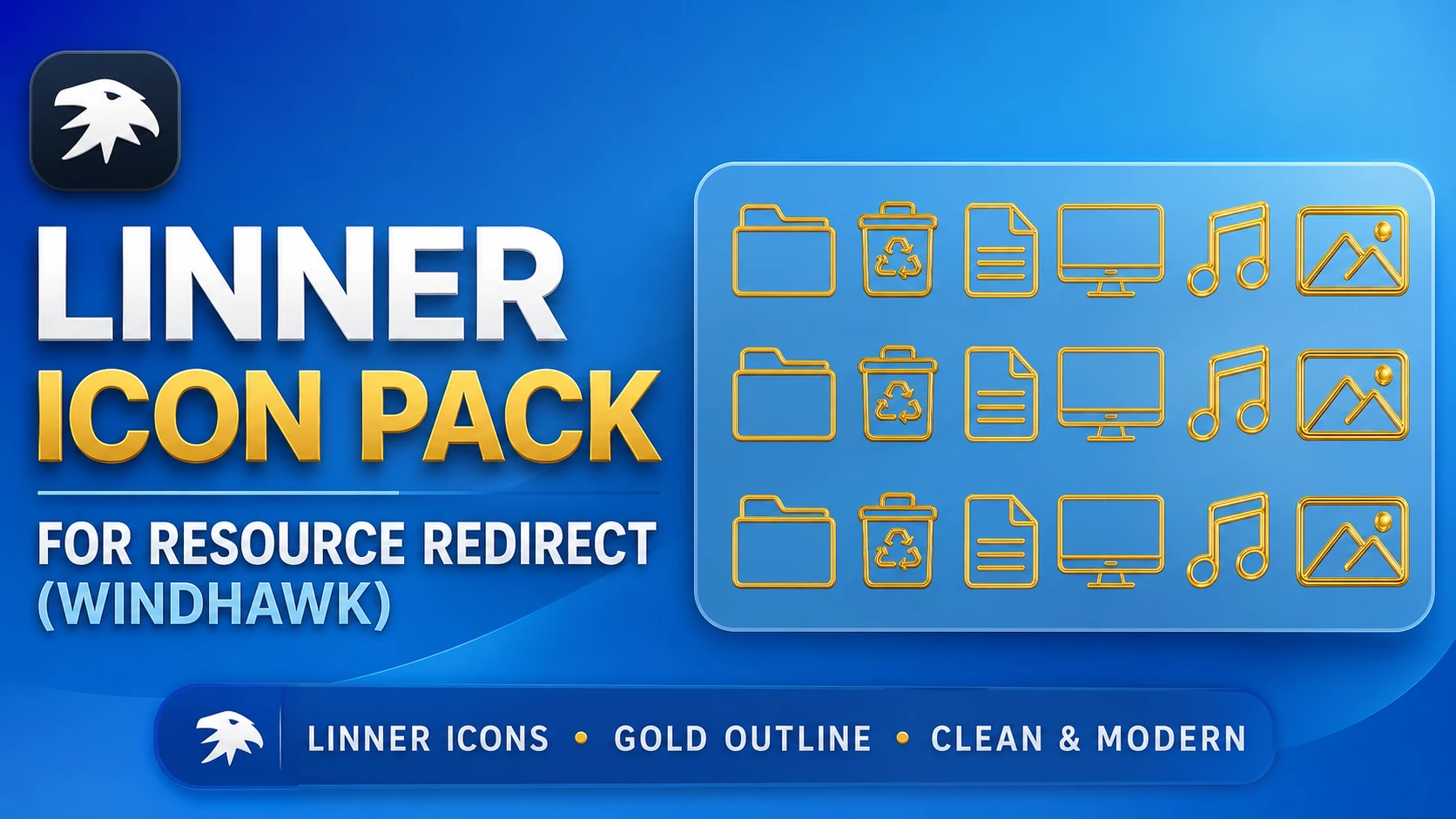
Linner Icon Pack is a Resource Redirect icon set for Windows 11 built around thin gold outlines and simple line-based shapes. Instead of filling each icon with heavy colors or gradients, Linner keeps the design light and clean, using gold strokes to define folders, documents, media, and other supported Windows resources.
The style feels noticeably different from the usual Windows icon packs. Folder icons stay familiar, but the gold outline gives them a more refined look. Recycle Bin, document, monitor, music, and image resources follow the same line-art direction, which helps the set feel consistent across File Explorer.
This version is made for Resource Redirect in Windhawk. It changes supported Windows icon resources through the mod, so you do not need to manually replace protected system files. Wallpaper, Start menu styling, taskbar effects, and other Windows customizations remain separate.
Gold Outline Design
Linner keeps its palette deliberately simple. Gold is the main visual accent, while the icon body itself stays mostly open rather than filled with solid color. That gives the icons a lighter appearance, especially compared with glossy, neon, or heavily shaded packs.
The repeated outline style also helps different resources feel connected. Folder, document, recycle, display, music, and picture icons may have different shapes, but the same gold line treatment ties them together.
Features
- Thin gold outline icon design
- Clean line-art styling instead of heavy filled shapes
- Matching folder, document, recycle, monitor, music, and image resources where supported
- Consistent visual language across File Explorer locations
- Designed for Resource Redirect in Windhawk
- No manual replacement of protected Windows system files
- Can be used independently from your Windows theme or wallpaper
- Linner Resource Redirect Icon Pack: Contains the replacement icon resources used by Resource Redirect for supported Windows 11 locations.
Compatibility
- Windows 11
Icon coverage can vary depending on your Windows build and the resources included in the pack. Some applications use their own icons, while folders with thumbnail previews may continue to show those previews instead of the themed folder resource.
Requirements
- Windows 11
- Windhawk installed
- Resource Redirect mod installed and enabled
- The Linner pack extracted to a permanent folder
- A ZIP extraction tool
Before You Apply Linner
Save your current Resource Redirect settings before changing the icon path. If you want to return to the previous setup later, having the old configuration ready saves a lot of unnecessary guessing.
After Linner is working, keep the extracted folder in the same location. Resource Redirect loads the replacement files from that saved path, so moving or renaming the folder can stop the icons from appearing. Windows customization remains intensely loyal to file paths, apparently.
Installation Steps
- Install Windhawk: Download and install Windhawk if it is not already installed.
- Install Resource Redirect: Open Windhawk, search for Resource Redirect, and install the mod.
- Download Linner: Download the ZIP archive using the button below.
- Extract the Pack: Extract the archive to a folder that you plan to keep in the same location.
- Copy the Folder Path: Open the extracted Linner folder and copy its full Windows path.
- Open Resource Redirect Settings: Go to the mod’s settings and locate the custom theme or resource folder field.
- Paste the Path: Paste the Linner folder path into the required field. Remove quotation marks if Windows added them automatically.
- Save the Settings: Apply the Resource Redirect configuration and let the mod reload.
- Refresh Explorer: Restart Windows Explorer if the new icons do not appear immediately.
For a more detailed setup guide, you can also check:
Download Linner Icon Pack
Linner Icon Pack 18MB
Download Icon PackIf the Icons Do Not Appear
Check that Resource Redirect is enabled and make sure the saved path points to the extracted Linner folder rather than the ZIP file itself.
If the path is correct but older icons are still showing, restart Windows Explorer. Windows may also be using cached icon data, so an icon-cache refresh can sometimes be needed.
Why Do Some Icons Stay Unchanged?
Resource Redirect can only replace resources included in the pack. Some applications load their own icons, while certain folders may show thumbnails instead of the standard folder resource.
That means a few unchanged items do not automatically indicate a problem with Linner. They may simply come from resources outside the pack’s coverage.
How to Remove
- Open Windhawk: Select the installed Resource Redirect mod.
- Open Its Settings: Find the custom path currently pointing to the Linner folder.
- Restore Your Previous Setup: Replace the Linner path with your earlier configuration, or remove it if you want the default Windows resources again.
- Save the Changes: Apply the updated Resource Redirect settings.
- Restart Explorer: Restart Windows Explorer so the previous or default icons can reload.
- Delete the Pack Later: Remove the extracted Linner folder only after Resource Redirect is no longer using it.
Where Linner Fits Best
Linner works well for users who prefer a cleaner icon style and do not want every folder filled with bright color. The gold outline is enough to make the icons feel different while still keeping the design restrained.
Dark blue, black, charcoal, or muted wallpapers can give the gold lines more contrast, but a matching theme is not required. The icon pack works perfectly well on its own.
Explore More Windows Customization
Disclaimer
Linner Icon Pack is an independently shared third-party Windows customization resource intended for desktop personalization. It is not an official Microsoft, Windhawk, or Resource Redirect product and is not affiliated with, authorized by, sponsored by, approved by, or endorsed by those companies or projects. Microsoft, Windows, and other trademarks belong to their respective owners. Appearance and compatibility may vary between Windows builds and mod versions.
Final Word
Linner takes a very different route from most colorful icon packs. Instead of filling every shape with gradients or glow, it uses thin gold lines to define the icons and lets the background do the rest.
If you prefer a cleaner Windows 11 setup with one strong accent color, the gold outline style gives supported folders and system resources a distinct look without making File Explorer feel overloaded.
Frequently Asked Questions
Are Linner icons filled with gold color?
No. The main design uses thin gold outlines rather than solid gold-filled icon bodies.
Does Linner need a dark Windows theme?
No. The icon pack works independently, although darker backgrounds can make the gold outlines easier to see.
Does Linner change the taskbar or Start menu?
No. Linner focuses on supported icon resources. Taskbar, Start menu, wallpaper, and other interface styling remain separate customizations.
Why do some folders still show the default icon?
Some folders display thumbnails or resources not included in the pack, while some applications use their own icon files.
Can I switch to another Resource Redirect icon pack later?
Yes. Extract the next pack to its own folder, update the saved path inside Resource Redirect, save the settings, and restart Explorer if needed.
You may also like
Disclaimer: All themes, visual styles, and concepts shared on this website are unofficial, fan-made creations built from imagination for customization purposes. We are not affiliated with, endorsed by, or sponsored by Microsoft or any other official brand.