

New Linner Start Menu Style For Windows 11
Linner Start Menu Style For Windows 11 brings a clean, modern, and elegant Start Menu design with premium aesthetics for a stylish desktop experience.

Linner Start Menu Style For Windows 11
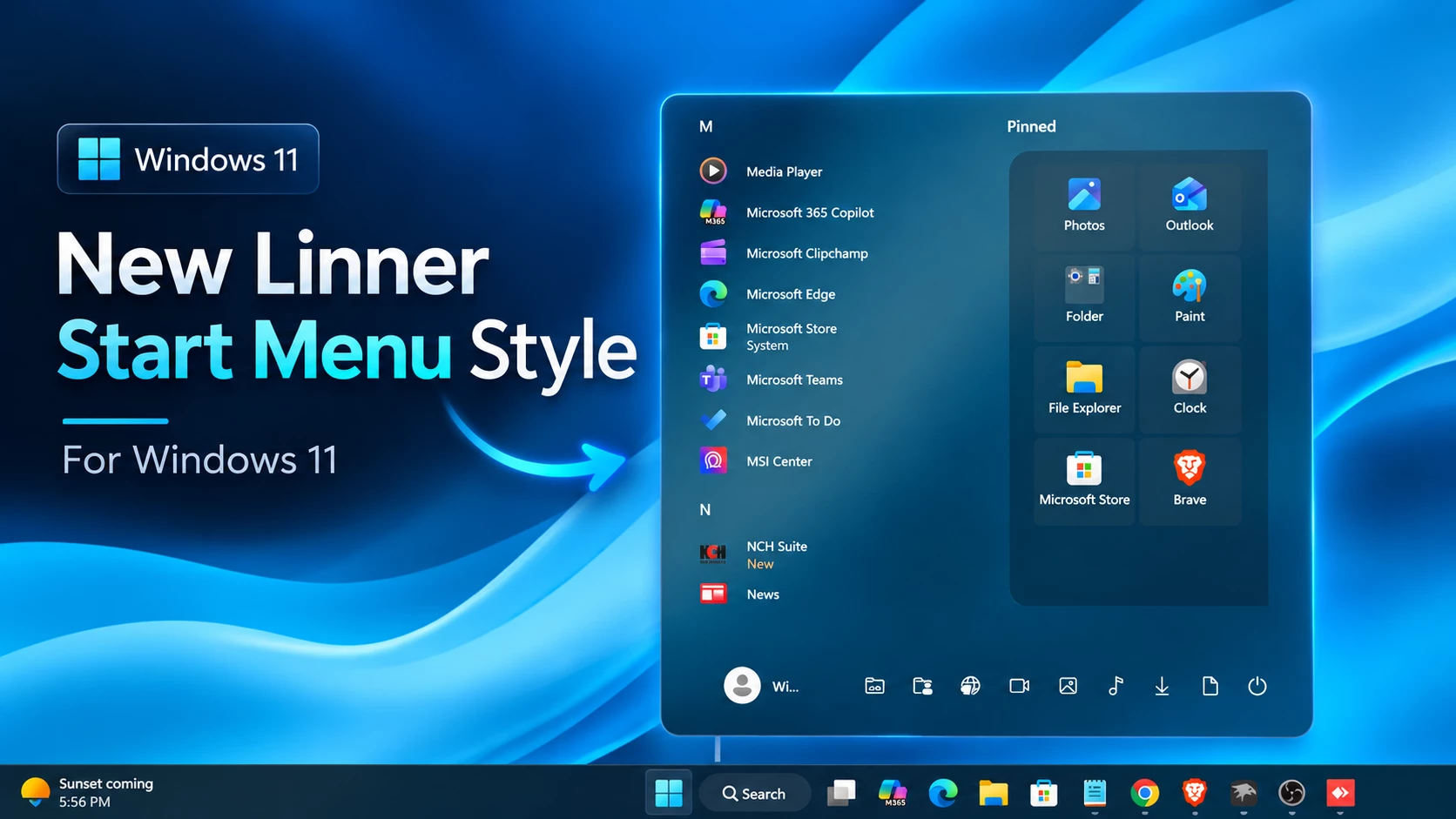
The Linner Start Menu Style For Windows 11 is a clean and modern customization created for users who want a different look for their Windows 11 Start Menu. It introduces a redesigned layout with a separate app list, pinned apps section, rounded corners, and a dark transparent appearance that gives the interface a more refined visual style.
This style changes the overall arrangement of the Start Menu by placing the All Apps section on the left side and the Pinned Apps section on the right. The pinned applications are displayed in a simple tile layout, making the Start Menu look more organized while keeping the familiar Windows 11 navigation experience.
The dark glass-inspired background and soft transparency effects make the Linner Start Menu Style For Windows 11 a good match for dark wallpapers and modern desktop setups. It is designed for users who enjoy customizing their Windows interface and creating a more personalized desktop environment.
Why Choose Linner Start Menu Style For Windows 11?
The Linner Start Menu Style For Windows 11 focuses on improving the visual appearance of the Start Menu without changing its basic functionality. The balanced layout provides a cleaner presentation for installed applications and pinned shortcuts while maintaining the original Windows 11 experience.
Features
- Clean two-section Start Menu layout
- Separate All Apps and Pinned Apps areas
- Dark transparent background style
- Rounded corner Start Menu panel
- Organized pinned app tile design
- Minimal and modern interface appearance
- Inspired by Windows 11 Fluent Design elements
- Suitable for custom desktop setups
Compatibility
- Windows 11 21H2: Not Tested
- Windows 11 22H2: Not Tested
- Windows 11 23H2: Not Tested
- Windows 11 24H2: Yes
- Windows 11 25H2: Yes, but test carefully after Windows updates.
Check the current compatibility notes on the Windows 11 Start Menu Styler page before installing. Compatibility can vary with your Windows build, screen resolution, and display scaling.
Before You Apply the Style
Create a system restore point first. Search Windows for Create a restore point, open it, and check that protection is enabled for your system drive. If needed, enable it through Configure. Select Create and give the restore point a name you will recognize.
Microsoft explains these steps in its System Protection guide. Keep a separate backup of important files and copy your existing Windhawk settings into a text file before replacing them.
Download Windhawk To Use The Style
How to Install
- Download and install Windhawk
- Open Windhawk and install the Windows 11 Start Menu Styler mod
- Go to the Advanced tab
- Paste the provided configuration code into the “Mod settings” box
- Click Save to apply the style
- For more details, visit this GitHub guide
- For The taskbar Style Check Here
{ "theme": "Windows11_Metro10", "controlStyles[0].target": "Border#AcrylicOverlay", "controlStyles[0].styles[0]": "Visibility=Collapsed", "controlStyles[1].target": "Border#AcrylicBorder", "controlStyles[1].styles[0]": "Background:=<AcrylicBrush TintColor=\"{ThemeResource CardStrokeColorDefaultSolid}\" FallbackColor=\"{ThemeResource CardStrokeColorDefaultSolid}\" TintOpacity=\"0\" TintLuminosityOpacity=\".55\" Opacity=\"1\"/>", "controlStyles[2].target": "StartDocked.SearchBoxToggleButton", "controlStyles[2].styles[0]": "Canvas.ZIndex=1", "controlStyles[2].styles[1]": "Width=330", "controlStyles[2].styles[2]": "Height=50", "controlStyles[2].styles[3]": "RenderTransform:=<TranslateTransform X=\"0\" Y=\"0\"/>", "controlStyles[2].styles[4]": "Margin=0,15,0,0", "controlStyles[2].styles[5]": "VerticalAlignment=Top", "controlStyles[2].styles[6]": "HorizontalAlignment=Center", "controlStyles[3].target": "Windows.UI.Xaml.Controls.Border#AppBorder", "controlStyles[3].styles[0]": "Background:=$Background", "controlStyles[3].styles[1]": "BorderBrush:=$BorderBrush", "controlStyles[3].styles[2]": "BorderThickness=$BorderThickness", "controlStyles[4].target": "StartMenu.SearchBoxToggleButton#SearchBoxToggleButton > Windows.UI.Xaml.Controls.Grid > Windows.UI.Xaml.Controls.Border#BorderElement", "controlStyles[4].styles[0]": "BorderThickness=$BorderThickness", "controlStyles[4].styles[1]": "CornerRadius=$CornerRadius", "controlStyles[5].target": "Windows.UI.Xaml.Controls.Border#AppBorder", "controlStyles[5].styles[0]": "Background:=$Background", "controlStyles[5].styles[1]": "BorderBrush:=$BorderBrush", "controlStyles[5].styles[2]": "BorderThickness=$BorderThickness", "controlStyles[5].styles[3]": "CornerRadius=$CornerRadius", "controlStyles[6].target": "Cortana.UI.Views.RichSearchBoxControl#SearchBoxControl", "controlStyles[6].styles[0]": "Width=500", "controlStyles[6].styles[1]": "RenderTransform:=<TranslateTransform X=\"0\" />", "controlStyles[7].target": "Windows.UI.Xaml.Controls.Border#BorderElement", "controlStyles[7].styles[0]": "Background=Transparent", "controlStyles[7].styles[1]": "BorderThickness=$BorderThickness", "controlStyles[8].target": "StartMenu.CategoryControl > Windows.UI.Xaml.Controls.Grid#RootGrid > Windows.UI.Xaml.Controls.Border ", "controlStyles[8].styles[0]": "BorderThickness=$ElementBorderThickness", "controlStyles[8].styles[1]": "CornerRadius=$ElementCornerRadius", "controlStyles[8].styles[2]": "BorderBrush:=$ElementBorderBrush", "controlStyles[8].styles[3]": "Background:=$ElementBG", "controlStyles[9].target": "Windows.UI.Xaml.Controls.Border#BorderUnderline", "controlStyles[9].styles[0]": "Visibility=Visible", "controlStyles[10].target": "StackPanel#TimeAndDatePanel", "controlStyles[10].styles[0]": "VerticalAlignment=Top", "controlStyles[10].styles[1]": "HorizontalAlignment=Center", "controlStyles[10].styles[2]": "RenderTransform:=<TranslateTransform X=\"0\" />", "controlStyles[11].target": "StackPanel#TimePanel > TextBlock#Time", "controlStyles[11].styles[0]": "HorizontalAlignment=Center", "controlStyles[11].styles[1]": "RenderTransform:=<TranslateTransform X=\"0\" Y=\"0\" />", "controlStyles[11].styles[2]": "FontFamily=vivo Sans Clock Stencil Regular", "controlStyles[11].styles[3]": "Foreground:=$ClockBG", "controlStyles[11].styles[4]": "Margin=0,50,0,0", "controlStyles[11].styles[5]": "VerticalAlignment=Center", "controlStyles[12].target": "StackPanel#TimeAndDatePanel > TextBlock#Date", "controlStyles[12].styles[0]": "HorizontalAlignment=Center", "controlStyles[12].styles[1]": "RenderTransform:=<TranslateTransform X=\"0\" Y=\"0\" />", "controlStyles[12].styles[2]": "FontFamily=vivo Sans EN VF", "controlStyles[12].styles[3]": "Foreground:=$ClockBG", "controlStyles[12].styles[4]": "Margin=0,-180,0,180", "controlStyles[12].styles[5]": "VerticalAlignment=Center", "controlStyles[13].target": "Windows.UI.Xaml.Controls.Grid#WidgetFrameGrid", "controlStyles[13].styles[0]": "Background:=$Background", "controlStyles[13].styles[1]": "BorderBrush:=$BorderBrush", "controlStyles[13].styles[2]": "BorderThickness=$BorderThickness", "controlStyles[13].styles[3]": "CornerRadius=$CornerRadius", "controlStyles[14].target": "Windows.UI.Xaml.Controls.Grid#WidgetCanvasPanel", "controlStyles[14].styles[0]": "HorizontalAlignment=Center", "controlStyles[14].styles[1]": "RenderTransform:=<TranslateTransform X=\"0\" Y=\"50\" />", "controlStyles[15].target": "Windows.UI.Xaml.Controls.Grid#MediaTransportControls", "controlStyles[15].styles[0]": "Background:=$Background", "controlStyles[15].styles[1]": "BorderBrush:=$BorderBrush", "controlStyles[15].styles[2]": "BorderThickness=$BorderThickness", "controlStyles[15].styles[3]": "CornerRadius=$CornerRadius", "controlStyles[16].target": "Windows.UI.Xaml.Controls.Grid#MediaControlsContainer", "controlStyles[16].styles[0]": "Visibility=Visible", "controlStyles[16].styles[1]": "RenderTransform:=<TranslateTransform X=\"0\" Y=\"0\" />", "controlStyles[16].styles[2]": "Margin=0,-800,0,800", "controlStyles[16].styles[3]": "CornerRadius=$CornerRadius", "controlStyles[16].styles[4]": "VerticalAlignment=Center", "controlStyles[16].styles[5]": "HorizontalAlignment=Center", "controlStyles[17].target": "Windows.UI.Xaml.Controls.Border#BorderElement", "controlStyles[17].styles[0]": "CornerRadius=$CornerRadius", "controlStyles[18].target": "Windows.UI.Xaml.Controls.Primitives.ToggleButton#ShowHideCompanion", "controlStyles[18].styles[0]": "RenderTransform:=<TranslateTransform X=\"-120\" />", "controlStyles[18].styles[1]": "Visibility=Collapsed", "controlStyles[19].target": "Windows.UI.Xaml.Controls.Grid#CompanionRoot > Windows.UI.Xaml.Controls.Border#AcrylicOverlay", "controlStyles[19].styles[0]": "BorderThickness=0", "controlStyles[19].styles[1]": "Visibility=Collapsed", "controlStyles[20].target": "Windows.UI.Xaml.Controls.Grid#Root > Windows.UI.Xaml.Controls.Border", "controlStyles[20].styles[0]": "BorderBrush:=$BorderBrush", "controlStyles[20].styles[1]": "Background:=$Background", "controlStyles[20].styles[2]": "BorderThickness=$BorderThickness", "controlStyles[20].styles[3]": "CornerRadius=$CornerRadius", "controlStyles[21].target": "Windows.UI.Xaml.Controls.Border#StartDropShadow", "controlStyles[21].styles[0]": "CornerRadius=$CornerRadius", "controlStyles[22].target": "Windows.UI.Xaml.Controls.Border#RightCompanionDropShadow", "controlStyles[22].styles[0]": "CornerRadius=$CornerRadius", "controlStyles[22].styles[1]": "Visibility=1", "controlStyles[23].target": "Windows.UI.Xaml.Controls.Grid#DroppedFlickerWorkaroundWrapper > Windows.UI.Xaml.Controls.Border#BackgroundBorder", "controlStyles[23].styles[0]": "Background@PointerOver:=$Background", "controlStyles[23].styles[1]": "Background@Pressed:=$Background", "controlStyles[23].styles[2]": "Background@Selected:=$Background", "controlStyles[24].target": "Windows.UI.Xaml.Controls.Border#BackgroundBorder", "controlStyles[24].styles[0]": "CornerRadius=10", "controlStyles[25].target": "Windows.UI.Xaml.Controls.Grid#ContentBorder", "controlStyles[25].styles[0]": "CornerRadius=10", "controlStyles[26].target": "Windows.UI.Xaml.Controls.Border#LayerBorder", "controlStyles[26].styles[0]": "CornerRadius=$CornerRadius", "controlStyles[27].target": "Windows.UI.Xaml.Controls.Grid#OuterBorderGrid", "controlStyles[27].styles[0]": "CornerRadius=$CornerRadius", "controlStyles[28].target": "Windows.UI.Xaml.Controls.Grid#MainMenu", "controlStyles[28].styles[0]": "", "controlStyles[29].target": "Windows.UI.Xaml.PopupRoot", "controlStyles[29].styles[0]": "CornerRadius=$CornerRadius", "controlStyles[30].target": "Windows.UI.Xaml.Controls.ContentPresenter#ZoomedInPresenter > Windows.UI.Xaml.Controls.GridView#AllAppsGrid > Windows.UI.Xaml.Controls.Border > Windows.UI.Xaml.Controls.ScrollViewer#ScrollViewer > Windows.UI.Xaml.Controls.Border#Root > Windows.UI.Xaml.Controls.Grid > Windows.UI.Xaml.Controls.ScrollContentPresenter#ScrollContentPresenter > Windows.UI.Xaml.Controls.ItemsPresenter > Windows.UI.Xaml.Controls.ItemsWrapGrid", "controlStyles[30].styles[0]": "MaximumRowsOrColumns=2", "controlStyles[30].styles[1]": "Margin=5,-100,5,0", "controlStyles[30].styles[2]": "Width=Auto", "controlStyles[30].styles[3]": "MinWidth:=100", "controlStyles[30].styles[4]": "MaxWidth:=350", "controlStyles[31].target": "Windows.UI.Xaml.Controls.Grid#RightCompanionContainerGrid", "controlStyles[31].styles[0]": "Visibility=Collapsed", "controlStyles[32].target": "StartMenu.PinnedList#StartMenuPinnedList", "controlStyles[32].styles[0]": "Visibility=0", "controlStyles[32].styles[1]": "Margin=0,0,0,50", "controlStyles[32].styles[2]": "RenderTransform:=<TranslateTransform X=\"0\" Y=\"0\" />", "controlStyles[32].styles[3]": "Height=Auto", "controlStyles[32].styles[4]": "MinHeight:=450", "controlStyles[32].styles[5]": "MaxWidth=300", "controlStyles[33].target": "Windows.UI.Xaml.Controls.TextBlock#PinnedListHeaderText", "controlStyles[33].styles[0]": "Visibility=0", "controlStyles[33].styles[1]": "Margin=250,50,0,0", "controlStyles[33].styles[2]": "RenderTransform:=<TranslateTransform X=\"30\" Y=\"-40\" />", "controlStyles[34].target": "Microsoft.UI.Xaml.Controls.DropDownButton#ViewSelectionButton", "controlStyles[34].styles[0]": "RenderTransform:=<TranslateTransform X=\"0\" Y=\"0\" />", "controlStyles[35].target": "Windows.UI.Xaml.Controls.Grid#NavPanePlaceholder", "controlStyles[35].styles[0]": "Width=Auto", "controlStyles[35].styles[1]": "RenderTransform:=<TranslateTransform X=\"0\" Y=\"0\" />", "controlStyles[35].styles[2]": "Background=Transparent", "controlStyles[35].styles[3]": "BorderBrush=Transparent", "controlStyles[35].styles[4]": "CornerRadius=0", "controlStyles[35].styles[5]": "BorderThickness=0", "controlStyles[35].styles[6]": "Height=70", "controlStyles[35].styles[7]": "Padding=0", "controlStyles[35].styles[8]": "Margin=0,0,0,0", "controlStyles[35].styles[9]": "MaxWidth:=300", "controlStyles[35].styles[10]": "MinWidth=200", "controlStyles[36].target": "Windows.UI.Xaml.Controls.Primitives.ScrollBar#VerticalScrollBar", "controlStyles[36].styles[0]": "RenderTransform:=<TranslateTransform X=\"0\" Y=\"0\" />", "controlStyles[37].target": "StartMenu.PinnedList#StartMenuPinnedList > Windows.UI.Xaml.Controls.Grid#Root > Windows.UI.Xaml.Controls.GridView#PinnedList > Windows.UI.Xaml.Controls.Border", "controlStyles[37].styles[0]": "Background:=$ElementBG", "controlStyles[37].styles[1]": "BorderBrush:=$ElementBorderBrush", "controlStyles[37].styles[2]": "CornerRadius=$CornerRadius", "controlStyles[37].styles[3]": "BorderThickness=$ElementBorderThickness", "controlStyles[37].styles[4]": "Padding:=20,10,0,10", "controlStyles[38].target": "Windows.UI.Xaml.Controls.Grid#AllListHeading", "controlStyles[38].styles[0]": "RenderTransform:=<TranslateTransform X=\"0\" Y=\"-70\" />", "controlStyles[38].styles[1]": "Margin=0,10,0,50", "controlStyles[39].target": "StartMenu.PinnedListTile > Windows.UI.Xaml.Controls.Grid#Root > Windows.UI.Xaml.Controls.Grid#DisplayNameAndDownloadIconContainer > Windows.UI.Xaml.Controls.TextBlock", "controlStyles[39].styles[0]": "Visibility=0", "controlStyles[40].target": "StartMenu.StartHome", "controlStyles[40].styles[0]": "Margin=0,0,0,100", "controlStyles[40].styles[1]": "Padding=0", "controlStyles[41].target": "StartMenu.StartMenuCompanion#RightCompanion > Windows.UI.Xaml.Controls.Grid#CompanionRoot > Windows.UI.Xaml.Controls.Border#AcrylicBorder", "controlStyles[41].styles[0]": "Background:=$ElementBG", "controlStyles[41].styles[1]": "BorderBrush:=$ElementBorderBrush", "controlStyles[41].styles[2]": "BorderThickness=$ElementBorderThickness", "controlStyles[41].styles[3]": "CornerRadius=$ElementCornerRadius", "controlStyles[42].target": "Windows.UI.Xaml.Controls.Grid#TopLevelHeader > Windows.UI.Xaml.Controls.Grid > Windows.UI.Xaml.Controls.Button", "controlStyles[42].styles[0]": "Visibility=1", "controlStyles[43].target": "Windows.UI.Xaml.Controls.MenuFlyoutPresenter > Windows.UI.Xaml.Controls.Border", "controlStyles[43].styles[0]": "BorderBrush:=$BorderBrush", "controlStyles[43].styles[1]": "Background:=$Background", "controlStyles[43].styles[2]": "CornerRadius=15", "controlStyles[43].styles[3]": "BorderThickness=$BorderThickness", "controlStyles[44].target": "Windows.UI.Xaml.Controls.ToolTip > Windows.UI.Xaml.Controls.ContentPresenter#LayoutRoot", "controlStyles[44].styles[0]": "Background:=$Background", "controlStyles[44].styles[1]": "BorderBrush:=$BorderBrush", "controlStyles[44].styles[2]": "BorderThickness=$BorderThickness", "controlStyles[44].styles[3]": "CornerRadius=15", "controlStyles[45].target": "Windows.UI.Xaml.Controls.Button#AddButton", "controlStyles[45].styles[0]": "Background:=$Background", "controlStyles[45].styles[1]": "BorderBrush:=$BorderBrush", "controlStyles[45].styles[2]": "BorderThickness=$BorderThickness", "controlStyles[45].styles[3]": "CornerRadius=15", "controlStyles[46].target": "StartMenu.StartBlendedFlexFrame > Windows.UI.Xaml.Controls.Grid#FrameRoot", "controlStyles[46].styles[0]": "HorizontalAlignment=Center", "controlStyles[46].styles[1]": "Margin=0,0,0,0", "controlStyles[47].target": "Windows.UI.Xaml.Controls.Grid#MainMenu", "controlStyles[47].styles[0]": "MaxWidth:=650", "controlStyles[48].target": "Windows.UI.Xaml.Controls.GridView#PinnedList > Border > Windows.UI.Xaml.Controls.ScrollViewer", "controlStyles[48].styles[0]": "ScrollViewer.VerticalScrollMode=2", "controlStyles[48].styles[1]": "MaxHeight:=430", "controlStyles[48].styles[2]": "MinHeight:=100", "controlStyles[48].styles[3]": "Height=Auto", "controlStyles[49].target": "StartMenu.CategoryControl", "controlStyles[49].styles[0]": "MaxWidth:=200", "controlStyles[49].styles[1]": "MinWidth:=200", "controlStyles[49].styles[2]": "Width=Auto", "controlStyles[49].styles[3]": "Margin=10,0,-20,0", "controlStyles[50].target": "Windows.UI.Xaml.Controls.GridViewHeaderItem > Windows.UI.Xaml.Controls.Border > Windows.UI.Xaml.Controls.ContentPresenter#ContentPresenter > Windows.UI.Xaml.Controls.Button#Header > Windows.UI.Xaml.Controls.Border#Border", "controlStyles[50].styles[0]": "CornerRadius=10", "controlStyles[51].target": "StartMenu.FolderModal#StartFolderModal > Windows.UI.Xaml.Controls.Grid#Root", "controlStyles[51].styles[0]": "MaxHeight:=400", "controlStyles[51].styles[1]": "MaxWidth:=400", "controlStyles[51].styles[2]": "Height=Auto", "controlStyles[51].styles[3]": "Width=Auto", "controlStyles[52].target": "StartMenu.FolderModal#StartFolderModal > Windows.UI.Xaml.Controls.Grid#Root > Windows.UI.Xaml.Controls.ContentControl#ContentControl > Windows.UI.Xaml.Controls.ContentPresenter > StartMenu.UniversalTileContainer#UniversalTileContainer > Windows.UI.Xaml.Controls.Grid#GridViewContainer", "controlStyles[52].styles[0]": "Width=350", "controlStyles[52].styles[1]": "Height=350", "controlStyles[53].target": "StartMenu.SearchBoxToggleButton#SearchBoxToggleButton > Windows.UI.Xaml.Controls.Grid", "controlStyles[53].styles[0]": "Background:=$ElementBG", "controlStyles[53].styles[1]": "BorderBrush:=$ElementBorderBrush", "controlStyles[53].styles[2]": "BorderThickness=$ElementBorderThickness", "controlStyles[53].styles[3]": "CornerRadius=20", "styleConstants[0]": "Background=<WindhawkBlur BlurAmount=\"15\" TintColor=\"#10808080\"/>", "styleConstants[1]": "BorderBrush2=<LinearGradientBrush StartPoint=\"0,0\" EndPoint=\"0,1\"><GradientStop Color=\"{ThemeResource SystemChromeHighColor}\" Offset=\"0.0\" /><GradientStop Color=\"{ThemeResource SystemChromeAltHighColor}\" Offset=\"0.25\" /><GradientStop Color=\"{ThemeResource SystemChromeHighColor}\" Offset=\"1\" /></LinearGradientBrush>", "webContentCustomJs": "", "styleConstants[2]": "BorderThickness=0.3,1,0.3,0.3", "styleConstants[3]": "CornerRadius=20", "styleConstants[4]": "ClockBG=<WindhawkBlur BlurAmount=\"20\" TintColor=\"{ThemeResource SystemAccentColorLight2}\" TintOpacity=\"0.3\" />", "styleConstants[5]": "SearchBoxRadius=15", "styleConstants[6]": "Background2=Transparent", "styleConstants[7]": "Background2=<AcrylicBrush TintColor=\"{ThemeResource SystemChromeAltHighColor}\" TintOpacity=\"0.3\" FallbackColor=\"{ThemeResource SystemChromeAltHighColor}\" />", "styleConstants[8]": "ElementBG=<SolidColorBrush Color=\"{ThemeResource SystemChromeAltHighColor}\" Opacity=\"0.3\" />", "styleConstants[9]": "ElementBorderThickness=0.3,0.3,0.3,1", "styleConstants[10]": "ElementCornerRadius=20", "styleConstants[11]": "ElementBorderBrush=<LinearGradientBrush StartPoint=\"0,0\" EndPoint=\"0,1\"><GradientStop Color=\"#50808080\" Offset=\"1\" /><GradientStop Color=\"#50606060\" Offset=\"0.15\" /></LinearGradientBrush>", "styleConstants[12]": "BorderBrush=<LinearGradientBrush StartPoint=\"0,0\" EndPoint=\"0,1\"><GradientStop Color=\"#50808080\" Offset=\"0.0\" /><GradientStop Color=\"#50404040\" Offset=\"0.25\" /><GradientStop Color=\"#50808080\" Offset=\"1\" /></LinearGradientBrush>", "controlStyles[54].target": "Windows.UI.Xaml.Controls.Grid#TopLevelSuggestionsListHeader", "controlStyles[54].styles[0]": "Visibility=Collapsed", "controlStyles[55].target": "Windows.UI.Xaml.Controls.GridViewItem#RecommendedItemRoot0", "controlStyles[55].styles[0]": "Visibility=Collapsed", "controlStyles[56].target": "StartDocked.NavigationPaneView", "controlStyles[56].styles[0]": "Visibility=Visible", "controlStyles[56].styles[1]": "RenderTransform:=<TranslateTransform X=\"0\" Y=\"0\" />", "controlStyles[56].styles[2]": "HorizontalAlignment=Center", "controlStyles[56].styles[3]": "VerticalAlignment=Bottom", "controlStyles[57].target": "StartDocked.UserTileView#UserTile", "controlStyles[57].styles[0]": "Visibility=Visible", "controlStyles[57].styles[1]": "Margin=0", "controlStyles[57].styles[2]": "RenderTransform:=<TranslateTransform X=\"0\" Y=\"0\" />", "controlStyles[58].target": "StartDocked.PowerOptionsView", "controlStyles[58].styles[0]": "Visibility=Visible", "controlStyles[58].styles[1]": "RenderTransform:=<TranslateTransform X=\"0\" Y=\"0\" />", "controlStyles[59].target": "TextBlock#UserTileNameText", "controlStyles[59].styles[0]": "Visibility=Visible", "controlStyles[60].target": "Windows.UI.Xaml.Shapes.Rectangle", "controlStyles[60].styles[0]": "Visibility=Visible", "controlStyles[61].target": "StartDocked.NavigationPaneView > Grid", "controlStyles[61].styles[0]": "HorizontalAlignment=Center", "controlStyles[61].styles[1]": "VerticalAlignment=Bottom", "controlStyles[61].styles[2]": "Margin=0,0,0,20", "controlStyles[62].target": "Windows.UI.Xaml.Controls.Grid#MediaControlsContainer", "controlStyles[62].styles[0]": "Visibility=Visible", "controlStyles[62].styles[1]": "Margin=0", "controlStyles[62].styles[2]": "RenderTransform:=<TranslateTransform X=\"0\" Y=\"0\" />", "controlStyles[63].target": "StartDocked.NavigationPaneView", "controlStyles[63].styles[0]": "HorizontalAlignment=Center", "controlStyles[63].styles[1]": "Margin=-200,0,0,7", "controlStyles[63].styles[2]": "RenderTransform:=<TranslateTransform X=\"80\" Y=\"0\" />", "disableNewStartMenuLayout": "newLayoutSideBySide"}Final Thoughts
If you are searching for a stylish, clean, and modern Start Menu customization, the Linner Start Menu Style For Windows 11 is an excellent choice. Its elegant design, premium visual presentation, and seamless integration with modern desktop themes make it a valuable addition to any Windows 11 customization project. Whether you are a casual user or an experienced desktop customization enthusiast, the Linner Start Menu Style For Windows 11 can help transform your desktop into a more refined and visually appealing workspace.
You may also like


Disclaimer: All themes, visual styles, and concepts shared on this website are unofficial, fan-made creations built from imagination for customization purposes. We are not affiliated with, endorsed by, or sponsored by Microsoft or any other official brand.