

Orbit Start Menu Style For Windows 11
Download Orbit Start Menu Style for Windows 11. A modern Windhawk Start Menu customization with glass effect, rounded corners, and a clean futuristic desktop look.

Orbit Start Menu Style For Windows 11
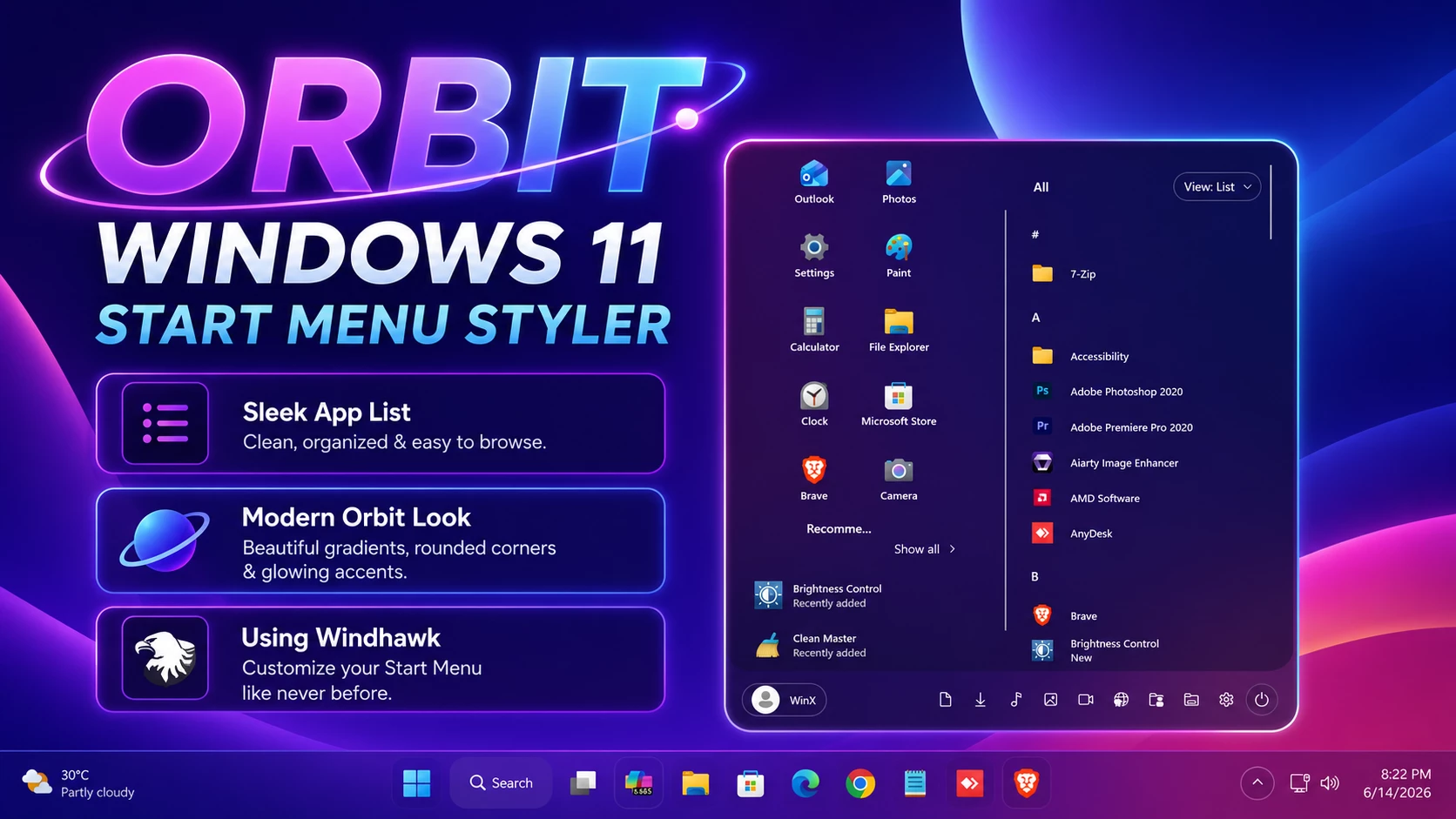
The Orbit Start Menu Style For Windows 11 is a Windhawk-based Start Menu customization built around a wide two-column layout. It uses a dark purple translucent surface, rounded outer corners, and bright cyan and magenta edge accents to give the menu a more distinctive appearance than the standard Windows 11 design.
The left side keeps frequently used apps arranged in a compact grid, with a separate recommended area underneath. The larger right section is used for the application list, with alphabetical grouping and a clear divider separating it from the pinned-app area.
A slim control strip runs along the bottom of the menu, placing the user profile on one side and several utility shortcuts on the other. This keeps the main application areas uncluttered while still leaving common controls within easy reach.
Features
- Wide two-column Start Menu layout
- Dark purple and deep blue translucent surface
- Rounded outer panel design
- Cyan, blue, and magenta edge accents
- Compact application grid on the left
- Separate recommended section
- Alphabetical application list on the right
- Clear vertical divider between the two main sections
- Bottom profile and utility control strip
- Designed for Windhawk Start Menu Styler
What the Style Changes
Orbit focuses on the appearance and arrangement of supported Windows 11 Start Menu elements. The configuration changes the menu layout, panel styling, spacing, borders, and positioning through the Windows 11 Start Menu Styler mod in Windhawk.
It does not replace Windows 11 with another operating system or install a separate Start Menu application. Wallpaper, taskbar styling, desktop icons, and other Windows customizations remain separate from the Orbit Start Menu configuration.
Compatibility
- Windows 11 21H2: Supported
- Windows 11 22H2: Supported
- Windows 11 23H2: Supported
- Windows 11 24H2: Supported
- Windows 11 25H2: Supported, but test carefully after Windows updates
Before Applying Orbit
If you already use another Start Menu Styler preset, save a copy of its configuration before replacing it. This gives you an easier way to return to your previous layout if you later decide to switch back.
Avoid combining several Start Menu presets that target the same interface elements. Overlapping rules can affect spacing, positioning, or visibility and may prevent the Orbit layout from displaying correctly.
How to Install Orbit Start Menu Style
- Download and install Windhawk.
- Open Windhawk and install the Windows 11 Start Menu Styler mod.
- Open the mod and go to the Advanced tab.
- Back up your current Start Menu Styler configuration if you already use another preset.
- Copy the complete Orbit configuration code.
- Paste it into the Mod settings box.
- Click Save to apply the style.
- Open the Start Menu and check that both columns and the bottom control area are positioned correctly.
For more information about Start Menu Styler configuration, see the Windows 11 Start Menu Styling Guide .
{ "Theme": "Orbit Start Menu Style by WinX Customization", "disableNewStartMenuLayout": "newLayoutSideBySide", "styleConstants[0]": "GlassMain=<WindhawkBlur BlurAmount=\"64\" TintColor=\"#75101022\"/>", "styleConstants[1]": "GlassPanel=<WindhawkBlur BlurAmount=\"52\" TintColor=\"#501A1430\"/>", "styleConstants[2]": "GlassPanelSoft=<WindhawkBlur BlurAmount=\"48\" TintColor=\"#401B1835\"/>", "styleConstants[3]": "GlassHover=<WindhawkBlur BlurAmount=\"0\" TintColor=\"#504C3A80\"/>", "styleConstants[4]": "GlassPressed=<WindhawkBlur BlurAmount=\"46\" TintColor=\"#705C48A0\"/>", "styleConstants[5]": "GlassFlyout=<WindhawkBlur BlurAmount=\"58\" TintColor=\"#80121024\"/>", "styleConstants[6]": "TransparentBrush=<SolidColorBrush Color=\"Transparent\"/>", "styleConstants[7]": "SoftBorder=<SolidColorBrush Color=\"#66C9D8FF\"/>", "styleConstants[8]": "BrightBorder=<SolidColorBrush Color=\"#B8E7EFFF\"/>", "styleConstants[9]": "GlowBorder=<SolidColorBrush Color=\"#88BCA7FF\"/>", "styleConstants[10]": "WhiteText=<SolidColorBrush Color=\"#FFF8F4FF\"/>", "styleConstants[11]": "MutedText=<SolidColorBrush Color=\"#CFE8E4FF\"/>", "styleConstants[12]": "MenuHover=<WindhawkBlur BlurAmount=\"38\" TintColor=\"#504C3A80\"/>", "styleConstants[13]": "MenuPressed=<WindhawkBlur BlurAmount=\"44\" TintColor=\"#755B49A0\"/>", "controlStyles[0].target": "Grid#MainMenu", "controlStyles[0].styles[0]": "Width=650", "controlStyles[1].target": "Grid#FrameRoot", "controlStyles[1].styles[0]": "Height=690", "controlStyles[2].target": "Border#AcrylicBorder", "controlStyles[2].styles[0]": "Background:=$GlassMain", "controlStyles[2].styles[1]": "BorderBrush:=$SoftBorder", "controlStyles[2].styles[2]": "BorderThickness=1", "controlStyles[2].styles[3]": "CornerRadius=28", "controlStyles[2].styles[4]": "Padding=0", "controlStyles[2].styles[5]": "Opacity=0.96", "controlStyles[3].target": "Border#AcrylicOverlay", "controlStyles[3].styles[0]": "Background:=$GlassMain", "controlStyles[3].styles[1]": "CornerRadius=28", "controlStyles[3].styles[2]": "Margin=0,-64,0,0", "controlStyles[3].styles[3]": "Opacity=0.88", "controlStyles[4].target": "Border#BorderElement", "controlStyles[4].styles[0]": "Background:=$GlassPanel", "controlStyles[4].styles[1]": "BorderBrush:=$SoftBorder", "controlStyles[4].styles[2]": "BorderThickness=1", "controlStyles[4].styles[3]": "CornerRadius=28", "controlStyles[4].styles[4]": "Opacity=0.92", "controlStyles[5].target": "Border#AppBorder", "controlStyles[5].styles[0]": "Background:=$GlassMain", "controlStyles[5].styles[1]": "BorderBrush:=$SoftBorder", "controlStyles[5].styles[2]": "BorderThickness=1", "controlStyles[5].styles[3]": "CornerRadius=28", "controlStyles[5].styles[4]": "Opacity=0.94", "controlStyles[6].target": "Border#AccentAppBorder", "controlStyles[6].styles[0]": "Background:=$GlassMain", "controlStyles[6].styles[1]": "BorderBrush:=$BrightBorder", "controlStyles[6].styles[2]": "BorderThickness=1", "controlStyles[6].styles[3]": "CornerRadius=28", "controlStyles[6].styles[4]": "Opacity=0.96", "controlStyles[7].target": "Border#LayerBorder", "controlStyles[7].styles[0]": "Visibility=Collapsed", "controlStyles[7].styles[1]": "Opacity=0", "controlStyles[8].target": "Border#StartDropShadow", "controlStyles[8].styles[0]": "CornerRadius=28", "controlStyles[8].styles[1]": "Margin=-1", "controlStyles[9].target": "Border#dropshadow", "controlStyles[9].styles[0]": "CornerRadius=28", "controlStyles[9].styles[1]": "Margin=-1", "controlStyles[10].target": "Frame#StartFrame", "controlStyles[10].styles[0]": "Margin=0,-64,0,0", "controlStyles[11].target": "StartMenu.SearchBoxToggleButton", "controlStyles[11].styles[0]": "Height=0", "controlStyles[11].styles[1]": "Width=0", "controlStyles[11].styles[2]": "Visibility=Collapsed", "controlStyles[12].target": "StartDocked.SearchBoxToggleButton", "controlStyles[12].styles[0]": "Height=0", "controlStyles[12].styles[1]": "Width=0", "controlStyles[12].styles[2]": "Visibility=Collapsed", "controlStyles[13].target": "Grid#SideBySidePinnedWrapper", "controlStyles[13].styles[0]": "ColumnDefinitions:=<ColumnDefinitionCollection><ColumnDefinition Width=\"330*\"/><ColumnDefinition Width=\"320*\"/></ColumnDefinitionCollection>", "controlStyles[13].styles[1]": "Background:=$TransparentBrush", "controlStyles[14].target": "GridView#AllAppsGrid > Border > Grid#SideBySidePinnedWrapper > ScrollViewer#ScrollViewer", "controlStyles[14].styles[0]": "Grid.Column=1", "controlStyles[14].styles[1]": "Margin=4,12,22,12", "controlStyles[15].target": "ScrollViewer#SideBySidePinnedScrollViewer", "controlStyles[15].styles[0]": "Grid.Column=0", "controlStyles[15].styles[1]": "Margin=22,12,4,12", "controlStyles[16].target": "Grid#SideBySidePinnedWrapper > ScrollViewer > Border#Root > Grid > ScrollContentPresenter > ItemsPresenter > ItemsWrapGrid", "controlStyles[16].styles[0]": "Margin=4,8,14,8", "controlStyles[17].target": "Grid#AllListHeading > TextBlock#AllListHeadingText", "controlStyles[17].styles[0]": "Margin=18,8,12,8", "controlStyles[17].styles[1]": "Foreground:=$WhiteText", "controlStyles[17].styles[2]": "FontWeight=SemiBold", "controlStyles[17].styles[3]": "FontSize=14", "controlStyles[18].target": "Grid#AllListHeading > Microsoft.UI.Xaml.Controls.DropDownButton#ViewSelectionButton", "controlStyles[18].styles[0]": "Margin=0,0,16,0", "controlStyles[19].target": "Grid#NavPanePlaceholder", "controlStyles[19].styles[0]": "Margin=18,0,18,0", "controlStyles[20].target": "StartDocked.NavigationPaneView#UserControl > Grid#RootPanel", "controlStyles[20].styles[0]": "FlowDirection=0", "controlStyles[20].styles[1]": "Background:=$TransparentBrush", "controlStyles[21].target": "StartDocked.PowerOptionsView#PowerButton", "controlStyles[21].styles[0]": "FlowDirection=0", "controlStyles[22].target": "ItemsStackPanel > ListViewItem", "controlStyles[22].styles[0]": "FlowDirection=0", "controlStyles[23].target": "Windows.UI.Xaml.Controls.TextBlock#PinnedListHeaderText", "controlStyles[23].styles[0]": "Visibility=Collapsed", "controlStyles[24].target": "TextBlock#PinnedListHeaderText", "controlStyles[24].styles[0]": "Visibility=Collapsed", "controlStyles[25].target": "Button#ShowAllAppsButton", "controlStyles[25].styles[0]": "Visibility=Collapsed", "controlStyles[26].target": "Windows.UI.Xaml.Controls.Button#ShowAllAppsButton", "controlStyles[26].styles[0]": "Visibility=Collapsed", "controlStyles[27].target": "Button#CloseAllAppsButton", "controlStyles[27].styles[0]": "Visibility=Collapsed", "controlStyles[28].target": "Windows.UI.Xaml.Controls.Button#CloseAllAppsButton", "controlStyles[28].styles[0]": "Visibility=Collapsed", "controlStyles[29].target": "StartMenu.PinnedList", "controlStyles[29].styles[0]": "Height=410", "controlStyles[29].styles[1]": "Margin=0,0,0,4", "controlStyles[30].target": "Border#ContentBorder@CommonStates > Grid#DroppedFlickerWorkaroundWrapper > Border", "controlStyles[30].styles[0]": "Background@Normal:=$TransparentBrush", "controlStyles[30].styles[1]": "Background@PointerOver:=$GlassHover", "controlStyles[30].styles[2]": "Background@Pressed:=$GlassPressed", "controlStyles[30].styles[3]": "BorderBrush@PointerOver:=$BrightBorder", "controlStyles[30].styles[4]": "BorderBrush@Pressed:=$GlowBorder", "controlStyles[30].styles[5]": "BorderThickness@PointerOver=1", "controlStyles[30].styles[6]": "BorderThickness@Pressed=1", "controlStyles[30].styles[7]": "CornerRadius=16", "controlStyles[30].styles[8]": "Margin=3", "controlStyles[30].styles[9]": "Opacity=0.96", "controlStyles[31].target": "StartDocked.AppListViewItem > Grid@CommonStates > Border", "controlStyles[31].styles[0]": "Background@Normal:=$TransparentBrush", "controlStyles[31].styles[1]": "Background@PointerOver:=$GlassHover", "controlStyles[31].styles[2]": "Background@Pressed:=$GlassPressed", "controlStyles[31].styles[3]": "BorderBrush@PointerOver:=$BrightBorder", "controlStyles[31].styles[4]": "BorderBrush@Pressed:=$GlowBorder", "controlStyles[31].styles[5]": "BorderThickness@PointerOver=1", "controlStyles[31].styles[6]": "BorderThickness@Pressed=1", "controlStyles[31].styles[7]": "CornerRadius=15", "controlStyles[31].styles[8]": "Margin=2", "controlStyles[32].target": "StartDocked.AllAppsGridListViewItem > Grid@CommonStates > Border", "controlStyles[32].styles[0]": "Background@Normal:=$TransparentBrush", "controlStyles[32].styles[1]": "Background@PointerOver:=$GlassHover", "controlStyles[32].styles[2]": "Background@Pressed:=$GlassPressed", "controlStyles[32].styles[3]": "BorderBrush@PointerOver:=$BrightBorder", "controlStyles[32].styles[4]": "BorderBrush@Pressed:=$GlowBorder", "controlStyles[32].styles[5]": "BorderThickness@PointerOver=1", "controlStyles[32].styles[6]": "BorderThickness@Pressed=1", "controlStyles[32].styles[7]": "CornerRadius=15", "controlStyles[32].styles[8]": "Margin=2", "controlStyles[33].target": "ListViewItem > Grid#ContentBorder@CommonStates", "controlStyles[33].styles[0]": "Background@Normal:=$TransparentBrush", "controlStyles[33].styles[1]": "Background@PointerOver:=$GlassHover", "controlStyles[33].styles[2]": "Background@Pressed:=$GlassPressed", "controlStyles[33].styles[3]": "BorderBrush@PointerOver:=$BrightBorder", "controlStyles[33].styles[4]": "BorderBrush@Pressed:=$GlowBorder", "controlStyles[33].styles[5]": "BorderThickness@PointerOver=1", "controlStyles[33].styles[6]": "BorderThickness@Pressed=1", "controlStyles[33].styles[7]": "CornerRadius=15", "controlStyles[33].styles[8]": "Margin=2", "controlStyles[34].target": "GridView#RecommendedList", "controlStyles[34].styles[0]": "Margin=0,-2,0,0", "controlStyles[35].target": "Grid#TopLevelSuggestionsListHeader", "controlStyles[35].styles[0]": "Margin=8,0,0,4", "controlStyles[36].target": "TextBlock#TopLevelSuggestionsListHeaderText", "controlStyles[36].styles[0]": "Foreground:=$WhiteText", "controlStyles[36].styles[1]": "FontWeight=SemiBold", "controlStyles[36].styles[2]": "FontSize=14", "controlStyles[37].target": "Grid#TopLevelSuggestionsContainer", "controlStyles[37].styles[0]": "Margin=0,0,0,0", "controlStyles[38].target": "StartDocked.NavigationPaneButton#UserTileButton > Grid@CommonStates > Border", "controlStyles[38].styles[0]": "Background@Normal:=$GlassPanelSoft", "controlStyles[38].styles[1]": "Background@PointerOver:=$GlassHover", "controlStyles[38].styles[2]": "Background@Pressed:=$GlassPressed", "controlStyles[38].styles[3]": "BorderBrush:=$SoftBorder", "controlStyles[38].styles[4]": "BorderBrush@PointerOver:=$BrightBorder", "controlStyles[38].styles[5]": "BorderBrush@Pressed:=$GlowBorder", "controlStyles[38].styles[6]": "BorderThickness=1", "controlStyles[38].styles[7]": "CornerRadius=18", "controlStyles[38].styles[8]": "Margin=2", "controlStyles[38].styles[9]": "Opacity=0.92", "controlStyles[39].target": "StartDocked.NavigationPaneButton#PowerButton > Grid@CommonStates > Border", "controlStyles[39].styles[0]": "Background@Normal:=$GlassPanelSoft", "controlStyles[39].styles[1]": "Background@PointerOver:=$GlassHover", "controlStyles[39].styles[2]": "Background@Pressed:=$GlassPressed", "controlStyles[39].styles[3]": "BorderBrush:=$SoftBorder", "controlStyles[39].styles[4]": "BorderBrush@PointerOver:=$BrightBorder", "controlStyles[39].styles[5]": "BorderBrush@Pressed:=$GlowBorder", "controlStyles[39].styles[6]": "BorderThickness=1", "controlStyles[39].styles[7]": "CornerRadius=18", "controlStyles[39].styles[8]": "Margin=2", "controlStyles[39].styles[9]": "Opacity=0.92", "controlStyles[40].target": "StartDocked.PowerOptionsView > Grid@CommonStates > Border", "controlStyles[40].styles[0]": "Background@Normal:=$TransparentBrush", "controlStyles[40].styles[1]": "Background@PointerOver:=$GlassHover", "controlStyles[40].styles[2]": "Background@Pressed:=$GlassPressed", "controlStyles[40].styles[3]": "BorderBrush@PointerOver:=$BrightBorder", "controlStyles[40].styles[4]": "BorderBrush@Pressed:=$GlowBorder", "controlStyles[40].styles[5]": "BorderThickness@PointerOver=1", "controlStyles[40].styles[6]": "BorderThickness@Pressed=1", "controlStyles[40].styles[7]": "CornerRadius=18", "controlStyles[40].styles[8]": "Margin=2", "controlStyles[41].target": "Microsoft.UI.Xaml.Controls.DropDownButton > Grid#RootGrid", "controlStyles[41].styles[0]": "Background:=$GlassPanelSoft", "controlStyles[41].styles[1]": "Background@PointerOver:=$GlassHover", "controlStyles[41].styles[2]": "Background@Pressed:=$GlassPressed", "controlStyles[41].styles[3]": "BorderBrush:=$SoftBorder", "controlStyles[41].styles[4]": "BorderBrush@PointerOver:=$BrightBorder", "controlStyles[41].styles[5]": "BorderThickness=1", "controlStyles[41].styles[6]": "CornerRadius=14", "controlStyles[42].target": "DropDownButton", "controlStyles[42].styles[0]": "Background:=$TransparentBrush", "controlStyles[42].styles[1]": "Foreground:=$WhiteText", "controlStyles[43].target": "Button > Grid@CommonStates > Border", "controlStyles[43].styles[0]": "Background@Normal:=$TransparentBrush", "controlStyles[43].styles[1]": "Background@PointerOver:=$GlassHover", "controlStyles[43].styles[2]": "Background@Pressed:=$GlassPressed", "controlStyles[43].styles[3]": "BorderBrush@PointerOver:=$BrightBorder", "controlStyles[43].styles[4]": "BorderBrush@Pressed:=$GlowBorder", "controlStyles[43].styles[5]": "BorderThickness@PointerOver=1", "controlStyles[43].styles[6]": "BorderThickness@Pressed=1", "controlStyles[43].styles[7]": "CornerRadius=15", "controlStyles[44].target": "Button#Header > Border#Border@CommonStates", "controlStyles[44].styles[0]": "Background@Normal:=$TransparentBrush", "controlStyles[44].styles[1]": "Background@PointerOver:=$MenuHover", "controlStyles[44].styles[2]": "Background@Pressed:=$MenuPressed", "controlStyles[44].styles[3]": "BorderBrush@PointerOver:=$BrightBorder", "controlStyles[44].styles[4]": "BorderThickness@PointerOver=1", "controlStyles[44].styles[5]": "CornerRadius=15", "controlStyles[45].target": "StartMenu.FolderModal > Grid > Border", "controlStyles[45].styles[0]": "Background:=$GlassFlyout", "controlStyles[45].styles[1]": "BorderBrush:=$BrightBorder", "controlStyles[45].styles[2]": "BorderThickness=1", "controlStyles[45].styles[3]": "CornerRadius=24", "controlStyles[45].styles[4]": "Padding=6", "controlStyles[45].styles[5]": "Opacity=0.96", "controlStyles[46].target": "StartMenu.ExpandedFolderList > Grid > Border", "controlStyles[46].styles[0]": "Background:=$GlassFlyout", "controlStyles[46].styles[1]": "BorderBrush:=$BrightBorder", "controlStyles[46].styles[2]": "BorderThickness=1", "controlStyles[46].styles[3]": "CornerRadius=24", "controlStyles[46].styles[4]": "Opacity=0.96", "controlStyles[47].target": "MenuFlyoutPresenter > Border", "controlStyles[47].styles[0]": "Background:=$GlassFlyout", "controlStyles[47].styles[1]": "BorderBrush:=$SoftBorder", "controlStyles[47].styles[2]": "BorderBrush@PointerOver:=$BrightBorder", "controlStyles[47].styles[3]": "BorderThickness=1", "controlStyles[47].styles[4]": "CornerRadius=20", "controlStyles[47].styles[5]": "Padding=6,7,6,7", "controlStyles[47].styles[6]": "Margin=2", "controlStyles[47].styles[7]": "Opacity=0.96", "controlStyles[48].target": "MenuFlyoutItem", "controlStyles[48].styles[0]": "CornerRadius=14", "controlStyles[48].styles[1]": "Background:=$TransparentBrush", "controlStyles[48].styles[2]": "Background@PointerOver:=$MenuHover", "controlStyles[48].styles[3]": "Background@Pressed:=$MenuPressed", "controlStyles[48].styles[4]": "BorderBrush@PointerOver:=$BrightBorder", "controlStyles[48].styles[5]": "BorderThickness@PointerOver=1", "controlStyles[48].styles[6]": "Margin=2,1,2,1", "controlStyles[49].target": "MenuFlyoutItem TextBlock", "controlStyles[49].styles[0]": "Foreground:=$WhiteText", "controlStyles[49].styles[1]": "FontWeight=SemiBold", "controlStyles[50].target": "ToolTip > ContentPresenter#LayoutRoot", "controlStyles[50].styles[0]": "Background:=$GlassFlyout", "controlStyles[50].styles[1]": "BorderBrush:=$SoftBorder", "controlStyles[50].styles[2]": "BorderThickness=1", "controlStyles[50].styles[3]": "CornerRadius=16", "controlStyles[50].styles[4]": "Padding=6,4,6,4", "controlStyles[51].target": "ToolTip > Border", "controlStyles[51].styles[0]": "Background:=$GlassFlyout", "controlStyles[51].styles[1]": "BorderBrush:=$SoftBorder", "controlStyles[51].styles[2]": "BorderThickness=1", "controlStyles[51].styles[3]": "CornerRadius=16", "controlStyles[51].styles[4]": "Padding=6,4,6,4", "controlStyles[52].target": "TextBlock", "controlStyles[52].styles[0]": "Foreground:=$WhiteText", "controlStyles[53].target": "TextBlock#Text", "controlStyles[53].styles[0]": "Foreground:=$WhiteText", "controlStyles[53].styles[1]": "FontWeight=SemiBold", "controlStyles[54].target": "TextBlock#DisplayName", "controlStyles[54].styles[0]": "Foreground:=$WhiteText", "controlStyles[54].styles[1]": "FontWeight=SemiBold", "controlStyles[55].target": "TextBlock#SecondaryText", "controlStyles[55].styles[0]": "Foreground:=$MutedText", "controlStyles[56].target": "StartDocked.SearchBoxToggleButton TextBlock", "controlStyles[56].styles[0]": "Foreground:=$MutedText", "controlStyles[56].styles[1]": "FontWeight=SemiBold", "controlStyles[57].target": "StartMenu.SearchBoxToggleButton TextBlock", "controlStyles[57].styles[0]": "Foreground:=$MutedText", "controlStyles[57].styles[1]": "FontWeight=SemiBold"}How to Remove Orbit Start Menu Style
- Open Windhawk.
- Select the Windows 11 Start Menu Styler mod.
- Open the mod settings.
- Remove the Orbit configuration or restore your previous preset.
- Save the settings.
- Disable the Start Menu Styler mod if you want to return to the normal Windows Start Menu styling.
Taskbar & Start menu
- Taskbar Style
Disclaimer
Orbit Explorer Style is a third-party Windows customization resource created for personalization purposes. It is not an official Microsoft theme and is not affiliated with Microsoft. Compatibility may vary depending on your Windows version, updates, and system configuration. Always create a System Restore Point before applying any customization.
Final Thoughts
If you like modern desktop customization, Orbit is a beautiful Start Menu style worth trying. It brings a premium look to Windows 11 and makes the Start Menu feel more elegant, organized, and visually impressive.
You may also like


Disclaimer: All themes, visual styles, and concepts shared on this website are unofficial, fan-made creations built from imagination for customization purposes. We are not affiliated with, endorsed by, or sponsored by Microsoft or any other official brand.