Pastel Theme For Windows 11
Pastel Theme For Windows 11 : Upgrade your desktop with the Pastel Theme for Windows 11, featuring soft gradient colors, glass-style transparency, and modern icons for a clean, elegant, and eye-friendly user experience.

Pastel Theme For Windows 11 (Custom Windows Theme)
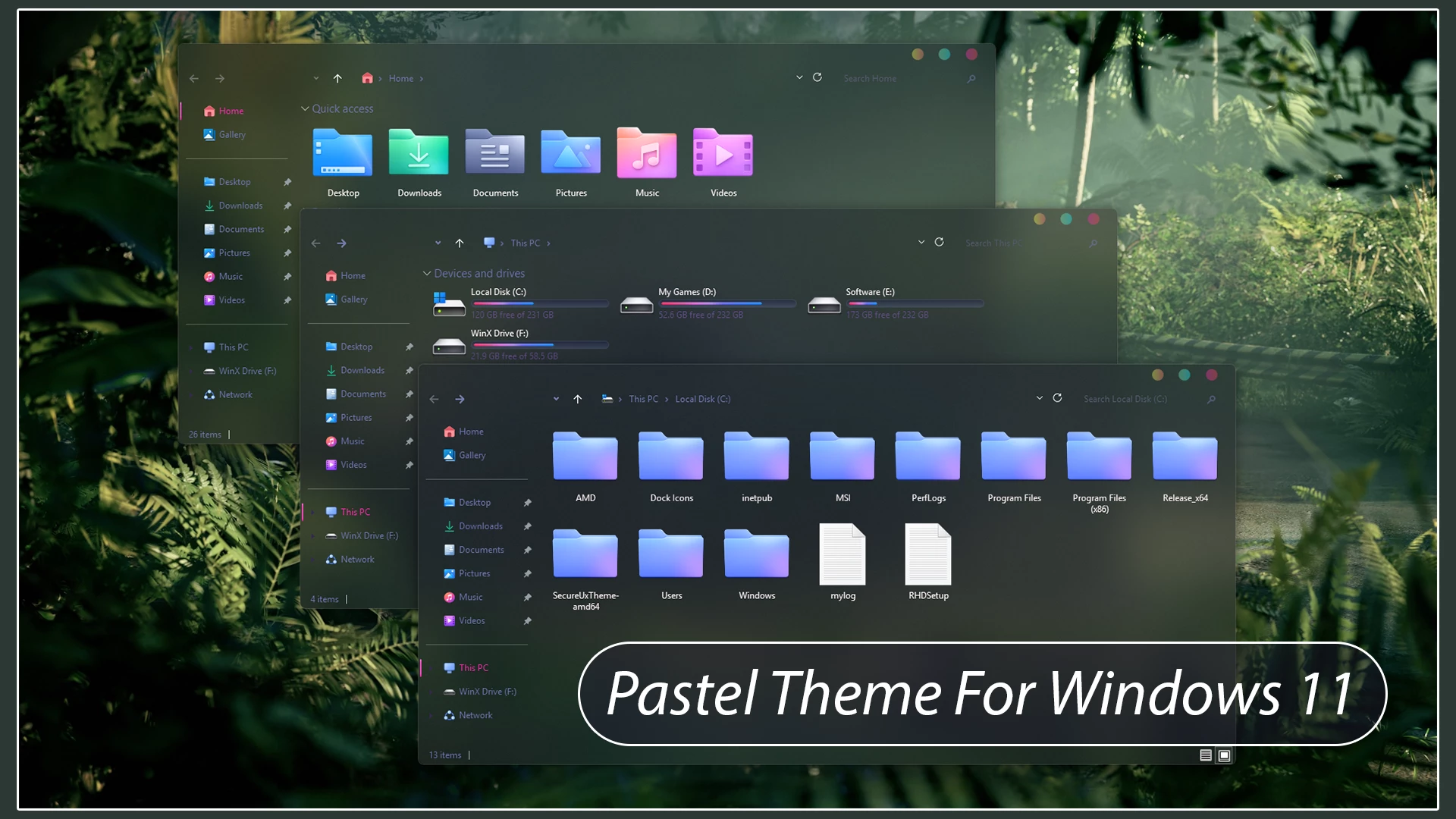
The Pastel Theme for Windows 11 gives File Explorer a transparent glass-style appearance with soft pastel accents and a clean Windows 11 layout. The transparent window surfaces allow the wallpaper to remain visible through Explorer, giving the interface a layered look without covering the desktop with a heavy solid background.
The theme keeps the main interface simple while adding subtle pastel details around navigation items, window controls, and storage information. Because the Explorer surfaces are transparent, colors from the wallpaper can influence the overall appearance, so the same theme can look noticeably different when used with another background.
The hard-drive level indicators use a mix of cyan, blue, violet, and soft pastel tones, adding color to the storage section without overpowering the interface. The DWM window controls also follow the pastel direction, using small circular buttons with yellow, teal-cyan, and pink-red accents for the minimize, maximize, and close controls.
- Transparent glass-style File Explorer surfaces
- Wallpaper remains visible through the Explorer background
- Soft pastel interface accents
- Cyan, blue, violet, and pastel hard-drive level indicators
- Custom pastel-style DWM window buttons
- Yellow, teal-cyan, and pink-red DWM button accents
- Thin borders and restrained interface separators
- Keeps the familiar Windows 11 Explorer structure
- Windows 11 21H2: May work, but not recommended for the best experience
- 22H2 YES
- 23H2 YES
- 24H2 YES
- 25H2 YES
- Windows 11 Theme
Apply the Pastel Theme
- Create a System Restore Point, prepare Windows with a compatible theme patcher, then place the extracted theme files in
C:\Windows\Resources\Themesand apply the style from Personalization > Themes. - For the complete setup instructions, read this Windows 11 custom theme installation guide.
Theme Files 5MB
Download- Choose a default Windows 11 theme and turn off any extra customization tools or visual changes that were added with the Pastel setup.
- If you need the full restoration process, follow this Windows 11 custom theme removal guide.
Pastel Theme Customization Notice
Pastel Theme for Windows 11 is an independent third-party customization resource intended for personal desktop customization. It is not an official Microsoft product and is not affiliated with, sponsored by, or endorsed by Microsoft. Windows and related trademarks belong to their respective owners.
Third-party visual styles can behave differently across Windows builds, so creating a System Restore Point before applying theme files or changing Windows visual resources is recommended.
Final Thoughts
The Pastel Theme for Windows 11 combines transparent Explorer surfaces with softer pastel accents, colorful hard-drive level indicators, and compact DWM controls. The interface remains light and colorful without replacing the familiar Windows 11 File Explorer structure.
Since the wallpaper remains visible through the transparent areas, changing the desktop background can also give the setup a different overall character while keeping the main visual style unchanged.