

Lumina Start Menu Style For Windows 11
Upgrade your Windows 11 Start Menu with Lumina Start Menu Style (Windhawk). Experience a modern glassmorphism design, glowing UI effects, and smooth customization for a premium desktop look.

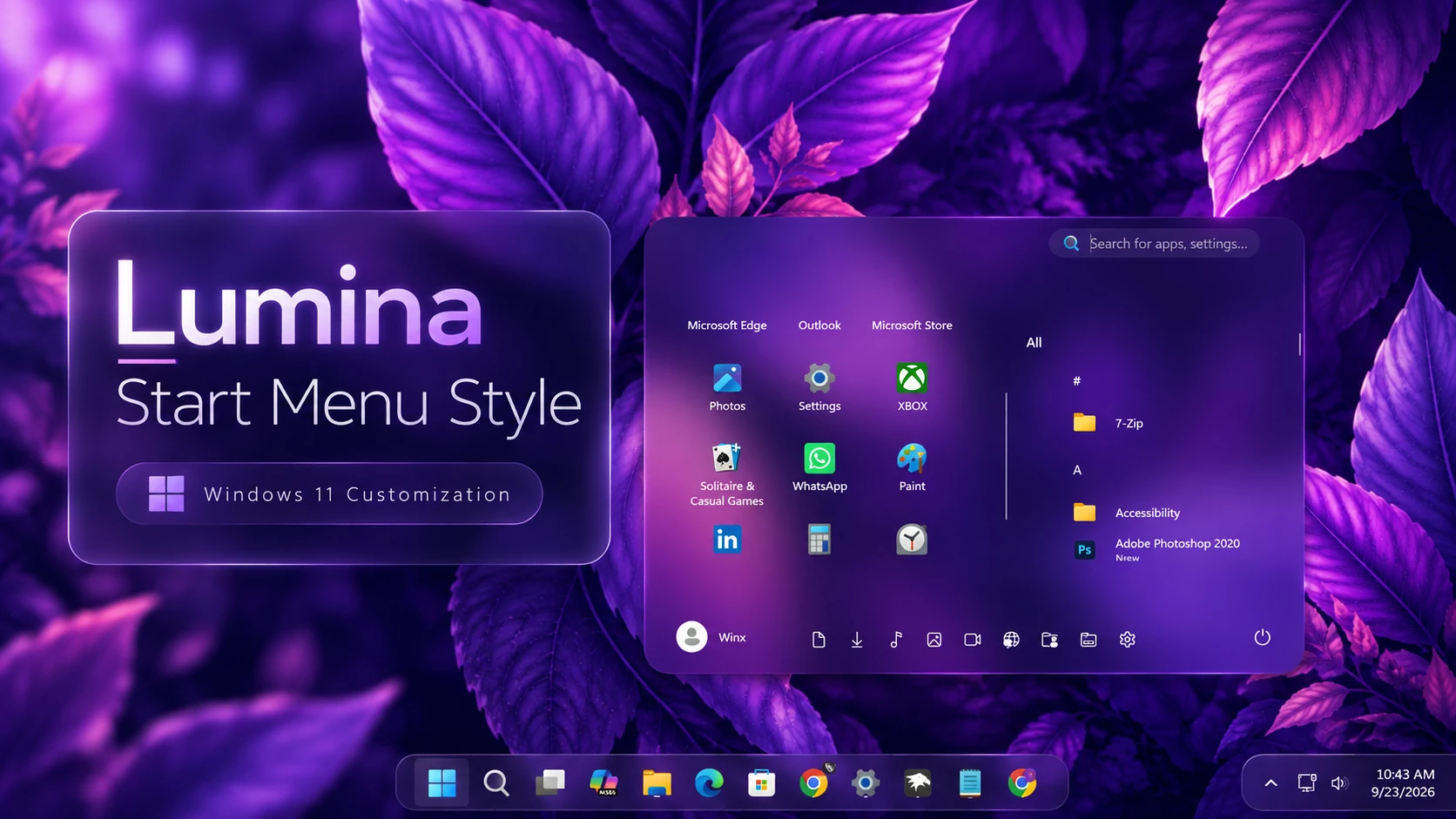
Lumina Start Menu Style (Windhawk) For Windows 11
Lumina Start Menu Style is a modern Windows 11 customization designed for users who prefer a clean, compact, and transparent interface. Created with Windhawk, this style transforms the default Start Menu into a lightweight glass-like design that blends naturally with your desktop background. Instead of using a solid background, Lumina focuses on transparency, allowing the wallpaper behind the Start Menu to remain visible and create a unique visual experience.
The main highlight of Lumina is its transparent Start Menu design. The background effect is created through transparency and blur, which allows the colors and details of your wallpaper to appear naturally through the interface. This creates a smooth layered appearance where the Start Menu feels like a part of the desktop rather than a separate window.
Lumina features a compact and well-organized layout that improves both appearance and usability. The left side of the Start Menu is dedicated to pinned applications, allowing quick access to frequently used programs. On the right side, the complete application list is displayed with clean spacing and easy navigation. This balanced two-section layout keeps everything organized while maintaining a minimal appearance.
The design also includes a clean search area at the top and neatly arranged controls at the bottom, creating a simple but functional interface. Rounded corners, smooth transparency, and subtle blur effects provide a modern Windows 11-inspired look while keeping the original Start Menu experience familiar.
Because Lumina works through Windhawk, users can enjoy a visual upgrade without replacing the Windows Start Menu completely. The customization focuses on improving the overall appearance while keeping the original functionality, making it suitable for everyday desktop use.
Lumina Start Menu Style is an excellent choice for users who enjoy transparent interfaces, minimal layouts, and modern desktop customization. When combined with a suitable wallpaper, the transparent design creates a unique appearance that changes naturally depending on the background.
Main Features of Lumina Start Menu Style
- Modern transparent Start Menu design
- Glass-like background with blur effect
- Wallpaper-visible transparency for a natural desktop blend
- Compact and balanced Start Menu layout
- Left-side pinned applications section
- Right-side application list section
- Clean search area for quick access
- Rounded corners with smooth visual styling
- Minimal design while keeping Windows functionality
- Works beautifully with different wallpaper styles
- Created for Windows 11 customization using Windhawk
Download Windhawk To Use The Style
Compatibility
- Windows 11 21H2: May work, but not recommended for the best experience
- Windows 11 22H2: May work, but compatibility can vary
- Windows 11 23H2: Recommended
- Windows 11 24H2: Recommended
- Windows 11 25H2: YES
Installation steps:
- Download & Install windhawk.
- install & Open the Windows 11 Start Menu Styler mod in Windhawk.
- Go to the “Advanced” tab.
- Copy the content below to the text box under “Mod settings” and click “Save”.
{ "theme": "Lumina Start Menu by WinX Customization", "controlStyles[0].target": "Grid#MainMenu", "controlStyles[0].styles[0]": "Width=690", "controlStyles[0].styles[1]": "MinWidth=690", "controlStyles[0].styles[2]": "MaxWidth=690", "controlStyles[1].target": "Grid#FrameRoot", "controlStyles[1].styles[0]": "Height=500", "controlStyles[1].styles[1]": "MaxHeight=500", "controlStyles[2].target": "Grid#SideBySidePinnedWrapper", "controlStyles[2].styles[0]": "ColumnDefinitions:=<ColumnDefinitionCollection><ColumnDefinition Width=\"385*\"/><ColumnDefinition Width=\"305*\"/></ColumnDefinitionCollection>", "controlStyles[3].target": "ScrollViewer#SideBySidePinnedScrollViewer", "controlStyles[3].styles[0]": "Grid.Column=0", "controlStyles[3].styles[1]": "Margin=0", "controlStyles[4].target": "GridView#AllAppsGrid > Border > Grid#SideBySidePinnedWrapper > ScrollViewer#ScrollViewer", "controlStyles[4].styles[0]": "Grid.Column=1", "controlStyles[4].styles[1]": "Margin=0", "controlStyles[5].target": "TextBlock#PinnedListHeaderText", "controlStyles[5].styles[0]": "Visibility=Visible", "controlStyles[5].styles[1]": "Text=Pinned", "controlStyles[5].styles[2]": "FontSize=13", "controlStyles[5].styles[3]": "FontWeight=SemiBold", "controlStyles[5].styles[4]": "Opacity=.85", "controlStyles[5].styles[5]": "Margin=26,14,0,0", "controlStyles[6].target": "StartMenu.PinnedList#StartMenuPinnedList", "controlStyles[6].styles[0]": "Width=375", "controlStyles[6].styles[1]": "MaxWidth=375", "controlStyles[6].styles[2]": "Height=350", "controlStyles[6].styles[3]": "MaxHeight=350", "controlStyles[6].styles[4]": "Margin=8,10,0,0", "controlStyles[7].target": "StartMenu.PinnedList#StartMenuPinnedList Border#ContentBorder@CommonStates > Grid#DroppedFlickerWorkaroundWrapper > Border", "controlStyles[7].styles[0]": "Background@Normal:=<RevealBorderBrush Color=\"Transparent\" TargetTheme=\"1\" Opacity=\"0.18\"/>", "controlStyles[7].styles[1]": "Background@PointerOver:=<RevealBorderBrush Color=\"Transparent\" TargetTheme=\"1\" Opacity=\"0.35\"/>", "controlStyles[7].styles[2]": "BorderBrush:=<LinearGradientBrush StartPoint=\"0,0\" EndPoint=\"1,1\" Opacity=\"0.55\"><GradientStop Color=\"#80ffffff\" Offset=\"0.0\"/><GradientStop Color=\"{ThemeResource SurfaceStrokeColorDefault}\" Offset=\"0.55\"/><GradientStop Color=\"#80ffffff\" Offset=\"1\"/></LinearGradientBrush>", "controlStyles[7].styles[3]": "BorderThickness=1", "controlStyles[7].styles[4]": "CornerRadius=24", "controlStyles[7].styles[5]": "Margin=2", "controlStyles[8].target": "Microsoft.UI.Xaml.Controls.PipsPager#PinnedListPipsPager", "controlStyles[8].styles[0]": "Visibility=Collapsed", "controlStyles[9].target": "Grid#TopLevelSuggestionsListHeader", "controlStyles[9].styles[0]": "Visibility=Collapsed", "controlStyles[9].styles[1]": "Height=0", "controlStyles[10].target": "Grid#TopLevelSuggestionsRoot", "controlStyles[10].styles[0]": "Visibility=Collapsed", "controlStyles[10].styles[1]": "Height=0", "controlStyles[10].styles[2]": "MaxHeight=0", "controlStyles[11].target": "Grid#TopLevelSuggestionsContainer", "controlStyles[11].styles[0]": "Visibility=Collapsed", "controlStyles[11].styles[1]": "Height=0", "controlStyles[12].target": "GridView#RecommendedList", "controlStyles[12].styles[0]": "Visibility=Collapsed", "controlStyles[12].styles[1]": "Height=0", "controlStyles[13].target": "Grid#ShowMoreSuggestions", "controlStyles[13].styles[0]": "Visibility=Collapsed", "controlStyles[13].styles[1]": "Height=0", "controlStyles[14].target": "Grid#MoreSuggestionsRoot", "controlStyles[14].styles[0]": "Visibility=Collapsed", "controlStyles[14].styles[1]": "Height=0", "controlStyles[15].target": "Grid#AllListHeading", "controlStyles[15].styles[0]": "Margin=0,12,0,0", "controlStyles[16].target": "Grid#AllListHeading > TextBlock#AllListHeadingText", "controlStyles[16].styles[0]": "Text=All", "controlStyles[16].styles[1]": "FontSize=13", "controlStyles[16].styles[2]": "FontWeight=SemiBold", "controlStyles[16].styles[3]": "Opacity=.85", "controlStyles[16].styles[4]": "Margin=16,4,8,4", "controlStyles[17].target": "Grid#AllListHeading > Microsoft.UI.Xaml.Controls.DropDownButton#ViewSelectionButton", "controlStyles[17].styles[0]": "Visibility=Collapsed", "controlStyles[18].target": "StartMenu.SearchBoxToggleButton#SearchBoxToggleButton", "controlStyles[18].styles[0]": "Visibility=Visible", "controlStyles[18].styles[1]": "Height=32", "controlStyles[18].styles[2]": "Width=220", "controlStyles[18].styles[3]": "HorizontalAlignment=Right", "controlStyles[18].styles[4]": "VerticalAlignment=Top", "controlStyles[18].styles[5]": "Margin=0,10,18,0", "controlStyles[18].styles[6]": "Canvas.ZIndex=10", "controlStyles[19].target": "StartMenu.SearchBoxToggleButton#SearchBoxToggleButton > Grid@CommonStates > Border#BorderElement", "controlStyles[19].styles[0]": "Background:=<SolidColorBrush Color=\"#12ffffff\"/>", "controlStyles[19].styles[1]": "BorderBrush:=<RevealBorderBrush Color=\"Transparent\" TargetTheme=\"1\" Opacity=\".45\"/>", "controlStyles[19].styles[2]": "BorderThickness=1", "controlStyles[19].styles[3]": "CornerRadius=16", "controlStyles[20].target": "GridView#AllAppsGrid", "controlStyles[20].styles[0]": "Margin=0,42,0,50", "controlStyles[21].target": "Border#AcrylicBorder", "controlStyles[21].styles[0]": "Background:=<AcrylicBrush BackgroundSource=\"Backdrop\" TintColor=\"{ThemeResource CardStrokeColorDefaultSolid}\" TintOpacity=\"0\" TintLuminosityOpacity=\".20\"/>", "controlStyles[21].styles[1]": "BorderBrush:=<RevealBorderBrush Color=\"Transparent\" TargetTheme=\"1\" Opacity=\".50\"/>", "controlStyles[21].styles[2]": "BorderThickness=1", "controlStyles[21].styles[3]": "CornerRadius=28", "controlStyles[21].styles[4]": "Margin=0", "controlStyles[22].target": "Border#AcrylicOverlay", "controlStyles[22].styles[0]": "Visibility=Collapsed", "controlStyles[23].target": "Border#DropShadow", "controlStyles[23].styles[0]": "CornerRadius=28", "controlStyles[23].styles[1]": "Margin=0", "controlStyles[24].target": "Border#StartDropShadow", "controlStyles[24].styles[0]": "CornerRadius=28", "controlStyles[25].target": "Grid#NavPanePlaceholder", "controlStyles[25].styles[0]": "Margin=20,0,20,12", "controlStyles[26].target": "StartDocked.UserTileView", "controlStyles[26].styles[0]": "HorizontalAlignment=Left", "controlStyles[26].styles[1]": "Margin=4,0,0,0", "controlStyles[26].styles[2]": "Height=38", "controlStyles[27].target": "StartDocked.NavigationPaneButton#UserTileButton > Grid@CommonStates > Border", "controlStyles[27].styles[0]": "Background@Normal:=<RevealBorderBrush Color=\"Transparent\" TargetTheme=\"1\" Opacity=\".20\"/>", "controlStyles[27].styles[1]": "Background@PointerOver:=<RevealBorderBrush Color=\"Transparent\" TargetTheme=\"1\" Opacity=\".40\"/>", "controlStyles[27].styles[2]": "CornerRadius=19", "controlStyles[28].target": "StartDocked.AppListView#NavigationPanePlacesListView", "controlStyles[28].styles[0]": "HorizontalAlignment=Center", "controlStyles[28].styles[1]": "Margin=0,0,0,0", "controlStyles[29].target": "StartDocked.AppListView#NavigationPanePlacesListView > Border", "controlStyles[29].styles[0]": "Background:=<RevealBorderBrush Color=\"Transparent\" TargetTheme=\"1\" Opacity=\".15\"/>", "controlStyles[29].styles[1]": "BorderBrush:=<RevealBorderBrush Color=\"Transparent\" TargetTheme=\"1\" Opacity=\".45\"/>", "controlStyles[29].styles[2]": "BorderThickness=1", "controlStyles[29].styles[3]": "CornerRadius=19", "controlStyles[29].styles[4]": "Padding=4,2,4,2", "controlStyles[30].target": "StartDocked.AppListViewItem > Grid@CommonStates > Border", "controlStyles[30].styles[0]": "Background@Normal=Transparent", "controlStyles[30].styles[1]": "Background@PointerOver:=<RevealBorderBrush Color=\"Transparent\" TargetTheme=\"1\" Opacity=\".30\"/>", "controlStyles[30].styles[2]": "CornerRadius=14", "controlStyles[31].target": "StartDocked.PowerOptionsView", "controlStyles[31].styles[0]": "HorizontalAlignment=Right", "controlStyles[31].styles[1]": "Margin=0,0,4,0", "controlStyles[32].target": "StartDocked.NavigationPaneButton#PowerButton > Grid@CommonStates > Border#BackgroundBorder", "controlStyles[32].styles[0]": "Background@Normal:=<RevealBorderBrush Color=\"Transparent\" TargetTheme=\"1\" Opacity=\".20\"/>", "controlStyles[32].styles[1]": "Background@PointerOver:=<RevealBorderBrush Color=\"Transparent\" TargetTheme=\"1\" Opacity=\".40\"/>", "controlStyles[32].styles[2]": "BorderBrush@PointerOver:=<RevealBorderBrush Color=\"White\" TargetTheme=\"1\" Opacity=\".50\"/>", "controlStyles[32].styles[3]": "CornerRadius=19", "controlStyles[33].target": "StartMenu.ExpandedFolderList > Grid > Grid", "controlStyles[33].styles[0]": "CornerRadius=20", "controlStyles[34].target": "StartMenu.ExpandedFolderList > Grid > Grid > Microsoft.UI.Xaml.Controls.PipsPager#PinnedListPipsPager", "controlStyles[34].styles[0]": "Visibility=Collapsed", "controlStyles[35].target": "Windows.UI.Xaml.Controls.Primitives.ToggleButton#ShowHideCompanion", "controlStyles[35].styles[0]": "Visibility=Collapsed", "controlStyles[36].target": "Grid#CompanionRoot", "controlStyles[36].styles[0]": "Visibility=Collapsed", "controlStyles[37].target": "Grid#RightCompanionContainerGrid", "controlStyles[37].styles[0]": "Visibility=Collapsed", "disableNewStartMenuLayout": "newLayoutSideBySide"}Disclaimer
Lumina Start Menu Style is an unofficial Windows 11 customization created for personalization purposes only. It is not developed, endorsed, or supported by Microsoft. This style works with tools like Windhawk, and compatibility may vary depending on your Windows version, system settings, and future updates. Always create a backup or System Restore Point before applying any customization.
Finalization
Lumina Start Menu Style (Windhawk) brings a clean, transparent, and modern look to the Windows 11 Start Menu. Its compact layout, wallpaper-based transparency, and organized design create a smooth desktop experience while keeping the familiar Windows functionality. For users who enjoy minimal and elegant customization, Lumina offers a stylish way to refresh the Windows 11 interface without making it complicated.
You may also like


Disclaimer: All themes, visual styles, and concepts shared on this website are unofficial, fan-made creations built from imagination for customization purposes. We are not affiliated with, endorsed by, or sponsored by Microsoft or any other official brand.