

Rampage Gaming Theme For Windows 11
Upgrade your desktop with Rampage Gaming Theme For Windows 11. Get a bold red & black gaming UI with smooth performance and modern customization.

Rampage Gaming Theme For Windows 11: Red & Black Gaming Style
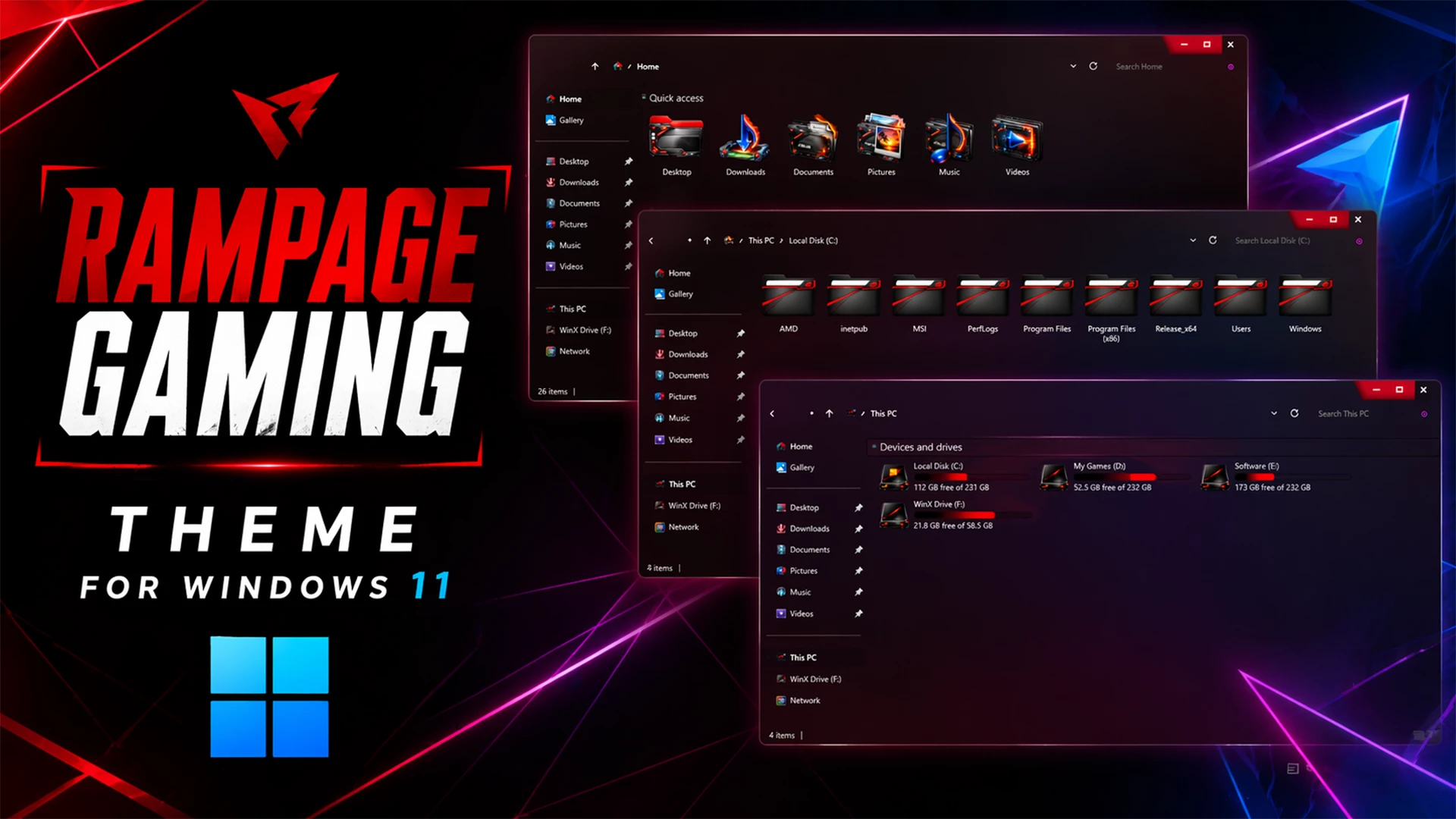
The Rampage Gaming Theme For Windows 11 gives the desktop a dark gaming-focused appearance built around black, deep red, and subtle magenta accents. File Explorer uses dark surfaces with restrained transparency, allowing parts of the wallpaper lighting to remain visible while keeping folders, navigation items, and storage information easy to read.
Red is the strongest accent color across the setup. The theme uses dark Explorer panels with red highlights around selected interface areas, window details, and other supported elements. The result is a sharper gaming-style appearance without covering every part of Windows in bright color.
The drive section uses bright red hard-drive level indicators that stand out clearly against the darker Explorer background. Supported windows also use customized DWM controls with a stronger red treatment around the minimize, maximize, and close area, keeping the upper window section consistent with the rest of the theme.
What is Rampage Gaming Theme?
Rampage Gaming Theme is a custom Windows 11 visual style created around a darker red-and-black design. It changes supported interface elements such as File Explorer surfaces, window areas, borders, accent details, and other themeable parts of Windows while keeping the normal Windows 11 environment underneath.
Additional icons, Start Menu changes, taskbar configurations, or other gaming-style resources can be added separately if you want to extend the same visual direction across more of the desktop.
Top Features of the Rampage Gaming Theme
- Dark black and deep red Windows 11 styling
- Gaming-inspired File Explorer appearance
- Restrained transparent surfaces with visible wallpaper lighting
- Bright red hard-drive level indicators
- Red accent details around supported window elements
- Custom DWM window controls with matching red styling
- Subtle magenta and violet tones where the wallpaper shows through
- Keeps the familiar Windows 11 Explorer structure
Why Choose the Rampage Gaming Theme?
Rampage Gaming Theme is suited to users who prefer darker desktop setups with stronger red accents. The combination of black Explorer surfaces, red storage indicators, and restrained interface highlights gives Windows 11 a more aggressive visual direction without changing how File Explorer and normal Windows functions work.
The theme can also be paired with separate gaming-style icon packs, wallpapers, or taskbar customizations. Those extras are optional and should be applied individually after the main theme is working correctly.
Requirements
- Windows 11 Operating System
- Basic Windows customization knowledge
Theme Installation
- Create a System Restore Point, patch Windows with a compatible theme patcher, then copy the extracted theme files to
C:\Windows\Resources\Themesand apply the theme from Personalization > Themes. - For the complete installation process, follow this Windows 11 custom theme installation guide.
Compatibility
- 21H2 YES
- 22H2 YES
- 23H2 YES
- 24H2 YES
- 25H2 YES
What’s Included in This?
- Windows 11 Theme
- Wallpapers
Rampage Theme 11MB
DownloadHow to Remove Rampage Gaming Theme
Removal Steps
- Open Windows Settings and go to Personalization > Themes.
- Select one of the default Windows 11 themes.
- Restore the default Windows icons if a separate gaming icon pack was applied.
- Disable or remove optional Start Menu, taskbar, or other interface customizations used with the setup.
- Restart Windows Explorer or reboot your PC.
- Use the System Restore Point if any unwanted visual changes remain.
- For a complete step-by-step removal guide, see How to Remove a Custom Theme on Windows 11 .
Disclaimer
Rampage Gaming Theme for Windows 11 is an independent third-party customization resource intended for personal desktop customization. It is not an official Microsoft product and is not affiliated with, sponsored by, or endorsed by Microsoft. Windows and related trademarks belong to their respective owners. Third-party themes can behave differently across Windows builds, so create a System Restore Point before applying theme files or modifying Windows visual resources.
Conclusion
The Rampage Gaming Theme For Windows 11 gives File Explorer a darker gaming identity through black surfaces, red accents, bright red hard-drive level indicators, and matching DWM window details. The theme keeps the underlying Windows 11 structure familiar while giving supported interface areas a more aggressive visual direction.



Disclaimer: All themes, visual styles, and concepts shared on this website are unofficial, fan-made creations built from imagination for customization purposes. We are not affiliated with, endorsed by, or sponsored by Microsoft or any other official brand.