

Sweet 2.0 Theme For Windows 11
Sweet 2.0 Theme For Windows 11 : Sweet 2.0 Theme for Windows 11 delivers a soft, modern, and aesthetic UI experience with pastel colors, smooth gradients, and elegant design elements. Perfect for minimal desktop lovers, it refreshes Windows 11 with a calm, stylish, and performance-friendly look.

Sweet 2.0 Theme For Windows 11
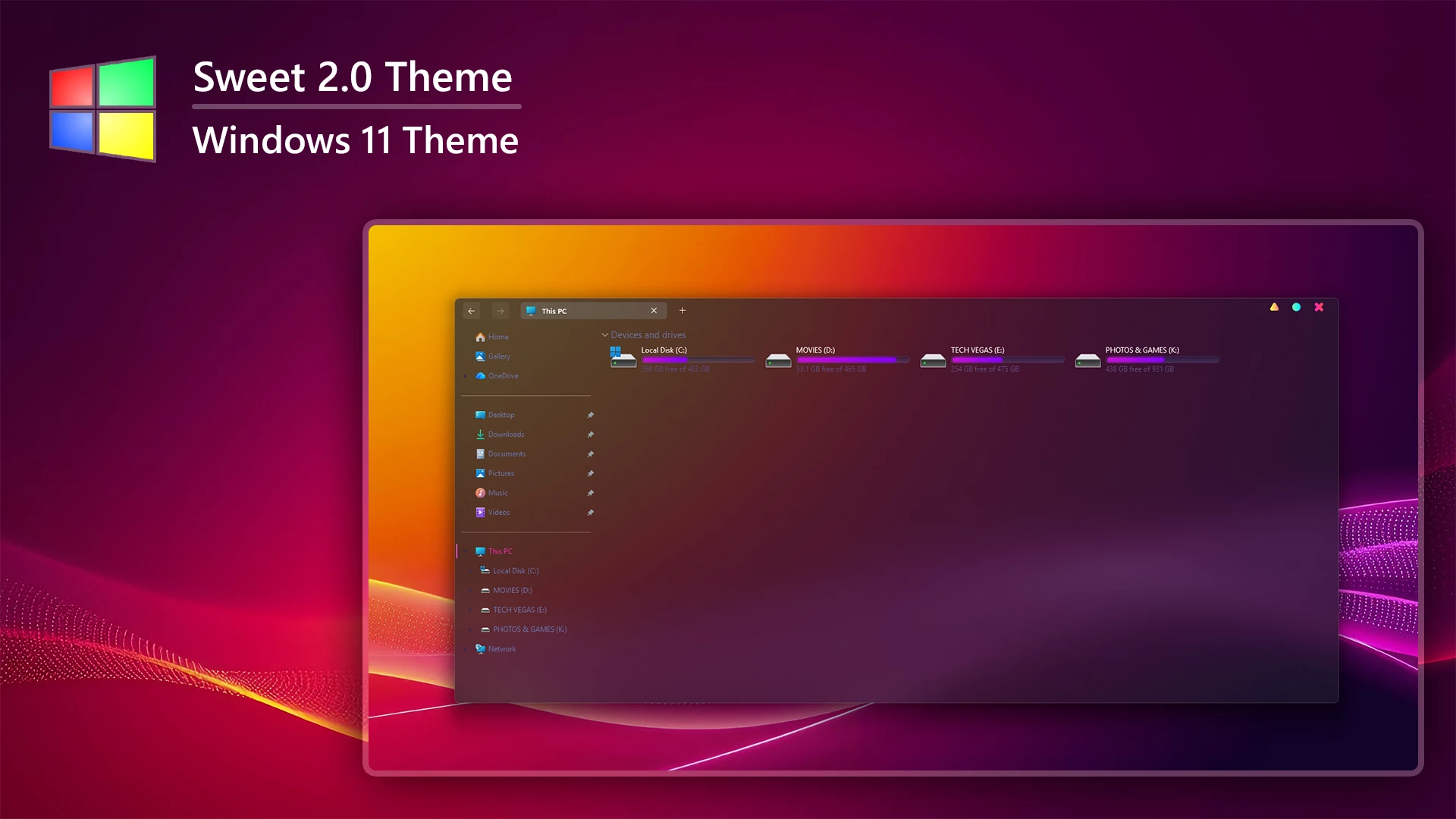
The Sweet 2.0 Theme for Windows 11 gives File Explorer a dark translucent appearance with deep plum, purple, and muted charcoal surfaces. The interface allows some of the wallpaper color to remain visible through the window, creating a softer layered look without changing the familiar Windows 11 layout.
The orange, pink, red, and violet tones visible across File Explorer come largely from the wallpaper behind the translucent surface rather than from a fixed Explorer color. Because of this, changing the wallpaper can noticeably alter the overall appearance of the theme.
The drive section uses bright magenta and purple usage indicators that stand out against the darker Explorer background. Sweet 2.0 also uses customized DWM controls, with a yellow minimize button, cyan maximize button, and pink-red close button in the upper corner of supported windows.
Features
- Dark translucent File Explorer styling
- Deep plum, purple, and charcoal interface surfaces
- Wallpaper colors remain visible through the Explorer background
- Magenta and purple hard-drive usage indicators
- Custom DWM window controls
- Yellow minimize, cyan maximize, and pink-red close buttons
- Subtle borders and restrained interface separators
- Keeps the familiar Windows 11 Explorer structure
Compatibility
- Windows 11 21H2: May work, but not recommended for the best experience
- 22H2 YES
- 23H2 YES
- 24H2 YES
- 25H2 YES
What is included in this?
- Windows 11 Theme
- Extras
Applying the Theme
- Create a System Restore Point, prepare Windows with a compatible theme patcher, then place the extracted theme files in
C:\Windows\Resources\Themesand apply the visual style. - For detailed setup instructions, follow this Windows 11 custom theme installation guide.
Returning to Default
- Switch back to a default Windows 11 theme and disable any optional StartAllBack or other visual changes used with the setup.
- For the complete restoration process, use this Windows 11 custom theme removal guide.
Theme Files 18MB
Download Disclaimer
Sweet 2.0 Theme for Windows 11 is an independently created third-party customization resource intended for personal desktop styling. It is not an official Microsoft product and is not affiliated with, sponsored by, or endorsed by Microsoft. Windows and related trademarks remain the property of their respective owners. Compatibility may vary across Windows builds and after major system updates.
Finalization
The Sweet 2.0 Theme for Windows 11 gives File Explorer a darker translucent character through plum and purple surfaces, colorful DWM controls, and bright magenta storage indicators. Since wallpaper colors remain visible through the interface, changing the desktop background can give the same theme a noticeably different visual tone.




Disclaimer: All themes, visual styles, and concepts shared on this website are unofficial, fan-made creations built from imagination for customization purposes. We are not affiliated with, endorsed by, or sponsored by Microsoft or any other official brand.