Liquid Glass 2.0 Taskbar Style
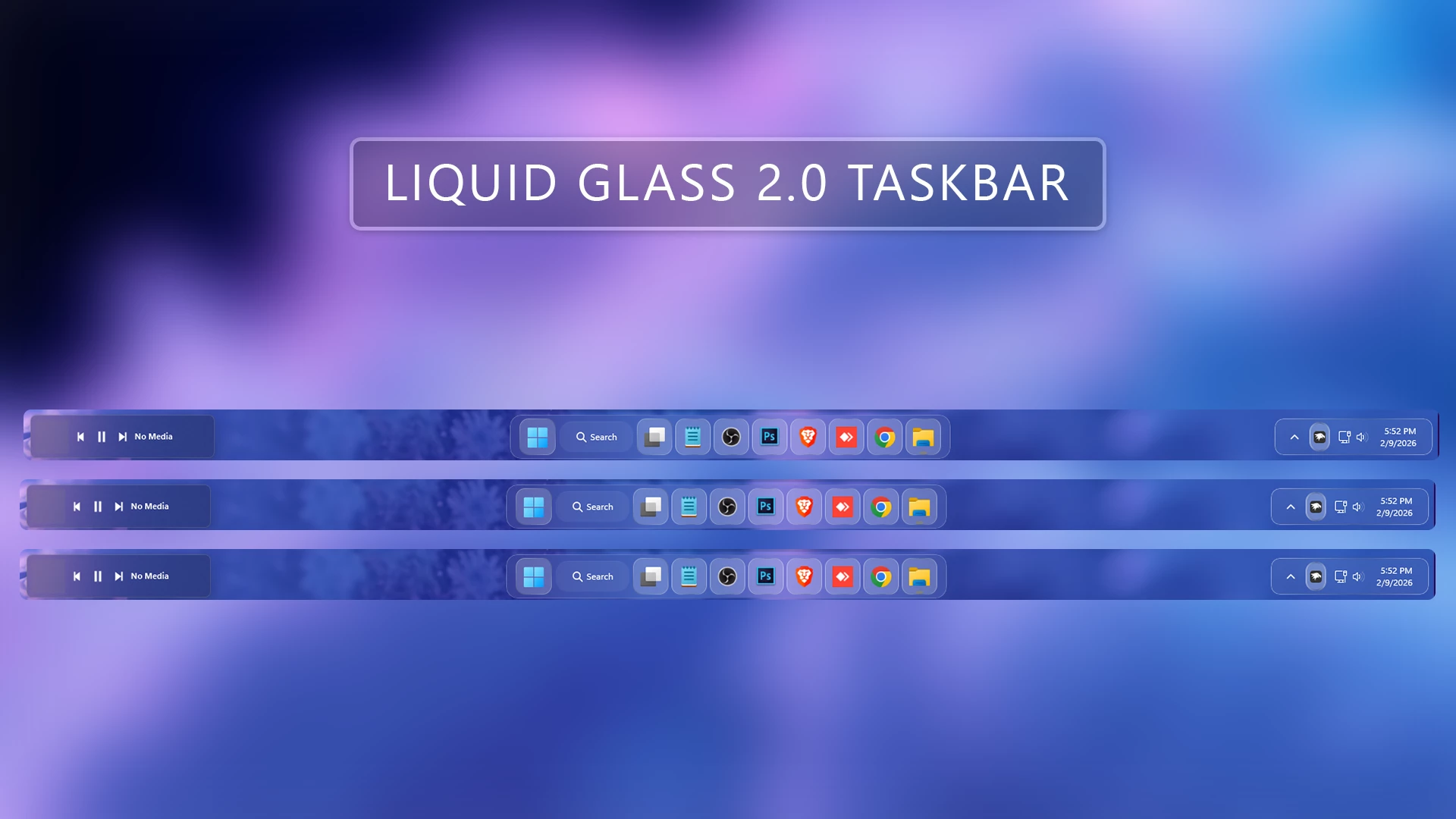
Liquid Glass 2.0 Taskbar Style : Liquid Glass 2.0 Taskbar for Windows 11 brings a sleek glass-style blur and modern transparency using Windhawk mods. It delivers a smooth, minimal, and premium taskbar look without harming system performance, perfect for aesthetic desktop lovers and advanced Windows customization setups.

Liquid Glass 2.0 Taskbar Style-Windhawk Mods
Liquid Glass 2.0 Taskbar is a modern and visually stunning customization style designed to give your Windows 11 taskbar a premium glass-like appearance. Built using Windhawk mods, this taskbar style blends transparency, blur effects, and smooth animations to create a clean and futuristic desktop experience. If you love minimal, Glass Style, or fluent-style desktops, Liquid Glass 2.0 is a perfect upgrade for your setup.
Download Windhawk To Use The Style
Start Menu Styler
Compatibility
- Windows 11 21H2: May work, but not recommended for the best experience
- Windows 11 22H2: May work, but compatibility can vary
- Windows 11 23H2: Recommended
- Windows 11 24H2: Recommended
- Windows 11 25H2: YES work, but test carefully after Windows updates
Installation steps:
- Download & Install windhawk.
- install & Open the Windows 11 taskbar Styler mod in Windhawk.
- Go to the “Advanced” tab.
- Copy the content below to the text box under “Mod settings” and click “Save”.
{ "theme": "liquid glass 2.0 Taskbar - Fixed", "controlStyles[0].target": "Taskbar.TaskbarFrame#TaskbarFrame > Grid#RootGrid, Taskbar.TaskbarFrame > Grid#RootGrid", "controlStyles[0].styles[0]": "Background:=<WindhawkBlur BlurAmount=\"30\" TintColor=\"#10ffffff\" />", "controlStyles[0].styles[1]": "Margin=3", "controlStyles[0].styles[2]": "CornerRadius=15", "controlStyles[0].styles[3]": "BorderBrush:=<LinearGradientBrush StartPoint=\"0,0\" EndPoint=\"1,1\" Opacity=\"0.6\"><GradientStop Color=\"#80ffffff\" Offset=\"0.0\" /><GradientStop Color=\"{ThemeResource SurfaceStrokeColorDefault}\" Offset=\"0.55\" /><GradientStop Color=\"#80ffffff\" Offset=\"1\" /></LinearGradientBrush>", "controlStyles[0].styles[4]": "BorderThickness=1", "controlStyles[0].styles[5]": "Padding=10,0", "controlStyles[1].target": "Taskbar.TaskListButtonPanel@CommonStates > Grid > Border#BackgroundElement, Taskbar.TaskListButtonPanel@CommonStates > Border#BackgroundElement", "controlStyles[1].styles[0]": "CornerRadius=12", "controlStyles[1].styles[1]": "Background:=<WindhawkBlur BlurAmount=\"10\" TintColor=\"#40ffffff\" />", "controlStyles[1].styles[2]": "Background@InactivePointerOver:=<WindhawkBlur BlurAmount=\"10\" TintColor=\"#40ffffff\" />", "controlStyles[1].styles[3]": "Background@ActivePointerOver:=<WindhawkBlur BlurAmount=\"10\" TintColor=\"#40ffffff\" />", "controlStyles[1].styles[4]": "Background@ActiveNormal:=<WindhawkBlur BlurAmount=\"10\" TintColor=\"#30ffffff\" />", "controlStyles[1].styles[5]": "Background@InactiveNormal:=<WindhawkBlur BlurAmount=\"10\" TintColor=\"#30ffffff\" />", "controlStyles[1].styles[6]": "Background@InactivePressed:=<WindhawkBlur BlurAmount=\"10\" TintColor=\"#30ffffff\" />", "controlStyles[1].styles[7]": "Background@ActivePressed:=<WindhawkBlur BlurAmount=\"10\" TintColor=\"#20ffffff\" />", "controlStyles[1].styles[8]": "BorderBrush:=<LinearGradientBrush StartPoint=\"0,0\" EndPoint=\"1,1\"><GradientStop Color=\"#80ffffff\" Offset=\"0.0\" /><GradientStop Color=\"{ThemeResource SurfaceStrokeColorDefault}\" Offset=\"0.55\" /><GradientStop Color=\"#80ffffff\" Offset=\"1\" /></LinearGradientBrush>", "controlStyles[1].styles[9]": "BorderThickness=1", "controlStyles[2].target": "StackPanel#SystemTrayFrameGrid, Grid#SystemTrayFrameGrid", "controlStyles[2].styles[0]": "Background:=<WindhawkBlur BlurAmount=\"10\" TintColor=\"#10ffffff\" />", "controlStyles[2].styles[1]": "CornerRadius=12", "controlStyles[2].styles[2]": "Margin=8,8,8,8", "controlStyles[2].styles[3]": "Padding=10,0,2,0", "controlStyles[2].styles[4]": "BorderBrush:=<LinearGradientBrush StartPoint=\"0,0\" EndPoint=\"1,1\"><GradientStop Color=\"#80ffffff\" Offset=\"0.0\" /><GradientStop Color=\"{ThemeResource SurfaceStrokeColorDefault}\" Offset=\"0.55\" /><GradientStop Color=\"#80ffffff\" Offset=\"1\" /></LinearGradientBrush>", "controlStyles[2].styles[5]": "BorderThickness=1", "controlStyles[3].target": "Grid#IconPanel@RunningIndicatorStates > Rectangle#RunningIndicator, Taskbar.TaskListLabeledButtonPanel@RunningIndicatorStates > Rectangle#RunningIndicator, Grid#IconPanel@RunningIndicatorStates > Rectangle, Taskbar.TaskListLabeledButtonPanel@RunningIndicatorStates > Rectangle", "controlStyles[3].styles[0]": "Fill:=#808080", "controlStyles[3].styles[1]": "RadiusX=4", "controlStyles[3].styles[2]": "RadiusY=4", "controlStyles[3].styles[3]": "Height=4", "controlStyles[3].styles[4]": "Width=10", "controlStyles[3].styles[5]": "Width@ActiveRunningIndicator=20", "controlStyles[3].styles[6]": "Fill@ActiveRunningIndicator=#60CDFF", "controlStyles[4].target": "Taskbar.TaskListLabeledButtonPanel > TextBlock#LabelControl", "controlStyles[4].styles[0]": "Margin=4,0,0,0", "controlStyles[4].styles[1]": "Foreground=White", "controlStyles[5].target": "Taskbar.SearchBoxButton", "controlStyles[5].styles[0]": "Foreground=White", "controlStyles[5].styles[1]": "Margin=-11,0,0,0", "controlStyles[6].target": "TextBlock#SearchBoxTextBlock", "controlStyles[6].styles[0]": "FontSize=12", "controlStyles[6].styles[1]": "Foreground=White", "controlStyles[7].target": "Grid", "controlStyles[7].styles[0]": "RequestedTheme=2", "controlStyles[8].target": "Taskbar.TaskListButton#TaskListButton[AutomationProperties.Name=Copilot] > Taskbar.TaskListLabeledButtonPanel#IconPanel > Grid > Border#BackgroundElement, Taskbar.TaskListButton#TaskListButton[AutomationProperties.Name=Copilot] > Taskbar.TaskListLabeledButtonPanel#IconPanel > Border#BackgroundElement", "controlStyles[8].styles[0]": "Background:=<WindhawkBlur BlurAmount=\"10\" TintColor=\"#10ffffff\" />", "controlStyles[9].target": "Taskbar.AugmentedEntryPointButton#AugmentedEntryPointButton > Taskbar.TaskListButtonPanel#ExperienceToggleButtonRootPanel > Grid > Border#BackgroundElement@CommonStates, Taskbar.AugmentedEntryPointButton#AugmentedEntryPointButton > Taskbar.TaskListButtonPanel#ExperienceToggleButtonRootPanel > Border#BackgroundElement@CommonStates", "controlStyles[9].styles[0]": "Background:=<WindhawkBlur BlurAmount=\"10\" TintColor=\"#30ffffff\" />", "controlStyles[9].styles[1]": "Background@InactivePointerOver:=<WindhawkBlur BlurAmount=\"10\" TintColor=\"#20ffffff\" />", "controlStyles[10].target": "Border#MultiWindowElement", "controlStyles[10].styles[0]": "Visibility=Collapsed", "controlStyles[11].target": "TextBlock#TimeInnerTextBlock", "controlStyles[11].styles[0]": "Foreground=White", "controlStyles[12].target": "TextBlock#DateInnerTextBlock", "controlStyles[12].styles[0]": "Foreground=White", "controlStyles[13].target": "SystemTray.TextIconContent > Grid > SystemTray.AdaptiveTextBlock#Base > TextBlock", "controlStyles[13].styles[0]": "Foreground=White", "controlStyles[14].target": "Taskbar.AugmentedEntryPointButton#AugmentedEntryPointButton", "controlStyles[14].styles[0]": "Margin=-12,0,0,0", "controlStyles[15].target": "Taskbar.ExperienceToggleButton#LaunchListButton[AutomationProperties.Name=Task View]", "controlStyles[15].styles[0]": "Margin=0,0,0,0", "controlStyles[16].target": "taskbar:TaskListLabeledButtonPanel@RunningIndicatorStates > Border, Taskbar.TaskListLabeledButtonPanel@RunningIndicatorStates > Border", "controlStyles[16].styles[0]": "Background@InactiveRunningIndicatorPointerOver:=<WindhawkBlur BlurAmount=\"40\" TintColor=\"#10ffffff\" />", "controlStyles[16].styles[1]": "CornerRadius=12", "controlStyles[16].styles[2]": "BorderBrush@InactiveRunningIndicatorPointerOver:=<LinearGradientBrush StartPoint=\"0,0\" EndPoint=\"1,1\"><GradientStop Color=\"#80ffffff\" Offset=\"0.0\" /><GradientStop Color=\"{ThemeResource SurfaceStrokeColorDefault}\" Offset=\"0.55\" /><GradientStop Color=\"#80ffffff\" Offset=\"1\" /></LinearGradientBrush>", "controlStyles[16].styles[3]": "BorderThickness@InactiveRunningIndicatorPointerOver=1", "controlStyles[17].target": "Grid#IconPanel@CommonStates > Border#BackgroundElement, Taskbar.TaskListLabeledButtonPanel@CommonStates > Border#BackgroundElement", "controlStyles[17].styles[0]": "Background@InactivePointerOver:=<WindhawkBlur BlurAmount=\"10\" TintColor=\"#40ffffff\" />", "controlStyles[17].styles[1]": "Background@ActivePointerOver:=<WindhawkBlur BlurAmount=\"10\" TintColor=\"#40ffffff\" />", "controlStyles[17].styles[2]": "Background@InactiveNormal:=<WindhawkBlur BlurAmount=\"10\" TintColor=\"#30ffffff\" />", "controlStyles[17].styles[3]": "Background@ActiveNormal:=<WindhawkBlur BlurAmount=\"10\" TintColor=\"#30ffffff\" />", "controlStyles[17].styles[4]": "Background@ActivePressed:=<WindhawkBlur BlurAmount=\"10\" TintColor=\"#30ffffff\" />", "controlStyles[17].styles[5]": "Background@InactivePressed:=<WindhawkBlur BlurAmount=\"10\" TintColor=\"#20ffffff\" />", "controlStyles[17].styles[6]": "CornerRadius=12", "controlStyles[17].styles[7]": "Margin=0", "controlStyles[17].styles[8]": "BorderBrush :=<LinearGradientBrush StartPoint=\"0,0\" EndPoint=\"1,0\"><GradientStop Color=\"#80ffffff\" Offset=\"0.0\" /><GradientStop Color=\"{ThemeResource SurfaceStrokeColorDefault}\" Offset=\"0.55\" /><GradientStop Color=\"#80ffffff\" Offset=\"1\" /></LinearGradientBrush>", "controlStyles[17].styles[9]": "BorderThickness=1", "controlStyles[18].target": "Rectangle#BackgroundStroke", "controlStyles[18].styles[0]": "Visibility=Collapsed", "controlStyles[18].styles[1]": "Fill=#000000", "controlStyles[19].target": "Taskbar.TaskbarFrame#TaskbarFrame, Taskbar.TaskbarFrame", "controlStyles[19].styles[0]": "Width=Auto", "controlStyles[19].styles[1]": "HorizontalAlignment=Center", "controlStyles[19].styles[2]": "Margin=250,0,250,0", "controlStyles[20].target": "Rectangle#BackgroundFill", "controlStyles[20].styles[0]": "Fill=Transparent", "controlStyles[21].target": "SystemTray.NotifyIconView#NotifyItemIcon, SystemTray.NotifyIconView", "controlStyles[21].styles[0]": "Background:=<WindhawkBlur BlurAmount=\"10\" TintColor=\"#40ffffff\" />", "controlStyles[21].styles[1]": "CornerRadius=12", "controlStyles[21].styles[2]": "Margin=2", "controlStyles[21].styles[3]": "Padding=2", "controlStyles[21].styles[4]": "BorderBrush :=<LinearGradientBrush StartPoint=\"0,0\" EndPoint=\"1,0\"><GradientStop Color=\"#80ffffff\" Offset=\"0.0\" /><GradientStop Color=\"{ThemeResource SurfaceStrokeColorDefault}\" Offset=\"0.55\" /><GradientStop Color=\"#80ffffff\" Offset=\"1\" /></LinearGradientBrush>", "controlStyles[21].styles[5]": "BorderThickness=2"}Required Windhawk Mods Taskbar Height & Icon Size for similar results
To achieve similar results, install and configure the following Windhawk mods in addition to Taskbar Styler
{ "TaskbarHeight": 65, "IconSize": 28, "TaskbarButtonWidth": 52, "IconSizeSmall": 16, "TaskbarButtonWidthSmall": 32}Liquid Glass 2.0 Taskbar is perfect for content creators, designers, and Windows customization lovers who want their desktop to look modern, clean, and professional. Pair it with 4K wallpapers, fluent icons, and animated widgets for a next-level Windows 11 setup. If you’re building an aesthetic desktop in 2026, this taskbar style is a must-try
Final Word
Liquid Glass 2.0 Taskbar Style is a great choice for Windows 11 users who want a clean, elegant, and glass-inspired desktop without making heavy system changes. With Windhawk and the Windows 11 Taskbar Styler mod, you can easily give your taskbar a fresh and polished appearance. Combine it with the matching Liquid Glass 2.0 Start Menu Style for a more consistent desktop setup. Always keep Windhawk and Windows updated, and check compatibility again after major Windows updates.