

New Round Glass Taskbar Style For Windows 11
Upgrade your desktop with the New Round Glass Taskbar Style For Windows 11 featuring elegant rounded corners, smooth glass transparency, and a modern minimalist design. This stylish Windows 11 taskbar customization delivers a premium glassmorphism look that makes your desktop cleaner, more futuristic, and visually stunning.

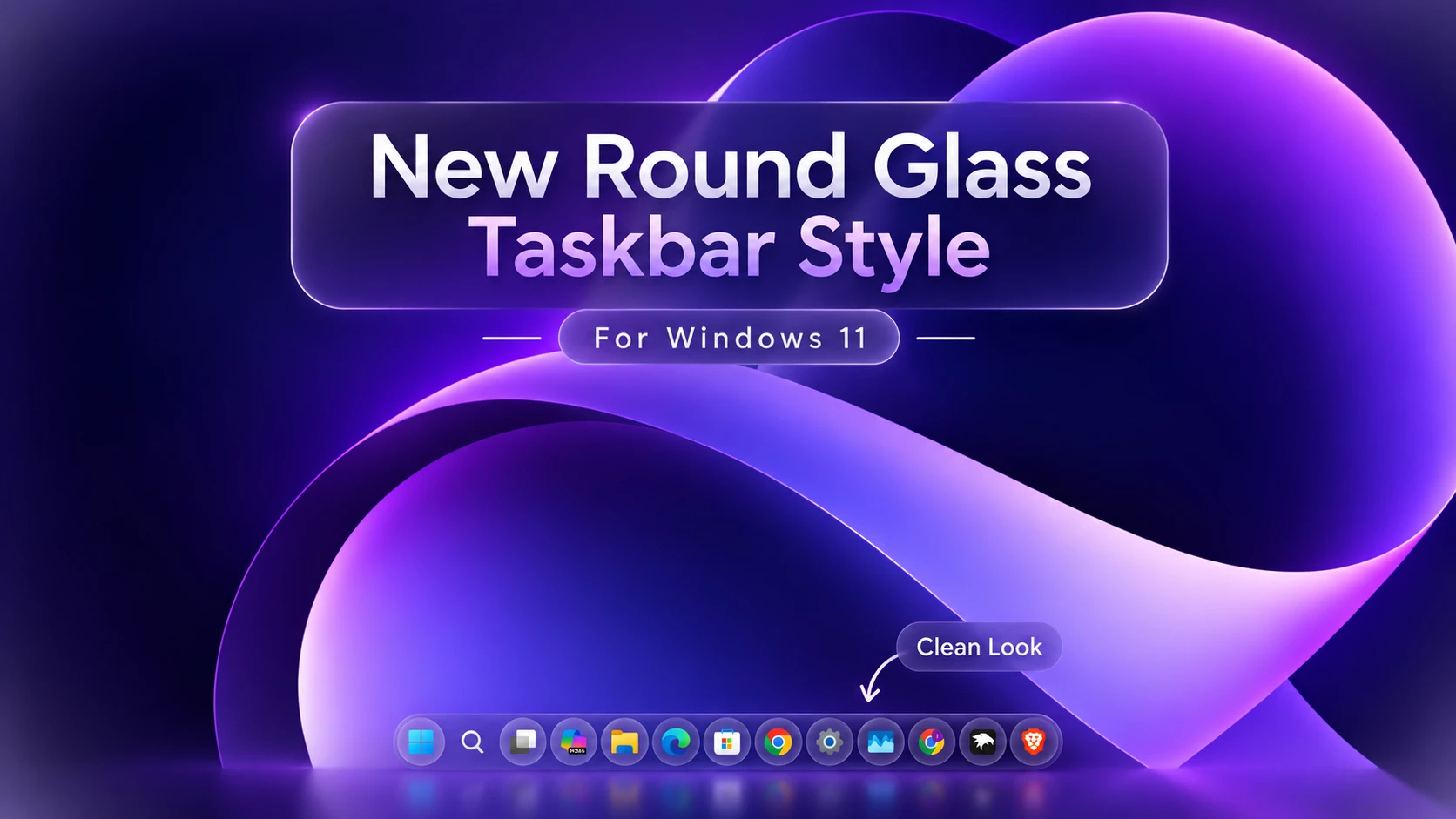
Round Glass Taskbar Style For Windows 11
With Round Glass Taskbar Style Transform your Windows 11 desktop into a modern, futuristic glass-inspired interface with the Round Glass Taskbar Style using Windhawk. This setup delivers a premium UI experience by combining smooth rounded edges, transparent glass effects, and glowing elements that elevate the default Windows look into something truly eye-catching.This customization focuses on redesigning the taskbar into a floating, rounded glass dock, similar to macOS but with a unique Windows 11 aesthetic. The taskbar appears fully translucent, with soft blur (acrylic effect), subtle reflections, and a glowing border that adapts beautifully to your wallpaper.
Key Features
- Rounded Glass Taskbar
A completely redesigned taskbar with smooth curved edges that gives a modern and minimal floating look. - Transparent / Acrylic Blur Effect
Enjoy a clean glass UI with real-time background blur, making your desktop feel more dynamic and premium. - Centered & Clean Layout
Perfectly aligned icons with spacing adjustments for a balanced and aesthetic appearance. - Glow & Neon Accents
Soft glow effects around the taskbar and icons enhance visibility and give a futuristic vibe. - Custom Icon Support
Works perfectly with custom icon packs to create a fully personalized desktop setup. - Lightweight & Smooth Performance
Optimized through Windhawk mods, ensuring smooth animations without slowing down your system.
Why Choose Round Glass Taskbar Style?
- A premium macOS-like dock feel with Windows flexibility
- A clean and minimal workspace
- A visually stunning desktop perfect for YouTube setups & showcases
- Full control over transparency, blur, and layout
Download Windhawk To Use The Style
Compatibility
- Windows 11 21H2: May work, but not recommended for the best experience
- Windows 11 22H2: May work, but compatibility can vary
- Windows 11 23H2: Recommended
- Windows 11 24H2: Recommended
- Windows 11 25H2: YES work, but test carefully after Windows updates
Installation steps:
- Download & Install windhawk.
- install & Open the Windows 11 taskbar Styler mod in Windhawk.
- Go to the “Advanced” tab.
- Copy the content below to the text box under “Mod settings” and click “Save”.
{ "theme": " Round Glass Taskbar Link Vegas", "styleConstants[0]": "mainRadius = 8", "styleConstants[1]": "transparent = <SolidColorBrush Color=\"Transparent\"/>", "styleConstants[2]": "base = <AcrylicBrush TintColor=\"{ThemeResource SystemAltLowColor}\" TintOpacity=\"0\" TintLuminosityOpacity=\".25\" FallbackColor=\"{ThemeResource SystemChromeLowColor}\" />", "styleConstants[3]": "overlay = <AcrylicBrush TintColor=\"{ThemeResource SystemAltLowColor}\" TintOpacity=\"0\" TintLuminosityOpacity=\"0\" FallbackColor=\"{ThemeResource CardStrokeColorDefaultSolid}\" />", "styleConstants[4]": "overlay2 = <AcrylicBrush TintColor=\"{ThemeResource SystemAltLowColor}\" TintOpacity=\"0\" TintLuminosityOpacity=\"0\" FallbackColor=\"{ThemeResource CardStrokeColorDefaultSolid}\" />", "styleConstants[5]": "accentColor = <SolidColorBrush Color=\"{ThemeResource SystemAccentColor}\" Opacity = \"0\" />", "styleConstants[6]": "inverseBW = <SolidColorBrush Color=\"{ThemeResource SystemBaseHighColor}\" Opacity = \"0\" />", "styleConstants[7]": "active = <AcrylicBrush TintColor=\"{ThemeResource SystemAltLowColor}\" TintOpacity=\"0\" TintLuminosityOpacity=\"1\" FallbackColor=\"{ThemeResource CardStrokeColorDefaultSolid}\" />", "controlStyles[0].target": "Taskbar.TaskbarFrame > Grid#RootGrid > Taskbar.TaskbarBackground > Grid > Rectangle#BackgroundFill", "controlStyles[0].styles[0]": "Fill := $transparent", "controlStyles[1].target": "Rectangle#BackgroundStroke", "controlStyles[1].styles[0]": "Fill := $transparent", "controlStyles[2].target": "Taskbar.TaskbarBackground#HoverFlyoutBackgroundControl", "controlStyles[2].styles[0]": "Fill:=$base", "controlStyles[2].styles[1]": "CornerRadius = $mainRadius", "controlStyles[3].target": "Taskbar.AugmentedEntryPointButton#AugmentedEntryPointButton", "controlStyles[3].styles[0]": "Margin=-1,1,1,1", "controlStyles[4].target": "Taskbar.TaskListButtonPanel@CommonStates > Grid > Border#BackgroundElement, Taskbar.TaskListButtonPanel@CommonStates > Border#BackgroundElement", "controlStyles[4].styles[0]": "CornerRadius = $mainRadius", "controlStyles[4].styles[1]": "Background :=$base", "controlStyles[4].styles[2]": "Background@InactivePointerOver :=$overlay2", "controlStyles[4].styles[3]": "Background@ActivePointerOver:=$overlay", "controlStyles[4].styles[4]": "Background@ActiveNormal :=$active", "controlStyles[5].target": "Taskbar.ExperienceToggleButton#LaunchListButton[AutomationProperties.Name=Task View]", "controlStyles[5].styles[0]": "Margin=0,0,2,0", "controlStyles[6].target": "Taskbar.TaskListButton#TaskListButton[AutomationProperties.Name=Copilot] > Taskbar.TaskListLabeledButtonPanel#IconPanel > Border#BackgroundElement", "controlStyles[6].styles[0]": "Visibility = 1", "controlStyles[7].target": "Taskbar.SearchBoxButton", "controlStyles[7].styles[0]": "Margin=0,0,2,0", "controlStyles[8].target": "Border#BackgroundElement", "controlStyles[8].styles[0]": "BorderThickness=0", "controlStyles[9].target": "Grid#IconPanel@CommonStates > Border#BackgroundElement, Taskbar.TaskListLabeledButtonPanel@CommonStates > Border#BackgroundElement", "controlStyles[9].styles[0]": "Background@InactiveNormal :=$base", "controlStyles[9].styles[1]": "Background@ActiveNormal :=$active", "controlStyles[9].styles[2]": "Background@InactivePointerOver :=$overlay2", "controlStyles[9].styles[3]": "Background@ActivePointerOver:=$overlay", "controlStyles[9].styles[4]": "CornerRadius = $mainRadius", "controlStyles[9].styles[5]": "Margin = 1,0,1,0", "controlStyles[9].styles[6]": "Background@MultiWindowNormal:=$base", "controlStyles[9].styles[7]": "Background@MultiWindowPointerOver:=$overlay2", "controlStyles[9].styles[8]": "Background@MultiWindowActive:=$active", "controlStyles[9].styles[9]": "Background@MultiWindowPressed:=$overlay", "controlStyles[10].target": "Border#MultiWindowElement", "controlStyles[10].styles[0]": "CornerRadius = $mainRadius", "controlStyles[10].styles[1]": "Padding = 7,0,8,0", "controlStyles[10].styles[2]": "Background :=$accentColor", "controlStyles[11].target": "Taskbar.TaskListLabeledButtonPanel > TextBlock#LabelControl", "controlStyles[11].styles[0]": "Margin=0,0,2,0", "controlStyles[12].target": "Grid#IconPanel@RunningIndicatorStates > Rectangle, Taskbar.TaskListLabeledButtonPanel@RunningIndicatorStates > Rectangle", "controlStyles[12].styles[0]": "Fill := $inverseBW", "controlStyles[12].styles[1]": "RadiusX=1.5", "controlStyles[12].styles[2]": "RadiusY=1.5", "controlStyles[12].styles[3]": "Height=4", "controlStyles[12].styles[4]": "Width=12", "controlStyles[12].styles[5]": "Fill@ActiveRunningIndicator :=$accentColor", "controlStyles[12].styles[6]": "Width@ActiveRunningIndicator=21", "controlStyles[13].target": "StackPanel#SystemTrayFrameGrid, Grid#SystemTrayFrameGrid", "controlStyles[13].styles[0]": "Background:=$base", "controlStyles[13].styles[1]": "CornerRadius = $mainRadius", "controlStyles[13].styles[2]": "Margin=0,5,12,5", "controlStyles[13].styles[3]": "Padding=5,0,0,0", "controlStyles[13].styles[4]": "Background :=$base", "controlStyles[13].styles[5]": "BorderBrush:=<LinearGradientBrush StartPoint=\"0,0\" EndPoint=\"1,1\"><GradientStop Color=\"#80ffffff\" Offset=\"0.0\" /><GradientStop Color=\"{ThemeResource SurfaceStrokeColorDefault}\" Offset=\"0.55\" /><GradientStop Color=\"#80ffffff\" Offset=\"1\" /></LinearGradientBrush>", "controlStyles[14].target": "Border#BackgroundBorder", "controlStyles[14].styles[0]": "Margin=2,5,2,5", "controlStyles[14].styles[1]": "CornerRadius=8", "controlStyles[14].styles[2]": "BorderThickness = 0", "controlStyles[15].target": "Grid#OverflowRootGrid > Border", "controlStyles[15].styles[0]": "Background:=$base", "controlStyles[15].styles[1]": "Shadow :=", "controlStyles[15].styles[2]": "CornerRadius = 14", "controlStyles[16].target": "Windows.UI.Xaml.Shapes.Rectangle#HorizontalTrackRect", "controlStyles[16].styles[0]": "Height = 8", "controlStyles[16].styles[1]": "Margin = 0", "controlStyles[16].styles[2]": "Fill := $overlay", "controlStyles[17].target": "Windows.UI.Xaml.Shapes.Rectangle#HorizontalDecreaseRect", "controlStyles[17].styles[0]": "Height = 8", "controlStyles[18].target": "Windows.UI.Xaml.Controls.TextBlock#volumeLevelText", "controlStyles[18].styles[0]": "FontFamily = Tektur", "controlStyles[18].styles[1]": "Margin = 0,-2,0,0", "controlStyles[19].target": "Windows.UI.Xaml.Controls.Grid#VolumeConfirmator", "controlStyles[19].styles[0]": "Padding = 8,0,3,0", "controlStyles[19].styles[1]": "CornerRadius = 20", "controlStyles[20].target": "Windows.UI.Xaml.Controls.Grid#ConfirmatorMainGrid", "controlStyles[20].styles[0]": "Background :=$base", "controlStyles[20].styles[1]": "CornerRadius = 14", "controlStyles[20].styles[2]": "BorderThickness = 0", "controlStyles[20].styles[3]": "Margin = 0,0,0,10", "controlStyles[20].styles[4]": "Shadow :=", "controlStyles[21].target": "Windows.UI.Xaml.Controls.Grid#BrightnessConfirmator", "controlStyles[21].styles[0]": "Padding = 15,0,17,0", "controlStyles[21].styles[1]": "CornerRadius = 20", "controlStyles[22].target": "Microsoft.UI.Xaml.Controls.AnimatedIcon#BrightnessIcon", "controlStyles[22].styles[0]": "Margin = 0,-1,12,0", "controlStyles[23].target": "Microsoft.UI.Xaml.Controls.ProgressBar#ProgressIndicator", "controlStyles[23].styles[0]": "Margin = 0,0,0,1", "controlStyles[24].target": "Windows.UI.Xaml.Shapes.Rectangle#ProgressBarTrack", "controlStyles[24].styles[0]": "Fill := $inverseBW", "controlStyles[24].styles[1]": "RadiusX = 1.5", "controlStyles[24].styles[2]": "RadiusY = 1.5", "controlStyles[25].target": "Windows.UI.Xaml.Shapes.Rectangle#DeterminateProgressBarIndicator", "controlStyles[25].styles[0]": "Fill :=$accentColor", "controlStyles[26].target": "Taskbar.TaskListButton#TaskListButton > Taskbar.TaskListLabeledButtonPanel#IconPanel > Microsoft.UI.Xaml.Controls.ProgressBar#ProgressIndicator", "controlStyles[26].styles[0]": "MinHeight = 4", "controlStyles[26].styles[1]": "Width = 26", "controlStyles[27].target": "Windows.UI.Xaml.Controls.ContentPresenter#ContentPresenter", "controlStyles[27].styles[0]": "BorderThickness = 0", "controlStyles[28].target": "Taskbar.ExperienceToggleButton#LaunchListButton[AutomationProperties.Name=Start]", "controlStyles[28].styles[0]": "Margin = 0,0,2,0", "controlStyles[29].target": "Taskbar.Badge#BadgeControl", "controlStyles[29].styles[0]": "Height = 14", "controlStyles[29].styles[1]": "MinWidth = 14", "controlStyles[29].styles[2]": "Margin = 0,0,0,0", "controlStyles[29].styles[3]": "CornerRadius = 20", "controlStyles[30].target": "Windows.UI.Xaml.Shapes.Rectangle#BackgroundRect", "controlStyles[30].styles[0]": "RadiusX = 4", "controlStyles[30].styles[1]": "RadiusY = 4", "controlStyles[31].target": "MenuFlyoutPresenter", "controlStyles[31].styles[0]": "Background := $base", "controlStyles[31].styles[1]": "Shadow :=", "controlStyles[31].styles[2]": "CornerRadius = 25", "controlStyles[32].target": "SearchUx.SearchUI.SearchButtonRootGrid#SearchBoxButtonRootPanel > Grid > Border#BackgroundElement, SearchUx.SearchUI.SearchButtonRootGrid#SearchBoxButtonRootPanel > Border#BackgroundElement", "controlStyles[32].styles[0]": "Background@InactiveNormal :=$base", "controlStyles[32].styles[1]": "CornerRadius = 25", "controlStyles[33].target": "Grid#IconPanel@CommonStates > Border#BackgroundElement, Taskbar.TaskListLabeledButtonPanel@CommonStates > Border#BackgroundElement", "controlStyles[33].styles[0]": "Background@InactivePointerOver:=<WindhawkBlur BlurAmount=\"10\" TintColor=\"#40ffffff\" />", "controlStyles[33].styles[1]": "Background@ActivePointerOver:=<WindhawkBlur BlurAmount=\"10\" TintColor=\"#40ffffff\" />", "controlStyles[33].styles[2]": "Background@InactiveNormal:=<WindhawkBlur BlurAmount=\"10\" TintColor=\"#30ffffff\" />", "controlStyles[33].styles[3]": "Background@ActiveNormal:=<WindhawkBlur BlurAmount=\"10\" TintColor=\"#30ffffff\" />", "controlStyles[33].styles[4]": "Background@ActivePressed:=<WindhawkBlur BlurAmount=\"10\" TintColor=\"#30ffffff\" />", "controlStyles[33].styles[5]": "Background@InactivePressed:=<WindhawkBlur BlurAmount=\"10\" TintColor=\"#20ffffff\" />", "controlStyles[33].styles[6]": "CornerRadius=25", "controlStyles[33].styles[7]": "Margin=0", "controlStyles[33].styles[8]": "BorderBrush :=<LinearGradientBrush StartPoint=\"0,0\" EndPoint=\"1,0\"><GradientStop Color=\"#80ffffff\" Offset=\"0.0\" /><GradientStop Color=\"{ThemeResource SurfaceStrokeColorDefault}\" Offset=\"0.55\" /><GradientStop Color=\"#80ffffff\" Offset=\"1\" /></LinearGradientBrush>", "controlStyles[33].styles[9]": "BorderThickness=1", "controlStyles[34].target": "Taskbar.TaskListButtonPanel@CommonStates > Grid > Border#BackgroundElement, Taskbar.TaskListButtonPanel@CommonStates > Border#BackgroundElement", "controlStyles[34].styles[0]": "CornerRadius=25", "controlStyles[34].styles[1]": "Background:=<WindhawkBlur BlurAmount=\"10\" TintColor=\"#40ffffff\" />", "controlStyles[34].styles[2]": "Background@InactivePointerOver:=<WindhawkBlur BlurAmount=\"10\" TintColor=\"#40ffffff\" />", "controlStyles[34].styles[3]": "Background@ActivePointerOver:=<WindhawkBlur BlurAmount=\"10\" TintColor=\"#40ffffff\" />", "controlStyles[34].styles[4]": "Background@ActiveNormal:=<WindhawkBlur BlurAmount=\"10\" TintColor=\"#30ffffff\" />", "controlStyles[34].styles[5]": "Background@InactiveNormal:=<WindhawkBlur BlurAmount=\"10\" TintColor=\"#30ffffff\" />", "controlStyles[34].styles[6]": "Background@InactivePressed:=<WindhawkBlur BlurAmount=\"10\" TintColor=\"#30ffffff\" />", "controlStyles[34].styles[7]": "Background@ActivePressed:=<WindhawkBlur BlurAmount=\"10\" TintColor=\"#20ffffff\" />", "controlStyles[34].styles[8]": "BorderBrush:=<LinearGradientBrush StartPoint=\"0,0\" EndPoint=\"1,1\"><GradientStop Color=\"#80ffffff\" Offset=\"0.0\" /><GradientStop Color=\"{ThemeResource SurfaceStrokeColorDefault}\" Offset=\"0.55\" /><GradientStop Color=\"#80ffffff\" Offset=\"1\" /></LinearGradientBrush>", "controlStyles[34].styles[9]": "BorderThickness=1", "controlStyles[35].target": "StackPanel#SystemTrayFrameGrid, Grid#SystemTrayFrameGrid", "controlStyles[35].styles[0]": "Background:=<WindhawkBlur BlurAmount=\"10\" TintColor=\"#20ffffff\" />", "controlStyles[35].styles[1]": "CornerRadius=25", "controlStyles[35].styles[2]": "Margin=5,5,5,5", "controlStyles[35].styles[3]": "Padding=10,0,2,0", "controlStyles[35].styles[4]": "BorderBrush:=<LinearGradientBrush StartPoint=\"0,0\" EndPoint=\"1,1\"><GradientStop Color=\"#80ffffff\" Offset=\"0.0\" /><GradientStop Color=\"{ThemeResource SurfaceStrokeColorDefault}\" Offset=\"0.55\" /><GradientStop Color=\"#80ffffff\" Offset=\"1\" /></LinearGradientBrush>", "controlStyles[35].styles[5]": "BorderThickness=1"}Required Windhawk Mods Taskbar Height & Icon Size for similar results
To achieve similar results, install and configure the following Windhawk mods in addition to Taskbar Styler
{ "TaskbarHeight": 65, "IconSize": 28, "TaskbarButtonWidth": 58, "IconSizeSmall": 16, "TaskbarButtonWidthSmall": 35}For More Infotmation
Final Thoughts
The Round Glass Taskbar Style for Windows 11 is one of the most beautiful and modern customization setups available today. With its glass morphism design, smooth animations, and elegant layout, it completely transforms the Windows experience into something futuristic and visually appealing.
You may also like


Disclaimer: All themes, visual styles, and concepts shared on this website are unofficial, fan-made creations built from imagination for customization purposes. We are not affiliated with, endorsed by, or sponsored by Microsoft or any other official brand.