Proma Taskbar Style For Windows 11
Proma Taskbar Style For Windows 11 : The Proma Taskbar Style for Windows 11 using Windhawk Mods is a premium customization designed to give your taskbar a clean, modern, and professional appearance.

Proma Taskbar Style For Windows 11
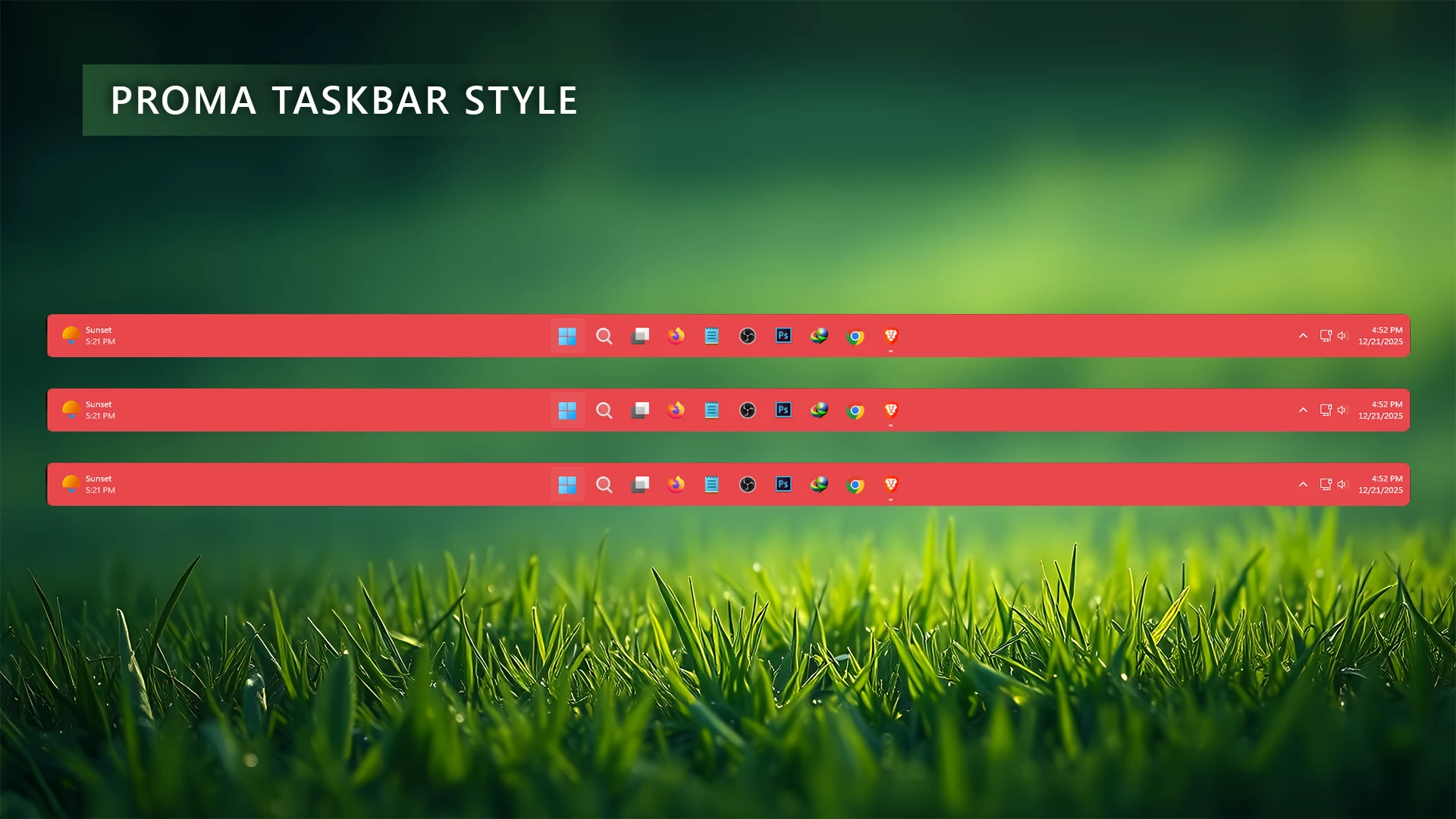
The Proma Taskbar Style for Windows 11 using Windhawk Mods is a stylish red color taskbar customization created for users who want a bold, modern, and premium desktop experience. This design transforms the default Windows 11 taskbar into a clean and visually attractive interface with a strong red accent that adds personality to your desktop setup.
Designed with simplicity and balance in mind, Proma keeps the taskbar lightweight while giving it a fresh and professional appearance. The smooth red color theme creates a powerful visual identity, making it a perfect match for gaming setups, creative desktops, and users who enjoy unique Windows customization. It maintains the familiar Windows experience while adding a more polished and modern look.
Whether you prefer a minimal desktop or a fully customized Windows setup, the Proma Taskbar Style provides a clean layout with an eye-catching design. Using Windhawk, you can easily apply this style and give your Windows 11 taskbar a completely refreshed appearance without replacing the original system interface.
Download Windhawk To Use The Style
Start Menu
Compatibility
- Windows 11 21H2: May work, but not recommended for the best experience
- Windows 11 22H2: May work, but compatibility can vary
- Windows 11 23H2: Recommended
- Windows 11 24H2: Recommended
- Windows 11 25H2: YES work, but test carefully after Windows updates
Features
- Premium Red Color Theme: A bold red color design that gives your Windows 11 taskbar a powerful and eye-catching appearance.
- Modern Minimal Design: A clean and refined taskbar layout that improves the overall look of your desktop without unnecessary visual elements.
- Elegant Windows Customization: Adds a unique style to the default Windows 11 interface while keeping the original system experience.
- Balanced Visual Appearance: The carefully designed red accent creates a smooth and professional look that fits both dark and colorful desktop setups.
- Perfect for Gaming Setups: The strong red visual style makes it a great choice for gaming desktops, RGB themes, and custom Windows setups.
- Lightweight Performance: Built with Windhawk Mods, the style focuses on appearance improvements while keeping system performance smooth.
- Works with Desktop Customization: Easily pairs with Rainmeter skins, custom wallpapers, icon packs, and other Windows personalization tools.
- Easy Installation and Removal: Enable or disable the taskbar style anytime through Windhawk without making permanent system changes.
{ "controlStyles[0].target": "Taskbar.TaskbarFrame#TaskbarFrame", "controlStyles[0].styles[1]": "HorizontalAlignment=Center", "controlStyles[0].styles[2]": "Width=Auto", "controlStyles[1].target": "Taskbar.TaskbarFrame#TaskbarFrame > Grid#RootGrid", "controlStyles[1].styles[0]": "Padding=6,0,6,0", "controlStyles[1].styles[1]": "Margin=10,2,10,3", "controlStyles[1].styles[2]": "BorderThickness=2", "controlStyles[1].styles[3]": "BorderBrush:=#e7484c", "controlStyles[2].target": "Rectangle#BackgroundFill", "controlStyles[2].styles[0]": "Visibility=Collapsed", "controlStyles[3].target": "Rectangle#BackgroundStroke", "controlStyles[3].styles[0]": "Visibility=Collapsed", "controlStyles[4].target": "Taskbar.AugmentedEntryPointButton#AugmentedEntryPointButton > Taskbar.TaskListButtonPanel#ExperienceToggleButtonRootPanel", "controlStyles[4].styles[0]": "Margin=0", "controlStyles[5].target": "Grid#SystemTrayFrameGrid", "controlStyles[5].styles[0]": "Background:=#00000000", "controlStyles[5].styles[1]": "CornerRadius=5", "controlStyles[5].styles[2]": "BackgroundSizing=InnerBorderEdge", "controlStyles[5].styles[3]": "Margin=0,2,0,3", "controlStyles[5].styles[4]": "BorderThickness=5", "controlStyles[6].target": "SystemTray.ChevronIconView", "controlStyles[6].styles[0]": "Padding=0", "controlStyles[7].target": "SystemTray.NotifyIconView#NotifyItemIcon", "controlStyles[7].styles[0]": "Padding=0", "controlStyles[8].target": "SystemTray.OmniButton", "controlStyles[8].styles[0]": "Padding=0", "controlStyles[9].target": "SystemTray.CopilotIcon", "controlStyles[9].styles[0]": "Padding=0", "controlStyles[10].target": "SystemTray.OmniButton#NotificationCenterButton > Grid > ContentPresenter > ItemsPresenter > StackPanel > ContentPresenter > systemtray:IconView#SystemTrayIcon > Grid", "controlStyles[10].styles[0]": "Padding=0,0,0,0", "controlStyles[11].target": "SystemTray.IconView#SystemTrayIcon > Grid#ContainerGrid > ContentPresenter#ContentPresenter > Grid#ContentGrid > SystemTray.TextIconContent > Grid#ContainerGrid", "controlStyles[11].styles[0]": "Padding=0", "controlStyles[12].target": "SystemTray.StackListView#IconStack > ItemsPresenter > StackPanel > ContentPresenter > SystemTray.IconView#SystemTrayIcon", "controlStyles[12].styles[0]": "Padding=0", "controlStyles[13].target": "SystemTray.Stack#ShowDesktopStack", "controlStyles[13].styles[0]": "Margin=0,0,0,0", "controlStyles[14].target": "Taskbar.Gripper#GripperControl", "controlStyles[14].styles[0]": "Width=Auto", "controlStyles[14].styles[1]": "MinWidth=24", "controlStyles[1].styles[4]": "CornerRadius=5", "controlStyles[1].styles[5]": "Background:=#e7484c"}Required Windhawk Mods for similar results
To achieve similar results, install and configure the following Windhawk mods in addition to Taskbar Styler
{ "TaskbarHeight": 65, "IconSize": 25, "TaskbarButtonWidth": 50, "IconSizeSmall": 16, "TaskbarButtonWidthSmall": 32}Powered by Windhawk Taskbar Mods, Proma is lightweight, safe, and fully customizable. Users can adjust icon size, padding, opacity, blur intensity, alignment (center or left), and corner radius to match their personal workflow and aesthetic preference. It works flawlessly alongside custom Start Menu styles, Rainmeter skins, and modern icon packs
⚠️ Disclaimer: This Windhawk Start Menu Style is provided for Windows UI personalization and educational purposes only. It is an unofficial customization and is not developed, endorsed, or supported by Microsoft. Compatibility may vary depending on your Windows version, Windhawk version, Start Menu Styler version, and system configuration. Windows updates may also affect how the style works. Please keep a backup of your current settings before applying any changes.
Final Words
The Proma Taskbar Style brings a fresh and stylish look to Windows 11 with its bold red color design and modern visual approach. It transforms the standard taskbar into a more personalized and premium-looking interface while keeping the experience simple and lightweight. Whether you are building a gaming setup, a creative workspace, or a customized desktop theme, Proma adds a strong visual identity that makes your Windows environment feel more unique. With Windhawk, applying and managing this customization is easy, allowing you to enjoy a cleaner and more attractive taskbar experience without changing the core Windows system.