Amazing Liquid Glass Pro Start Menu & Taskbar Style
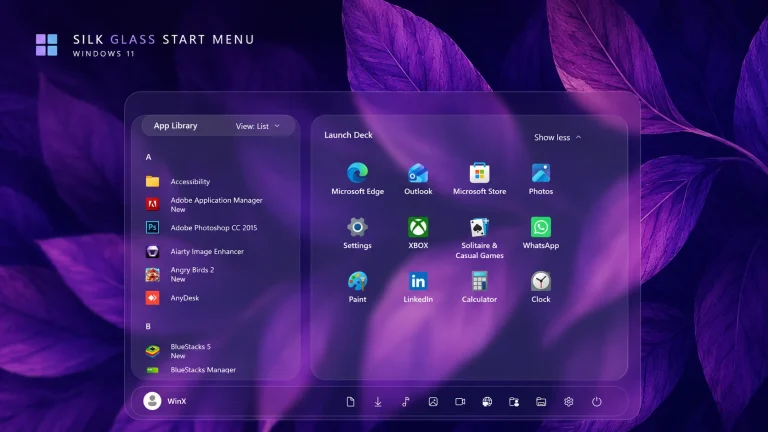
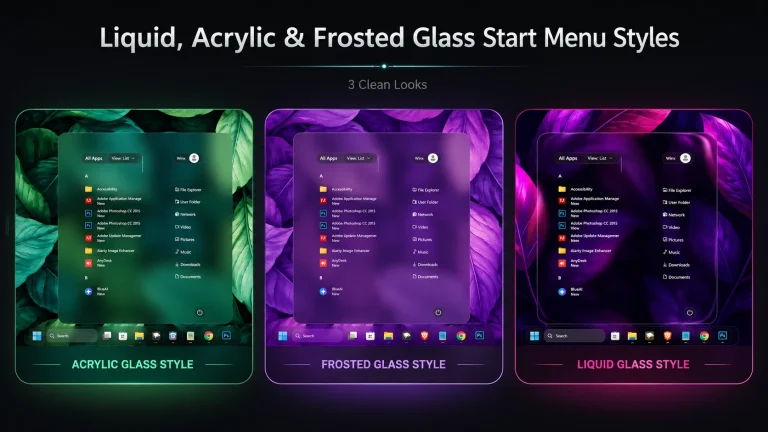
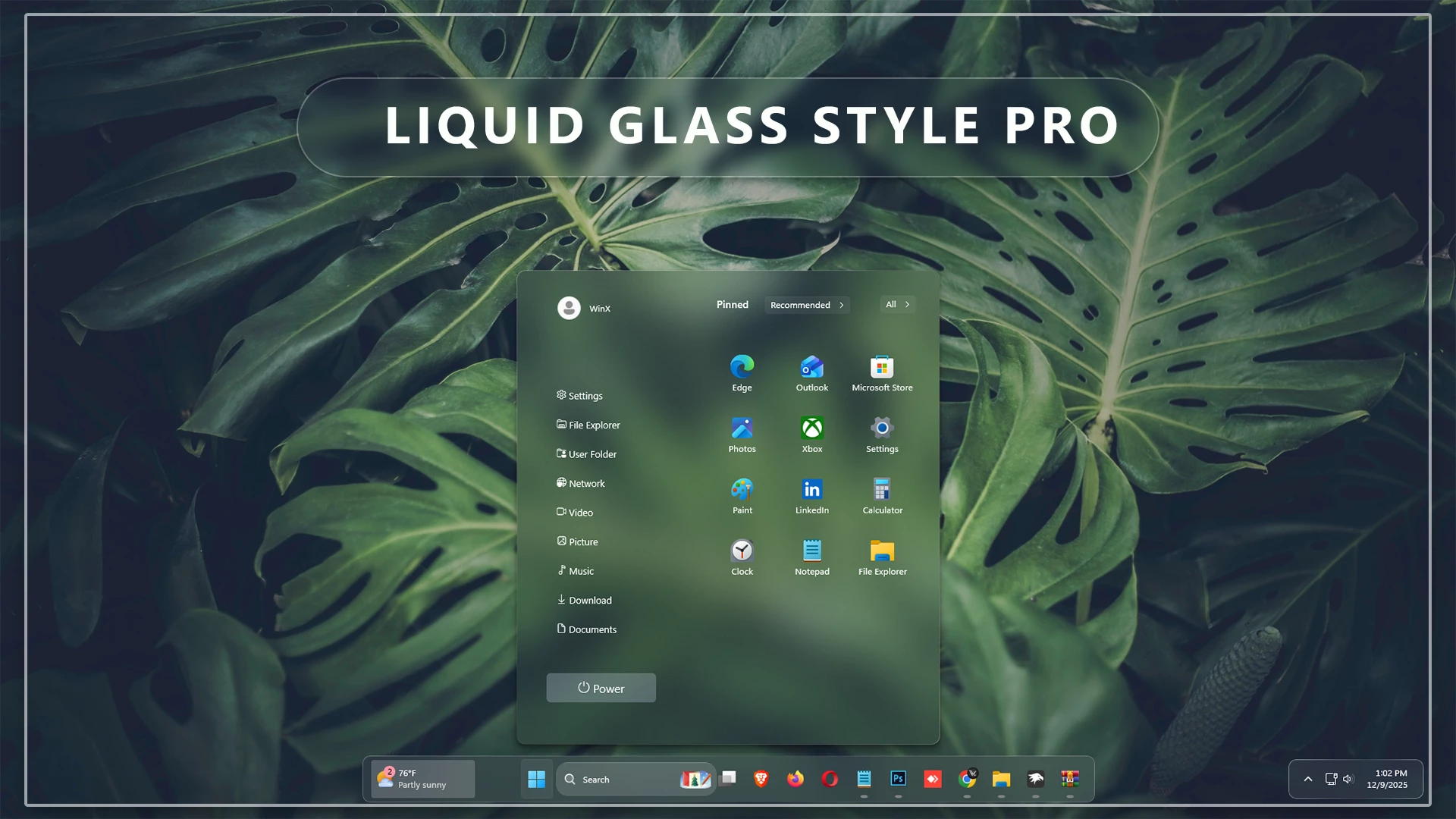
Liquid Glass Pro Start Menu & Taskbar Style : Liquid Glass Pro is a premium Start Menu styling mod for Windhawk that brings a stunning, ultra-modern translucent design to Windows 11. This mod completely enhances the look of your Start Menu with crystal-clear glass effects, smooth blur layers, and a glossy depth that feels futuristic and highly refined

Liquid Glass Pro Start Menu & Taskbar Style – Windhawk
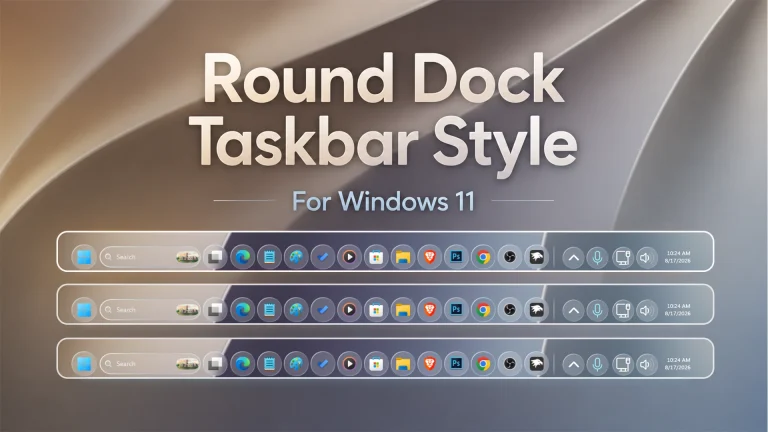
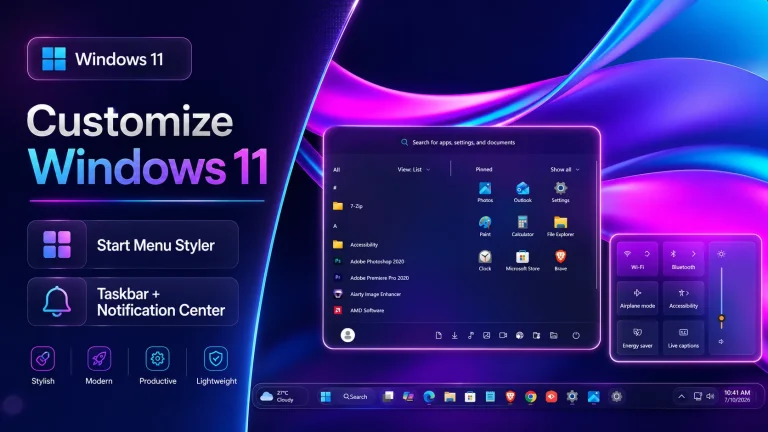
Transform your Windows 11 desktop with the stunning Liquid Glass Pro Start Menu & Taskbar Style for Windhawk. This modern customization brings a premium glass-inspired appearance to your Start Menu and Taskbar, creating a sleek, elegant, and futuristic user experience. If you love clean transparency effects, smooth visual elements, and a polished desktop environment, this style is designed specifically for you.
What Is Liquid Glass Pro Start Menu & Taskbar Style?
Liquid Glass Pro Start Menu & Taskbar Style is a custom Windhawk styling configuration that enhances the appearance of the Windows 11 Start Menu and Taskbar. Inspired by modern glassmorphism design trends, this style introduces crystal-clear transparency, soft blur effects, rounded corners, and refined visual details that instantly improve the overall look of your desktop.
The style is lightweight, responsive, and designed to blend perfectly with Windows 11 while maintaining excellent usability and performance.
Key Features
- Premium liquid glass visual design.
- Beautiful transparent Start Menu.
- Modern glass-effect Taskbar styling.
- Smooth blur and acrylic-inspired appearance.
- Clean rounded corners throughout the interface.
- Fully compatible with Windows 11.
- Works seamlessly with Windhawk.
- Professional and minimal desktop aesthetic.
- Lightweight and performance-friendly design.
- Perfect for desktop customization enthusiasts.
Why Choose Liquid Glass Pro Style?
Many Windows users want a desktop that feels unique without sacrificing usability. The Liquid Glass Pro Start Menu & Taskbar Style provides the perfect balance between beauty and functionality. Instead of the standard Windows appearance, you get a more premium interface that looks modern and visually appealing.
The transparent layers and subtle blur effects create depth throughout the desktop environment. Whether you’re working, gaming, studying, or simply browsing, the enhanced visuals make Windows 11 feel more refined and enjoyable.
Perfect for Windows 11 Customization
If you’re passionate about Windows customization, this style is an excellent addition to your setup. It pairs beautifully with custom wallpapers, icon packs, Rainmeter skins, cursor themes, and other desktop enhancement tools.
The glass-inspired design complements both dark and light themes, allowing users to create a personalized desktop experience that reflects their own style.
Easy Installation with Windhawk
Installing the Liquid Glass Pro Start Menu & Taskbar Style is simple. After installing Windhawk, you can apply the configuration to instantly transform the appearance of your Start Menu and Taskbar. No advanced customization knowledge is required, making it suitable for both beginners and experienced users.
Once applied, the changes take effect quickly, allowing you to enjoy a refreshed Windows 11 experience within minutes.
Modern Glassmorphism Design
Glassmorphism has become one of the most popular design trends in modern operating systems and applications. The Liquid Glass Pro style embraces this trend by introducing elegant transparency effects and soft visual layers that create a premium feel.
The result is a sophisticated interface that looks cleaner, brighter, and more professional than the default Windows 11 design.
Performance and Compatibility
Performance remains an important consideration for desktop customization. This Windhawk style is optimized to provide beautiful visuals while maintaining smooth system performance. It works well across a wide range of Windows 11 devices and integrates naturally with the operating system.
Users can enjoy enhanced aesthetics without significantly impacting daily workflow or responsiveness.
Who Should Use This Style?
- Windows 11 customization enthusiasts.
- Windhawk users looking for premium Start Menu styles.
- Users who love transparent desktop effects.
- Creators and professionals seeking a modern workspace.
- Anyone wanting a cleaner and more elegant desktop appearance.
- 21H2 YES
- 22H2 YES
- 22H3 YES
- 24H2 YES
- Windows 11 25H2: YES work, but test carefully after Windows updates
- Download & Install windhawk.
- install & Open the Windows 11 Start Menu Styler mod in Windhawk.
- Go to the “Advanced” tab.
- Copy the content below to the text box under “Mod settings” and click “Save”.
- Windhawk Start Menu Mods
- Windhawk Taskbar Mods
- Windhawk Taskbar Size Mods
{ "controlStyles[0].target": "Windows.UI.Xaml.Controls.Grid#TopLevelSuggestionsListHeader", "controlStyles[0].styles[0]": "Visibility=Collapsed", "controlStyles[1].target": "Windows.UI.Xaml.Controls.Grid#NoTopLevelSuggestionsText", "controlStyles[1].styles[0]": "Height=0", "controlStyles[2].target": "Windows.UI.Xaml.Controls.Grid#TopLevelSuggestionsContainer", "controlStyles[2].styles[0]": "Height=0", "controlStyles[3].target": "Windows.UI.Xaml.Controls.Grid#ShowMoreSuggestions", "controlStyles[3].styles[0]": "RenderTransform:=<TranslateTransform Y=\"-560\" X=\"-120\" />", "controlStyles[4].target": "StartMenu.PinnedList", "controlStyles[4].styles[0]": "Height=293", "controlStyles[4].styles[1]": "RenderTransform:=<TranslateTransform Y=\"-10\" X=\"195\" />", "controlStyles[5].target": "Windows.UI.Xaml.Controls.Grid#ShowMoreSuggestions > Windows.UI.Xaml.Controls.Button > Windows.UI.Xaml.Controls.ContentPresenter > Windows.UI.Xaml.Controls.StackPanel > Windows.UI.Xaml.Controls.TextBlock", "controlStyles[5].styles[0]": "Text=Recommended", "controlStyles[6].target": "StartDocked.StartSizingFrame", "controlStyles[6].styles[0]": "MaxHeight=650", "controlStyles[6].styles[1]": "MaxWidth=580", "controlStyles[6].styles[2]": "MinWidth=580", "controlStyles[6].styles[3]": "Width=580", "controlStyles[7].target": "Windows.UI.Xaml.Controls.Grid#UndockedRoot", "controlStyles[7].styles[0]": "HorizontalAlignment=Left", "controlStyles[7].styles[1]": "Margin=0,0,0,0", "controlStyles[7].styles[2]": "Width=640", "controlStyles[8].target": "Border#AcrylicOverlay ", "controlStyles[8].styles[0]": "HorizontalAlignment=Right", "controlStyles[8].styles[1]": "Margin=0,0,0,-65", "controlStyles[8].styles[2]": "Width=125", "controlStyles[9].target": "StartMenu.PinnedList#StartMenuPinnedList", "controlStyles[9].styles[0]": "Height=450", "controlStyles[9].styles[1]": "Margin=-170,40,0,0", "controlStyles[9].styles[2]": "MaxWidth=405", "controlStyles[10].target": "StartDocked.NavigationPaneView", "controlStyles[10].styles[0]": "Height=180", "controlStyles[10].styles[1]": "Margin=0,-750,0,0", "controlStyles[10].styles[2]": "Transform3D:=<CompositeTransform3D TranslateX=\"215\" RotationZ=\"270\" />", "controlStyles[10].styles[3]": "VerticalAlignment=1", "controlStyles[11].target": "Windows.UI.Xaml.Controls.ItemsStackPanel > StartDocked.AppListViewItem", "controlStyles[11].styles[0]": "FlowDirection=0", "controlStyles[11].styles[1]": "Height=180", "controlStyles[12].target": "StartDocked.AppListViewItem > Grid#ContentBorder > Windows.UI.Xaml.Controls.ContentPresenter#ContentPresenter ", "controlStyles[12].styles[0]": "VerticalAlignment=2", "controlStyles[12].styles[1]": "Width=105", "controlStyles[13].target": "StartDocked.AppListViewItem > Grid#ContentBorder > Windows.UI.Xaml.Controls.ContentPresenter#ContentPresenter > Windows.UI.Xaml.Controls.FontIcon", "controlStyles[13].styles[0]": "Margin=20,0,-45,0", "controlStyles[13].styles[1]": "Transform3D:=<CompositeTransform3D TranslateX=\"-13\" RotationZ=\"90\" />", "controlStyles[13].styles[2]": "Width=125", "controlStyles[14].target": "StartDocked.AppListViewItem > Grid#ContentBorder > Windows.UI.Xaml.Controls.ContentPresenter#ContentPresenter > Windows.UI.Xaml.Controls.FontIcon > Grid > TextBlock", "controlStyles[14].styles[0]": "FontFamily=Segoe UI, Segoe Fluent Icons", "controlStyles[14].styles[1]": "FontSize=13", "controlStyles[14].styles[2]": "HorizontalAlignment=Left", "controlStyles[15].target": "StartDocked.NavigationPaneView > Grid#RootPanel", "controlStyles[15].styles[0]": "FlowDirection=1", "controlStyles[16].target": "StartDocked.NavigationPaneButton#PowerButton", "controlStyles[16].styles[0]": "Width=150", "controlStyles[16].styles[1]": "CornerRadius=40", "controlStyles[17].target": "StartDocked.PowerOptionsView", "controlStyles[17].styles[0]": "Margin=-300,0,0,-910", "controlStyles[17].styles[1]": "Transform3D:=<CompositeTransform3D TranslateX=\"-100\" TranslateY=\"-500\" RotationZ=\"-90\" />", "controlStyles[18].target": "StartDocked.NavigationPaneButton#UserTileButton > Grid > ContentPresenter", "controlStyles[18].styles[0]": "FlowDirection=0", "controlStyles[19].target": "Windows.UI.Xaml.Controls.TextBlock[Text=]", "controlStyles[19].styles[0]": "FontFamily=Segoe UI, Segoe Fluent Icons", "controlStyles[19].styles[1]": "Text= Power", "controlStyles[20].target": "Windows.UI.Xaml.Controls.TextBlock[Text=]", "controlStyles[20].styles[0]": "Text= Documents", "controlStyles[21].target": "Windows.UI.Xaml.Controls.TextBlock[Text=]", "controlStyles[21].styles[0]": "Text= Download", "controlStyles[22].target": "Windows.UI.Xaml.Controls.TextBlock[Text=]", "controlStyles[22].styles[0]": "Text= Music", "controlStyles[23].target": "Windows.UI.Xaml.Controls.TextBlock[Text=]", "controlStyles[23].styles[0]": "Text= Picture", "controlStyles[24].target": "Windows.UI.Xaml.Controls.TextBlock[Text=]", "controlStyles[24].styles[0]": "Text= Video", "controlStyles[25].target": "Windows.UI.Xaml.Controls.TextBlock[Text=]", "controlStyles[25].styles[0]": "Text= Network", "controlStyles[26].target": "Windows.UI.Xaml.Controls.Grid#MoreSuggestionsRoot", "controlStyles[26].styles[0]": "Margin=30,0,220,0", "controlStyles[27].target": "Windows.UI.Xaml.Controls.TextBlock[Text=]", "controlStyles[27].styles[0]": "Text= File Explorer", "controlStyles[28].target": "Windows.UI.Xaml.Controls.Grid#AllAppsRoot", "controlStyles[28].styles[0]": "Margin=190,0,70,0", "controlStyles[29].target": "Button#ShowAllAppsButton > ContentPresenter#ContentPresenter@CommonStates", "controlStyles[29].styles[0]": "RenderTransform:=<TranslateTransform Y=\"-6\" X=\"-30\" />", "controlStyles[30].target": "StartDocked.NavigationPaneButton#PowerButton > Grid > Border#BackgroundBorder", "controlStyles[30].styles[0]": "Background:=#46c9d8ed", "controlStyles[30].styles[1]": "CornerRadius=5", "controlStyles[31].target": "StartDocked.UserTileView#UserTile", "controlStyles[31].styles[0]": "Transform3D:=<CompositeTransform3D TranslateX=\"420\" TranslateY=\"100\" RotationZ=\"270\" />", "controlStyles[31].styles[1]": "Margin=340,-170,-300,0", "controlStyles[32].target": "Border#AcrylicBorder", "controlStyles[32].styles[0]": "Background:=<AcrylicBrush TintColor=\"{ThemeResource CardStrokeColorDefaultSolid}\" FallbackColor=\"{ThemeResource CardStrokeColorDefaultSolid}\" TintOpacity=\"0\" TintLuminosityOpacity=\".05\" Opacity=\"1\"/>", "controlStyles[32].styles[1]": "BorderBrush:=<LinearGradientBrush StartPoint=\"0,0\" EndPoint=\"1,1\" Opacity=\"0.6\"><GradientStop Color=\"#80ffffff\" Offset=\"0.0\" /><GradientStop Color=\"{ThemeResource SurfaceStrokeColorDefault}\" Offset=\"0.55\" /><GradientStop Color=\"#80ffffff\" Offset=\"1\" /></LinearGradientBrush>", "controlStyles[32].styles[2]": "BorderThickness=1", "controlStyles[32].styles[3]": "CornerRadius=10", "controlStyles[32].styles[4]": "Margin=0", "controlStyles[33].target": "StartDocked.SearchBoxToggleButton ", "controlStyles[33].styles[0]": "Visibility=Collapsed", "controlStyles[34].target": "StartDocked.SearchBoxToggleButton > Grid > Windows.UI.Xaml.Controls.Border", "controlStyles[34].styles[0]": "Background:=<AcrylicBrush TintColor=\"{ThemeResource CardStrokeColorDefaultSolid}\" FallbackColor=\"{ThemeResource CardStrokeColorDefaultSolid}\" TintOpacity=\".3\" TintLuminosityOpacity=\".5\" Opacity=\"1\"/>", "controlStyles[34].styles[1]": "CornerRadius=5", "controlStyles[35].target": "Border#AcrylicOverlay", "controlStyles[35].styles[0]": "Visibility=Collapsed", "controlStyles[36].target": "Border#ContentBorder@CommonStates > Grid#DroppedFlickerWorkaroundWrapper > Border", "controlStyles[36].styles[0]": "CornerRadius=5", "controlStyles[36].styles[1]": "FocusVisualPrimaryBrush:=<SolidColorBrush Color=\"#b3cefd\" Opacity=\".10\"/>", "controlStyles[36].styles[2]": "Height=80", "controlStyles[36].styles[3]": "Width=92", "controlStyles[37].target": "Windows.UI.Xaml.Controls.Border#ContentBorder@CommonStates > Windows.UI.Xaml.Controls.Grid#DroppedFlickerWorkaroundWrapper > Border#BackgroundBorder", "controlStyles[38].target": "StartDocked.NavigationPaneButton#UserTileButton > Grid@CommonStates > Border ", "controlStyles[38].styles[0]": "CornerRadius=5", "controlStyles[38].styles[1]": "Height=40", "controlStyles[38].styles[2]": "Margin=-0,0,0,0", "controlStyles[39].target": "Windows.UI.Xaml.Controls.TextBlock[Text=]", "controlStyles[39].styles[0]": "Text= Settings", "controlStyles[40].target": "Windows.UI.Xaml.Controls.TextBlock[Text=]", "controlStyles[40].styles[0]": "Text= User Folder", "controlStyles[41].target": "Windows.UI.Xaml.Controls.TextBlock#PinnedListHeaderText", "controlStyles[41].styles[0]": "Margin=210,-10,0,0", "controlStyles[42].target": "StartDocked.LauncherFrame > Grid#RootGrid > Grid#RootContent > Grid#MainContent > Grid#InnerContent > Rectangle", "controlStyles[42].styles[0]": "Visibility=Collapsed", "controlStyles[43].target": "Windows.UI.Xaml.Controls.Grid#MoreSuggestionsRoot", "controlStyles[43].styles[0]": "Margin=240,0,80,0", "controlStyles[44].target": "StartDocked.UserTileView#UserTile > StartDocked.NavigationPaneButton#UserTileButton", "controlStyles[44].styles[0]": "Margin=-10,0,0,0", "controlStyles[45].target": "StartDocked.UserTileView#UserTile > StartDocked.NavigationPaneButton#UserTileButton > Grid > Border", "controlStyles[46].target": "Windows.UI.Xaml.Controls.Border#BorderElement", "controlStyles[46].styles[0]": "CornerRadius=20", "controlStyles[47].target": "Border#AcrylicBorder", "controlStyles[47].styles[0]": "CornerRadius=12", "controlStyles[47].styles[1]": "Width=580", "controlStyles[47].styles[2]": "HorizontalAlignment=Left", "controlStyles[48].target": "Microsoft.UI.Xaml.Controls.PipsPager#PinnedListPipsPager", "controlStyles[48].styles[0]": "Visibility=Collapsed", "controlStyles[49].target": "Windows.UI.Xaml.Controls.TextBlock#PinnedListHeaderText", "controlStyles[49].styles[0]": "Background=#46c9d8ed"}{ "theme": "", "controlStyles[0].target": "Grid#MainMenu", "controlStyles[0].styles[0]": "Width=580", "controlStyles[0].styles[1]": "MinWidth=580", "controlStyles[0].styles[2]": "MaxWidth=580", "controlStyles[1].target": "Grid#FrameRoot", "controlStyles[1].styles[0]": "Height=650", "controlStyles[1].styles[1]": "MaxHeight=650", "controlStyles[2].target": "Grid#SideBySidePinnedWrapper", "controlStyles[2].styles[0]": "ColumnDefinitions:=<ColumnDefinitionCollection><ColumnDefinition Width=\"230*\"/><ColumnDefinition Width=\"350*\"/></ColumnDefinitionCollection>", "controlStyles[3].target": "GridView#AllAppsGrid > Border > Grid#SideBySidePinnedWrapper > ScrollViewer#ScrollViewer", "controlStyles[3].styles[0]": "Grid.Column=0", "controlStyles[3].styles[1]": "Margin=0", "controlStyles[4].target": "ScrollViewer#SideBySidePinnedScrollViewer", "controlStyles[4].styles[0]": "Grid.Column=1", "controlStyles[4].styles[1]": "Margin=0", "controlStyles[5].target": "Grid#SideBySidePinnedWrapper > ScrollViewer > Border#Root > Grid > ScrollContentPresenter > ItemsPresenter > ItemsWrapGrid", "controlStyles[5].styles[0]": "Margin=18,0,18,14", "controlStyles[6].target": "Grid#AllListHeading", "controlStyles[6].styles[0]": "Margin=0,4,0,0", "controlStyles[7].target": "Grid#AllListHeading > TextBlock#AllListHeadingText", "controlStyles[7].styles[0]": "Margin=24,6,8,7", "controlStyles[8].target": "Grid#AllListHeading > Microsoft.UI.Xaml.Controls.DropDownButton#ViewSelectionButton", "controlStyles[8].styles[0]": "Margin=0,0,14,0", "controlStyles[9].target": "GridView#AllAppsGrid", "controlStyles[9].styles[0]": "Margin=0,0,0,58", "controlStyles[10].target": "StartMenu.PinnedList#StartMenuPinnedList", "controlStyles[10].styles[0]": "Height=455", "controlStyles[10].styles[1]": "MaxHeight=455", "controlStyles[10].styles[2]": "MaxWidth=350", "controlStyles[10].styles[3]": "Margin=0,18,0,0", "controlStyles[11].target": "TextBlock#PinnedListHeaderText", "controlStyles[11].styles[0]": "Margin=20,5,0,0", "controlStyles[11].styles[1]": "Background=Transparent", "controlStyles[12].target": "Microsoft.UI.Xaml.Controls.PipsPager#PinnedListPipsPager", "controlStyles[12].styles[0]": "Visibility=Collapsed", "controlStyles[13].target": "Grid#TopLevelSuggestionsListHeader", "controlStyles[13].styles[0]": "Visibility=Collapsed", "controlStyles[13].styles[1]": "Height=0", "controlStyles[14].target": "Grid#TopLevelSuggestionsRoot", "controlStyles[14].styles[0]": "Visibility=Collapsed", "controlStyles[14].styles[1]": "Height=0", "controlStyles[14].styles[2]": "MaxHeight=0", "controlStyles[15].target": "Grid#ShowMoreSuggestions", "controlStyles[15].styles[0]": "Visibility=Collapsed", "controlStyles[15].styles[1]": "Height=0", "controlStyles[16].target": "Grid#MoreSuggestionsRoot", "controlStyles[16].styles[0]": "Visibility=Collapsed", "controlStyles[16].styles[1]": "Height=0", "controlStyles[17].target": "StartMenu.SearchBoxToggleButton", "controlStyles[17].styles[0]": "Visibility=Collapsed", "controlStyles[17].styles[1]": "Height=0", "controlStyles[18].target": "Border#AcrylicBorder", "controlStyles[18].styles[0]": "Background:=<AcrylicBrush BackgroundSource=\"Backdrop\" TintColor=\"{ThemeResource CardStrokeColorDefaultSolid}\" TintOpacity=\"0\" TintLuminosityOpacity=\".05\"/>", "controlStyles[18].styles[1]": "BorderBrush:=<LinearGradientBrush StartPoint=\"0,0\" EndPoint=\"1,1\" Opacity=\"0.6\"><GradientStop Color=\"#80FFFFFF\" Offset=\"0\"/><GradientStop Color=\"{ThemeResource SurfaceStrokeColorDefault}\" Offset=\"0.55\"/><GradientStop Color=\"#80FFFFFF\" Offset=\"1\"/></LinearGradientBrush>", "controlStyles[18].styles[2]": "BorderThickness=1", "controlStyles[18].styles[3]": "CornerRadius=12", "controlStyles[18].styles[4]": "Margin=0", "controlStyles[19].target": "Border#AcrylicOverlay", "controlStyles[19].styles[0]": "Visibility=Collapsed", "controlStyles[20].target": "Border#DropShadow", "controlStyles[20].styles[0]": "CornerRadius=12", "controlStyles[20].styles[1]": "Margin=0", "controlStyles[21].target": "Border#StartDropShadow", "controlStyles[21].styles[0]": "CornerRadius=12", "controlStyles[22].target": "StartMenu.PinnedList#StartMenuPinnedList Border#ContentBorder@CommonStates > Grid#DroppedFlickerWorkaroundWrapper > Border", "controlStyles[22].styles[0]": "CornerRadius=5", "controlStyles[22].styles[1]": "Height=80", "controlStyles[22].styles[2]": "Width=92", "controlStyles[22].styles[3]": "FocusVisualPrimaryBrush:=<SolidColorBrush Color=\"#b3cefd\" Opacity=\".10\"/>", "controlStyles[23].target": "StartMenu.PinnedList#StartMenuPinnedList Border#ContentBorder@CommonStates > Grid#DroppedFlickerWorkaroundWrapper > Border#BackgroundBorder", "controlStyles[23].styles[0]": "Background@Normal:=<AcrylicBrush BackgroundSource=\"Backdrop\" TintColor=\"{ThemeResource CardStrokeColorDefaultSolid}\" TintOpacity=\"0\" TintLuminosityOpacity=\".20\"/>", "controlStyles[23].styles[1]": "Background@PointerOver:=<AcrylicBrush BackgroundSource=\"Backdrop\" TintColor=\"{ThemeResource CardStrokeColorDefaultSolid}\" TintOpacity=\"0\" TintLuminosityOpacity=\".50\"/>", "controlStyles[23].styles[2]": "BorderBrush:=<LinearGradientBrush StartPoint=\"0,0\" EndPoint=\"1,1\" Opacity=\".45\"><GradientStop Color=\"#70FFFFFF\" Offset=\"0\"/><GradientStop Color=\"#20FFFFFF\" Offset=\".5\"/><GradientStop Color=\"#70FFFFFF\" Offset=\"1\"/></LinearGradientBrush>", "controlStyles[23].styles[3]": "BorderThickness=1", "controlStyles[23].styles[4]": "CornerRadius=5", "controlStyles[24].target": "Grid#NavPanePlaceholder", "controlStyles[24].styles[0]": "Margin=18,0,18,0", "controlStyles[25].target": "StartDocked.NavigationPaneView#UserControl > Grid#RootPanel", "controlStyles[25].styles[0]": "FlowDirection=1", "controlStyles[26].target": "StartDocked.PowerOptionsView#PowerButton", "controlStyles[26].styles[0]": "FlowDirection=0", "controlStyles[27].target": "ItemsStackPanel > ListViewItem", "controlStyles[27].styles[0]": "FlowDirection=0", "controlStyles[28].target": "StartDocked.AppListView#NavigationPanePlacesListView > Border", "controlStyles[28].styles[0]": "Background:=<AcrylicBrush BackgroundSource=\"Backdrop\" TintColor=\"{ThemeResource CardStrokeColorDefaultSolid}\" TintOpacity=\"0\" TintLuminosityOpacity=\".45\"/>", "controlStyles[28].styles[1]": "CornerRadius=10", "controlStyles[28].styles[2]": "Margin=0,0,15,0", "controlStyles[29].target": "StartDocked.NavigationPaneButton#PowerButton > Grid@CommonStates > Border#BackgroundBorder", "controlStyles[29].styles[0]": "Background:=<AcrylicBrush TintColor=\"{ThemeResource CardStrokeColorDefaultSolid}\" FallbackColor=\"{ThemeResource CardStrokeColorDefaultSolid}\" TintOpacity=\"0\" TintLuminosityOpacity=\".75\" Opacity=\"1\"/>", "controlStyles[29].styles[1]": "BorderBrush@Normal:=<AcrylicBrush TintColor=\"{ThemeResource SurfaceStrokeColorDefault}\" FallbackColor=\"{ThemeResource SurfaceStrokeColorDefault}\" TintOpacity=\"0\" TintLuminosityOpacity=\".15\" Opacity=\"1\"/>", "controlStyles[29].styles[2]": "BorderBrush@PointerOver:=<AcrylicBrush TintColor=\"{ThemeResource SystemAccentColor}\" FallbackColor=\"{ThemeResource SystemAccentColor}\" TintOpacity=\".8\" TintLuminosityOpacity=\".5\" Opacity=\".55\"/>", "controlStyles[29].styles[3]": "BorderThickness=2", "controlStyles[29].styles[4]": "CornerRadius=30", "controlStyles[29].styles[5]": "Margin=0", "controlStyles[30].target": "StartDocked.UserTileView", "controlStyles[30].styles[0]": "Height=42", "controlStyles[31].target": "Grid#UserTileIcon", "controlStyles[31].styles[0]": "Width=36", "controlStyles[31].styles[1]": "Height=36", "controlStyles[32].target": "StartDocked.NavigationPaneButton#UserTileButton > Grid@CommonStates > Border", "controlStyles[32].styles[0]": "CornerRadius=8", "controlStyles[33].target": "Windows.UI.Xaml.Controls.Primitives.ToggleButton#ShowHideCompanion", "controlStyles[33].styles[0]": "Visibility=Collapsed", "controlStyles[34].target": "Grid#CompanionRoot", "controlStyles[34].styles[0]": "Visibility=Collapsed", "disableNewStartMenuLayout": "newLayoutSideBySide"}{ "theme": "Liquid Glass Taskbar", "controlStyles[0].target": "Taskbar.TaskbarFrame#TaskbarFrame > Grid#RootGrid", "controlStyles[0].styles[0]": "Background:=<WindhawkBlur BlurAmount=\"30\" TintColor=\"#10ffffff\" />", "controlStyles[0].styles[1]": "Margin=3", "controlStyles[0].styles[2]": "CornerRadius=10", "controlStyles[0].styles[3]": "BorderBrush:=<LinearGradientBrush StartPoint=\"0,0\" EndPoint=\"1,1\" Opacity=\"0.6\"><GradientStop Color=\"#80ffffff\" Offset=\"0.0\" /><GradientStop Color=\"{ThemeResource SurfaceStrokeColorDefault}\" Offset=\"0.55\" /><GradientStop Color=\"#80ffffff\" Offset=\"1\" /></LinearGradientBrush>", "controlStyles[0].styles[4]": "BorderThickness=1", "controlStyles[0].styles[5]": "Padding=10,0", "controlStyles[1].target": "Taskbar.TaskListButtonPanel@CommonStates > Border#BackgroundElement", "controlStyles[2].target": "Grid#SystemTrayFrameGrid", "controlStyles[2].styles[0]": "Background:=<WindhawkBlur BlurAmount=\"10\" TintColor=\"#10ffffff\" />", "controlStyles[2].styles[1]": "CornerRadius=10", "controlStyles[2].styles[2]": "Margin=8,8,8,8", "controlStyles[2].styles[3]": "Padding=10,0,2,0", "controlStyles[2].styles[4]": "BorderBrush:=<LinearGradientBrush StartPoint=\"0,0\" EndPoint=\"1,1\"><GradientStop Color=\"#80ffffff\" Offset=\"0.0\" /><GradientStop Color=\"{ThemeResource SurfaceStrokeColorDefault}\" Offset=\"0.55\" /><GradientStop Color=\"#80ffffff\" Offset=\"1\" /></LinearGradientBrush>", "controlStyles[2].styles[5]": "BorderThickness=1", "controlStyles[3].target": "Taskbar.TaskListLabeledButtonPanel@RunningIndicatorStates > Rectangle#RunningIndicator", "controlStyles[3].styles[0]": "Fill:=#808080", "controlStyles[3].styles[1]": "RadiusX=4", "controlStyles[3].styles[2]": "RadiusY=4", "controlStyles[3].styles[3]": "Height=4", "controlStyles[3].styles[4]": "Width=10", "controlStyles[3].styles[5]": "Width@ActiveRunningIndicator=20", "controlStyles[3].styles[6]": "Fill@ActiveRunningIndicator=#60CDFF", "controlStyles[4].target": "Taskbar.TaskListLabeledButtonPanel > TextBlock#LabelControl", "controlStyles[4].styles[0]": "Margin=4,0,0,0", "controlStyles[4].styles[1]": "Foreground=White", "controlStyles[5].target": "Taskbar.SearchBoxButton", "controlStyles[5].styles[0]": "Foreground=White", "controlStyles[5].styles[1]": "Margin=-11,0,0,0", "controlStyles[6].target": "TextBlock#SearchBoxTextBlock", "controlStyles[6].styles[0]": "FontSize=12", "controlStyles[6].styles[1]": "Foreground=White", "controlStyles[7].target": "Grid", "controlStyles[7].styles[0]": "RequestedTheme=2", "controlStyles[8].target": "Taskbar.TaskListButton#TaskListButton[AutomationProperties.Name=Copilot] > Taskbar.TaskListLabeledButtonPanel#IconPanel > Border#BackgroundElement", "controlStyles[8].styles[0]": "Background:=<WindhawkBlur BlurAmount=\"10\" TintColor=\"#10ffffff\" />", "controlStyles[9].target": "Taskbar.AugmentedEntryPointButton#AugmentedEntryPointButton > Taskbar.TaskListButtonPanel#ExperienceToggleButtonRootPanel > Border#BackgroundElement@CommonStates", "controlStyles[9].styles[0]": "Background:=<WindhawkBlur BlurAmount=\"10\" TintColor=\"#30ffffff\" />", "controlStyles[9].styles[1]": "Background@InactivePointerOver:=<WindhawkBlur BlurAmount=\"10\" TintColor=\"#20ffffff\" />", "controlStyles[10].target": "Border#MultiWindowElement", "controlStyles[10].styles[0]": "Visibility=Collapsed", "controlStyles[11].target": "TextBlock#TimeInnerTextBlock", "controlStyles[11].styles[0]": "Foreground=White", "controlStyles[12].target": "TextBlock#DateInnerTextBlock", "controlStyles[12].styles[0]": "Foreground=White", "controlStyles[13].target": "SystemTray.TextIconContent > Grid > SystemTray.AdaptiveTextBlock#Base > TextBlock", "controlStyles[13].styles[0]": "Foreground=White", "controlStyles[14].target": "Taskbar.AugmentedEntryPointButton#AugmentedEntryPointButton", "controlStyles[14].styles[0]": "Margin=-12,0,0,0", "controlStyles[15].target": "Taskbar.ExperienceToggleButton#LaunchListButton[AutomationProperties.Name=Task View]", "controlStyles[15].styles[0]": "Margin=-12,0,0,0", "controlStyles[16].target": "taskbar:TaskListLabeledButtonPanel@RunningIndicatorStates > Border", "controlStyles[16].styles[0]": "Background@InactiveRunningIndicatorPointerOver:=<WindhawkBlur BlurAmount=\"40\" TintColor=\"#10ffffff\" />", "controlStyles[16].styles[1]": "CornerRadius=10", "controlStyles[16].styles[2]": "BorderBrush@InactiveRunningIndicatorPointerOver:=<LinearGradientBrush StartPoint=\"0,0\" EndPoint=\"1,1\"><GradientStop Color=\"#80ffffff\" Offset=\"0.0\" /><GradientStop Color=\"{ThemeResource SurfaceStrokeColorDefault}\" Offset=\"0.55\" /><GradientStop Color=\"#80ffffff\" Offset=\"1\" /></LinearGradientBrush>", "controlStyles[16].styles[3]": "BorderThickness@InactiveRunningIndicatorPointerOver=1", "controlStyles[17].target": "Taskbar.TaskListLabeledButtonPanel@CommonStates > Border#BackgroundElement", "controlStyles[18].target": "Rectangle#BackgroundStroke", "controlStyles[18].styles[0]": "Visibility=Collapsed", "controlStyles[18].styles[1]": "Fill=#000000", "controlStyles[19].target": "Taskbar.TaskbarFrame#TaskbarFrame", "controlStyles[19].styles[0]": "Width=Auto", "controlStyles[19].styles[1]": "HorizontalAlignment=Center", "controlStyles[19].styles[2]": "Margin=250,0,250,0", "controlStyles[20].target": "Rectangle#BackgroundFill", "controlStyles[20].styles[0]": "Fill=Transparent", "controlStyles[21].target": "SystemTray.NotifyIconView#NotifyItemIcon", "controlStyles[21].styles[0]": "Background:=<WindhawkBlur BlurAmount=\"10\" TintColor=\"#40ffffff\" />", "controlStyles[21].styles[1]": "CornerRadius=10", "controlStyles[21].styles[2]": "Margin=2", "controlStyles[21].styles[3]": "Padding=4", "controlStyles[21].styles[4]": "BorderBrush:=<LinearGradientBrush StartPoint=\"0,0\" EndPoint=\"1,1\"><GradientStop Color=\"#80ffffff\" Offset=\"0.0\" /><GradientStop Color=\"{ThemeResource SurfaceStrokeColorDefault}\" Offset=\"0.55\" /><GradientStop Color=\"#80ffffff\" Offset=\"1\" /></LinearGradientBrush>", "controlStyles[21].styles[5]": "BorderThickness=1"}{ "TaskbarHeight": 65, "IconSize": 28, "TaskbarButtonWidth": 52, "IconSizeSmall": 16, "TaskbarButtonWidthSmall": 32} ⚠️ Disclaimer: This Windhawk Start Menu Style is provided for Windows UI personalization and educational purposes only. It is an unofficial customization and is not developed, endorsed, or supported by Microsoft. Compatibility may vary depending on your Windows version, Windhawk version, Start Menu Styler version, and system configuration. Windows updates may also affect how the style works. Please keep a backup of your current settings before applying any changes.
Final Thoughts
The Liquid Glass Pro Start Menu & Taskbar Style for Windhawk is an excellent customization option for users who want a premium Windows 11 experience. Its beautiful glass effects, modern transparency, smooth blur visuals, and polished design make it one of the most attractive Start Menu and Taskbar styles available.
If you’re looking to upgrade your desktop with a sleek and professional appearance, Liquid Glass Pro delivers a perfect combination of style, elegance, and functionality. Install it today and give your Windows 11 desktop a stunning visual makeover.