Blue Flux Icon Pack For Windows 11
Blue Flux Icon Pack : Blue Flux Icon Pack is a modern blue-styled icon set for Windows 11 designed for Windhawk Resource Redirect. It replaces default system icons with glossy blue icons for a clean and futuristic desktop look.

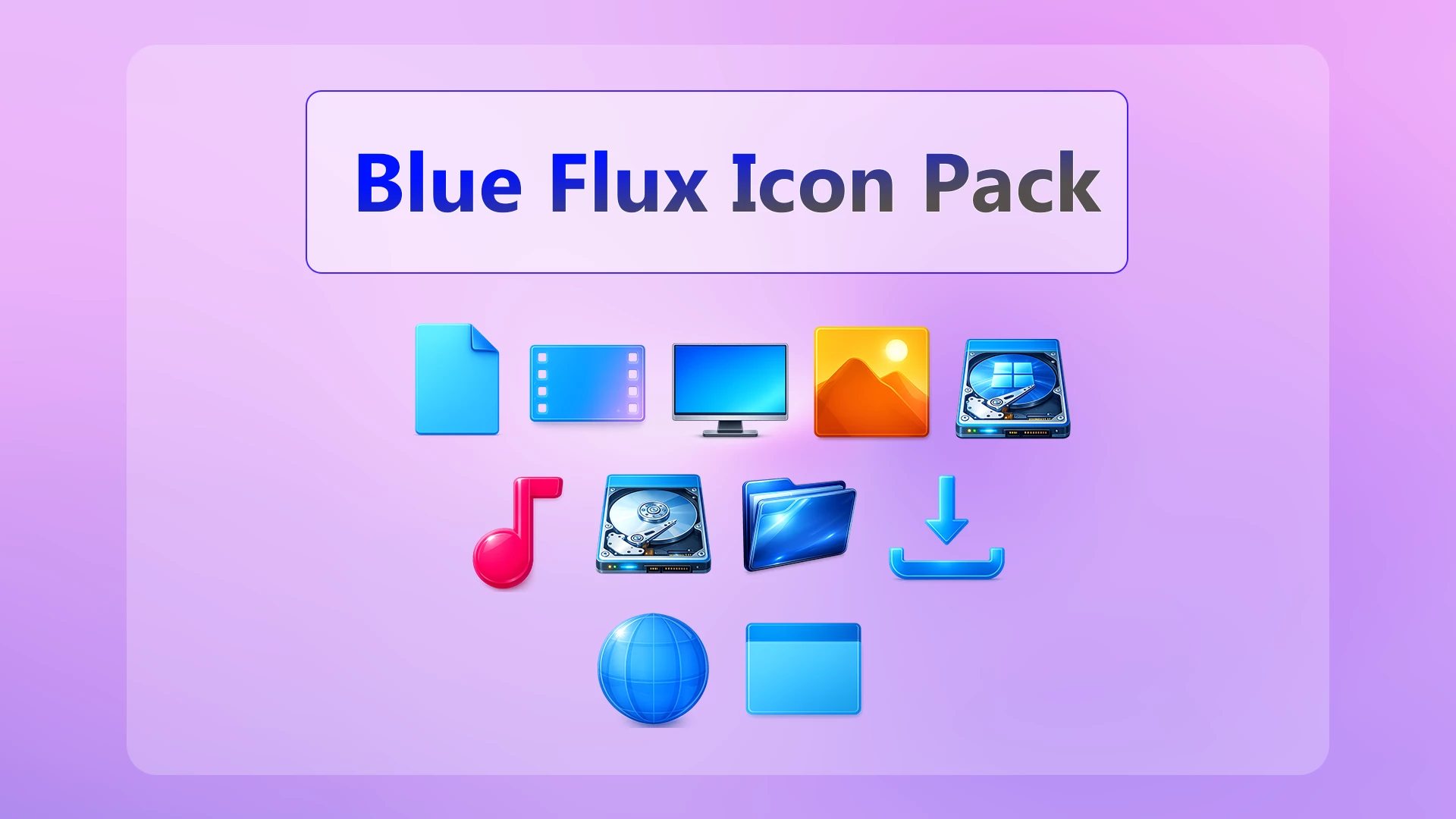
Blue Flux Icon Pack For Windows 11
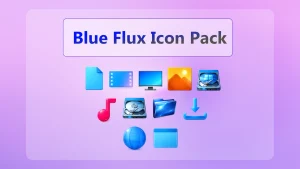
Blue Flux Icon Pack gives Windows 11 a brighter icon style built around cool blue gradients, glossy highlights, and a few bold color accents. Most of the system-style icons stay within cyan and blue tones, while media icons bring in pink, orange, and purple for a little contrast.
The set covers familiar Windows resources such as folders, documents, downloads, desktop, pictures, music, drives, network, and other supported locations. The shapes are simple enough to recognize quickly, but the brighter colors and reflective details make them feel noticeably different from the default Windows icons.
This pack is designed for Resource Redirect in Windhawk. It changes supported Windows icon resources through the mod instead of asking you to manually replace protected system files. Your wallpaper, taskbar, Start menu, and Windows theme remain separate customizations.
Blue Flux Icon Style
Blue is the main color throughout the pack. Document, folder, download, desktop, and network icons use cyan, aqua, and deeper blue shades, often with soft highlights around the edges.
The media icons add more variation. The music icon uses a strong pink finish, the picture icon brings in orange and yellow, and the video icon mixes blue with subtle purple tones. That keeps the set colorful without making every icon look unrelated.
The hard-drive icons are more detailed than the rest of the set, with metallic surfaces, visible disk elements, and small highlights. They still fit the Blue Flux palette, but they have a slightly more technical look than the simpler folder and media icons.
Features
- Cyan, aqua, and blue system-style icons
- Bright pink music icon and orange-yellow picture icon
- Glossy gradients and soft reflective highlights
- Detailed drive icons with metallic visual elements
- Custom resources for supported folders, downloads, desktop, media, network, and drives
- Designed for Resource Redirect in Windhawk
- Can be used without changing your Windows theme or wallpaper
Compatibility & Requirements
Not every icon in Windows is guaranteed to change. Some applications provide their own icons, and folders that display thumbnail previews may continue to show those previews instead of the replacement folder resource.
Requirements & Included Files
- Platform: Windows 11
- Tool: Windhawk with Resource Redirect mod enabled
- Included: Blue Flux Resource Redirect Icon Pack files
- Extras: A ZIP extraction tool
Before You Install
Keep a copy of your current Resource Redirect settings before changing the icon path. That gives you an easy way back to your previous icon setup if you decide Blue Flux is not the style you want to keep.
Once the pack is active, leave the extracted folder where it is. Resource Redirect loads the replacement files from the saved path, so moving or renaming the folder can break the setup. Windows customization, naturally, has found another reason to care deeply about folder paths.
How to Install Blue Flux Icon Pack
Installation Steps
- Install Windhawk: Download and install Windhawk if it is not already installed.
- Install Resource Redirect: Open Windhawk, search for Resource Redirect, and install the mod.
- Download Blue Flux: Download the ZIP archive using the button below.
- Extract the Pack: Extract the archive to a folder that you plan to keep in the same location.
- Copy the Folder Path: Open the extracted Blue Flux folder and copy its full Windows path.
- Open Resource Redirect Settings: Go to the mod’s settings and locate the custom resource or theme folder field.
- Paste the Path: Paste the Blue Flux folder path into the required field. Remove quotation marks if Windows added them automatically.
- Save the Settings: Apply the Resource Redirect configuration and let the mod reload.
- Refresh Explorer: Restart Windows Explorer if the new icons do not appear immediately.
Keep the extracted folder in place: Resource Redirect needs the same saved path to continue loading the Blue Flux resources.
Download Blue Flux Icon Pack
Blue Flux Icon Pack 12 MB
Download Icon PackIf the Icons Do Not Change
Check that Resource Redirect is enabled and that the saved path points to the extracted Blue Flux folder rather than the ZIP file itself. A path that stops one folder too early is enough to make the whole thing sit there doing absolutely nothing.
If the path is correct but old icons remain visible, restart Windows Explorer. You may also need to refresh the icon cache depending on which Windows resources are still being displayed.
Why Are Some Folder Icons Still Different?
Windows sometimes displays folder thumbnails or previews instead of the standard folder resource. Some programs also use their own icon files, which Resource Redirect may not replace.
That means a few unchanged icons do not automatically indicate that the pack failed. Coverage depends on the resources included in Blue Flux and how each application or Windows component loads its icons.
How to Remove Blue Flux Icon Pack
How to Remove
- Open Windhawk: Select the installed Resource Redirect mod.
- Open Its Settings: Find the custom path currently pointing to the Blue Flux folder.
- Restore Your Previous Setup: Replace the Blue Flux path with your earlier configuration, or remove it if you want to return to the default Windows resources.
- Save the Changes: Apply the updated Resource Redirect settings.
- Restart Explorer: Restart Windows Explorer so the previous or default icons can reload.
- Delete the Pack Later: Remove the extracted Blue Flux folder only after Resource Redirect is no longer using it.
Disclaimer
Blue Flux Icon Pack is an independently shared third-party Windows customization resource intended for desktop personalization. It is not an official Microsoft or Windhawk product and is not affiliated with, authorized by, sponsored by, approved by, or endorsed by Microsoft Corporation, Windhawk, or the creators of Resource Redirect. Microsoft, Windows, and other trademarks belong to their respective owners. Compatibility and appearance may vary between Windows builds and mod versions.
Final Word
Blue Flux has a lively look without forcing every icon into the same color. The cyan and blue system icons keep the set connected, while the pink music icon, orange photo icon, and detailed drives add enough variation to stop File Explorer from feeling repetitive.
You can use the pack as the main visual change on an otherwise simple Windows setup, or pair it with the separate Blue Flux theme if you want more of the desktop to follow the same direction.