

Glance Start Menu Style ( Windhawk) For Win 11
Glance Start Menu Style ( Windhawk) : The Glance Super Acrylic style is also highly customizable. Through the Windhawk configuration panel, users can tweak transparency levels, blur intensity, colors, and layout spacing

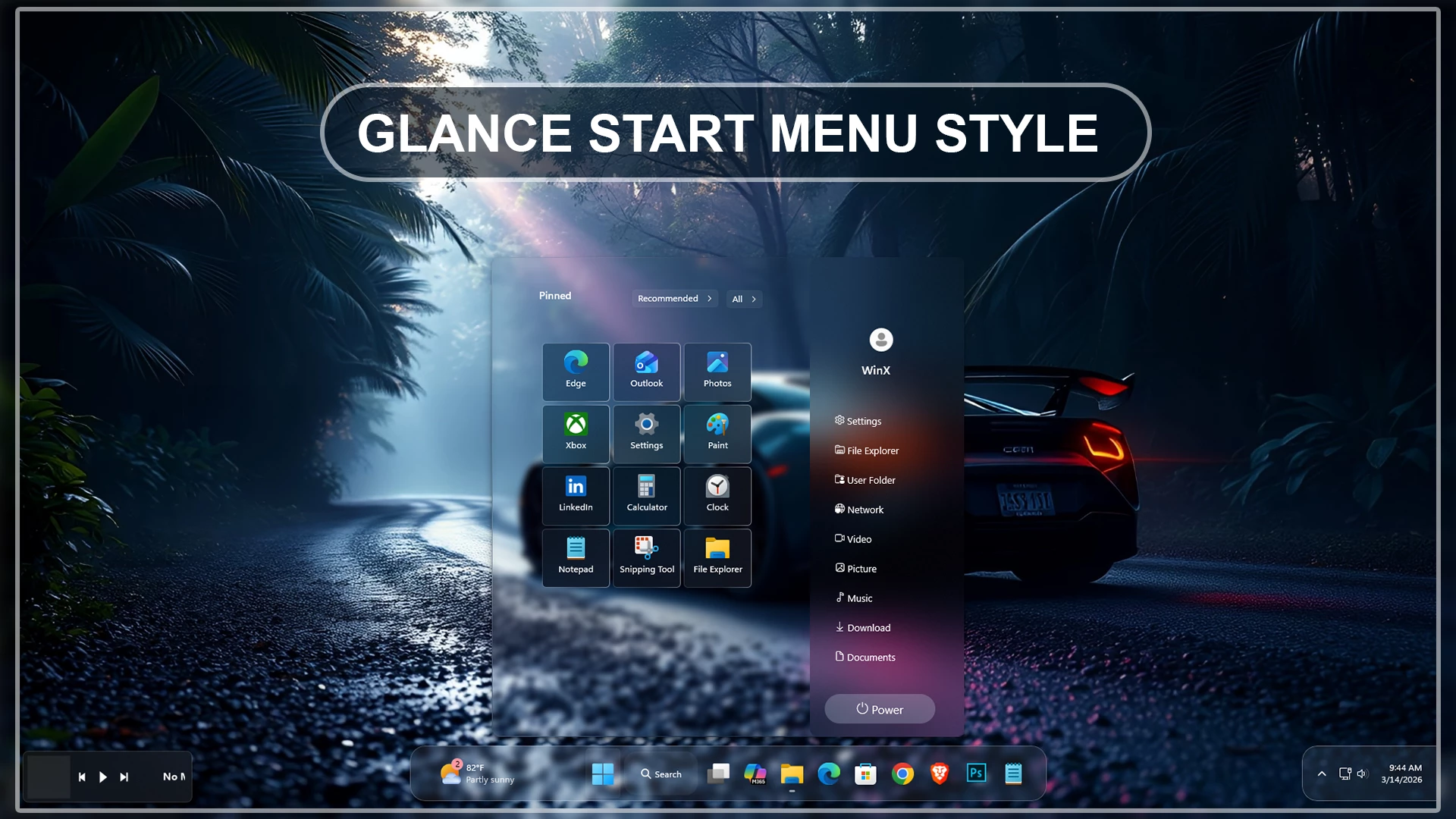
Glance Start Menu Style (Windhawk) – Modern Windows 11 Customization
The Glance Start Menu Style for Windows 11 is a premium and modern customization designed for users who want a cleaner, smoother, and more elegant desktop experience. Built specifically for Windhawk, this stylish Start Menu setup transforms the default Windows 11 interface into a polished and futuristic UI with balanced spacing, transparent effects, modern layouts, and a refined visual appearance.
If you are searching for the best Glance Start Menu Style Windhawk customization, this setup delivers a minimal yet professional desktop look that feels lightweight and visually impressive. The design is inspired by modern UI trends, combining glassmorphism, smooth corners, clean icon placement, and a distraction-free interface to make your Windows 11 desktop look unique and premium.
Why Choose Glance Start Menu Style?
The Glance Start Menu Style is created for users who enjoy desktop customization and want a beautiful Windows 11 environment without making the interface complicated. This Start Menu style provides a clean structure while improving usability and visual comfort.
- Modern and elegant Start Menu layout
- Optimized for Windows 11 customization
- Designed specifically for Windhawk
- Minimal glassmorphism visual effects
- Smooth rounded corners and spacing
- Clean search and app arrangement
- Lightweight and performance friendly
- Perfect for aesthetic desktop setups
- Professional and futuristic appearance
- Easy to install and customize
Beautiful Windows 11 Desktop Experience
The Glance Start Menu Style Windhawk setup gives your desktop a fresh and modern identity. Unlike the default Windows 11 Start Menu, this customization focuses on visual clarity, elegant spacing, and refined transparency effects that improve the overall desktop atmosphere.
The clean layout helps users access apps quickly while maintaining a stylish appearance. Whether you use your PC for gaming, productivity, editing, streaming, or daily browsing, this Start Menu style blends perfectly with every workflow and desktop theme.
The modern UI design also works beautifully with custom icon packs, Rainmeter widgets, transparent taskbars, and other Windows 11 customization tools. This makes it an excellent choice for users who want a fully personalized desktop setup.
Optimized for Windhawk
Windhawk is one of the most powerful Windows customization tools available today, and the Glance Start Menu Style is fully optimized to work smoothly with it. The style is designed to provide a stable experience while keeping the desktop responsive and lightweight.
Using this Windhawk Start Menu style allows users to enhance the visual design of Windows 11 without affecting system performance. The customization remains smooth even during multitasking, making it ideal for both low-end and high-performance systems.
Perfect for Minimal Desktop Lovers
If you enjoy minimal desktop setups, the Glance Start Menu Style for Windows 11 is a perfect choice. The balanced UI design removes unnecessary visual clutter and creates a calm desktop environment that feels modern and professional.
The elegant layout, smooth transparency, and clean icon positioning make the Start Menu visually attractive while keeping it practical for daily use. It is ideal for users who want a desktop that looks aesthetic without becoming overly flashy.
Download Windhawk To Use The Style
Compatibility
- Windows 11 21H2: May work, but not recommended for the best experience
- Windows 11 22H2: May work, but compatibility can vary
- Windows 11 23H2: Recommended
- Windows 11 24H2: Recommended
- Windows 11 25H2: YES Updated
Installation steps:
- Download & Install windhawk.
- install & Open the Windows 11 Start Menu Styler mod in Windhawk.
- Go to the “Advanced” tab.
- Copy the content below to the text box under “Mod settings” and click “Save”.
{ "theme": "", "disableNewStartMenuLayout": "forceNewLayout", "controlStyles[0].target": "Grid#MainMenu", "controlStyles[0].styles[0]": "Width=640", "controlStyles[0].styles[1]": "MinWidth=640", "controlStyles[0].styles[2]": "MaxWidth=640", "controlStyles[1].target": "StartMenu.StartBlendedFlexFrame > Grid#FrameRoot", "controlStyles[1].styles[0]": "Height=650", "controlStyles[1].styles[1]": "MaxHeight=650", "controlStyles[2].target": "Border#AcrylicBorder", "controlStyles[2].styles[0]": "Background:=<WindhawkBlur BlurAmount=\"4\" TintColor=\"#00000000\"/>", "controlStyles[2].styles[1]": "BorderBrush:=<AcrylicBrush TintColor=\"{ThemeResource SurfaceStrokeColorDefault}\" FallbackColor=\"{ThemeResource SurfaceStrokeColorDefault}\" TintOpacity=\"0\" TintLuminosityOpacity=\"0\" Opacity=\"1\"/>", "controlStyles[2].styles[2]": "BorderThickness=1", "controlStyles[2].styles[3]": "CornerRadius=10", "controlStyles[2].styles[4]": "Margin=0", "controlStyles[3].target": "Border#AcrylicOverlay", "controlStyles[3].styles[0]": "Background:=<AcrylicBrush BackgroundSource=\"Backdrop\" TintColor=\"{ThemeResource SystemChromeAltHighColor}\" TintOpacity=\"0\" TintLuminosityOpacity=\"0\"/>", "controlStyles[3].styles[1]": "Width=210", "controlStyles[3].styles[2]": "HorizontalAlignment=Right", "controlStyles[3].styles[3]": "VerticalAlignment=Stretch", "controlStyles[3].styles[4]": "Margin=0,-64,0,-60", "controlStyles[3].styles[5]": "CornerRadius=10", "controlStyles[3].styles[6]": "IsHitTestVisible=False", "controlStyles[4].target": "Border#StartDropShadow", "controlStyles[4].styles[0]": "CornerRadius=10", "controlStyles[5].target": "Grid#MainMenu > Grid#MainContent", "controlStyles[5].styles[0]": "RowDefinitions:=<RowDefinitionCollection><RowDefinition Height=\"0\"/><RowDefinition Height=\"*\"/><RowDefinition Height=\"0\"/><RowDefinition Height=\"60\"/></RowDefinitionCollection>", "controlStyles[6].target": "Grid#MainMenu > Grid#MainContent > Frame#StartFrame", "controlStyles[6].styles[0]": "Grid.Row=1", "controlStyles[6].styles[1]": "Grid.RowSpan=1", "controlStyles[6].styles[2]": "Width=420", "controlStyles[6].styles[3]": "MinWidth=0", "controlStyles[6].styles[4]": "MaxWidth=420", "controlStyles[6].styles[5]": "HorizontalAlignment=Left", "controlStyles[6].styles[6]": "Margin=0", "controlStyles[6].styles[7]": "VerticalAlignment=Stretch", "controlStyles[7].target": "Grid#MainMenu > Grid#MainContent > Grid", "controlStyles[7].styles[0]": "Grid.Row=3", "controlStyles[7].styles[1]": "Grid.RowSpan=1", "controlStyles[7].styles[2]": "Canvas.ZIndex=2", "controlStyles[8].target": "StartMenu.SearchBoxToggleButton", "controlStyles[8].styles[0]": "Visibility=Collapsed", "controlStyles[8].styles[1]": "Height=0", "controlStyles[8].styles[2]": "MinHeight=0", "controlStyles[9].target": "Grid#TopLevelHeader", "controlStyles[9].styles[0]": "RowDefinitions:=<RowDefinitionCollection><RowDefinition Height=\"64\"/><RowDefinition Height=\"Auto\"/><RowDefinition Height=\"Auto\"/></RowDefinitionCollection>", "controlStyles[10].target": "Grid#PinnedListHeaderGrid", "controlStyles[10].styles[0]": "Grid.Row=0", "controlStyles[10].styles[1]": "Width=92", "controlStyles[10].styles[2]": "Height=40", "controlStyles[10].styles[3]": "Margin=60,12,0,0", "controlStyles[10].styles[4]": "HorizontalAlignment=Left", "controlStyles[10].styles[5]": "VerticalAlignment=Top", "controlStyles[10].styles[6]": "Visibility=Visible", "controlStyles[11].target": "TextBlock#PinnedListHeaderText", "controlStyles[11].styles[0]": "Text=Pinned", "controlStyles[11].styles[1]": "Margin=0", "controlStyles[11].styles[2]": "FontSize=13", "controlStyles[11].styles[3]": "Visibility=Visible", "controlStyles[11].styles[4]": "VerticalAlignment=Center", "controlStyles[12].target": "Grid#ShowMorePinnedGrid", "controlStyles[12].styles[0]": "Grid.Row=0", "controlStyles[12].styles[1]": "Width=82", "controlStyles[12].styles[2]": "Height=40", "controlStyles[12].styles[3]": "Margin=0,12,32,0", "controlStyles[12].styles[4]": "HorizontalAlignment=Right", "controlStyles[12].styles[5]": "VerticalAlignment=Top", "controlStyles[13].target": "Grid#ShowMorePinnedGrid > Button", "controlStyles[13].styles[0]": "Width=82", "controlStyles[13].styles[1]": "MinWidth=0", "controlStyles[13].styles[2]": "Height=30", "controlStyles[13].styles[3]": "MinHeight=0", "controlStyles[13].styles[4]": "Margin=0", "controlStyles[13].styles[5]": "Padding=4,0", "controlStyles[13].styles[6]": "VerticalAlignment=Center", "controlStyles[13].styles[7]": "FontSize=12", "controlStyles[14].target": "Grid#TopLevelSuggestionsListHeader", "controlStyles[14].styles[0]": "Height=0", "controlStyles[14].styles[1]": "Visibility=>GlanceRecommendationVisibility", "controlStyles[15].target": "Grid#TopLevelSuggestionsRoot", "controlStyles[15].styles[0]": "Grid.Row=0", "controlStyles[15].styles[1]": "Width=124", "controlStyles[15].styles[2]": "Height=40", "controlStyles[15].styles[3]": "MaxHeight=40", "controlStyles[15].styles[4]": "Margin=0,12,120,0", "controlStyles[15].styles[5]": "HorizontalAlignment=Right", "controlStyles[15].styles[6]": "VerticalAlignment=Top", "controlStyles[16].target": "Grid#ShowMoreSuggestions", "controlStyles[16].styles[0]": "Visibility={{GlanceRecommendationVisibility}}", "controlStyles[16].styles[1]": "Height=40", "controlStyles[16].styles[2]": "Margin=0", "controlStyles[16].styles[3]": "VerticalAlignment=Center", "controlStyles[17].target": "Button#ShowMoreSuggestionsButton", "controlStyles[17].styles[0]": "Width=124", "controlStyles[17].styles[1]": "MinWidth=0", "controlStyles[17].styles[2]": "Height=30", "controlStyles[17].styles[3]": "MinHeight=0", "controlStyles[17].styles[4]": "Margin=0", "controlStyles[17].styles[5]": "Padding=4,0", "controlStyles[17].styles[6]": "VerticalAlignment=Center", "controlStyles[17].styles[7]": "FontSize=12", "controlStyles[18].target": "Button#ShowMoreSuggestionsButton > Grid > ContentPresenter > StackPanel > TextBlock", "controlStyles[18].styles[0]": "Text=Recommended", "controlStyles[18].styles[1]": "FontSize=12", "controlStyles[18].styles[2]": "Margin=0", "controlStyles[19].target": "Grid#NoTopLevelSuggestionsText", "controlStyles[19].styles[0]": "Visibility=Collapsed", "controlStyles[20].target": "Grid#TopLevelSuggestionsContainer", "controlStyles[20].styles[0]": "Height=0", "controlStyles[21].target": "StartMenu.PinnedList#StartMenuPinnedList", "controlStyles[21].styles[0]": "Grid.Row=1", "controlStyles[21].styles[1]": "Width=324", "controlStyles[21].styles[2]": "MinWidth=0", "controlStyles[21].styles[3]": "MaxWidth=324", "controlStyles[21].styles[4]": "Height=450", "controlStyles[21].styles[5]": "MinHeight=450", "controlStyles[21].styles[6]": "MaxHeight=450", "controlStyles[21].styles[7]": "HorizontalAlignment=Center", "controlStyles[21].styles[8]": "Margin=0,20,0,0", "controlStyles[22].target": "StartMenu.PinnedList#StartMenuPinnedList > Grid#Root", "controlStyles[22].styles[0]": "MinWidth=0", "controlStyles[22].styles[1]": "MaxWidth=324", "controlStyles[22].styles[2]": "MinHeight=450", "controlStyles[22].styles[3]": "MaxHeight=450", "controlStyles[22].styles[4]": "Padding=0", "controlStyles[23].target": "StartMenu.PinnedList#StartMenuPinnedList > Grid#Root > GridView#PinnedList", "controlStyles[23].styles[0]": "MinWidth=0", "controlStyles[23].styles[1]": "MaxWidth=324", "controlStyles[23].styles[2]": "Padding=0", "controlStyles[24].target": "GridView#PinnedList > Border > ScrollViewer#ScrollViewer", "controlStyles[24].styles[0]": "VerticalScrollMode=Enabled", "controlStyles[24].styles[1]": "VerticalScrollBarVisibility=Auto", "controlStyles[24].styles[2]": "HorizontalScrollMode=Disabled", "controlStyles[24].styles[3]": "HorizontalScrollBarVisibility=Disabled", "controlStyles[24].styles[4]": "MaxHeight=450", "controlStyles[25].target": "GridView#PinnedList > Border > ScrollViewer#ScrollViewer > Border#Root > Grid > ScrollContentPresenter#ScrollContentPresenter > ItemsPresenter > ItemsWrapGrid", "controlStyles[25].styles[0]": "MaximumRowsOrColumns=3", "controlStyles[25].styles[1]": "Orientation=Horizontal", "controlStyles[25].styles[2]": "ItemWidth=96", "controlStyles[25].styles[3]": "ItemHeight=84", "controlStyles[25].styles[4]": "HorizontalAlignment=Left", "controlStyles[25].styles[5]": "Margin=0", "controlStyles[26].target": "GridView#PinnedList > Border > ScrollViewer#ScrollViewer > Border#Root > Grid > ScrollContentPresenter#ScrollContentPresenter > ItemsPresenter > ItemsWrapGrid > GridViewItem", "controlStyles[26].styles[0]": "Width=92", "controlStyles[26].styles[1]": "Height=80", "controlStyles[26].styles[2]": "MinWidth=0", "controlStyles[26].styles[3]": "MinHeight=0", "controlStyles[26].styles[4]": "Margin=2", "controlStyles[26].styles[5]": "Padding=0", "controlStyles[27].target": "GridView#PinnedList > Border > ScrollViewer#ScrollViewer > Border#Root > Grid > ScrollContentPresenter#ScrollContentPresenter > ItemsPresenter > ItemsWrapGrid > GridViewItem > Border#ContentBorder@CommonStates > Grid#DroppedFlickerWorkaroundWrapper > Border#BackgroundBorder", "controlStyles[27].styles[0]": "CornerRadius=5", "controlStyles[27].styles[1]": "BorderThickness=1", "controlStyles[27].styles[2]": "BorderBrush:=<LinearGradientBrush StartPoint=\"0,0\" EndPoint=\"1,0\"><GradientStop Color=\"#30ffffff\" Offset=\"0\"/><GradientStop Color=\"{ThemeResource SurfaceStrokeColorDefault}\" Offset=\"0.55\"/><GradientStop Color=\"#80ffffff\" Offset=\"1\"/></LinearGradientBrush>", "controlStyles[27].styles[3]": "Background@Normal:=<AcrylicBrush TintColor=\"{ThemeResource CardStrokeColorDefaultSolid}\" FallbackColor=\"{ThemeResource CardStrokeColorDefaultSolid}\" TintOpacity=\"0\" TintLuminosityOpacity=\".45\" Opacity=\"1\"/>", "controlStyles[27].styles[4]": "Background@PointerOver:=<AcrylicBrush TintColor=\"{ThemeResource CardStrokeColorDefaultSolid}\" FallbackColor=\"{ThemeResource CardStrokeColorDefaultSolid}\" TintOpacity=\"0\" TintLuminosityOpacity=\".30\" Opacity=\"1\"/>", "controlStyles[28].target": "GridView#PinnedList > Border > ScrollViewer#ScrollViewer > Border#Root > Grid > ScrollContentPresenter#ScrollContentPresenter > ItemsPresenter > ItemsWrapGrid > GridViewItem > Border#ContentBorder@CommonStates", "controlStyles[28].styles[0]": "CornerRadius=4", "controlStyles[28].styles[1]": "FocusVisualPrimaryBrush:=<SolidColorBrush Color=\"#b3cefd\" Opacity=\".10\"/>", "controlStyles[29].target": "StartMenu.PinnedListTile", "controlStyles[29].styles[0]": "Width=92", "controlStyles[29].styles[1]": "Height=80", "controlStyles[30].target": "StartMenu.PinnedListTile > Grid#Root > Grid#LogoContainer", "controlStyles[30].styles[0]": "Margin=0,8,0,0", "controlStyles[31].target": "StartMenu.PinnedListTile > Grid#Root > Grid#DisplayNameAndDownloadIconContainer", "controlStyles[31].styles[0]": "MaxWidth=88", "controlStyles[31].styles[1]": "HorizontalAlignment=Center", "controlStyles[32].target": "StartMenu.PinnedListTile > Grid#Root > Grid#DisplayNameAndDownloadIconContainer > TextBlock#DisplayName", "controlStyles[32].styles[0]": "FontSize=12", "controlStyles[32].styles[1]": "TextAlignment=Center", "controlStyles[33].target": "Grid#AllListHeading", "controlStyles[33].styles[0]": "Grid.Row=2", "controlStyles[33].styles[1]": "Margin=44,12,28,8", "controlStyles[34].target": "Grid#AllListHeading > TextBlock#AllListHeadingText", "controlStyles[34].styles[0]": "Text=All apps", "controlStyles[34].styles[1]": "FontSize=13", "controlStyles[34].styles[2]": "Margin=0", "controlStyles[35].target": "Grid#AllListHeading > Microsoft.UI.Xaml.Controls.DropDownButton#ViewSelectionButton", "controlStyles[35].styles[0]": "Margin=0", "controlStyles[35].styles[1]": "Height=30", "controlStyles[35].styles[2]": "FontSize=12", "controlStyles[36].target": "GridView#AllAppsGrid > Border > ScrollViewer#ScrollViewer > Border#Root > Grid > ScrollContentPresenter#ScrollContentPresenter > ItemsPresenter > ItemsWrapGrid", "controlStyles[36].styles[0]": "Margin=32,0,28,16", "controlStyles[36].styles[1]": "MaximumRowsOrColumns=1", "controlStyles[36].styles[2]": "Orientation=Horizontal", "controlStyles[37].target": "Grid#NavPanePlaceholder", "controlStyles[37].styles[0]": "Grid.Row=3", "controlStyles[37].styles[1]": "Grid.RowSpan=1", "controlStyles[37].styles[2]": "Height=622", "controlStyles[37].styles[3]": "MinHeight=0", "controlStyles[37].styles[4]": "MaxHeight=622", "controlStyles[37].styles[5]": "VerticalAlignment=Bottom", "controlStyles[37].styles[6]": "Margin=0,-562,0,0", "controlStyles[37].styles[7]": "BorderThickness=0", "controlStyles[37].styles[8]": "CornerRadius=10", "controlStyles[37].styles[9]": "Canvas.ZIndex=10", "controlStyles[37].styles[10]": "Width=640", "controlStyles[37].styles[11]": "MinWidth=640", "controlStyles[37].styles[12]": "Background:=", "controlStyles[37].styles[13]": "HorizontalAlignment=Stretch", "controlStyles[38].target": "StartDocked.NavigationPaneView", "controlStyles[38].styles[0]": "Height=622", "controlStyles[38].styles[1]": "MinHeight=0", "controlStyles[38].styles[2]": "MaxHeight=622", "controlStyles[38].styles[3]": "Margin=0", "controlStyles[38].styles[4]": "Background:=", "controlStyles[38].styles[5]": "VerticalAlignment=Stretch", "controlStyles[38].styles[6]": "Width=640", "controlStyles[38].styles[7]": "MinWidth=640", "controlStyles[38].styles[8]": "HorizontalAlignment=Stretch", "controlStyles[39].target": "StartDocked.NavigationPaneView > Grid#RootPanel", "controlStyles[39].styles[0]": "Height=622", "controlStyles[39].styles[1]": "MinHeight=0", "controlStyles[39].styles[2]": "Background:=", "controlStyles[39].styles[3]": "FlowDirection=LeftToRight", "controlStyles[39].styles[4]": "RowDefinitions:=<RowDefinitionCollection><RowDefinition Height=\"160\"/><RowDefinition Height=\"*\"/><RowDefinition Height=\"68\"/></RowDefinitionCollection>", "controlStyles[39].styles[5]": "Width=640", "controlStyles[39].styles[6]": "ColumnDefinitions:=<ColumnDefinitionCollection><ColumnDefinition Width=\"430\"/><ColumnDefinition Width=\"210\"/></ColumnDefinitionCollection>", "controlStyles[40].target": "StartDocked.UserTileView", "controlStyles[40].styles[0]": "Grid.Row=0", "controlStyles[40].styles[1]": "Margin=0", "controlStyles[40].styles[2]": "HorizontalAlignment=Center", "controlStyles[40].styles[3]": "VerticalAlignment=Center", "controlStyles[40].styles[4]": "Grid.Column=1", "controlStyles[40].styles[5]": "Grid.ColumnSpan=1", "controlStyles[41].target": "StartDocked.NavigationPaneButton#UserTileButton > Grid@CommonStates > Border", "controlStyles[41].styles[0]": "Background=Transparent", "controlStyles[41].styles[1]": "CornerRadius=5", "controlStyles[42].target": "StartDocked.PowerOptionsView", "controlStyles[42].styles[0]": "Grid.Row=2", "controlStyles[42].styles[1]": "Margin=0", "controlStyles[42].styles[2]": "HorizontalAlignment=Center", "controlStyles[42].styles[3]": "VerticalAlignment=Center", "controlStyles[42].styles[4]": "Grid.Column=1", "controlStyles[42].styles[5]": "Grid.ColumnSpan=1", "controlStyles[43].target": "StartDocked.NavigationPaneButton#PowerButton", "controlStyles[43].styles[0]": "Width=150", "controlStyles[43].styles[1]": "Height=40", "controlStyles[43].styles[2]": "CornerRadius=20", "controlStyles[44].target": "StartDocked.NavigationPaneButton#PowerButton > Grid@CommonStates > Border", "controlStyles[44].styles[0]": "Background@Normal=#46c9d8ed", "controlStyles[44].styles[1]": "Background@PointerOver=#66c9d8ed", "controlStyles[44].styles[2]": "CornerRadius=20", "controlStyles[45].target": "StartDocked.AppListView#NavigationPanePlacesListView", "controlStyles[45].styles[0]": "Grid.Row=1", "controlStyles[45].styles[1]": "Width=174", "controlStyles[45].styles[2]": "MinWidth=0", "controlStyles[45].styles[3]": "MaxWidth=174", "controlStyles[45].styles[4]": "Height=360", "controlStyles[45].styles[5]": "MaxHeight=360", "controlStyles[45].styles[6]": "Margin=0", "controlStyles[45].styles[7]": "Padding=0", "controlStyles[45].styles[8]": "HorizontalAlignment=Center", "controlStyles[45].styles[9]": "VerticalAlignment=Top", "controlStyles[45].styles[10]": "MinHeight=360", "controlStyles[45].styles[11]": "Visibility=Visible", "controlStyles[45].styles[12]": "Opacity=1", "controlStyles[45].styles[13]": "IsHitTestVisible=True", "controlStyles[45].styles[14]": "HorizontalContentAlignment=Stretch", "controlStyles[45].styles[15]": "VerticalContentAlignment=Top", "controlStyles[45].styles[16]": "Grid.Column=1", "controlStyles[45].styles[17]": "Grid.ColumnSpan=1", "controlStyles[46].target": "StartDocked.AppListViewItem", "controlStyles[46].styles[0]": "Width=168", "controlStyles[46].styles[1]": "MinWidth=0", "controlStyles[46].styles[2]": "Height=40", "controlStyles[46].styles[3]": "MinHeight=0", "controlStyles[46].styles[4]": "Margin=0", "controlStyles[46].styles[5]": "Padding=0", "controlStyles[46].styles[6]": "Visibility=Visible", "controlStyles[46].styles[7]": "Opacity=1", "controlStyles[46].styles[8]": "HorizontalContentAlignment=Stretch", "controlStyles[46].styles[9]": "VerticalContentAlignment=Center", "controlStyles[47].target": "StartDocked.AppListViewItem > Grid > ContentPresenter", "controlStyles[47].styles[0]": "HorizontalAlignment=Left", "controlStyles[47].styles[1]": "VerticalAlignment=Center", "controlStyles[47].styles[2]": "Width=158", "controlStyles[47].styles[3]": "Margin=8,0,0,0", "controlStyles[47].styles[4]": "Visibility=Visible", "controlStyles[47].styles[5]": "Opacity=1", "controlStyles[48].target": "StartDocked.AppListViewItem > Grid > ContentPresenter > FontIcon", "controlStyles[48].styles[0]": "FontSize=13", "controlStyles[48].styles[1]": "Width=150", "controlStyles[48].styles[2]": "HorizontalAlignment=Left", "controlStyles[48].styles[3]": "VerticalAlignment=Center", "controlStyles[48].styles[4]": "FontFamily=Segoe UI, Segoe Fluent Icons", "controlStyles[49].target": "StartDocked.AppListViewItem > Grid > ContentPresenter > FontIcon > Grid > TextBlock", "controlStyles[49].styles[0]": "FontSize=13", "controlStyles[49].styles[1]": "HorizontalAlignment=Left", "controlStyles[49].styles[2]": "FontFamily=Segoe UI, Segoe Fluent Icons", "controlStyles[50].target": "StartDocked.NavigationPaneButton#PowerButton > Grid > ContentPresenter > Grid > FontIcon", "controlStyles[50].styles[0]": "FontFamily=Segoe UI, Segoe Fluent Icons", "controlStyles[50].styles[1]": "Width=110", "controlStyles[51].target": "StartDocked.NavigationPaneButton#PowerButton > Grid > ContentPresenter > Grid > FontIcon > Grid > TextBlock", "controlStyles[51].styles[0]": "FontFamily=Segoe UI, Segoe Fluent Icons", "controlStyles[51].styles[1]": "FontSize=15", "controlStyles[51].styles[2]": "Text= Power", "controlStyles[52].target": "StartDocked.AppListViewItem > Grid > ContentPresenter > FontIcon > Grid > TextBlock[Text=]", "controlStyles[52].styles[0]": "Text= Documents", "controlStyles[53].target": "StartDocked.AppListViewItem > Grid > ContentPresenter > FontIcon > Grid > TextBlock[Text=]", "controlStyles[53].styles[0]": "Text= Download", "controlStyles[54].target": "StartDocked.AppListViewItem > Grid > ContentPresenter > FontIcon > Grid > TextBlock[Text=]", "controlStyles[54].styles[0]": "Text= Music", "controlStyles[55].target": "StartDocked.AppListViewItem > Grid > ContentPresenter > FontIcon > Grid > TextBlock[Text=]", "controlStyles[55].styles[0]": "Text= Picture", "controlStyles[56].target": "StartDocked.AppListViewItem > Grid > ContentPresenter > FontIcon > Grid > TextBlock[Text=]", "controlStyles[56].styles[0]": "Text= Video", "controlStyles[57].target": "StartDocked.AppListViewItem > Grid > ContentPresenter > FontIcon > Grid > TextBlock[Text=]", "controlStyles[57].styles[0]": "Text= Network", "controlStyles[58].target": "StartDocked.AppListViewItem > Grid > ContentPresenter > FontIcon > Grid > TextBlock[Text=]", "controlStyles[58].styles[0]": "Text= File Explorer", "controlStyles[59].target": "StartDocked.AppListViewItem > Grid > ContentPresenter > FontIcon > Grid > TextBlock[Text=]", "controlStyles[59].styles[0]": "Text= Settings", "controlStyles[60].target": "StartDocked.AppListViewItem > Grid > ContentPresenter > FontIcon > Grid > TextBlock[Text=]", "controlStyles[60].styles[0]": "Text= User Folder", "controlStyles[61].target": "StartMenu.StartMenuCompanion#RightCompanion", "controlStyles[61].styles[0]": "Visibility=Collapsed", "controlStyles[62].target": "Windows.UI.Xaml.Controls.Primitives.ToggleButton#ShowHideCompanion", "controlStyles[62].styles[0]": "Visibility=Collapsed", "controlStyles[63].target": "Border#AppBorder", "controlStyles[63].styles[0]": "Background:=<WindhawkBlur BlurAmount=\"4\" TintColor=\"#00000000\"/>", "controlStyles[64].target": "StartDocked.NavigationPaneButton#UserTileButton > Grid > ContentPresenter > Grid", "controlStyles[64].styles[0]": "RowDefinitions:=<RowDefinitionCollection><RowDefinition Height=\"44\"/><RowDefinition Height=\"28\"/></RowDefinitionCollection>", "controlStyles[64].styles[1]": "ColumnDefinitions:=<ColumnDefinitionCollection><ColumnDefinition Width=\"*\"/></ColumnDefinitionCollection>", "controlStyles[65].target": "TextBlock#UserTileNameText", "controlStyles[65].styles[0]": "Grid.Row=1", "controlStyles[65].styles[1]": "Grid.Column=0", "controlStyles[65].styles[2]": "Margin=0", "controlStyles[65].styles[3]": "HorizontalAlignment=Center", "controlStyles[65].styles[4]": "FontSize=16", "controlStyles[65].styles[5]": "FontWeight=SemiBold", "controlStyles[66].target": "StartDocked.AppListView#NavigationPanePlacesListView > Border > ScrollViewer > Border#Root > Grid > ScrollContentPresenter > ItemsPresenter > ItemsStackPanel", "controlStyles[66].styles[0]": "Orientation=Vertical", "controlStyles[66].styles[1]": "Margin=0", "controlStyles[66].styles[2]": "HorizontalAlignment=Stretch", "controlStyles[67].target": "StartDocked.AppListView#NavigationPanePlacesListView > Border > ScrollViewer > Border#Root > Grid > ScrollContentPresenter > ItemsPresenter > ItemsStackPanel > ListViewItem", "controlStyles[67].styles[0]": "Width=168", "controlStyles[67].styles[1]": "MinWidth=0", "controlStyles[67].styles[2]": "Height=40", "controlStyles[67].styles[3]": "MinHeight=0", "controlStyles[67].styles[4]": "Margin=0", "controlStyles[67].styles[5]": "Padding=0", "controlStyles[67].styles[6]": "Visibility=Visible", "controlStyles[67].styles[7]": "HorizontalContentAlignment=Stretch"} ⚠️ Disclaimer: This Windhawk Start Menu Style is provided for Windows UI personalization and educational purposes only. It is an unofficial customization and is not developed, endorsed, or supported by Microsoft. Compatibility may vary depending on your Windows version, Windhawk version, Start Menu Styler version, and system configuration. Windows updates may also affect how the style works. Please keep a backup of your current settings before applying any changes.
Wrapping Up
The Glance Start Menu Style (Windhawk) is one of the best modern Start Menu customizations for Windows 11 users who want a clean, elegant, and futuristic desktop experience. With its minimal design, glassmorphism effects, smooth layout, and optimized performance, this customization helps transform your Windows 11 desktop into a premium setup.
Whether you are building a stylish workstation, creating an aesthetic gaming setup, or simply improving your Windows 11 interface, the Glance Start Menu Style Windhawk customization delivers a visually refined and professional result that stands out beautifully.
You may also like


Disclaimer: All themes, visual styles, and concepts shared on this website are unofficial, fan-made creations built from imagination for customization purposes. We are not affiliated with, endorsed by, or sponsored by Microsoft or any other official brand.