Harmony OS Theme For Windows 11
Download Harmony OS Theme For Windows 11 and transform your desktop with Huawei-inspired icons, transparent effects, modern UI, and premium visuals.

Harmony OS Theme For Windows 11 – Transform Your Desktop with a Premium Huawei-Inspired Experience
Harmony OS Theme For Windows 11 is a beautifully designed desktop customization package inspired by Huawei’s modern HarmonyOS interface. If you love clean visuals, smooth transparency effects, elegant icons, and a futuristic user experience, this theme is the perfect choice for your Windows 11 PC.
This premium-looking theme completely refreshes the appearance of Windows 11 by introducing HarmonyOS-inspired design elements, including sleek folder icons, modern window styling, glass-like effects, refined taskbar aesthetics, and a polished desktop environment. The result is a professional and visually stunning workspace that feels fresh, lightweight, and highly organized.
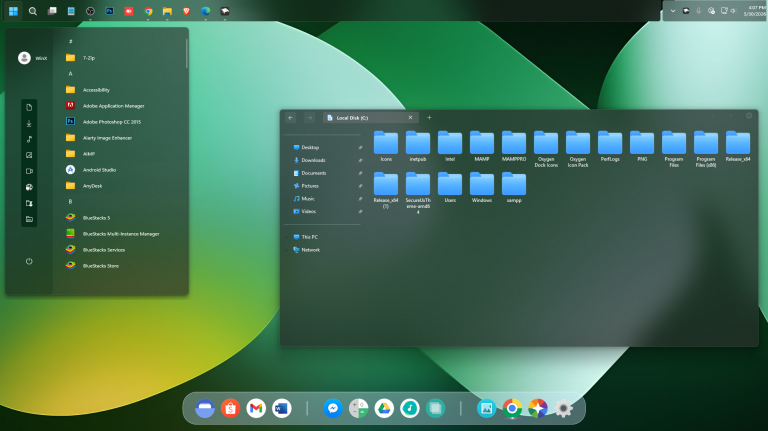
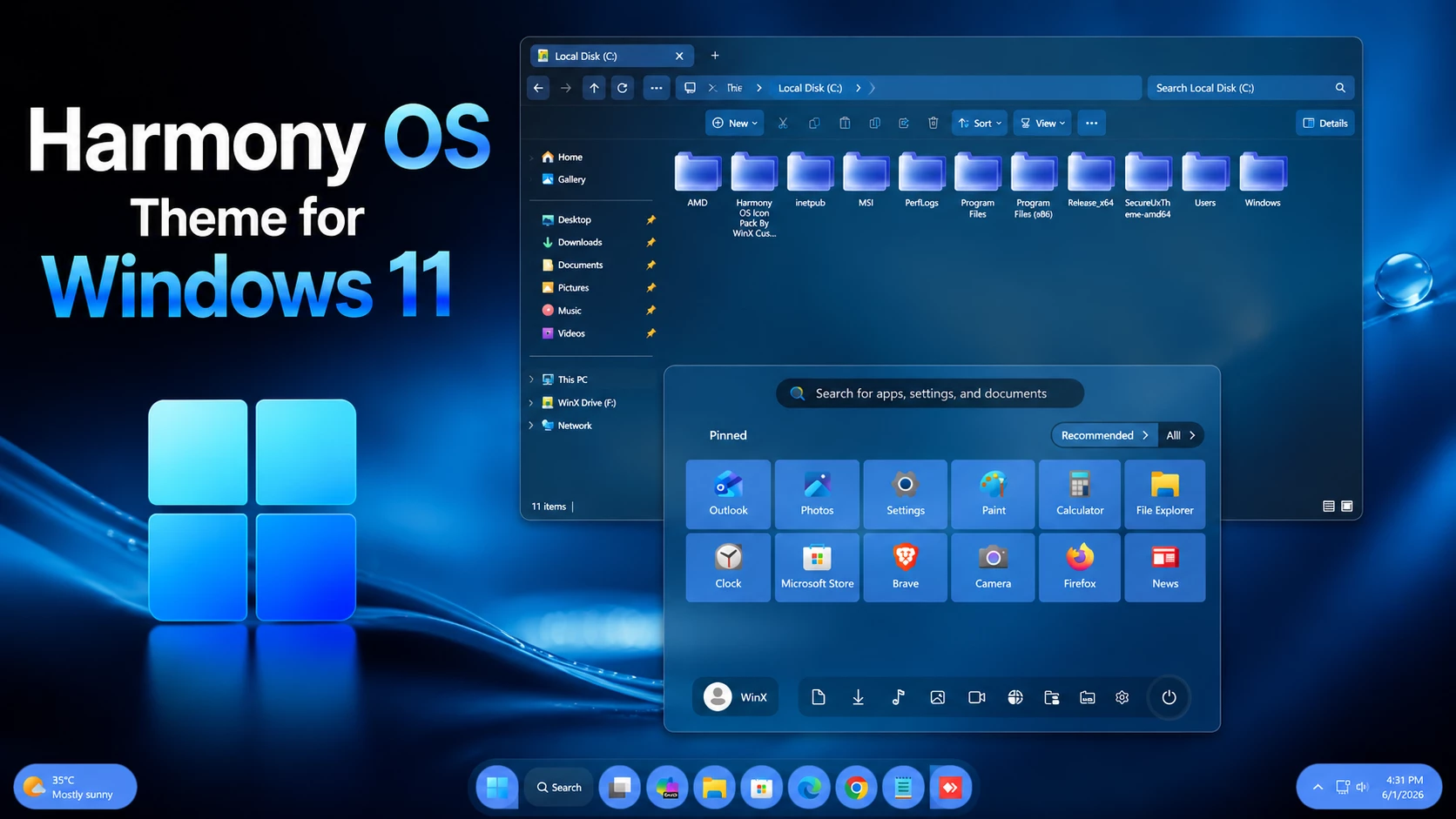
As shown in the preview screenshot, the theme delivers a clean dark-blue interface with beautiful transparency effects, smooth gradients, and redesigned system icons. The file explorer receives a complete visual makeover, featuring HarmonyOS-style folders and modern navigation elements that significantly enhance the overall user experience.
Why Choose Harmony OS Theme For Windows 11?
Many Windows users want a unique desktop environment without sacrificing performance. The Harmony OS Theme For Windows 11 provides exactly that. It combines Huawei’s elegant design philosophy with Microsoft’s powerful operating system, creating a seamless blend of beauty and functionality.
Unlike ordinary themes that only change wallpapers, this customization package transforms multiple visual components of Windows 11, making your system look more modern, premium, and professionally designed.
Key Features of Harmony OS Theme For Windows 11
- HarmonyOS-inspired visual design.
- Modern transparent File Explorer appearance.
- Beautiful Harmony-style folder icons.
- Elegant blue and dark color accents.
- Enhanced desktop aesthetics.
- Clean and organized user interface.
- Smooth visual experience for daily use.
- Perfect compatibility with Windows 11.
- Premium look without requiring expensive software.
- Lightweight customization package.
Beautiful HarmonyOS Inspired Interface
The biggest highlight of this theme is its visually appealing HarmonyOS-inspired design language. Every element is carefully crafted to deliver a modern user experience. From the transparent explorer windows to the redesigned icons, every detail contributes to a cleaner and more sophisticated desktop environment.
The blue glass effects and subtle shadows create depth while maintaining a minimalist appearance. Users who enjoy modern operating system designs will immediately appreciate the elegance and simplicity offered by this theme.
Enhanced File Explorer Experience
The File Explorer receives one of the most noticeable upgrades. The Harmony OS Theme For Windows 11 introduces stylish navigation bars, modern folder icons, transparent window effects, and improved visual consistency throughout the interface.
Browsing files, managing folders, and navigating directories becomes more enjoyable thanks to the polished design. The modernized explorer layout closely resembles Huawei’s HarmonyOS ecosystem while retaining the functionality of Windows 11.
Perfect for Personal and Professional Use
Whether you’re a student, gamer, content creator, developer, or office professional, this theme adds a premium touch to your desktop. The clean interface helps reduce visual clutter and creates a productive workspace suitable for both entertainment and work-related tasks.
Users who spend long hours on their computers will appreciate the balanced colors and modern visual design that help create a comfortable viewing experience.
- I recommend creating a restore point before starting your customization.
- This third-party theme will only work if you install Theme Patcher, so definitely install Theme Patcher.
- If you’re new to customization, check out this page that explains in detail how to install Windows custom themes.
- Or Check This Post for a guide on Windows custom themes Installation.
- Theme support: Windows 11
For a detailed guide, you can also check:
- 21H2 YES
- 22H2 YES
- 22H3 YES
- 24H2 YES
- 25H2 YES
What’s Included in This?
- Windows 11 Theme
- Wallpapers
- Dock
- Windhawk Config
Harmony OS Theme 17MB
DownloadFinal Words
If you are looking for the best Harmony OS Theme For Windows 11, this customization package offers an impressive combination of beauty, modern design, and usability. With its HarmonyOS-inspired visuals, elegant transparency effects, stylish icons, and premium desktop appearance, it is an excellent choice for anyone who wants to give Windows 11 a fresh new look.
Download Harmony OS Theme For Windows 11 today and enjoy a sleek, modern, and professional desktop experience inspired by Huawei HarmonyOS.