Glaze Icon Pack for Windhawk
Discover Glaze icon pack for Windhawk with a clean Windows 11 customization look, modern folder icons, glassmorphism style, and safe setup tips.

Glaze Icon Pack for Windows 11 – Resource Redirect
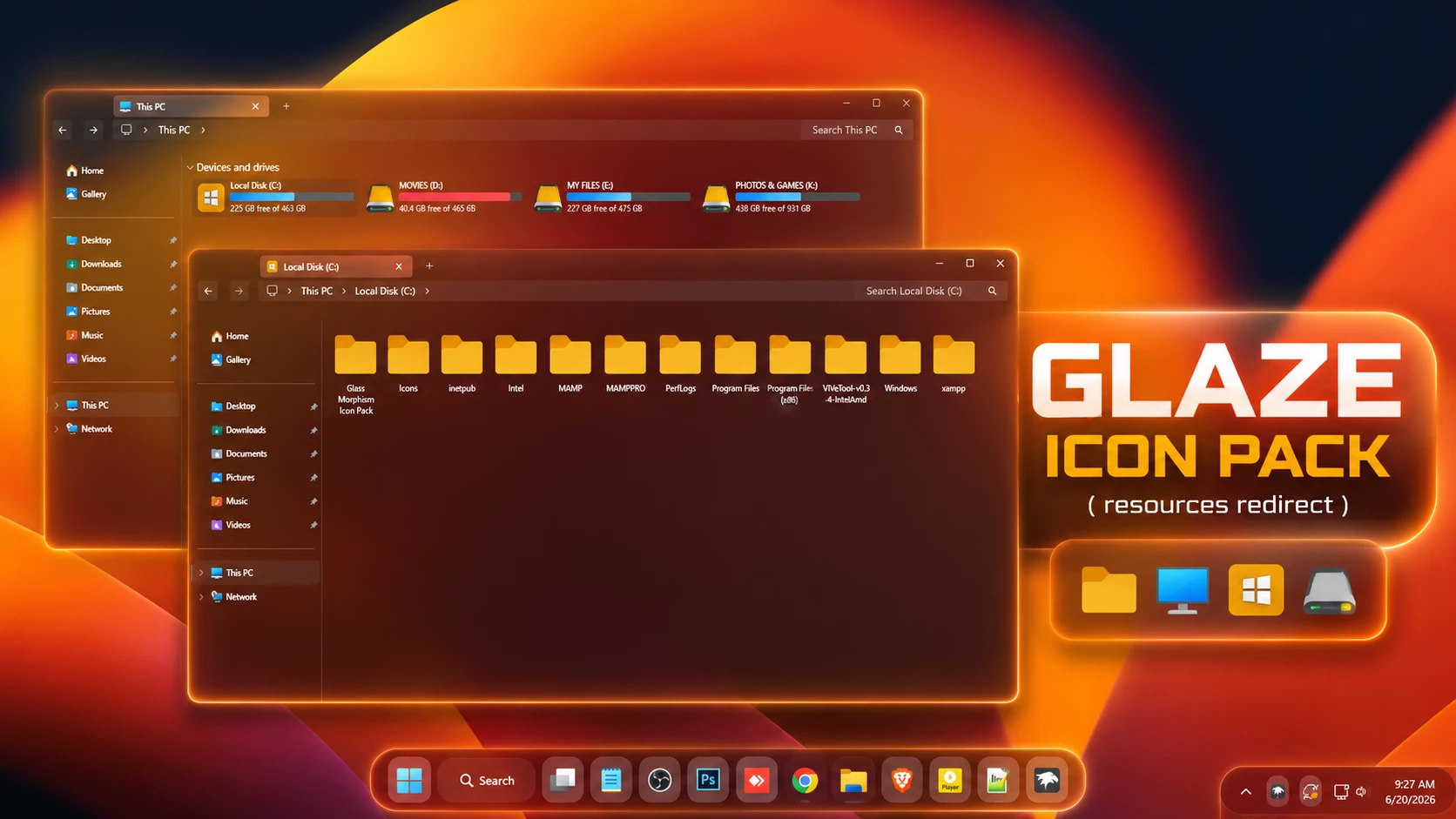
Glaze Icon Pack gives supported Windows 11 icons a warmer look built around golden-yellow folders and simple, easy-to-read system resources. Instead of using heavy gradients or complicated artwork, the pack keeps most shapes familiar and lets the brighter folder color do the visual work.
The folder icons are the most noticeable part of the set. They use a rich yellow-orange tone that stands out clearly inside File Explorer, especially when the surrounding interface is darker. Other supported resources, such as the monitor, Windows-style system icon, and drive icon, use their own colors while keeping the same straightforward design approach.
This version is made for Resource Redirect in Windhawk. It changes supported Windows icon resources through the mod, so there is no need to manually replace protected system files. Your Windows theme, wallpaper, taskbar, and Start menu remain separate customizations.
Warm Golden Folder Style
Glaze does not try to make every resource identical. The folders stay within a warm yellow and orange palette, while system-style icons introduce blue, gray, and other supporting colors where needed.
That makes File Explorer feel more colorful without turning every item into a different visual experiment. The familiar folder shape is still easy to recognize, just with a brighter finish than the default Windows icons.
Features
- Warm yellow and golden folder icons
- Simple folder shapes that remain easy to recognize
- Blue monitor-style resource
- Gold Windows-style system icon where supported
- Gray drive-style resource for supported locations
- Designed for Resource Redirect in Windhawk
- No manual replacement of protected Windows system files
- Glaze Resource Redirect Icon Pack: Contains the replacement resources used by Resource Redirect for supported Windows 11 icons.
Compatibility
- Windows 11
Icon coverage can vary depending on your Windows build and the resources included in the pack. Some programs provide their own icons, while folders that show thumbnail previews may continue to display those previews instead of the themed folder resource.
Requirements
- Windows 11
- Windhawk installed
- Resource Redirect mod installed and enabled
- The Glaze pack extracted to a permanent folder
- A ZIP extraction tool
Before You Apply Glaze
Keep a copy of your current Resource Redirect settings before changing the icon path. If you decide to use another icon pack later, having the old configuration saved makes switching back much easier.
After Glaze is working, leave the extracted folder in the same location. Resource Redirect loads the replacement files from that saved path, so moving or renaming the folder can stop the icons from appearing. Windows customization remains remarkably dramatic about folder locations.
Installation Steps
- Install Windhawk: Download and install Windhawk if it is not already installed.
- Install Resource Redirect: Open Windhawk, search for Resource Redirect, and install the mod.
- Download Glaze: Download the ZIP archive using the button below.
- Extract the Pack: Extract the archive to a folder that you plan to keep in the same location.
- Copy the Folder Path: Open the extracted Glaze folder and copy its full Windows path.
- Open Resource Redirect Settings: Go to the mod’s settings and locate the custom theme or resource folder field.
- Paste the Path: Paste the Glaze folder path into the required field. Remove quotation marks if Windows added them automatically.
- Save the Settings: Apply the Resource Redirect configuration and allow the mod to reload.
- Refresh Explorer: Restart Windows Explorer if the new icons do not appear immediately.
For a more detailed installation guide, you can also check:
Download Glaze Icon Pack
Glaze Icon Pack 10MB
Download Icon PackIf the Icons Do Not Change
Check that Resource Redirect is enabled and make sure the saved path points to the extracted Glaze folder rather than the ZIP archive itself.
If the path is correct but the older icons remain visible, restart Windows Explorer. An icon-cache refresh may also be needed if Windows is still displaying previously cached resources.
Why Do Some Icons Stay Unchanged?
Resource Redirect can only replace resources that are included in the pack. Some applications use their own icons, and certain folders may display thumbnail previews instead of the standard folder resource.
A few unchanged icons therefore do not automatically mean the pack failed. They may simply come from resources outside the Glaze set.
How to Remove
- Open Windhawk: Select the installed Resource Redirect mod.
- Open Its Settings: Find the custom folder path currently pointing to Glaze.
- Restore Your Previous Setup: Replace the Glaze path with your earlier configuration, or remove it if you want to return to the default Windows resources.
- Save the Changes: Apply the updated Resource Redirect settings.
- Restart Explorer: Restart Windows Explorer so the previous or default icons can reload.
- Delete the Pack Later: Remove the extracted Glaze folder only after Resource Redirect is no longer using it.
Where Glaze Works Well
The warm folder color pairs naturally with darker Windows interfaces because the yellow-orange icons have plenty of contrast. Black, brown, charcoal, navy, or warm gradient wallpapers can all work nicely with the set.
You do not need to copy the orange desktop shown in the preview. Glaze is an icon pack, not a complete theme, so the folder resources can be used with whatever Windows style you already prefer.
Explore More Windows Customization
Disclaimer
Glaze Icon Pack is an independently shared third-party Windows customization resource intended for desktop personalization. It is not an official Microsoft, Windhawk, or Resource Redirect product and is not affiliated with, authorized by, sponsored by, approved by, or endorsed by those companies or projects. Microsoft, Windows, and other trademarks belong to their respective owners. Appearance and compatibility may vary between Windows builds and mod versions.
Final Word
Glaze keeps things straightforward. The warm golden folders are the main attraction, while the blue monitor, gray drive, and other supported system resources add enough variation to keep the set practical.
If you want File Explorer to feel warmer and more distinctive without moving into neon, glass, or heavily detailed icon artwork, Glaze offers a cleaner middle ground.
Frequently Asked Questions
Is Glaze a glass or transparent icon pack?
No. Despite the name, the visible design is mainly built around warm yellow and golden folder icons rather than transparent glass-style resources.
What colors are used in the Glaze icon pack?
The folders mainly use yellow, gold, and orange tones, while selected system resources use blue, gray, and other supporting colors.
Do I need the orange theme shown in the preview?
No. The preview shows one possible desktop setup. Glaze works independently through Resource Redirect and can be used with another Windows theme or wallpaper.
Does Glaze also change the taskbar or Start menu?
No. The pack focuses on supported icon resources. Taskbar, Start menu, wallpaper, and other interface styling remain separate customizations.
Why might some Windows icons remain unchanged?
Some applications use their own icon files, while certain folders display thumbnails or resources that are not included in the pack.