

New Windows Dark Rainmeter Skin
Windows Dark Rainmeter Skin gives your desktop a clean, dark, and modern look with useful widgets. Learn how to install, customize, remove, and fix common Rainmeter issues.

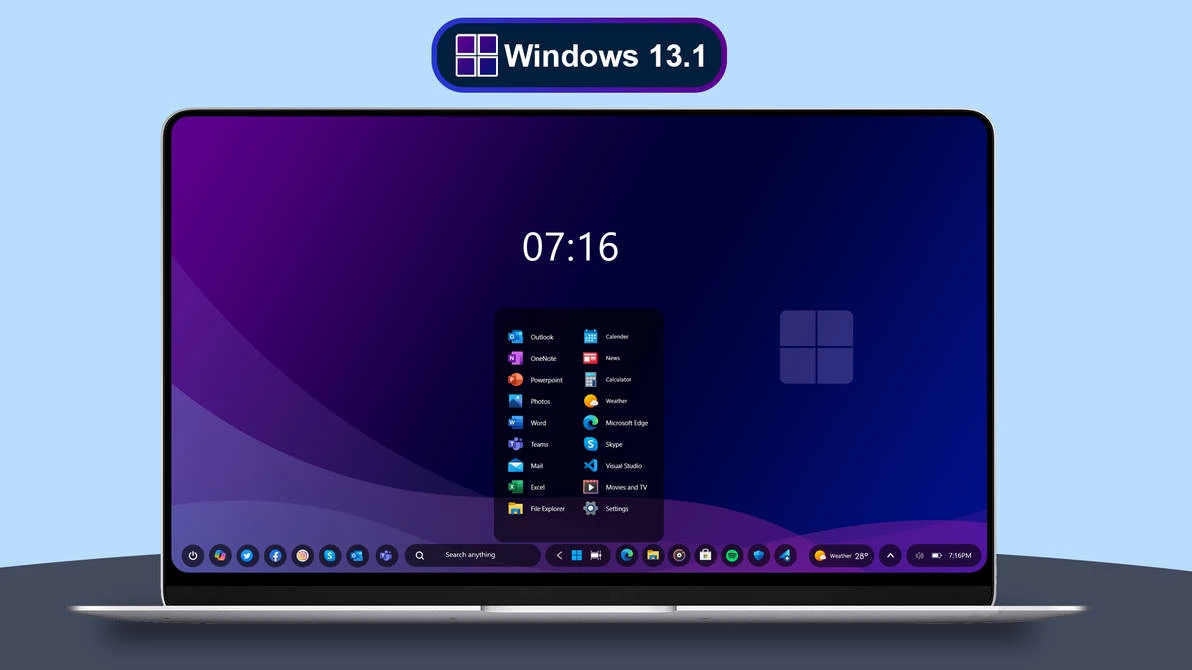
Windows Dark Rainmeter Skin
Windows Dark Rainmeter Skin is a clean and modern Rainmeter Skin for users who want a darker, more polished desktop setup. It is made for people who like simple widgets, smooth dark themes, and a desktop that feels more useful without looking crowded.
This skin can help you display useful desktop information such as time, date, system usage, shortcuts, or other widgets depending on the included skin files. It does not change your full Windows system. It only adds Rainmeter widgets on top of your desktop, so your apps, files, taskbar, Start Menu, and normal Windows features stay the same.
If you enjoy Windows customization, dark wallpapers, minimal icons, and clean desktop layouts, this skin can be a nice addition to your setup. It is especially useful if you want your desktop to look better for daily work, screenshots, tutorials, or YouTube customization videos.
What Is Windows Dark Rainmeter Skin?
Windows Dark Rainmeter Skin is a desktop customization skin made for Rainmeter. It gives your Windows desktop a dark, stylish, and organized look by adding visual widgets to your screen.
The main purpose of this skin is to make the desktop feel more personal and useful. Instead of keeping a plain wallpaper with only icons, you can add clean desktop elements that match your dark theme. A good Rainmeter setup can make your desktop look modern without needing a heavy full-system theme.
This type of skin usually looks best with dark, black, gradient, neon, glass, or abstract wallpapers. If the wallpaper is too bright or too colorful, the widgets may not look as clean. For the best result, use a wallpaper that matches the dark style.
Why Use a Dark Rainmeter Skin?
A dark desktop setup is easy on the eyes and looks clean when it is designed properly. Many users prefer dark themes because they feel calmer, especially during night work, editing, coding, browsing, or long study sessions.
Rainmeter skins are useful because they let you add desktop widgets without changing the whole Windows interface. You can keep your normal Windows setup and only customize the parts you want. This makes Rainmeter a good choice for users who like control and flexibility.
Windows Dark Rainmeter Skin is a good option if you want a simple but premium-looking desktop. It can match well with dark taskbar styles, custom icon packs, minimal wallpapers, and clean Windows 11 themes.
Main Features
- Clean dark desktop style for Windows
- Modern Rainmeter widgets for a polished setup
- Good match for dark, gradient, and abstract wallpapers
- Useful for minimal desktop customization
- Can work with icon packs, wallpapers, and taskbar styles
- Easy to load, unload, or remove from Rainmeter
- Suitable for personal desktops, screenshots, and theme previews
- Rainmeter Skin
- Download & Install Rainmeter.
- Once installed, Rainmeter will start automatically
- Download the .rmskin file (Rainmeter Skin Installer format) Double-click the .rmskin file..
- The Rainmeter Skin Installer will open,Click Install to add it to Rainmeter.
- Right-click the Rainmeter icon in the system tray
- Navigate to Skins and select the installed skin.
- Click Load to apply it.
Zip File 14Mb
DownloadFinal Thoughts
Windows Dark Rainmeter Skin is a good choice if you want your desktop to look clean, dark, and modern without changing the whole Windows system. It adds useful widgets and gives your setup a more personal style.
For the best result, use a matching dark wallpaper, keep your widgets organized, and avoid loading too many skins at the same time. If you enjoy Windows desktop customization, visit Link Vegas Theme for more Rainmeter skins, Windows themes, wallpapers, icon packs, taskbar styles, and desktop setup tutorials.







