

Windows 13 Concept Style Light Rainmeter Skin
Windows 13 Concept Style Light Rainmeter Skin gives your desktop a clean and bright concept-style look. This is only a Rainmeter skin, not a real Windows 13 theme or operating system.

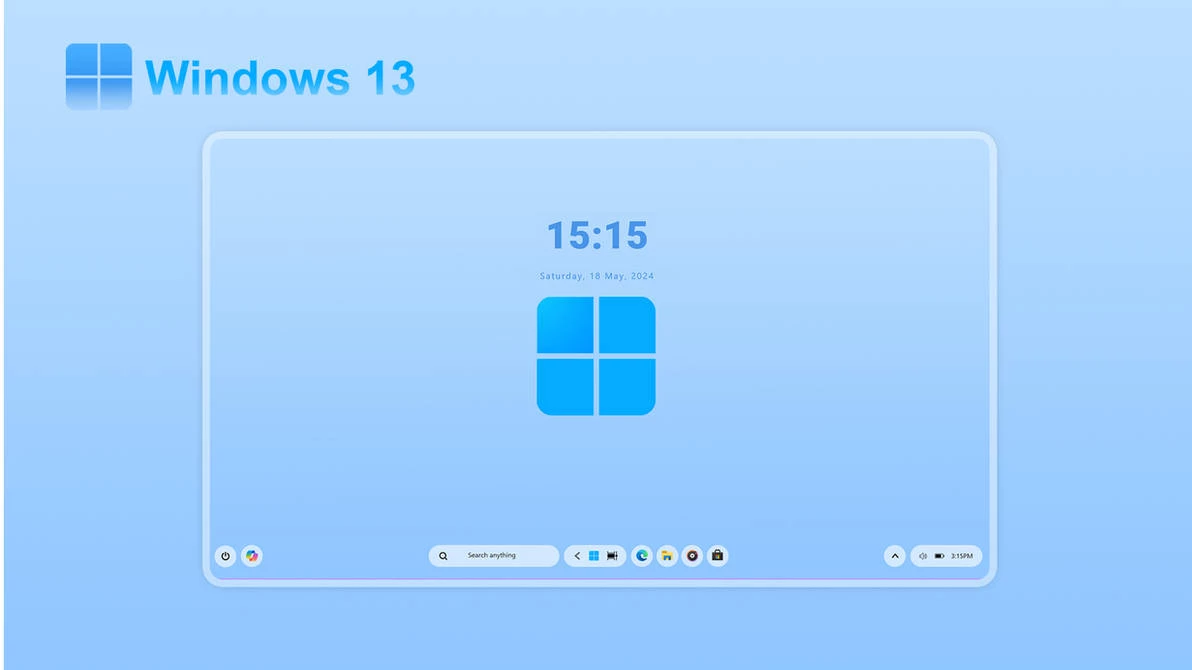
Windows 13 Concept Style Light Rainmeter Skin
Windows 13 Concept Style Light Rainmeter Skin is a clean and bright Rainmeter Skin for users who want a fresh desktop look on Windows. It gives your desktop a concept-style layout with light colors, simple widgets, and a modern visual feel.
Important warning: this is only a Rainmeter skin. It is not Windows 13, it is not a full Windows theme, and it is not an official Microsoft product. The “Windows 13 Concept” name is used only to describe the visual idea of the desktop setup.
If you like light desktop designs, clean widgets, soft UI elements, and concept-style Windows customization, this skin can make your desktop look more interesting without changing your actual operating system.
What Is Windows 13 Concept Style Light Rainmeter Skin?
Windows 13 Concept Style Light Rainmeter Skin is a desktop customization setup made for Rainmeter. It adds visual widgets to your desktop, such as clock, date, system information, shortcuts, or other elements depending on the files included in the skin package.
The skin is designed to give your desktop a clean concept-style look. It can work well with light wallpapers, soft gradient backgrounds, minimal icons, and a simple taskbar setup. The goal is to make your desktop feel more modern while keeping everything easy to use.
This skin does not replace Windows 11 or any other Windows version. Your apps, files, folders, Start Menu, taskbar, and system settings remain the same. Rainmeter skins sit on top of your desktop as widgets, so you can load, move, unload, or remove them when needed.
Why Use a Light Rainmeter Skin?
Many desktop setups use dark themes, but a light setup can look very clean when it is designed properly. A bright wallpaper, simple widget layout, and soft colors can make your desktop feel open, fresh, and less heavy.
This style is useful if you want a desktop that looks modern but still simple. It can be good for daily work, study, browsing, editing, or content creation. A clean Rainmeter layout can also make screenshots and YouTube customization videos look more polished.
Windows 13 Concept Style Light Rainmeter Skin is made for users who want a future-style desktop idea, not a deep system modification. That makes it easier to test compared to full Windows visual styles or system patching tools.
Main Features
- Clean light concept-style desktop look
- Designed for Rainmeter desktop customization
- Works well with light, white, soft, or gradient wallpapers
- Can include widgets such as clock, date, system monitor, or shortcuts
- Good for minimal Windows desktop setups
- Useful for screenshots, previews, and customization videos
- Easy to unload or remove from Rainmeter
- Rainmeter Skin
- Download & Install Rainmeter.
- Once installed, Rainmeter will start automatically
- Download the .rmskin file (Rainmeter Skin Installer format) Double-click the .rmskin file..
- The Rainmeter Skin Installer will open,Click Install to add it to Rainmeter.
- Right-click the Rainmeter icon in the system tray
- Navigate to Skins and select the installed skin.
- Click Load to apply it.
Zip File 14Mb
DownloadFAQ
Is this real Windows 13?
No. This is not Windows 13. It is only a Rainmeter skin with a concept-style name.
Is this an official Microsoft theme?
No. It is a third-party desktop customization skin. It is not made or supported by Microsoft.
Do I need Rainmeter to use it?
Yes. This skin is made for Rainmeter, so Rainmeter must be installed on your PC.
Will it change my full Windows system?
No. It only adds desktop widgets. Your apps, files, taskbar, Start Menu, and Windows settings stay the same unless you customize them separately.
Can I remove it later?
Yes. You can unload the widgets, delete the skin folder, or uninstall Rainmeter if you no longer want to use it.
Final Thoughts
Windows 13 Concept Style Light Rainmeter Skin is a nice option if you want your desktop to look clean, bright, and modern. It gives your Windows setup a concept-style feel without changing your real operating system.
Just remember the main point: this is only a Rainmeter skin. It is not Windows 13, not a full Windows theme, and not an official Microsoft product. For the best result, use a clean wallpaper, keep your widgets organized, and avoid loading too many skins at the same time.







