

WinOS Menu Rainmeter Skin
WinOS Menu Rainmeter Skin:WinOS Menu Rainmeter Skin is a sleek and modern start menu-style widget that brings a Windows-inspired interface to your desktop

WinOS Menu Rainmeter Skin
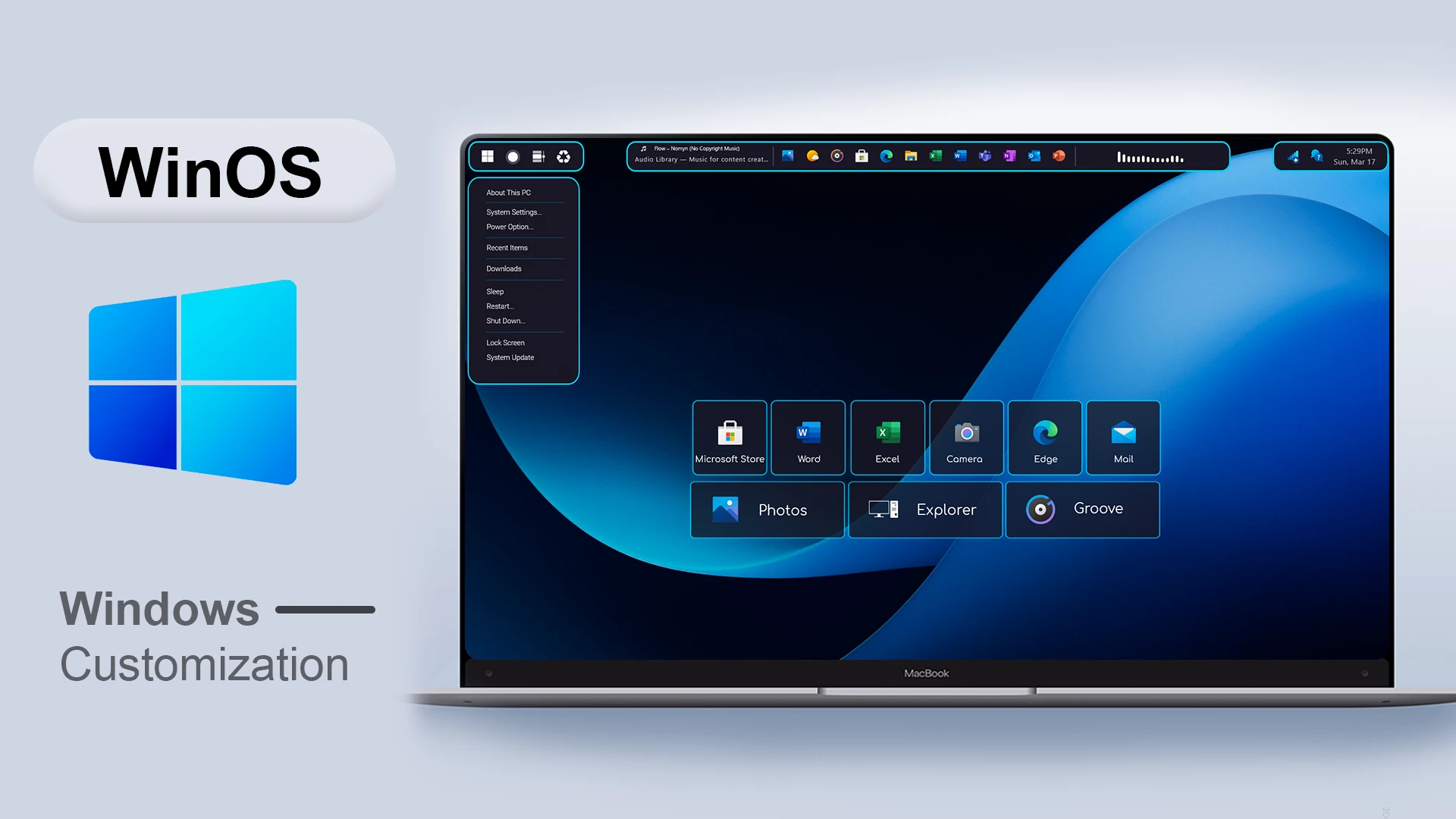
WinOS Menu Rainmeter Skin adds a clean shortcut launcher to the Windows desktop. It brings together useful applications, folders, and system controls in one organised Rainmeter layout.
The skin uses a slim menu bar, a compact dropdown panel, and labelled shortcut tiles. Its simple arrangement keeps frequently used options easy to access while leaving the rest of the desktop clear.
Main Features
- Compact Windows-style desktop launcher.
- Slim top bar with shortcut icons and status sections.
- Left-side menu button with a dropdown shortcut panel.
- My PC and system-related menu options.
- System Settings and Power Options.
- Recent Items and Recycle Bin shortcuts.
- Start Menu, Shut Down, Lock Screen, and system options.
- Microsoft Store shortcut tile.
- Microsoft Word and Excel shortcut tiles.
- Camera, Edge, and Mail shortcut tiles.
- Photos, Explorer, and Groove shortcut tiles.
- Compact bordered tiles with clear labels.
System Requirements
- A Windows computer that supports the Rainmeter version you install.
- Rainmeter installed on your computer.
- Basic knowledge of loading and managing Rainmeter skins.
What Is Included in This?
- WinOS Menu Rainmeter Skin
- Rainmeter configuration files
- Application and system shortcut layout
Download & Install Rainmeter
Installation Steps
- Download and install Rainmeter from the official website.
- Download the WinOS Menu Rainmeter Skin package.
- Extract the downloaded file if required.
- Open the Rainmeter skin installer file if it is included.
- Click Install to add the skin.
- Open Rainmeter’s Manage window from the system tray.
- Go to Skins and select WinOS Menu.
- Click Load to activate the available components.
- Move the menu and shortcut tiles to your preferred positions.
Zip File 13MB
DownloadMore Resources
How to Remove WinOS Menu
You can hide the launcher and its menu components through Rainmeter’s management window whenever you no longer want to use them.
- Right-click an active WinOS Menu element.
- Select Unload Skin to remove that component.
- Open Rainmeter’s Manage window from the system tray.
- Find the WinOS Menu skin folder and unload the remaining components.
- Delete the related skin folder after unloading it if you no longer need the files.
Disclaimer
WinOS Menu Rainmeter Skin is a third-party desktop customization resource created for Rainmeter users. It is not an official Microsoft product, Windows feature, or system component. Windows, Microsoft, Rainmeter, and related trademarks belong to their respective owners.
Final Thoughts
WinOS Menu Rainmeter Skin keeps applications, folders, and system controls together in one simple desktop launcher. Its menu bar, dropdown options, and labelled shortcut tiles make common Windows tools easier to access.







Disclaimer: All themes, visual styles, and concepts shared on this website are unofficial, fan-made creations built from imagination for customization purposes. We are not affiliated with, endorsed by, or sponsored by Microsoft or any other official brand.