

Windows XP Inspired Start Menu Rainmeter Skin
The Windows XP Rainmeter Skin:The Windows XP Rainmeter Skin is a nostalgic and charming desktop customization that brings the classic look and feel of Windows XP to modern systems using the power of Rainmeter

Windows XP Inspired Start Menu Rainmeter Skin
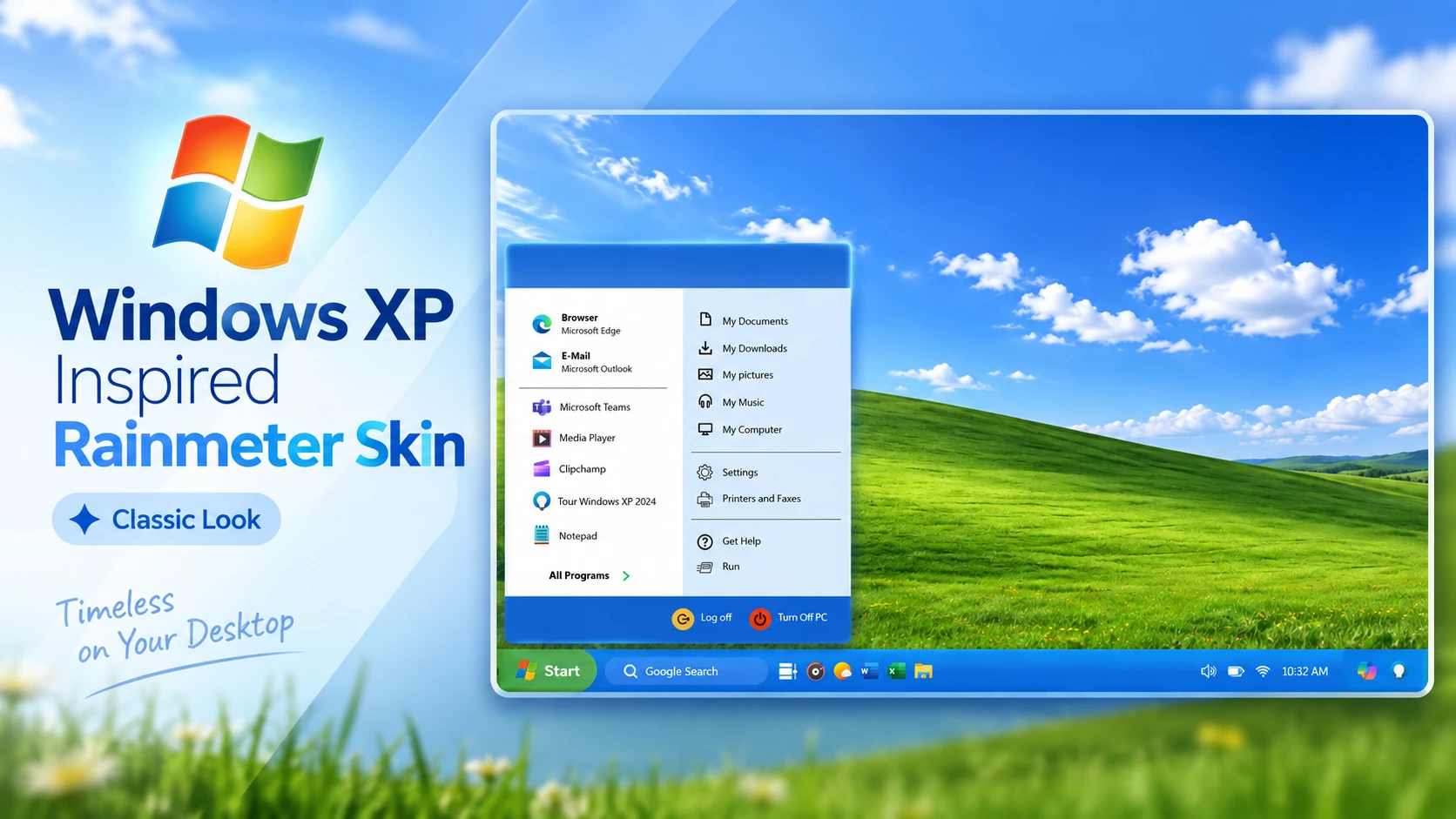
Windows XP Inspired Start Menu Rainmeter Skin brings the classic Windows XP Start Menu experience to modern Windows desktops through Rainmeter customization. Designed for users who enjoy the nostalgic look of the early Windows era, this skin recreates the familiar Start Menu layout with a retro interface style and classic desktop appearance.
The customization features a Windows XP-style Start Menu panel with a blue interface, application shortcuts, system options, and a classic taskbar-inspired layout. Combined with the iconic green hill wallpaper style and familiar desktop elements, it creates a vintage Windows atmosphere while keeping the flexibility of modern desktop customization.
Windows XP Inspired Start Menu Rainmeter Skin is a suitable choice for users who want to add a nostalgic touch to their Windows desktop. The simple layout and classic design make it ideal for anyone who enjoys retro interfaces and the traditional Windows XP visual style.
Key Features
- Classic Windows XP-inspired Start Menu design.
- Retro blue Start Menu interface with traditional layout.
- Quick access application and system shortcut sections.
- Windows XP-style taskbar appearance.
- Nostalgic desktop design with classic wallpaper style.
- Rainmeter-based Windows desktop customization.
- Clean and lightweight retro interface.
Compatibility
- Windows operating system.
- Rainmeter application installed.
- Basic knowledge of managing Rainmeter skins.
What is Included
- Windows XP Inspired Start Menu Rainmeter Skin
How to Install Windows XP Inspired Start Menu Rainmeter Skin
- Download and install Rainmeter on your Windows PC.
- Download the Windows XP Inspired Start Menu Rainmeter Skin file.
- Open the downloaded .rmskin file.
- The Rainmeter Skin Installer window will appear.
- Click Install to add the skin components.
- Open Rainmeter Manage from the system tray.
- Locate the Windows XP Inspired Start Menu components.
- Load the skin elements and adjust the position if required.
Zip File6MB
DownloadMore Resources
How to Remove Windows XP Inspired Start Menu Rainmeter Skin
- Right-click the Rainmeter icon from the system tray.
- Select Manage to open Rainmeter settings.
- Find the Windows XP Inspired Start Menu components from the installed skins list.
- Unload the active skin elements.
- Remove the skin folder from the Rainmeter Skins directory if you want to delete it completely.
Who Should Use This Skin?
Windows XP Inspired Start Menu Rainmeter Skin is suitable for users who enjoy classic Windows designs and nostalgic desktop customization. It is a good option for people who want to bring the familiar XP-style Start Menu experience to a modern Windows desktop.
- Users who like classic Windows XP visuals.
- People who enjoy retro desktop layouts.
- Rainmeter users looking for a nostalgic customization style.
- Users who want a simple and familiar Start Menu design.
Disclaimer
Windows XP Inspired Start Menu Rainmeter Skin is a third-party Windows customization resource created for desktop personalization purposes. It is not an official Microsoft product and is not affiliated with Microsoft Corporation. Windows and Microsoft-related trademarks belong to their respective owners.
Conclusion
Windows XP Inspired Start Menu Rainmeter Skin provides an easy way to bring the classic Windows XP interface style to modern desktops. With its familiar Start Menu layout, retro colors, and traditional desktop elements, it creates a nostalgic customization experience for users who appreciate the classic Windows look.







One comment
Leave a Reply
Disclaimer: All themes, visual styles, and concepts shared on this website are unofficial, fan-made creations built from imagination for customization purposes. We are not affiliated with, endorsed by, or sponsored by Microsoft or any other official brand.
Gracias por enseñarme a adaptar sus exelentes aportes a la resolusíon de mi equipo (1600×900), y por modificar sus “variables” a mis básicas necesidades, sigan asi por favor