


macOS Inspired Final Rainmeter Skins
macOS Inspired Final Rainmeter Suite : macOS Inspired Final Rainmeter Suite brings the polished, ultra-clean elegance of Apple’s interface directly to your Windows desktop. Designed with precision and inspired by the latest macOS visual standards, this suite transforms your home screen into a modern, minimalist, and premium macOS-style workspace.

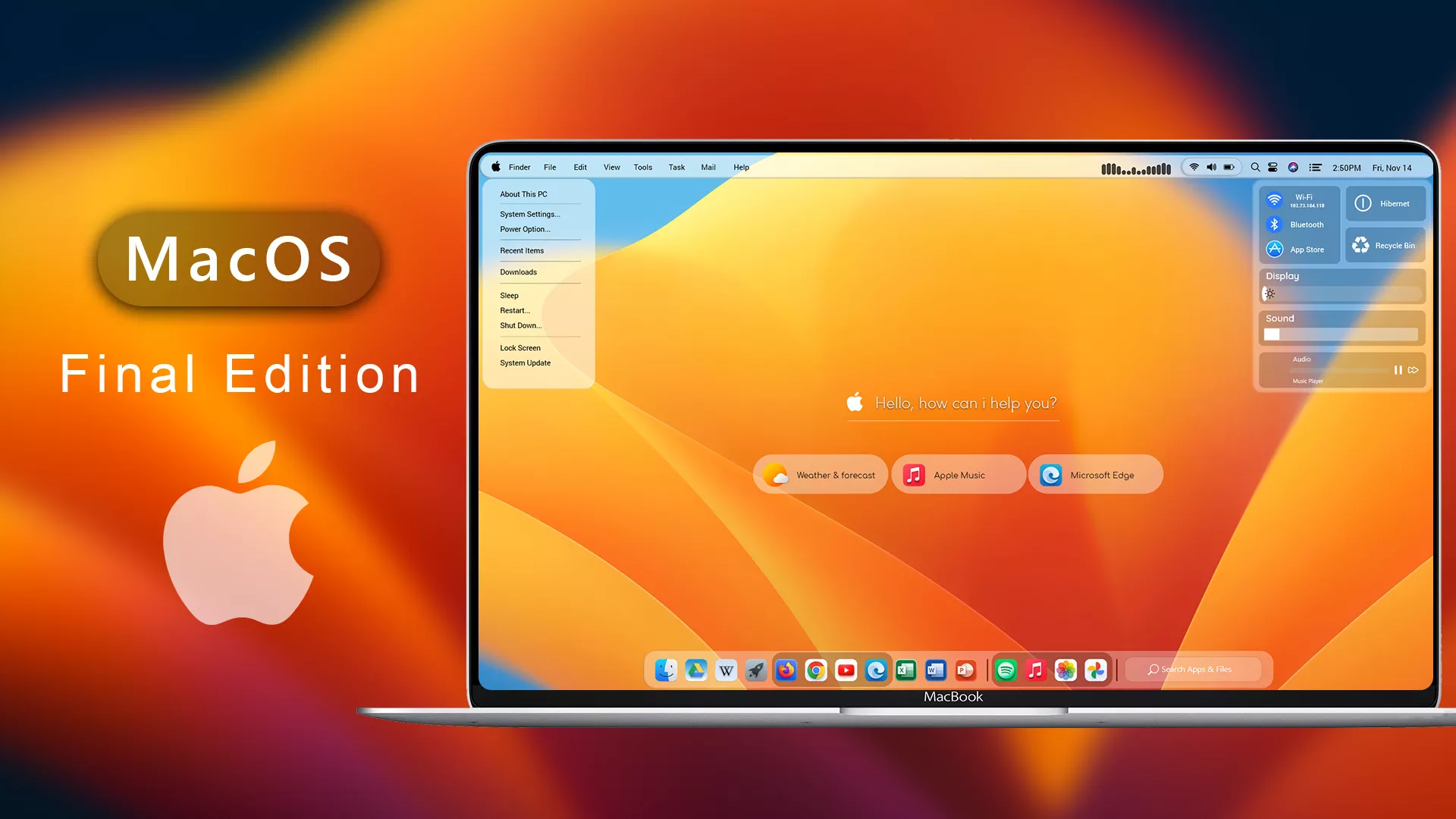
macOS Inspired Final Rainmeter Suite for Windows 11
The macOS Inspired Final Rainmeter Suite is a beautiful desktop customization collection designed for Windows users who want to create a clean, modern, and macOS-inspired workspace. With elegant widgets, minimal layouts, and a premium visual style, this Rainmeter suite can completely refresh the look of your Windows desktop.
Many users enjoy customizing Windows because a personalized desktop can make daily tasks more enjoyable and organized. Rainmeter is one of the most popular tools for desktop customization, allowing users to add useful widgets, system information, clocks, weather displays, and other visual elements.
About macOS Inspired Final Rainmeter Suite
The macOS Inspired Final Rainmeter Suite is created for users who love the simplicity and elegance of macOS-style desktop designs but prefer using Windows. This suite focuses on a clean interface with carefully designed widgets and layouts that match modern desktop aesthetics.
The design works especially well with minimal wallpapers, dark themes, custom icons, and other Windows personalization setups. Whether you want a complete macOS-inspired desktop or only a few stylish widgets, this Rainmeter suite can help you create a more attractive workspace.
Why Use a Rainmeter Suite for Windows Customization?
Windows provides many personalization options, but Rainmeter gives users more control over desktop appearance. It allows you to display useful information directly on your desktop while maintaining a clean and organized layout.
The macOS Inspired Final Rainmeter Suite is suitable for students, professionals, designers, content creators, and customization enthusiasts who want a modern desktop experience without changing the core Windows system.
Modern macOS Inspired Desktop Design
This Rainmeter suite follows a minimal design approach inspired by macOS aesthetics. It focuses on balanced spacing, clean typography, smooth visual elements, and an organized layout that looks professional on different screen sizes.
Combined with a suitable wallpaper, matching icons, and a custom taskbar or dock, this suite can help you build a complete Mac-inspired Windows desktop setup.
Key Features of macOS Inspired Final Rainmeter Suite
- Modern macOS-inspired desktop widgets
- Clean and minimal visual design
- Suitable for Windows 10 and Windows 11 customization
- Works with different wallpapers and desktop layouts
- Provides useful desktop information widgets
- Helps create a premium-looking workspace
- Easy to personalize according to your style
Requirements
- Windows 10 or Windows 11 Operating System
- Rainmeter Installed
- Basic knowledge of installing Rainmeter skins
- A system restore point before major customization changes
How to Install macOS Inspired Final Rainmeter Suite
- Download and install Rainmeter from its official website.
- Download the macOS Inspired Final Rainmeter Suite file.
- Extract the downloaded file if required.
- Open the Rainmeter skin file and install the included widgets.
- Load the desired skins from Rainmeter Manager.
- Adjust widget position, size, and transparency according to your desktop layout.
- Customize the setup with matching wallpapers, icons, and dock styles.
Recommended Customization Combination
For the best visual result, you can combine this Rainmeter suite with other Windows customization resources such as macOS-inspired icon packs, dock applications, custom wallpapers, and taskbar styling tools.
- Use a clean macOS-inspired wallpaper
- Add matching icon packs for better consistency
- Use a dock-style launcher for a Mac-like experience
- Keep desktop shortcuts organized for a minimal look
Compatibility
- Windows 10 – Supported
- Windows 11 21H2 – Supported
- Windows 11 22H2 – Supported
- Windows 11 23H2 – Supported
- Windows 11 24H2 – Supported with updated Rainmeter version
- Windows 11 25H2 – Test after major system updates
What is included in this?
- Rainmeter Skins
Optional Customization Tools
Installation steps:
- Download & Install Rainmeter.
- Once installed, Rainmeter will start automatically
- Download the .rmskin file (Rainmeter Skin Installer format) Double-click the .rmskin file..
- The Rainmeter Skin Installer will open,Click Install to add it to Rainmeter.
- Right-click the Rainmeter icon in the system tray
- Navigate to Skins and select the installed skin.
- Click Load to apply it.
Theme Files 27MB
DownloadDisclaimer
The macOS Inspired Final Rainmeter Suite is shared for desktop customization and personalization purposes only. It is an unofficial Windows customization resource and is not affiliated with, endorsed, or supported by Apple Inc. or Microsoft Corporation.
Rainmeter and third-party customization tools may behave differently depending on your Windows version, system settings, and installed software. Please create a system restore point before making changes and use customization resources carefully.
Final Thoughts
The macOS Inspired Final Rainmeter Suite is a great choice for Windows users who want a cleaner, more modern, and visually attractive desktop experience. With its elegant widgets and minimal design approach, it can help transform a regular Windows desktop into a stylish personalized workspace.
If you enjoy desktop customization and want to create a macOS-inspired setup on Windows, this Rainmeter suite can be a useful addition to your collection. Combine it with matching themes, icons, and dock styles to create a complete modern desktop environment.







Disclaimer: All themes, visual styles, and concepts shared on this website are unofficial, fan-made creations built from imagination for customization purposes. We are not affiliated with, endorsed by, or sponsored by Microsoft or any other official brand.